


Key takeaways
What this article covers, in order:
- Why this comes up / what goes wrong
- Step-by-step
- Example (fictional figures)
- Common mistakes
- Doing this in HelloBooks
- Frequently asked questions
The top farm accounting software for non-technical agricultural business owners in India combines simple, user-friendly interfaces with features tailored to agricultural trading, inventory management, GST invoicing, and compliance. This software reduces manual bookkeeping and helps manage GST returns and reconciliation efficiently without needing deep accounting skills. This article explains how to choose the right software, steps to evaluate options, common mistakes to avoid, and a worked example for Indian agri-businesses.
Why this comes up / what goes wrong
Many agricultural business owners and their accountants in India still rely on spreadsheets, Tally, or manual bill books for their accounting. These methods are time-consuming and error-prone, especially when handling GST invoicing, input tax credit reconciliation, and inventory tracking for seeds, fertilisers, or grains. Non-technical users often struggle with complicated software interfaces or GST compliance requirements, leading to late filings, missed ITC claims, and inaccurate financial records. For example, commission agents at grain mandis or seed and fertiliser dealers need software that fits their specific workflows and is easy to use without accounting expertise.
Step-by-step
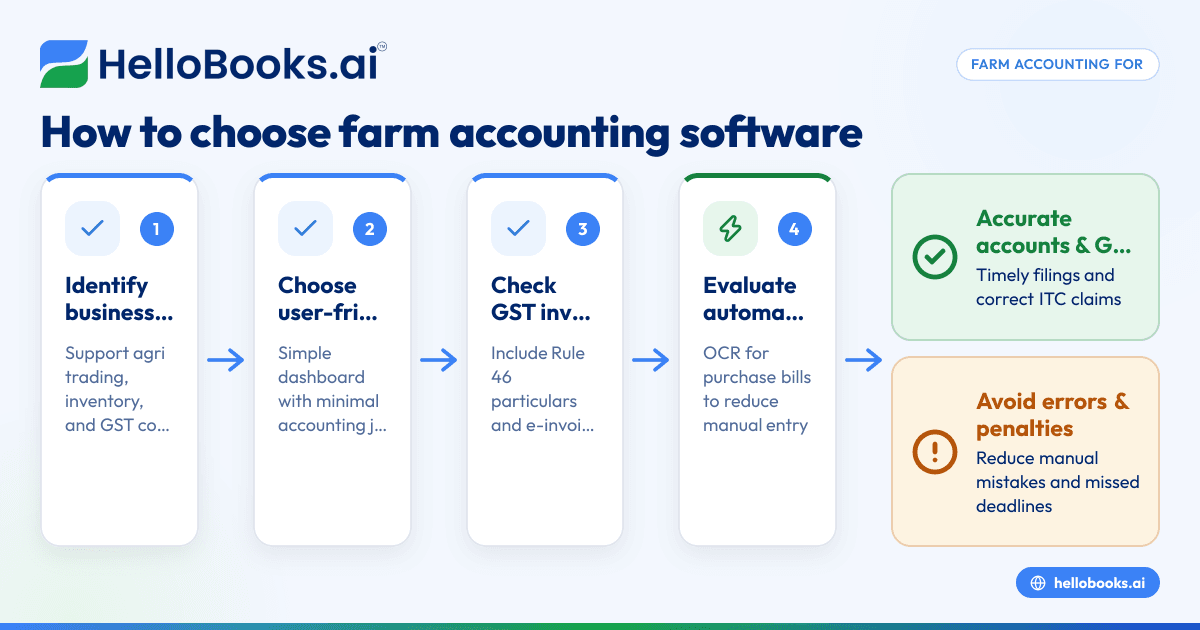
- Identify your business needs: Confirm the software supports agricultural trading, inventory management for your products (seeds, fertilisers, grains), and GST compliance suited for your turnover.
- Look for user-friendly interfaces: Choose software with simple dashboards, clear navigation, and minimal accounting jargon to suit non-technical users.
- Check GST features: Ensure it supports GST invoicing with all mandatory particulars as per Rule 46, e-invoicing if your turnover exceeds ₹5 crore, and filing of GSTR-1 and GSTR-3B returns.
- Evaluate automation capabilities: Features like OCR for purchase bills reduce manual data entry by capturing bills from photos or PDFs.
- Verify reconciliation support: The software should help reconcile bank statements and GST input tax credit (ITC) through GSTR-2B or GSTR-2A matching.
- Assess reporting and inventory tracking: Look for clear financial reports and inventory tracking tailored to agricultural goods.
- Consider scalability and pricing: The software should grow with your business and offer transparent pricing with free plans or trials.
For more help, see our guides on accounting software for small business and accounting software in India.
Example (fictional figures)
A commission agent at a grain mandi in Ludhiana records a wheat sale on 15/05/2024:
- Sale value: ₹2,50,000
- GST rate assumed: 5%
Calculations:
₹2,50,000 × 5% = ₹12,500 (GST amount)
₹2,50,000 + ₹12,500 = ₹2,62,500 (total invoice value)
The agent issues the GST invoice with all required particulars including supplier and recipient GSTIN, HSN code, and a consecutive serial number as per Rule 46 [cgst-rule-46/rule46-particulars].
Later, the agent uploads purchase bills for seed and fertiliser using OCR, reducing manual entry errors and speeding up bookkeeping.
Common mistakes
- Ignoring GST compliance deadlines: Set reminders for GSTR-1 and GSTR-3B filings to avoid penalties. Use software with filing alerts.
- Manual data entry errors: Prevent these by using OCR features for bills or automated data capture.
- Not reconciling bank and GST records: Regular reconciliation avoids mismatches in ITC claims and financial statements.
- Choosing software without agri-specific features: Ensure it handles inventory and invoicing relevant to agricultural goods.
- Overlooking user interface simplicity: Complex software can discourage use; pick one with clear navigation and easy workflows.
- Failing to check e-invoicing requirements: Businesses with turnover over ₹5 crore must issue e-invoices with IRN and QR codes [einvoice-threshold-5cr/einv-5cr-from-2023-08-01], [cgst-rule-46/rule46-qr-irn].
Learn more about agricultural business accounting in our Agricultural trading and agri businesses section.
Doing this in HelloBooks
HelloBooks offers OCR for purchase bills, allowing agricultural business owners to capture supplier bills from photos or PDFs automatically. This reduces manual entry and speeds up bookkeeping. For more details, visit HelloBooks for India at HelloBooks for India.
Frequently asked questions
What features should farm accounting software have for non-technical users?
Look for simple interfaces, GST invoicing with mandatory details, inventory management for seeds and fertilisers, bank reconciliation, and automation like OCR for bills. The software should also offer easy report generation.
Is e-invoicing mandatory for all farm businesses?
E-invoicing is mandatory for registered persons with aggregate turnover exceeding ₹5 crore from 1 August 2023 for B2B supplies. Smaller businesses may continue with regular GST invoices.
Can I use general accounting software for agricultural businesses?
You can, but software designed for agriculture or allied businesses typically includes relevant inventory categories, HSN codes, and workflows which simplify your tasks. See Agricultural trading and agri businesses for more.
How does OCR help in farm accounting?
OCR captures data from purchase bills automatically, reducing manual entry errors and saving time. It is especially useful for busy agricultural business owners managing many supplier bills.
What is the best way to reconcile GST input tax credit?
Use software that matches your purchase records with GSTR-2B auto-drafted ITC details to identify discrepancies early and claim correct ITC.
Key takeaways
- Choose farm accounting software with simple, user-friendly interfaces tailored for agricultural workflows.
- Ensure GST invoicing, e-invoicing (if applicable), and filing capabilities are included.
- Automation like OCR for purchase bills reduces errors and saves time.
- Regular reconciliation of bank and GST data prevents compliance issues.
- Consider software that supports inventory and reporting specific to agri-businesses.
Start managing your farm accounts more efficiently by exploring suitable software options. You can Start on the Free plan (200 transactions a year, GSTR-1 and 3B filing for one GSTIN) to try HelloBooks and see how OCR for purchase bills can help your agricultural business.


