


Key takeaways
What this article covers, in order:
- Why this comes up / what goes wrong
- Step-by-step
- Example (fictional figures)
- Common mistakes
- Doing this with OCR technology
- Frequently asked questions
Insurance businesses handle sensitive client and financial data, making accounting software security crucial. Insurance agents, NBFCs, and financial service providers must ensure their software safeguards data from unauthorized access while supporting compliance with GST invoicing and filing requirements. Many still use spreadsheets or manual books, increasing risks of errors and data breaches.
Why this comes up / what goes wrong
Insurance business owners and accountants often struggle with manual bookkeeping or generic accounting tools that lack industry-specific controls and strong security features. Handling client premiums, commissions, and claims requires precise tracking and confidentiality. Without secure software, data leaks or mistakes in GST invoices can lead to compliance issues or financial loss. Additionally, insurance agents managing multiple clients need scalable solutions that protect data integrity.
Step-by-step
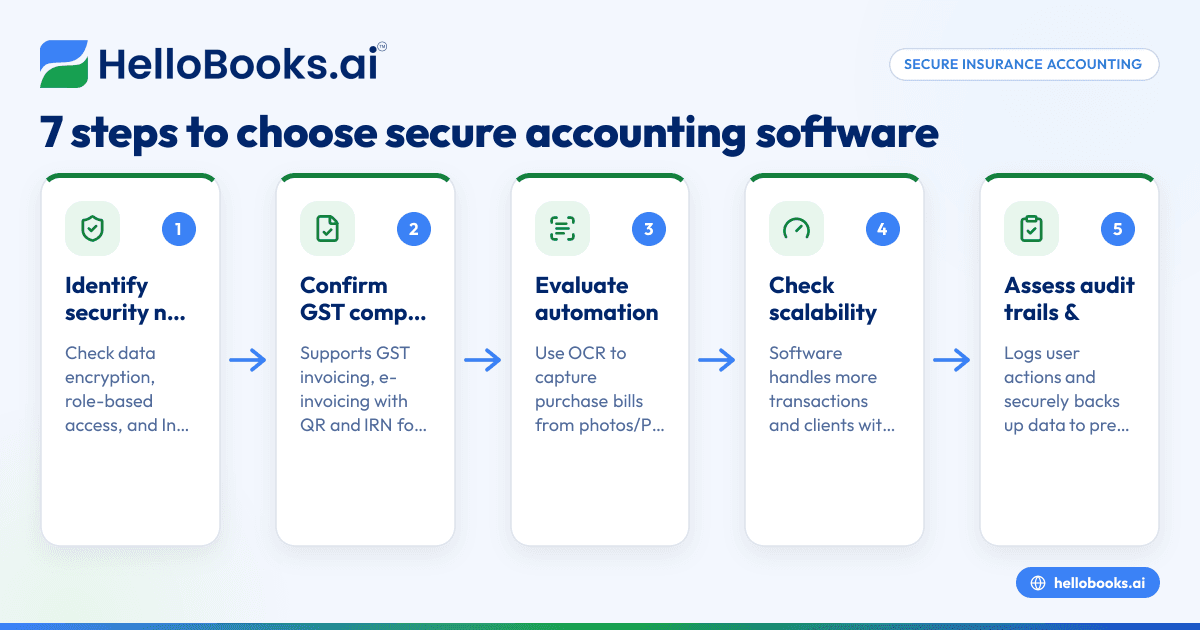
- Identify your security needs: Check if the software encrypts data, supports role-based access, and complies with Indian GST invoicing rules such as Rule 46 particulars (supplier and recipient details, HSN/SAC codes, tax rates, and digital signatures).[cgst-rule-46/rule46-particulars]
- Confirm GST compliance: Ensure the software supports GST invoicing, e-invoicing with QR codes and IRN for turnover above ₹5 crore, and filing of GSTR-1 and GSTR-3B returns.[einvoice-threshold-5cr/einv-5cr-from-2023-08-01][cgst-rule-46/rule46-qr-irn]
- Evaluate data entry automation: Look for OCR features to capture purchase bills from photos or PDFs, reducing manual entry errors and exposure to data breaches.
- Check scalability: The software should handle increasing transactions and clients without compromising speed or security.
- Assess audit trails and backups: Verify if the software logs user actions and securely backs up data to prevent loss.
- Review user access controls: Confirm the software allows setting permissions to restrict sensitive data access.
- Test integration and support: Ensure it integrates with your existing tools and offers reliable support.
Example (fictional figures)
An insurance agency in Mumbai processes monthly premium collections and commission payments. Assume the agency received ₹12,00,000 in premiums and paid ₹2,40,000 in commissions in August 2023. GST at an illustrative 18% applies to commission services.
Commission amount = ₹2,40,000
GST on commission = ₹2,40,000 × 18% = ₹43,200
Total commission invoice value = ₹2,40,000 + ₹43,200 = ₹2,83,200
The agency issues a GST-compliant invoice with all Rule 46 particulars including their GSTIN, client details, SAC code for insurance commission services, and digital signature. Using software with OCR for purchase bills, they capture commission payment bills from PDFs to reconcile expenses accurately.
Common mistakes
- Ignoring GST invoicing details: Missing supplier or recipient GSTIN or HSN/SAC codes can invalidate invoices. Always verify Rule 46 compliance.[cgst-rule-46/rule46-particulars]
- Manual data entry errors: Typing errors in amounts or dates cause reconciliation issues. Use OCR-enabled software to reduce these errors.
- Weak access controls: Allowing all staff full access risks data leaks. Implement role-based permissions.
- No audit trail: Without logs, it’s hard to track changes or detect fraud. Choose software with audit features.
- Neglecting backups: Data loss from hardware failure or ransomware can be catastrophic. Use software with secure backups.
- Choosing non-scalable software: Software that slows down with data growth hampers business efficiency. Plan for scalability.
Doing this with OCR technology
Using OCR (Optical Character Recognition) for purchase bills helps insurance businesses capture supplier bills from photos or PDFs instead of manual entry. This reduces errors and limits exposure of sensitive data during data entry. OCR technology supports accurate expense tracking and reconciliation, improving both security and efficiency.
Frequently asked questions
I want accounting software for insurance with great scalability. What should I look for?
Look for software that can handle growing transaction volumes and multiple GSTINs without slowing down. It should support bulk data processing and have cloud options for flexible storage. Check if it integrates with other tools you use and allows easy user management. See also accounting software for small business.
I want accounting software for insurance with great functionality. What features are essential?
Key features include GST-compliant invoicing with e-invoicing support, automated bank statement reconciliation, expense tracking, inventory management if applicable, and financial reporting. OCR for bills and digital filing support save time and reduce errors.
How does GST compliance affect insurance accounting software choice?
Insurance services often involve commission and premium collections subject to GST. Software must generate Rule 46-compliant invoices with all required particulars and support GSTR-1 and GSTR-3B filing. For turnover above ₹5 crore, e-invoicing with IRN and QR code is mandatory.[cgst-rule-46/rule46-particulars][einvoice-threshold-5cr/einv-5cr-from-2023-08-01] More on compliance at accounting software in India.
Can I use software if I currently use spreadsheets or Tally?
Yes, software with OCR for purchase bills helps reduce manual entry and errors. It can complement existing processes and improve accuracy and compliance.
Are there industry-specific solutions for insurance agents and NBFCs?
Some software tailor features for financial services, including insurance agents and NBFCs. These solutions support GST compliance and data capture features. Learn more about Insurance agents, NBFCs and financial services.
Key takeaways
- Choose software with strong data security, encryption, and role-based access.
- Verify GST compliance including Rule 46 invoice particulars and e-invoicing if applicable.
- Use OCR to automate bill capture and reduce manual errors and data exposure.
- Avoid software without audit trails and secure backups.
- Plan for scalability to accommodate business growth.
Start your accounting with strong security and compliance in mind. Explore software options and start on the Free plan (200 transactions a year, GSTR-1 and 3B filing for one GSTIN) today.


