


Key takeaways
What this article covers, in order:
- Why this comes up / what goes wrong
- Step-by-step
- Example (fictional figures)
- Common mistakes
- Frequently asked questions
- Key takeaways
Farm accounting software is designed specifically for agricultural businesses such as crop trading, seed and fertiliser sales, and commission agency at grain mandis. It helps track income, expenses, inventory, GST invoicing, and filing, making bookkeeping more accurate and less time-consuming.
Why this comes up / what goes wrong
Farm business owners or accountants often face challenges using generic bookkeeping tools like spreadsheets, Tally, or bill books that do not fully cater to the agricultural sector's unique transactions. For example, a commission agent at a grain mandi in Ludhiana must track commission income, GST on sales, and payments to farmers accurately. Similarly, a seed and fertiliser dealer in Guntur needs to manage inventory batches, expiry dates, and GST compliance for multiple product types. Without specialised farm accounting software, errors in data entry, delayed GST filing, and poor financial visibility are common problems.
Step-by-step
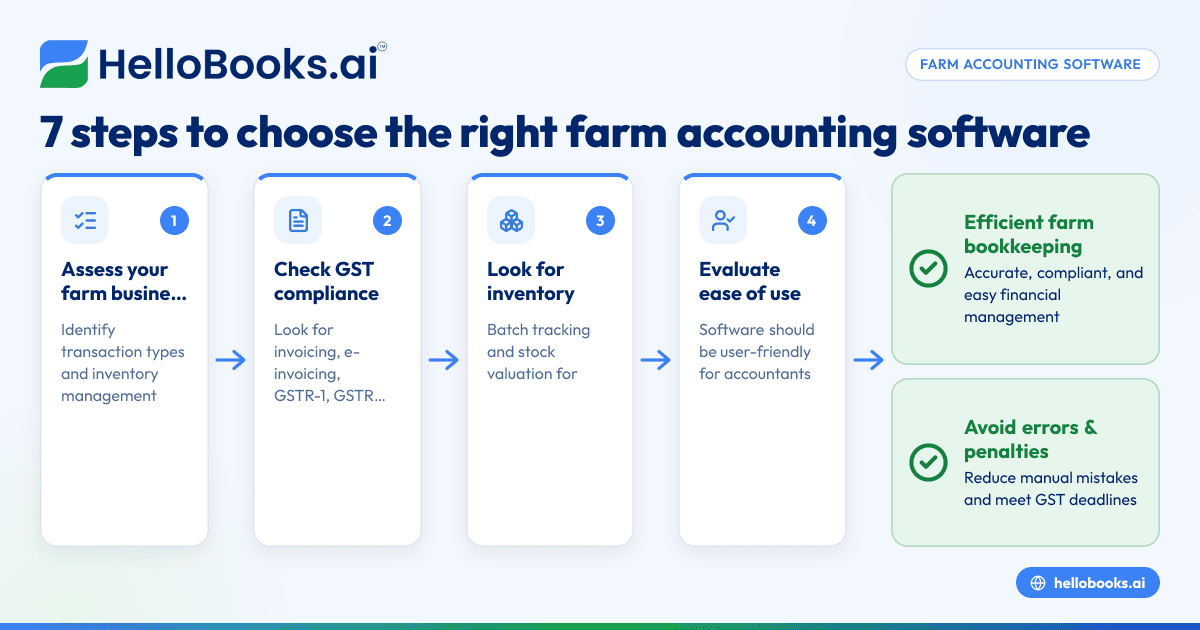
- Assess your farm business needs: Identify the types of transactions you handle, such as crop sales, input purchases, commissions, or services. Understand your inventory management needs, including batch tracking and expiry management if you deal in seeds or fertilisers.
- Check GST compliance features: Ensure the software supports GST invoicing, e-invoicing if applicable, GSTR-1 and GSTR-3B filing, and reconciliation with GSTR-2B to stay compliant with tax rules.
- Look for inventory management capabilities: For seed and fertiliser dealers, batch-wise inventory tracking and stock valuation are essential to avoid losses and comply with regulations.
- Evaluate ease of use for your staff: The software should be user-friendly so your accountant or bookkeeper can operate it without extensive training.
- Consider reporting capabilities: You need clear financial reports to understand profitability, cash flow, and tax liabilities, which help in decision-making.
- Check integration and data import/export options: If you currently use Excel or Tally, see if the software can import or export data to reduce manual data entry and errors.
- Review customer support and software updates: Timely support and regular updates are important to handle changes in tax laws or business requirements.
For broader guidance on software selection, see our articles on accounting software for small business and accounting software in India.
Example (fictional figures)
Consider a commission agent at a grain mandi in Ludhiana for March 2024:
- Total grain sales handled: ₹15,00,000
- Commission rate: 2%
- GST on commission: 18% (assumed illustrative rate)
Calculate commission income:
₹15,00,000 × 2% = ₹30,000
Calculate GST on commission:
₹30,000 × 18% = ₹5,400
Total commission invoice amount:
₹30,000 + ₹5,400 = ₹35,400
This invoice must be recorded accurately, and the GST collected needs to be filed in GSTR-1 and GSTR-3B. The software should automate these calculations and generate compliant invoices.
Common mistakes
- Not using software tailored to agriculture: Generic accounting tools may lack features like batch inventory or commission tracking. Prevent this by choosing software designed for agricultural businesses or that offers customisation.
- Ignoring GST compliance requirements: Missing deadlines or incorrect filings lead to penalties. Prevent this by selecting software with built-in GST filing and reconciliation features.
- Manual data entry errors: Typing mistakes cause reconciliation problems and delays. Prevent this by using software that supports import of bank statements or sales data.
- Poor inventory tracking: For seed and fertiliser dealers, mismanaging stock batches or expiry dates leads to losses. Prevent this by using inventory modules with batch and expiry tracking.
- Overlooking reporting needs: Without clear financial and GST reports, decision-making suffers. Prevent this by ensuring the software provides detailed summaries and compliance reports.
Learn more about agricultural accounting needs in our Agricultural trading and agri businesses article.
Frequently asked questions
What is farm accounting software?
Farm accounting software is a specialised tool designed to manage the financial records, GST compliance, inventory, and sales transactions of farm-related businesses such as crop trading, seed and fertiliser sales, and commission agents.
How is farm bookkeeping different from regular bookkeeping?
Farm bookkeeping involves tracking agricultural inputs, crop sales, commissions, seasonal inventory, and multiple GST rates. It requires features like batch tracking and commission calculation that generic bookkeeping software may not support.
Can I use regular accounting software for my farm business?
You can use generic software, but it may lack agriculture-specific features, leading to extra manual work or errors. Consider software designed for farm businesses or that offers customisation for agricultural transactions.
What features should I look for in farm accounting software?
Look for GST invoicing and filing, inventory management with batch tracking, commission tracking, easy reporting, and data import/export capabilities.
Is GST compliance included in farm accounting software?
Some farm accounting software includes GST invoicing, e-invoicing, GSTR-1 and GSTR-3B filing, and reconciliation features. Confirm these before choosing software to avoid compliance issues.
How do I start farm accounting if I currently use spreadsheets or Tally?
Start by mapping your current bookkeeping processes. Then choose software that can import your existing data or allow manual entry with GST compliance. Training your staff will help ease the transition. See also our AI bookkeeping article for modern approaches.
Key takeaways
- Farm accounting software addresses the unique financial and GST needs of agricultural businesses.
- Choose software with GST compliance, inventory management, and commission tracking features.
- Avoid manual errors by using software that supports data import and automated calculations.
- Clear financial and GST reports are essential for compliance and decision-making.
- Evaluate software ease of use, support, and integration options before selecting.
Start managing your farm business finances more efficiently. Start on the Free plan (200 transactions a year, GSTR-1 and 3B filing for one GSTIN).


