


Key takeaways
What this article covers, in order:
- Why this comes up / what goes wrong
- Step-by-step
- Example (fictional figures)
- Common mistakes
- Frequently asked questions
- Key takeaways
Event accounting software is designed to meet the unique financial management needs of event businesses such as event planners, caterers, and venue providers. These businesses handle multiple vendors, clients, and GST complexities that general accounting tools may not address effectively.
Why this comes up / what goes wrong
Event business owners and accountants often rely on manual bookkeeping, spreadsheets, or generic accounting software that lacks event-specific features. This leads to difficulties in tracking multiple events separately, managing client advances, reconciling vendor bills, and ensuring GST compliance. Without dedicated event accounting software, errors in data entry, missed payments, and GST filing mistakes are common, increasing financial risks and compliance issues.
For example, an event planner in Jaipur managing multiple events at once may struggle to allocate expenses and revenues correctly without event-wise tracking. Similarly, a salon chain or a gym offering event services may find it hard to reconcile vendor payments and client invoices accurately.
Step-by-step
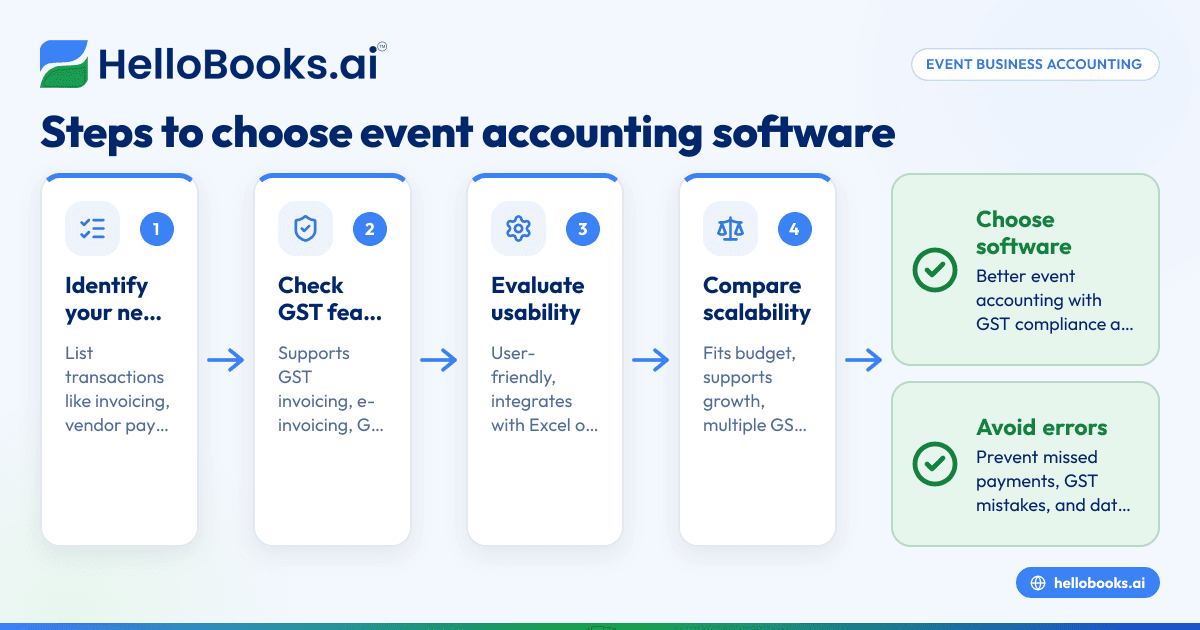
- Identify your event business needs: List the typical transactions such as client invoicing, vendor payments, expense tracking, and GST filing. Determine if you need features like multiple event tracking, advance payment management, or inventory control.
- Check GST compliance features: Confirm the software supports GST invoicing, e-invoicing if applicable, filing GSTR-1 and GSTR-3B returns, and reconciliation of input tax credit (ITC). This is crucial for avoiding penalties and ensuring smooth compliance.
- Evaluate usability and integration: Choose software that is user-friendly for your team. If you currently use Excel or Tally, check if the software can import or export data easily to reduce manual entry.
- Compare pricing and scalability: Select software that fits your current budget but can scale as your event business grows. Consider transaction limits, GSTIN support, and additional user fees.
- Test with a trial or demo: Use free trials to verify the software handles your event accounting workflows, including advance payments and event-wise expense tracking.
- Check support and training options: Ensure customer support is accessible and that learning resources like tutorials or manuals are available to help your team adapt quickly.
For more information on software options suitable for your needs, see accounting software for small business and accounting software in India.
Example (fictional figures)
An event planner in Jaipur received an advance payment from a client for an event scheduled on 05/08/2023. The total event cost is ₹5,00,000, including GST at an assumed illustrative rate of 18%.
- Total event cost = ₹5,00,000
- GST portion = ₹5,00,000 × 18/118 = ₹76,271 (approx)
- Base amount (without GST) = ₹5,00,000 - ₹76,271 = ₹4,23,729
The client paid an advance of ₹2,50,000 on 01/07/2023.
- Advance GST portion = ₹2,50,000 × 18/118 = ₹38,136
- Advance base amount = ₹2,50,000 - ₹38,136 = ₹2,11,864
On 05/08/2023, the planner issues the final invoice for the balance:
- Balance amount = ₹5,00,000 - ₹2,50,000 = ₹2,50,000
- Balance GST = ₹76,271 - ₹38,136 = ₹38,135
- Balance base = ₹4,23,729 - ₹2,11,864 = ₹2,11,865
This example illustrates how event accounting software helps track advances and final invoices with accurate GST calculations, ensuring compliance and correct financial reporting.
Common mistakes
- Mixing personal and business expenses: This causes confusion and inaccurate financial reports. Prevent it by maintaining separate accounts and using software that supports clear categorisation.
- Ignoring GST compliance deadlines: Missing deadlines can lead to penalties. Set reminders and use software that alerts you about GST filing dates.
- Not reconciling vendor bills with payments: This can cause duplicate payments or missed bills. Regularly match bills and payments in the software to avoid errors.
- Using generic accounting software without event-specific features: This increases manual work and errors. Choose software that supports multiple event tracking and advance payments.
- Failing to document advance payments properly: This leads to incorrect invoicing and GST reporting. Record advances separately and link them to final invoices.
For advice tailored to local service businesses, see Local service businesses.
Frequently asked questions
What features should I look for in event management accounting software?
Look for GST-compliant invoicing, expense tracking, vendor management, event-wise accounting, and easy GST return filing. Integration with bank statements and support for e-invoicing are also beneficial.
Can I use regular accounting software for event businesses?
You can, but it may lack features like tracking multiple events separately, managing advances, or handling complex vendor payments. This can cause more manual work and increase errors.
How does GST affect event accounting?
Event services attract GST, so your software must support GST invoicing, filing GSTR-1 and GSTR-3B returns, and reconciling input tax credit. Proper GST compliance helps avoid penalties.
Is it necessary to track expenses event-wise?
Yes, tracking expenses per event helps in accurate profitability analysis and client billing. Software with event-wise expense tracking simplifies this process.
How do I choose between cloud and desktop event accounting software?
Cloud software offers access from anywhere and easier updates, while desktop software may work offline but can be less flexible. Consider your team's working style and internet availability.
Key takeaways
- Event accounting software must handle GST compliance, vendor payments, and client invoicing specific to events.
- Evaluate software based on your event business needs, usability, GST features, and scalability.
- Avoid common mistakes like mixing expenses and ignoring GST deadlines by using dedicated event accounting tools.
- Test software with trials and check support before finalising your choice.
- Tracking advances and event-wise expenses accurately is crucial for event business accounting.
Start managing your event business finances better by choosing the right software. You can Start on the Free plan (200 transactions a year, GSTR-1 and 3B filing for one GSTIN) to explore options with GST filing support.


