
Key takeaways
What this article covers, in order:
- Before you start
- Step 1: What is bank reconciliation and why should I do it?
- Step 2: How do I prepare for bank reconciliation?
- Step 3: How should I perform bank reconciliation step by step?
- Step 4: Why use AI bank reconciliation software?
- Step 5: What common issues should I watch for during reconciliation?
Complete Guide to Bank Reconciliation Steps for Small Businesses in India
This guide is for small business owners and finance leads in India who want to complete accurate bank reconciliation. By the end, you will understand what bank reconciliation is, why it matters, and the exact steps to reconcile your books with your bank statement efficiently.
Before you start
- Have your latest bank statement and your business cash book or accounting records ready
- Ensure your books include all receipts, payments, and bank charges recorded up to the reconciliation date
- Familiarise yourself with the common banking transactions like UPI payments, ECS credits, and cheque clearances
- Access to bank reconciliation software or have your spreadsheet system ready
Step 1: What is bank reconciliation and why should I do it?
Bank reconciliation is the process of matching your company’s accounting records of cash and bank balances with the actual amounts reported by your bank in the statement. This ensures your books reflect the true financial position, which is essential for managing cash flow, identifying errors or fraud, and preparing GST filings.
Skipping reconciliation can lead to missed payments, unrecorded bank charges, and ultimately errors in your financial reports. For Indian SMEs, timely reconciliation also supports accurate GST return filing and easier audit preparation.
A common mistake is waiting until the month-end, which makes the task cumbersome and error-prone.
Step 2: How do I prepare for bank reconciliation?
Start by collecting your bank statement for the period you want to reconcile, usually the previous month. Check that your company books are updated with all transactions—including cash deposits, payments, bank interest, and charges—as your accounting software or ledger is your source of truth.
The biggest challenge is missing some transactions in the books or bank, such as delayed cheque clearances or failed UPI transfers. To avoid this, always keep digital records of invoices and receipts handy.
If you use Tally alternative or spreadsheet bookkeeping, ensure your data is neat and sorted by date to speed up matching.
Step 3: How should I perform bank reconciliation step by step?
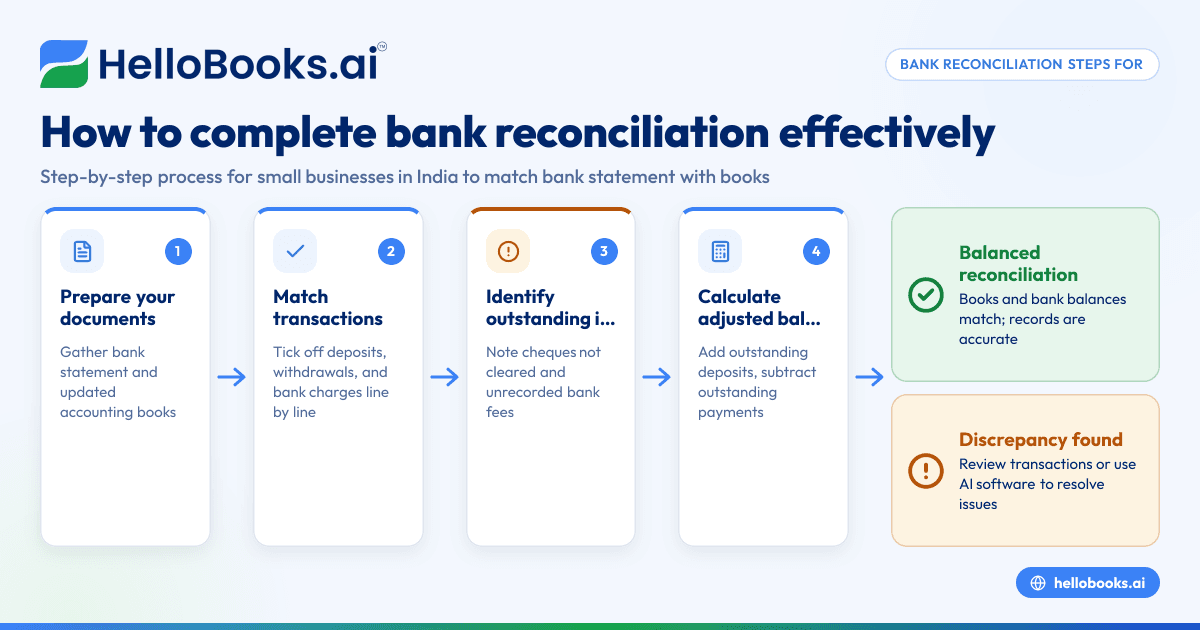
- Start with opening balances: The opening balance in your books and bank statement should be the same. If not, investigate adjustments from the previous period.
- Tick off matching entries: Line by line, match each transaction in your bank statement with the corresponding entry in your books. Tick off deposits, withdrawals, payments received, and bank charges.
- Identify outstanding items: Transactions recorded in your books but not in the bank statement, such as cheques issued but not yet cleared, are outstanding items.
- Note bank-only items: Sometimes banks may credit or debit your account (like bank charges or interest) without you recording them immediately. These must be recorded in your books.
- Calculate the adjusted balances: Add the outstanding deposits to the bank statement balance, subtract outstanding payments, and ensure it equals your book balance.
- Investigate discrepancies: If balances don’t align, re-check for missing or duplicate entries, errors in amounts, or unrecorded transactions.
Many make the mistake of ignoring small bank charges or rounding differences, which add up and cause persistent mismatches.
Step 4: Why use AI bank reconciliation software?
AI bank reconciliation automates most of the manual matching by recognising patterns in your transactions and suggesting matches instantly. This cuts down the time spent on manual tick-offs and flags anomalies, reducing errors.
Software like HelloBooks.ai not only automates the reconciliation but integrates it with your GST return preparation and expense management. This connected approach is especially valuable for growing Indian SMEs juggling multiple bank accounts and payment modes like UPI and Razorpay.
However, some reluctance to switch from spreadsheet-based reconciliation, or Tally, persists due to initial data setup. But trialing AI-based tools can show quick results and ease the monthly accounting workload significantly.
Step 5: What common issues should I watch for during reconciliation?
Watch out for these typical problems:
- Missing UPI transaction entries: Sometimes payments made or received through UPI apps are not in your books. Always cross-check your WhatsApp noted payments or DPDP Act-compliant data sources.
- Unrecorded bank charges: Monthly or quarterly bank fees often slip through unnoticed in ledgers, causing imbalance.
- Cheque clearance delays: Cheques issued might not clear within the period, creating timing differences.
- Duplicate entries: Data entry errors might lead to double posting either in bank or book records.
Stay consistent in reconciling frequently, ideally weekly, to catch such issues early.
Worked example: Reconciling ABC Traders’ bank account for January 2024
- Opening balance per books and bank: ₹2,00,000
- Bank statement transactions for January:
- ₹1,00,000 payment received via UPI on 12 January
- ₹10,000 cheque issued on 15 January (cleared only on 5 February)
- ₹1,000 bank charges debited on 31 January
- ₹5,000 expenses paid through Razorpay on 20 January
- Books show:
- ₹1,00,000 receipt recorded on 12 January
- ₹10,000 cheque payment recorded on 15 January
- No bank charges recorded yet
- ₹5,000 expenses recorded on 20 January
Reconciliation steps:
- Confirm opening balances match.
- Tick off ₹1,00,000 receipt and ₹5,000 payment since both appear in bank statement and books.
- Note ₹10,000 cheque expense as outstanding because cleared next month.
- Add ₹10,000 outstanding cheque to bank balance to adjust.
- Identify ₹1,000 bank charges in bank statement but missing in books. Record it to align balances.
- Final adjusted book balance = ₹2,00,000 + ₹1,00,000 – ₹5,000 – ₹10,000 – ₹1,000 = ₹2,84,000, which should match adjusted bank balance (bank balance + outstanding cheque).
This shows the importance of accounting for timing differences and unrecorded items.
What happens if my bank reconciliation doesn’t match?
If your reconciliation doesn’t balance, double-check every transaction date and amount. Common causes are missing UPI or Razorpay payments, overlooked bank charges, or entry errors in amounts.
If you cannot find the issue, consider consulting your accountant or using automated accounting software in India that supports AI bank reconciliation to uncover hidden discrepancies quickly.
What next after I complete bank reconciliation?
Once your bank reconciliation balances, update your accounting books with any newly identified bank charges, outstanding payments, or unrecorded receipts. This keeps your financial data current.
Reconcile your bank accounts regularly—weekly is ideal if you handle many transactions. Timely reconciliation supports smoother GST return filing and accurate cash-flow reporting.
To make reconciliation faster and less error-prone, explore AI-powered bank reconciliation tools available at HelloBooks.ai. You can compare plans to find the right fit, or book a demo to see how it streamlines your bookkeeping.
Bank reconciliation need not be a monthly headache. With clear steps and the right tools, you can master this vital accounting task to ensure your business finances stay accurate and compliant.
Related reading
- accounting software for small business
- Step-by-Step Bank Reconciliation Process for Small Businesses in India Using AI Software
- Bookkeeping Basics in the United States for Small Business Owners: A Practical Guide to Bank Reconciliation, Invoices, and Month-End
Read next
This article covers one part of a bigger topic. For the complete picture, read our guide to fully supported.