


Key takeaways
What this article covers, in order:
- Key takeaways
- What are bookkeeping basics in the United States for small business owners?
- Why does bookkeeping matter if I already check my bank balance?
- How should I set up my bookkeeping process?
- What should be on every invoice?
- What is bank reconciliation and why does it matter?
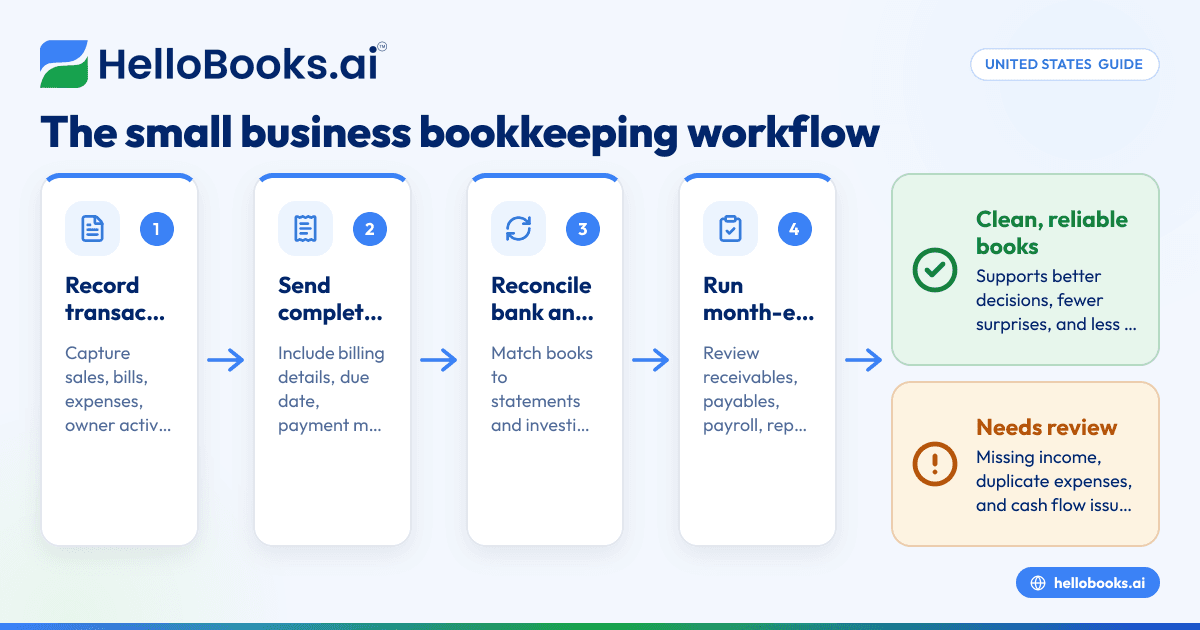
Bookkeeping basics in the United States for a small business come down to three habits: record every transaction correctly, match your books to your bank and credit card statements, and close each month with a simple review. If you do those three things well, you get cleaner financial reports, fewer surprises, and less stress at tax time.
Key takeaways
- Good bookkeeping starts with consistent transaction coding, complete invoices, and regular bank reconciliation.
- Small business owners in the United States should review books monthly, not just at year-end.
- Month-end closes help catch missing income, duplicate expenses, and cash flow issues early.
- The right workflow matters more than complexity. A simple checklist beats a messy spreadsheet.
- Automation can reduce data entry and speed up reconciliation when your transaction volume grows.
- This article is general information, not tax or legal advice.
What are bookkeeping basics in the United States for small business owners?
Bookkeeping basics in the United States for small business owners means keeping an accurate record of money coming in, money going out, what customers owe you, what you owe others, and how much cash your business has.
For most small businesses, that includes five core tasks:
- Recording sales and income.
- Recording bills, expenses, and owner transactions.
- Sending invoices and tracking payments.
- Reconciling bank and credit card accounts.
- Reviewing reports at month-end.
These tasks sound simple, but many business owners still do them in a patchwork way. A contractor in Houston may invoice from one app, track expenses in a spreadsheet, and check the bank account manually. A retail shop in Chicago may enter data into QuickBooks only when the CPA asks for it. That creates delays, errors, and unclear numbers.
The goal of bookkeeping is not just compliance. It is better decisions. Clean books tell you whether a customer is profitable, whether payroll is squeezing cash flow, and whether your prices still make sense.
If you are moving from spreadsheets or cleaning up years of catch-up work, start with the basics. Build one repeatable process for each task. Then improve speed and automation later.
Why does bookkeeping matter if I already check my bank balance?
Your bank balance shows cash today. Bookkeeping shows what that cash means, what is missing, and what obligations are coming next.
A healthy bank balance can hide unpaid sales tax, customer refunds, credit card charges, or bills due next week. Good books turn raw transactions into usable information. They help you see profit, not just cash.
For example, imagine a small wholesale business in Detroit with $42,000 in the bank on 09/30/2026. That sounds fine. But if $18,000 is owed to suppliers, $9,000 is payroll due in a few days, and $7,500 of customer invoices are already overdue, the picture changes quickly.
That is why bookkeeping matters even for owner-led businesses. It creates structure around timing. It separates revenue from collections. It separates expenses from actual cash payments. It also helps support year-end tax prep and lender conversations.
The basic records every small business should keep
You do not need a complex finance department. You do need complete records. At a minimum, keep:
- Bank statements
- Credit card statements
- Customer invoices
- Vendor bills and receipts
- Loan statements
- Payroll summaries
- Sales tax records, if applicable
- Owner contribution and owner draw records
Store them in one system or one organized digital folder structure. If support documents live across email inboxes, text threads, and paper files, month-end becomes much harder.
How should I set up my bookkeeping process?
Start with one source of truth for transactions, one method for invoicing, and one monthly closing checklist.
That setup keeps work manageable. It also reduces duplicate entries and missing items. Even a very small business should avoid mixing personal and business spending across the same bank account.
Step 1: Separate business finances
Open a dedicated business checking account and business credit card if you have not already. This is one of the most important bookkeeping basics united states small business owners can follow.
When personal and business transactions mix together, every month becomes a cleanup project. It also makes expense review slower and less reliable.
Step 2: Choose your bookkeeping system
Your system can be a spreadsheet at first, but most growing businesses outgrow that quickly. Once you have regular invoices, card spending, subscriptions, reimbursements, or multiple team members, software is usually the better choice.
Look for:
- Bank feed support
- Invoicing
- Expense tracking
- Reporting
- Reconciliation tools
- User access controls
If you are evaluating options, it helps to compare accounting software in the USA built for small businesses that want less manual entry.
Step 3: Build a simple chart of accounts
Your chart of accounts is the list of categories used to classify transactions. Keep it clean. Do not create dozens of nearly identical expense accounts.
A practical setup might include:
- Sales income
- Cost of goods sold
- Merchant fees
- Rent
- Utilities
- Software subscriptions
- Advertising
- Payroll
- Owner draws
- Office supplies
- Travel
- Meals
A shorter list is easier to review. You can always add detail later if needed.
Step 4: Decide how often work gets done
Daily is ideal for high-volume businesses. Weekly is enough for many service firms. Monthly is the bare minimum.
A simple rhythm might look like this:
- Weekly: review transactions and send invoices
- Mid-month: follow up on unpaid invoices
- End of month: reconcile all accounts and review reports
Consistency matters more than perfection.
What should be on every invoice?
A good invoice should clearly show who owes you, what you delivered, when payment is due, and how to pay.
That sounds basic, but missing details cause delays. Customers often hold invoices when they lack a purchase order reference, service date, billing contact, or payment terms.
Invoice essentials for small businesses
Every invoice should include:
- Your business name and contact information
- Customer name and billing details
- Unique invoice number
- Invoice date
- Description of products or services
- Quantity, rate, and total
- Payment due date
- Accepted payment methods
- Any relevant sales tax details, if applicable
If you send invoices by email, use a consistent subject line and message. That makes follow-up easier. It also helps your customer’s AP team find the bill quickly.
For example, “Invoice 1048 due 10/15/2026” is much clearer than “Please see attached.”
Common invoicing mistakes
Small business owners often lose time and cash because of avoidable invoice errors:
- Sending invoices late
- Reusing invoice numbers
- Forgetting due dates
- Not tracking partial payments
- Emailing the wrong contact
- Failing to follow up on overdue balances
The easier it is to create and track invoices, the faster you get paid. If this is still manual, consider using invoice software to standardize the process.
What is bank reconciliation and why does it matter?
Bank reconciliation means matching the transactions in your books to the transactions on your bank and credit card statements so your balances are accurate.
It matters because your books are only useful if they agree with reality. Reconciliation catches missing income, duplicate entries, bank fees, subscription charges, and coding mistakes before they pile up.
How do I reconcile my bank account each month?
Match every bank and card transaction to your books, investigate anything unmatched, and confirm the ending balance agrees with the statement.
Do this monthly for every bank account and credit card. Waiting until quarter-end makes errors harder to fix. Reconciliation is one of the most important ai bookkeeping basics because automation can speed matching, but you still need a human review.
A simple monthly bank reconciliation process
Use this checklist:
- Get the statements Download the bank and credit card statements for the month.
- Review starting balances Make sure the opening balance in your books matches the prior month’s ending balance.
- Match deposits Check that every deposit in the statement appears in your books for the correct amount and date.
- Match payments and withdrawals Compare checks, ACH payments, debit transactions, card charges, fees, and transfers.
- Investigate unmatched items Look for missing entries, duplicates, timing differences, or transactions posted to the wrong account.
- Record bank-only items Add interest, fees, returned payments, or other items that appear on the statement but not yet in your books.
- Confirm the ending balance The reconciled balance in your books should match the statement after valid timing differences are accounted for.
- Save support Keep the reconciliation report and statement together for future review.
Problems reconciliation helps catch
Reconciliation is not just a bookkeeping chore. It is an error detection tool. It helps catch:
- Duplicate expense entries
- Missed customer deposits
- Personal charges on business cards
- Uncashed checks
- Bank fees not recorded
- Subscription price changes
- Fraud or unusual transactions
As volume grows, software can reduce manual matching. A tool with bank reconciliation software features can save time, especially when your business uses cards heavily or processes many deposits.
What does month-end bookkeeping include?
Month-end bookkeeping means finishing the month with complete records, reconciled accounts, and a quick review of reports.
The purpose is simple. You want to know whether the month’s numbers are reliable before you use them to make decisions. Without a month-end close, profit and cash flow reports are often incomplete.
A practical month-end checklist
Most small businesses can close the month with the following steps:
- Record all income Make sure all invoices, sales receipts, and deposits are entered.
- Record all expenses Enter bills, receipts, card charges, loan payments, and reimbursements.
- Reconcile bank and credit cards Match every statement balance to the books.
- Review accounts receivable Identify unpaid customer invoices and send reminders.
- Review accounts payable Check unpaid vendor bills and upcoming due dates.
- Post payroll entries Confirm wages, taxes, and benefit deductions are reflected correctly.
- Review fixed assets and loan balances Confirm major purchases and debt payments are recorded properly.
- Check owner transactions Separate owner draws and contributions from normal business expenses.
- Review sales tax accounts if applicable Make sure collections and payments are tracked clearly.
- Run financial reports Review the profit and loss statement, balance sheet, and cash flow statement.
- Flag unusual items Investigate large swings, negative balances, and unexpected expenses.
- Lock the month if possible Avoid changing closed periods without a clear reason.
Which reports should you review every month?
At a minimum, review these three reports:
Profit and loss statement
This shows income and expenses for the month. Use it to check margins, overhead, and unusual spending.
Balance sheet
This shows what the business owns and owes at a point in time. It helps catch bad balances, like negative asset accounts or old loans not updated.
Cash flow view
This helps you understand where cash went. Profit and cash are not the same. A profitable month can still create cash strain.
How can small businesses make bookkeeping easier?
Use standard workflows, reduce manual entry, and review exceptions instead of rechecking every line from scratch.
This is where automation helps. Many owners waste time typing transactions, renaming vendors, and chasing missing receipts. Software can reduce that work when it pulls transactions in automatically, suggests categories, and keeps invoices and expenses in one place.
For many teams, the biggest improvement comes from moving away from disconnected tools. If invoicing happens in one app, receipts in another, and reconciliation in a spreadsheet, month-end always takes longer than expected.
A system designed for AI bookkeeping can help businesses speed up coding and review while keeping a human in control of final decisions.
When should you move beyond spreadsheets?
Spreadsheets can work for a solo consultant with very low volume. They become risky when:
- You process many monthly transactions
- You send recurring invoices
- You have employees
- You use multiple payment methods
- You need timely reporting
- More than one person touches the books
At that point, dedicated AI accounting software or accounting software for small business usually gives you more control and fewer errors.
What bookkeeping mistakes do small business owners make most often?
The most common mistakes are mixing personal and business spending, falling behind on reconciliations, and relying on memory instead of documentation.
These mistakes are common because bookkeeping often gets pushed aside until something hurts. That could be a cash crunch, a lender request, or tax season.
Five mistakes to avoid
1. Waiting too long to update the books
If you only book transactions every few months, details get lost. Receipts disappear. You forget why a payment was made.
2. Ignoring old unpaid invoices
Unpaid invoices distort revenue expectations. Review receivables monthly and follow up consistently.
3. Recording loan payments as one expense
Loan payments often include both principal and interest. Recording the whole amount as expense can distort your books.
4. Treating owner transactions like normal business costs
Owner draws, contributions, and personal purchases should be recorded separately and clearly.
5. Skipping the review step
Even automated systems need review. Someone should still scan reports for unusual swings, duplicates, and missing entries.
When should you hire help?
You should get help when your books are late, your reports are unclear, or you spend too much time fixing errors instead of running the business.
That help could be a bookkeeper, an accountant, or better software. If your numbers are consistently delayed or you are unsure how to classify transactions, outside help can save money by preventing bad decisions.
You may want support if:
- Reconciliations are months behind
- Sales tax tracking is messy
- You do not trust your reports
- You are applying for financing
- You have inventory or job costing complexity
- You need cleaner year-end records
If you need professional support, you can find an accountant and build a cleaner process around regular monthly bookkeeping.
A simple weekly and monthly routine you can actually follow
The best bookkeeping system is the one you will keep using. For many small business owners, that means a short weekly review and a tighter month-end checklist.
Weekly routine
- Review new bank and card transactions
- Categorize uncoded items
- Upload or attach receipts
- Send customer invoices
- Follow up on overdue balances
Monthly routine
- Reconcile all bank and credit card accounts
- Enter any missing bills or loan activity
- Review payroll entries
- Review receivables and payables
- Check sales tax balances if applicable
- Run and review reports
This routine is realistic for many service businesses, agencies, contractors, and small product companies. If your volume is higher, move parts of it to a daily process.
If you want to reduce manual work across invoicing, expenses, and reconciliation, a QuickBooks alternative may be worth evaluating as your business grows.
Read next
This article covers one part of a bigger topic. For the complete picture, read our guide to united states.


