


Key takeaways
What this article covers, in order:
- Why this comes up / what goes wrong
- Step-by-step
- Example (fictional figures)
- Common mistakes
- Frequently asked questions
- Key takeaways
Cloud based retail business accounting software enables retail shop owners and accountants to manage invoicing, GST compliance, inventory, and financial reports online, reducing manual data entry and errors. This article explains why retail businesses need cloud solutions, how to evaluate software step-by-step, includes a worked example for Indian retail shops, highlights common mistakes, and answers frequently asked questions.
Why this comes up / what goes wrong
Retail business owners and accountants in India, such as kirana stores in Indore, mobile accessories shops in Surat, or apparel stores with multiple outlets in Lucknow, often rely on spreadsheets, Tally, or physical bill books for their accounting and inventory management. These traditional methods can lead to frequent errors, time-consuming reconciliation processes, delayed GST filings, and difficulty tracking stock or cash flow across multiple outlets. For example, a two-outlet apparel store may struggle to consolidate sales and inventory data accurately using separate spreadsheets.
Cloud based accounting software offers real-time access to financial data, automated GST invoicing, easy filing of returns such as GSTR-1 and GSTR-3B, and inventory tracking to improve accuracy and save time. However, choosing the right software can be confusing without clear criteria tailored to retail businesses.
Step-by-step
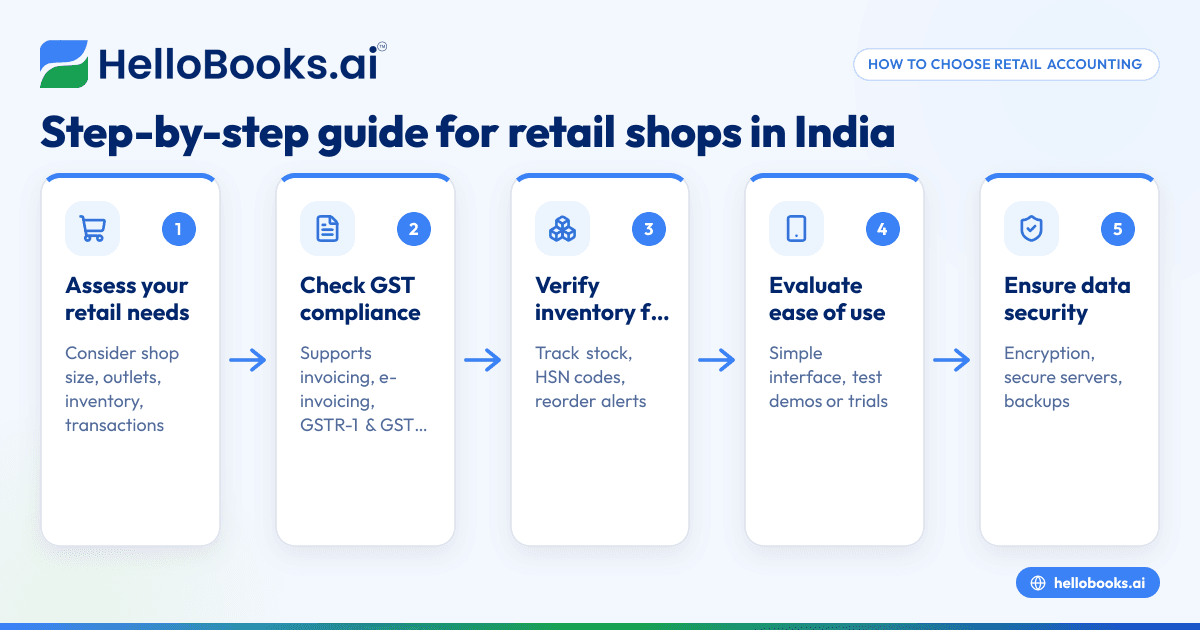
- Identify your retail business needs: Assess your shop size, number of outlets, inventory complexity, and average monthly transactions. For instance, a kirana store in Indore with a single outlet will have simpler needs than a two-outlet apparel store in Lucknow.
- Check GST compliance features: Confirm the software supports GST invoicing, e-invoicing where applicable, GSTR-1 and GSTR-3B filing, and reconciliation with GSTR-2B to ensure accurate tax compliance.
- Look for inventory management capabilities: The software should track stock levels, update automatically with sales, support multiple product categories with HSN codes, and manage reorder alerts.
- Evaluate ease of use: Choose software with a simple interface suitable for owners or accountants who may not be tech-savvy. Trying demos or free trials can help.
- Verify data security and backup: Ensure the cloud software uses encryption, secure servers, and provides regular data backups to protect your financial information.
- Assess reporting capabilities: The software should generate essential financial reports such as profit and loss statements, balance sheets, and GST reports with minimal effort.
- Consider integration options: Check if the software can import bank statements to simplify reconciliation and export data to Excel or Tally if needed.
- Compare pricing and plans: Select a plan that matches your transaction volume and GST filing requirements without hidden costs.
For more general guidance on software choices, see accounting software for small business and accounting software in India.
Example (fictional figures)
A kirana store in Indore records sales and GST for April 2024 as follows:
- Total taxable sales: ₹1,00,000
- Assumed CGST rate: 9%
- Assumed SGST rate: 9%
Calculate CGST:
₹1,00,000 × 9% = ₹9,000
Calculate SGST:
₹1,00,000 × 9% = ₹9,000
Total GST collected:
₹9,000 + ₹9,000 = ₹18,000
The software should automatically calculate these taxes on invoices, prepare GSTR-1 and GSTR-3B returns, and assist in reconciling input tax credit from purchases for accurate GST compliance.
Common mistakes
- Choosing software without GST filing support: This leads to manual filing errors and penalties. Prevent this by confirming the software supports GSTR-1 and GSTR-3B filing.
- Ignoring inventory management features: Causes stock mismanagement and lost sales. Prevent by selecting software that tracks multiple product categories and stock levels.
- Not verifying ease of use: Results in underutilization and errors. Prevent by testing demos or free trials before purchase.
- Overlooking data security: Risks data loss or breaches. Prevent by ensuring the software uses encryption and regular backups.
- Neglecting report customization: Makes financial analysis difficult. Prevent by choosing software that offers relevant, easy-to-generate reports.
- Underestimating transaction limits in plans: Leads to unexpected extra costs. Prevent by matching plan limits to your business volume.
Learn more about retail-specific needs at Retail shops.
Frequently asked questions
What is the benefit of cloud based accounting software for retail shops?
Cloud software provides real-time access to financial data from any location, automates GST compliance tasks, reduces manual errors, and offers inventory management features that save time and improve accuracy.
Can cloud accounting software handle multiple retail outlets?
Yes, many cloud accounting solutions support multiple outlets with consolidated financial and inventory reporting, which is useful for apparel stores with several locations.
Is GST e-invoicing supported in cloud retail accounting software?
Leading cloud accounting software supports GST e-invoicing where applicable, helping retail businesses comply with government mandates efficiently.
How secure is cloud based accounting software?
Reputable cloud software uses encryption, secure servers, and regular backups to protect your financial data from loss or theft.
Can I import bank statements into cloud accounting software?
Most cloud accounting software allows uploading bank statements to simplify reconciliation and reduce manual data entry.
Key takeaways
- Identify your retail business size, outlets, and transaction volume before choosing software.
- Ensure the software supports GST compliance including invoicing, e-invoicing, and filing GSTR-1 and GSTR-3B.
- Inventory management is essential for accurate stock tracking and reorder management.
- Ease of use and data security are critical to avoid errors and data loss.
- Compare pricing plans carefully to match your business's transaction volume and filing needs.
- Cloud accounting software helps retail owners focus on their business instead of manual bookkeeping.
Start your cloud accounting journey with the Start on the Free plan (200 transactions a year, GSTR-1 and 3B filing for one GSTIN) to test features without cost.


