


Key takeaways
What this article covers, in order:
- Why this comes up / what goes wrong
- Step-by-step
- Example (fictional figures)
- Common mistakes
- Doing this in HelloBooks
- Frequently asked questions
Accounting software for restaurants is designed to meet the unique financial management needs of food service businesses such as restaurants, cafes, cloud kitchens, and bakeries. It helps track daily sales from multiple channels, manage supplier bills, monitor inventory of ingredients, handle GST invoicing, and file tax returns accurately.
Why this comes up / what goes wrong
Restaurant owners and accountants in India often use spreadsheets, Tally, or manual bill books for bookkeeping. This leads to challenges such as:
- Tracking daily sales from dine-in customers and delivery platforms like Swiggy and Zomato
- Managing numerous supplier bills for kitchen ingredients and other supplies
- Reconciling GST input tax credit (ITC) and filing returns correctly and on time
- Monitoring inventory of perishable goods with expiry dates
- Spending excessive time on manual data entry and reconciliation
For instance, a 40-seat restaurant in Pune or a cloud kitchen in Gurugram must handle multiple sales streams and supplier invoices daily. Without accounting software tailored for restaurants, errors, delays, and compliance risks increase.
Step-by-step
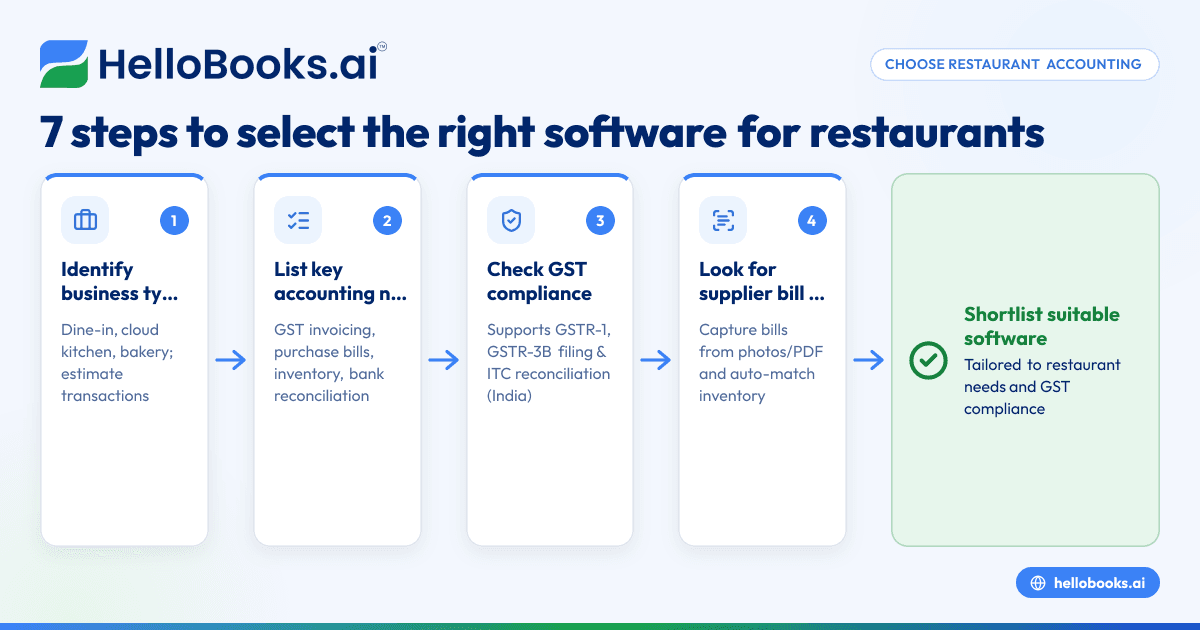
- Identify your business type and transaction volume: Determine whether you operate a dine-in restaurant, cloud kitchen, or bakery, and estimate your monthly sales and purchase transactions.
- List your key accounting needs: These typically include GST invoicing and e-invoicing if applicable, purchase bill management, inventory tracking (especially for food ingredients), bank statement reconciliation, and GST return filing.
- Check for GST compliance features: Ensure the software supports filing of GSTR-1 and GSTR-3B and can reconcile ITC using GSTR-2B.
- Look for supplier bill management with OCR: This feature captures bills from photos or PDFs and auto-matches line items to inventory, reducing manual entry errors.
- Assess inventory management capabilities: Since restaurants handle perishable stock, the software should track quantities, expiry dates, and alert for low stock.
- Verify ease of use and integration: The software should be user-friendly for your accountant or finance lead and integrate with your existing tools if needed.
- Compare pricing and plans: Choose a plan that fits your transaction volume and business size.
Following these steps will help you shortlist accounting software suited to your restaurant’s needs. For broader options, see accounting software for small business and accounting software in India.
Example (fictional figures)
Consider a bakery in Kochi with monthly figures:
- Sales (assumed GST rate 5%): ₹5,00,000
- Purchase of raw materials (ingredients) with GST 5%: ₹2,00,000
- Other expenses (rent, utilities) without GST: ₹50,000
Calculate GST on sales:
₹5,00,000 × 5% = ₹25,000 (output GST)
Calculate GST on purchases:
₹2,00,000 × 5% = ₹10,000 (input GST)
Net GST payable:
₹25,000 - ₹10,000 = ₹15,000
The bakery must file GSTR-1 with sales details and GSTR-3B with net GST payable. Using software with OCR for purchase bills can save time entering ₹2,00,000 worth of ingredient bills.
Common mistakes
- Choosing generic software without restaurant features: Generic tools may lack inventory or multi-channel sales support. Prevent this by checking for industry-specific features like those for Restaurants, cafes and cloud kitchens.
- Ignoring GST compliance capabilities: Missing timely GSTR-1 and GSTR-3B filing causes penalties. Prevent this by verifying software supports these filings.
- Manual entry of supplier bills: Leads to errors and wasted time. Prevent this by using OCR bill capture.
- Neglecting inventory tracking: Causes stockouts or wastage of perishables. Prevent this by choosing software with inventory features.
- Overlooking bank statement reconciliation: Causes cash flow confusion. Prevent this by regularly reconciling bank statements.
- Not considering multiple sales channels: Restaurants often have dine-in and delivery sales. Prevent this by choosing software that handles multi-channel sales.
Doing this in HelloBooks
HelloBooks offers OCR for purchase bills, where supplier bills are captured from a photo or PDF instead of manual entry. This helps restaurants quickly record ingredient purchases and match line items to inventory, reducing errors and saving time. Learn more about this feature at HelloBooks for India.
Frequently asked questions
What features should accounting software for restaurants have?
They should include GST invoicing and filing, purchase bill management with OCR, inventory tracking for ingredients, bank reconciliation, and support for multiple sales channels like dine-in and delivery apps.
Can I use generic accounting software for my restaurant?
Generic software may lack features like inventory tracking and multi-channel sales management, which are crucial for restaurants. Industry-specific software reduces errors and saves time.
How does OCR help in restaurant accounting?
OCR captures data from purchase bills automatically, reducing manual entry errors and speeding up bookkeeping.
Is GST filing included in restaurant accounting software?
Many restaurant accounting software options support GSTR-1 and GSTR-3B filing, which are mandatory for GST compliance.
Can cloud kitchens use the same software as restaurants?
Yes, but ensure the software handles multiple delivery platforms and online sales channels common to cloud kitchens.
How do I handle inventory of perishable goods in accounting software?
Choose software that tracks ingredient quantities, expiry dates, and sends alerts for low stock to prevent wastage and stockouts.
Key takeaways
- Choose accounting software designed specifically for restaurants, cafes, cloud kitchens, or bakeries.
- Key features include GST invoicing and filing, purchase bill OCR, inventory tracking, and bank reconciliation.
- Use OCR to avoid manual data entry errors and save time on supplier bill management.
- Verify the software supports GSTR-1 and GSTR-3B filing for GST compliance.
- Evaluate ease of use, integration capabilities, and pricing based on your business size.
- Ensure the software handles multiple sales channels and perishable inventory management.
Start managing your restaurant accounts efficiently today. You can Start on the Free plan (200 transactions a year, GSTR-1 and 3B filing for one GSTIN) with HelloBooks and simplify your accounting.


