


Key takeaways
What this article covers, in order:
- Why this comes up / what goes wrong
- Step-by-step
- Example (fictional figures)
- Common mistakes
- Doing this in HelloBooks
- Frequently asked questions
Managing accounting for a nursery school involves tracking student fees, staff salaries, purchase bills, and GST compliance. The right accounting software should make these tasks easier by automating data entry, supporting GST invoicing and filing, and providing clear financial reports. This article covers why nursery schools need tailored accounting solutions, step-by-step guidance to choose software, a detailed example with Indian figures, common mistakes to avoid, and how HelloBooks can assist.
Why this comes up / what goes wrong
Nursery school owners or accountants in India often handle multiple accounting tasks manually using spreadsheets, Tally, or physical bill books. These methods are time-consuming and prone to errors. Specific challenges include:
- Tracking fee payments from many students and managing due fees
- Processing monthly staff salaries and related deductions
- Recording purchase bills for supplies like toys, books, and stationery
- Preparing GST-compliant invoices and filing returns such as GSTR-1 and GSTR-3B
- Reconciling input tax credit (ITC) claims against supplier bills
Without software designed for small education providers, these tasks lead to mistakes, delays, and compliance risks. Nursery schools need accounting software that understands their unique needs.
Step-by-step
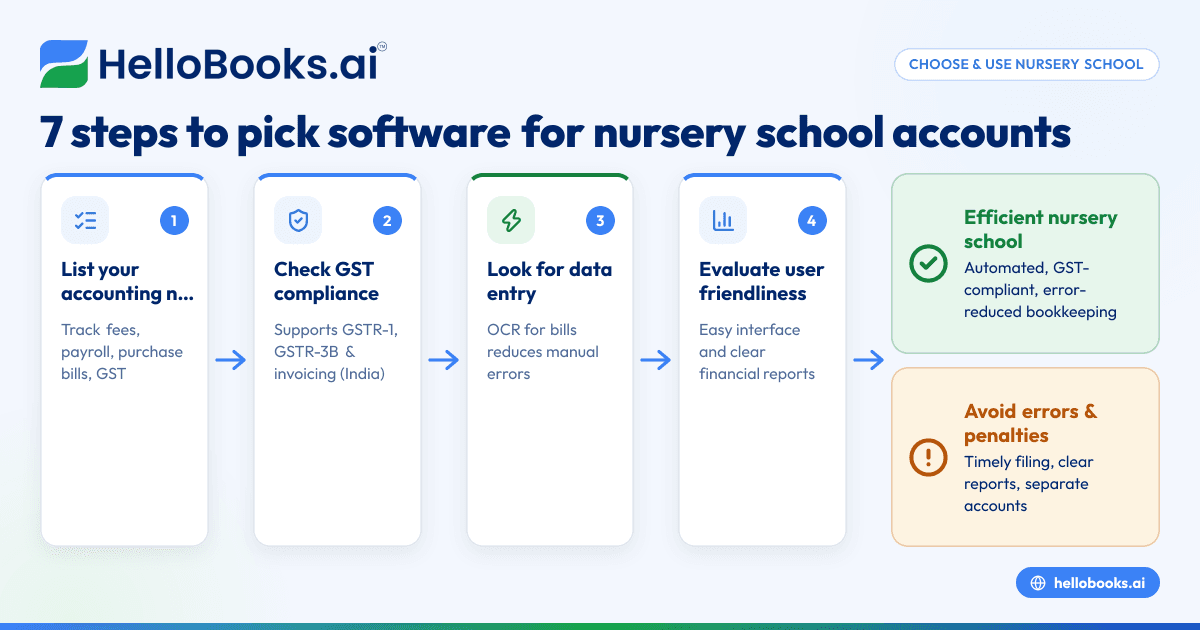
- List Your Accounting Needs: Identify key tasks such as fee collection tracking, payroll processing, purchase bill management, inventory tracking (if applicable), and GST invoicing and filing.
- Check for GST Compliance Features: Ensure the software supports GST invoice generation, e-invoicing if applicable, and filing of GSTR-1 and GSTR-3B returns.
- Look for Automation in Data Entry: Choose software with OCR (Optical Character Recognition) for purchase bills to capture supplier bills from photos or PDFs, reducing manual entry errors.
- Evaluate User Friendliness: Since nursery school owners or accountants may not be accounting experts, pick software with an easy-to-use interface and clear reports.
- Confirm Payroll Management Capabilities: Check if the software supports salary payments, statutory deductions, and payroll reports.
- Test Software with Your Data: Use free trials to enter your nursery school's data and see if the software handles your volume and types of transactions.
- Compare Pricing and Plans: Select a pricing plan that fits your transaction volume and GST filing needs.
For more information on software options for small businesses and education providers, see accounting software for small business, accounting software in India, and Coaching institutes and education providers.
Example (fictional figures)
A nursery school in Bengaluru has 120 students, each paying a monthly fee of ₹2,500. The school purchases supplies worth ₹40,000 monthly and pays ₹35,000 in staff salaries. Assume a GST rate of 18% on supplies.
- Monthly fees collected = 120 × ₹2,500 = ₹3,00,000
- Purchase bills (supplies) = ₹40,000
- GST on supplies = ₹40,000 × 18% = ₹7,200
- Total purchase cost including GST = ₹40,000 + ₹7,200 = ₹47,200
- Staff salaries = ₹35,000 (no GST)
The school records ₹3,00,000 as income and ₹47,200 + ₹35,000 = ₹82,200 as expenses. GST paid ₹7,200 is claimed as ITC.
This data is entered into the accounting software monthly to generate financial reports and prepare GST returns.
Common mistakes
- Manual data entry errors: Entering purchase bills and fees manually causes mistakes. Prevent this by using software with OCR for bills.
- Neglecting GST filing deadlines: Missing GSTR-1 and GSTR-3B deadlines leads to penalties. Use software that reminds and facilitates timely filing.
- Inadequate fee tracking: Not monitoring due and received fees causes cash flow problems. Use software that clearly tracks fee status.
- Mixing personal and school accounts: Combining accounts creates confusion and tax issues. Maintain separate books for the nursery school.
- Choosing complex software: Overly complicated software may not be used effectively. Select user-friendly tools suited for small education providers.
- Ignoring report verification: Always review financial reports and GST returns before submission to catch errors.
See Coaching institutes and education providers for accounting tips relevant to education businesses.
Doing this in HelloBooks
HelloBooks offers OCR for purchase bills, allowing nursery schools to capture supplier bills from photos or PDFs instead of manual entry. This reduces errors and saves time in bookkeeping. Learn more about this feature at HelloBooks for India.
Frequently asked questions
What features should nursery school accounting software have?
It should manage fee tracking, payroll, purchase bills, GST invoicing, and filing. Automation features like OCR for bills and clear financial reports reduce workload and errors.
Can HelloBooks support GST compliance for nursery schools?
Yes, HelloBooks supports GST invoicing, filing of GSTR-1 and GSTR-3B returns, and reconciles input tax credit, which are essential for nursery school compliance.
Is automating purchase bill entry important?
Automating with OCR saves time and reduces manual errors, especially when dealing with multiple supplier bills monthly.
How do I choose between different accounting software options?
Compare features against your nursery school’s needs, ease of use, GST support, and pricing. Use free trials to test software suitability.
Can nursery schools manage payroll within accounting software?
Some software includes payroll features or integrates with payroll tools. Verify if salary payments and statutory deductions are supported.
Key takeaways
- Nursery schools require accounting software tailored to fee management, payroll, purchase bills, and GST compliance.
- Automation such as OCR for purchase bills reduces manual entry errors and saves time.
- Choose software that supports GST invoicing, GSTR-1 and GSTR-3B filing, and ITC reconciliation.
- Test software usability and support before finalising your choice.
- Keep nursery school accounts separate from personal finances.
- Regularly review financial reports and GST returns for accuracy.
Efficiently manage your nursery school's accounts with the right software. Start on the Free plan (200 transactions a year, GSTR-1 and 3B filing for one GSTIN).


