


Key takeaways
What this article covers, in order:
- Why this comes up / what goes wrong
- Step-by-step
- Example (fictional figures)
- Common mistakes
- Doing this in HelloBooks
- Frequently asked questions
Accounting software for insurance businesses must support the unique financial transactions and regulatory requirements of insurance agencies, brokers, and related financial services. Key needs include managing commission payments, GST invoicing, expense tracking, and reconciling supplier bills efficiently. This article guides insurance business owners and accountants through selecting the right software, common errors to avoid, and practical steps to streamline accounting.
Why this comes up / what goes wrong
Insurance business owners and accountants often struggle with manual bookkeeping using spreadsheets, bill books, or generic accounting tools that lack insurance-specific features. Insurance agencies in Mumbai or brokers in smaller cities face challenges such as tracking commissions from multiple insurers, managing GST on insurance service invoices, and reconciling purchase bills from various service providers. Without software tailored to these needs, data entry errors, delayed GST filings, and reconciliation mismatches are common.
Insurance accounting also involves handling investment income and loan-related transactions for NBFCs or DSAs, adding complexity. These challenges make it critical to choose accounting software that fits insurance business workflows and GST compliance requirements in India.
Step-by-step
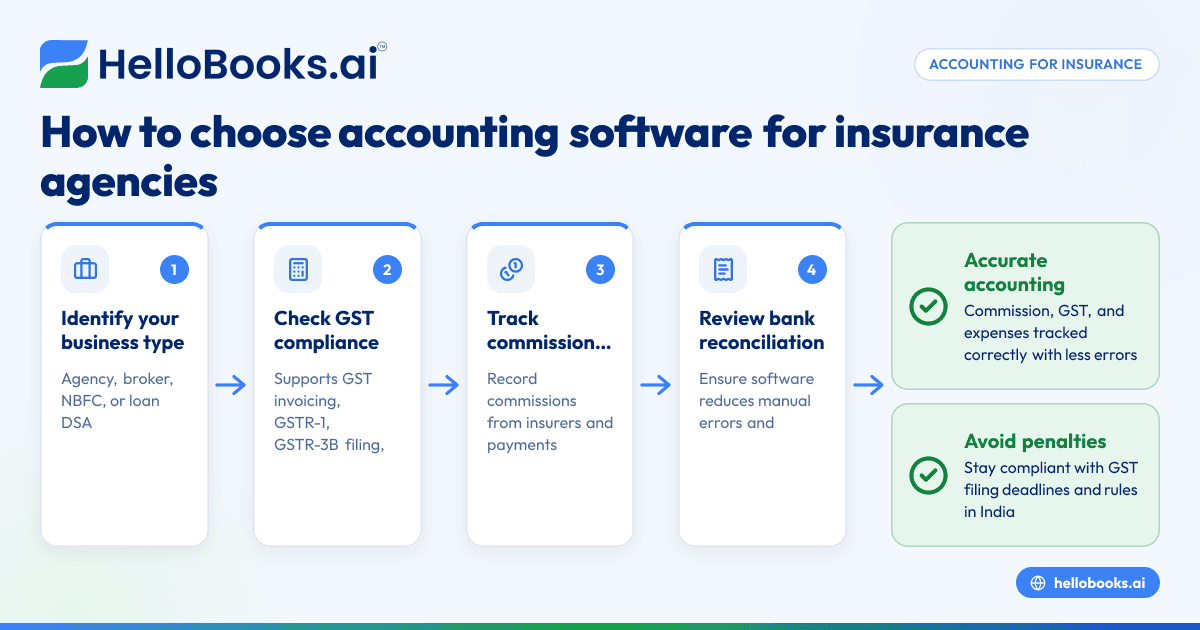
- Identify your insurance business type and transactions to manage. Check if you are an insurance agency, broker, NBFC, or loan DSA, as this affects the features you need.
- Check GST compliance support. Ensure the software supports GST invoicing, GSTR-1 and GSTR-3B filing, and can handle e-invoicing if applicable. This is essential for legal compliance.
- Look for commission and expense tracking features. Your software should let you record commissions received from insurers and payments made to agents or service providers.
- Review bank statement reconciliation options. Efficient reconciliation reduces manual errors and saves time.
- Check supplier bill entry methods. OCR for purchase bills helps capture bills from photos or PDFs without manual data entry, speeding up bookkeeping.
- Assess reporting capabilities. Financial reports tailored to insurance businesses, like commission reports and GST summaries, help in decision-making.
- Consider integration possibilities. If you use Tally or Excel, check if the software can import/export data to reduce duplicate work.
- Evaluate ease of use and support. The software should be user-friendly for owners or accountants who may not be accounting experts.
For more on accounting software options suitable for small businesses including insurance, see accounting software for small business and accounting software in India.
Example (fictional figures)
An insurance agency in Mumbai records the following transactions for March 2024:
- Commission received from insurer: ₹1,50,000
- GST on commission at assumed rate 18%: ₹1,50,000 × 18% = ₹27,000
- Total commission invoice: ₹1,50,000 + ₹27,000 = ₹1,77,000
- Office rent expense: ₹30,000
- Purchase of office supplies (bill captured via OCR): ₹5,000
The agency records the commission invoice in the software, which calculates GST automatically. Expenses are entered, and supplier bills are scanned with OCR to avoid manual entry.
This example shows how commission and GST are handled alongside expenses, simplifying accounting for the insurance agency.
Common mistakes
- Not tracking commissions separately: This leads to inaccurate income reporting. Use software features to record commissions distinctly.
- Ignoring GST compliance requirements: Missing deadlines or incorrect filings cause penalties. Use software that supports GSTR-1 and GSTR-3B filing.
- Manual entry of supplier bills: This causes errors and wastes time. Use OCR-enabled accounting software to capture bills from photos or PDFs.
- Using generic accounting software without insurance features: This complicates commission and expense tracking. Choose software designed for insurance or financial services.
- Neglecting reconciliation: Not reconciling bank statements regularly leads to discrepancies. Schedule monthly reconciliations.
For more on insurance and financial services accounting, see Insurance agents, NBFCs and financial services.
Doing this in HelloBooks
HelloBooks offers OCR for purchase bills, allowing insurance businesses to capture supplier bills from photos or PDFs instead of manual entry. This feature reduces data entry errors and speeds up bookkeeping. Learn more about OCR scanning at HelloBooks OCR scanning.
Frequently asked questions
What is the best accounting software for insurance companies?
The best software depends on your business size and needs. Look for features like GST compliance, commission tracking, and expense management. HelloBooks supports GST invoicing and OCR for bills, suited for insurance agencies.
How does accounting software for insurance brokers differ?
Insurance broker software focuses on commission tracking, GST invoicing for services, and expense management. It should handle multiple insurer relationships and reconcile payments efficiently.
Can I use generic accounting software for an insurance agency?
Generic software may lack insurance-specific features like commission tracking or GST compliance tailored to insurance. Specialized software or HelloBooks can reduce errors and save time.
Is GST filing supported in insurance accounting software?
Yes, software like HelloBooks supports GSTR-1 and GSTR-3B filing, essential for insurance businesses under GST.
How does OCR help in insurance accounting?
OCR reads purchase bills from photos or PDFs, reducing manual data entry. This helps insurance agencies capture expenses quickly and accurately.
For more details, see Insurance agents, NBFCs and financial services.
Key takeaways
- Choose accounting software that supports GST invoicing and filing for insurance agencies.
- Track commissions and expenses separately for accurate accounting.
- Use OCR-enabled software to capture supplier bills and reduce manual entry.
- Regularly reconcile bank statements to avoid discrepancies.
- Evaluate software ease of use and insurance-specific features before deciding.
Start with the Free plan (200 transactions a year, GSTR-1 and 3B filing for one GSTIN) at HelloBooks pricing to test features suitable for your insurance business.


