


Key takeaways
What this article covers, in order:
- Why this comes up / what goes wrong
- Step-by-step
- Example (fictional figures)
- Common mistakes
- Doing this in HelloBooks
- Frequently asked questions
Accounting software for grocery stores must efficiently handle inventory tracking, GST invoicing, purchase bill management, sales recording, and bank reconciliation. This article explains why grocery stores need specialised software, provides step-by-step guidance for selection, includes a worked example with Indian figures, highlights common mistakes, and describes how HelloBooks reduces manual data entry with OCR for purchase bills.
Why this comes up / what goes wrong
Grocery stores, often called kirana shops, deal with a wide range of products and many daily sales and purchase transactions. Typically, owners or accountants use spreadsheets, Tally, or manual bill books to maintain records. This approach often leads to delays and errors when entering purchase and sales data, managing stock, and preparing GST returns. Frequent supplier purchases, multiple payment modes like cash and digital payments, and the need for timely GST compliance add complexity. Without accounting software tailored for grocery and retail businesses, reconciling sales, inventory, and GST filings becomes time-consuming and error-prone. This situation encourages grocery store owners and accountants to seek software that simplifies stock management, billing, and GST filing.
Step-by-step
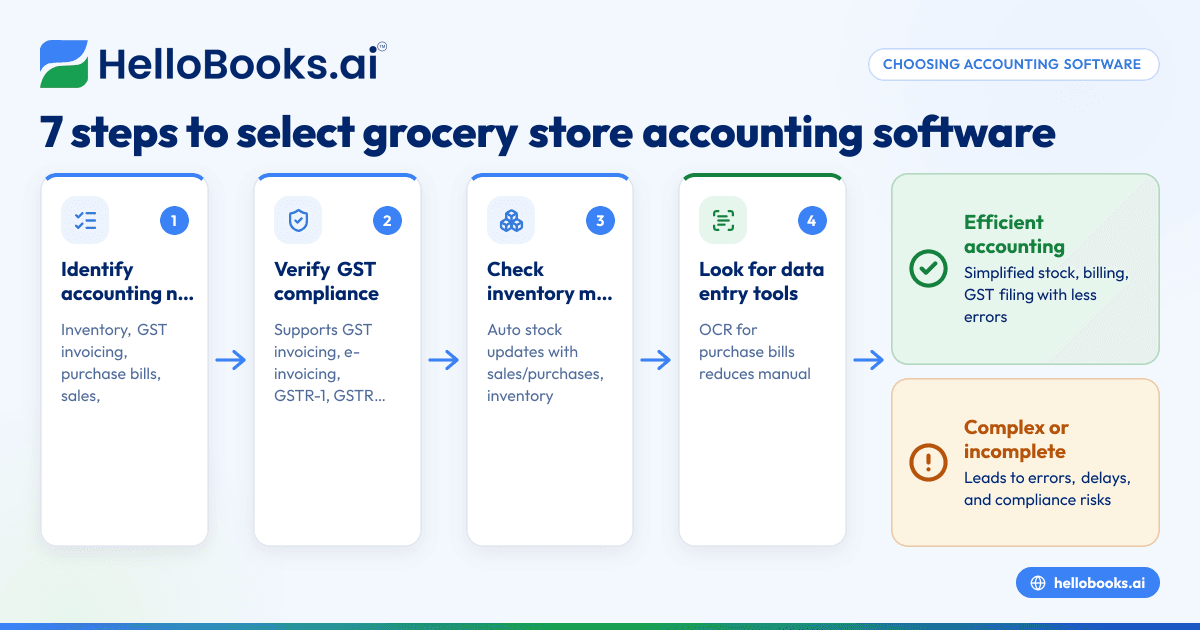
- List your grocery store’s accounting needs: Identify requirements such as inventory tracking, GST invoicing, purchase bill recording, sales data entry, bank reconciliation, and GST filing.
- Confirm GST compliance features: Check if the software supports GST invoicing, e-invoicing if applicable, filing of GSTR-1 and GSTR-3B, and reconciliation with GSTR-2B.
- Evaluate inventory management: Ensure the software tracks stock levels, updates inventory automatically with sales and purchases, and generates inventory reports.
- Look for data entry efficiency tools: Features like OCR for purchase bills can save time by capturing supplier bills from photos or PDFs instead of manual entry.
- Check reporting and financial insights: The software should provide clear reports on sales, expenses, profits, and stock status to help decision-making.
- Test ease of use and support: Choose software with a user-friendly interface suited for your staff and reliable customer support.
- Compare pricing and scalability: Review cost structures and transaction limits to ensure they fit your store’s current size and future growth plans.
For more general guidance on accounting software suitable for small businesses, see accounting software for small business. For retail-specific options, visit Retail shops.
Example (fictional figures)
Consider a kirana store in Indore for March 2024:
- Total supplier purchase bills: ₹1,20,000
- Total sales during the month: ₹1,80,000
- Assume a GST rate of 5% on both purchases and sales for illustration purposes.
Calculations:
Purchase GST input credit:
₹1,20,000 × 5% = ₹6,000
Sales GST collected:
₹1,80,000 × 5% = ₹9,000
GST payable:
₹9,000 - ₹6,000 = ₹3,000
The accounting software should automatically capture purchase bills using OCR, match line items to inventory, generate GST-compliant sales invoices, and calculate GST payable for filing.
Common mistakes
- Ignoring inventory integration: Using software that does not update stock automatically can lead to mismatches and stock shortages. Prevent this by selecting software with integrated inventory features.
- Manual data entry errors: Typing purchase bills and sales data manually increases the risk of mistakes. Using OCR or automated data capture reduces errors significantly.
- Overlooking GST filing support: Software lacking GSTR-1 and GSTR-3B filing capabilities increases compliance risks. Always confirm these features before purchase.
- Choosing overly complex software: Software that is too complicated wastes time and frustrates users. Opt for a simple, user-friendly interface suited for small grocery stores.
- Neglecting cost-effectiveness: Expensive plans with unnecessary features strain budgets. Compare plans carefully to match your store’s transaction volume and needs.
More information on accounting software tailored to Indian small businesses is available at accounting software in India.
Doing this in HelloBooks
HelloBooks offers OCR for purchase bills, allowing grocery store owners to capture supplier bills from photos or PDFs instead of manual entry. This feature reduces errors and saves time in entering purchase details, helping maintain accurate inventory and GST records efficiently.
Frequently asked questions
What features should grocery store accounting software have?
It should support GST invoicing, inventory tracking, purchase bill management, sales recording, bank reconciliation, and GST filing (GSTR-1 and GSTR-3B). OCR for bills helps save time and reduce manual errors.
Can I use HelloBooks for GST filing?
Yes, HelloBooks supports GSTR-1 and GSTR-3B filing for one GSTIN, making GST compliance easier for small grocery stores.
How does OCR help in grocery store accounting?
OCR reads purchase bills from photos or PDFs and auto-matches line items to inventory, reducing manual data entry and errors.
Is HelloBooks suitable for other retail shops?
Yes, HelloBooks is designed for small businesses including retail shops. Learn more at Retail shops.
What should I check before buying accounting software?
Check if it handles GST compliance, inventory management, ease of use, data entry options, reporting, support, and pricing.
Key takeaways
- Grocery stores need accounting software that integrates inventory, GST invoicing, and purchase bill management.
- OCR for purchase bills saves time and reduces manual entry errors.
- Ensure the software supports GSTR-1 and GSTR-3B filing for GST compliance.
- Avoid complex software; choose a simple interface suited for small retail stores.
- Compare features and costs carefully to match your store’s size and growth plans.
Start managing your grocery store accounts efficiently with HelloBooks. Start on the Free plan (200 transactions a year, GSTR-1 and 3B filing for one GSTIN).


