


Key takeaways
What this article covers, in order:
- Why this comes up / what goes wrong
- Step-by-step
- Example (fictional figures)
- Common mistakes
- Doing this in HelloBooks
- Frequently asked questions
Accounting software for agriculture businesses is designed to handle the unique needs of farming, trading in grains, seeds, fertilisers, and other agri inputs. It helps owners and accountants track sales, purchases, GST invoicing, stock, and expenses efficiently without manual errors or delays. This article explains why agriculture businesses seek such software, guides you through choosing the right tool, shares a worked example, highlights frequent mistakes, and shows how HelloBooks can assist.
Why this comes up / what goes wrong
Agriculture business owners or accountants often struggle with bookkeeping because their operations involve multiple product types, seasonal sales, and complex GST rules. For example, a commission agent at a grain mandi in Ludhiana handles large volumes of daily transactions, while a seed and fertiliser dealer in Guntur manages inventory with expiry dates and batch numbers. Many still use spreadsheets, Tally, or manual bill books, leading to time-consuming data entry, reconciliation issues, and errors in GST returns. Without specialised software, it is hard to keep track of purchase bills, sales invoices, and stock updates accurately.
Step-by-step
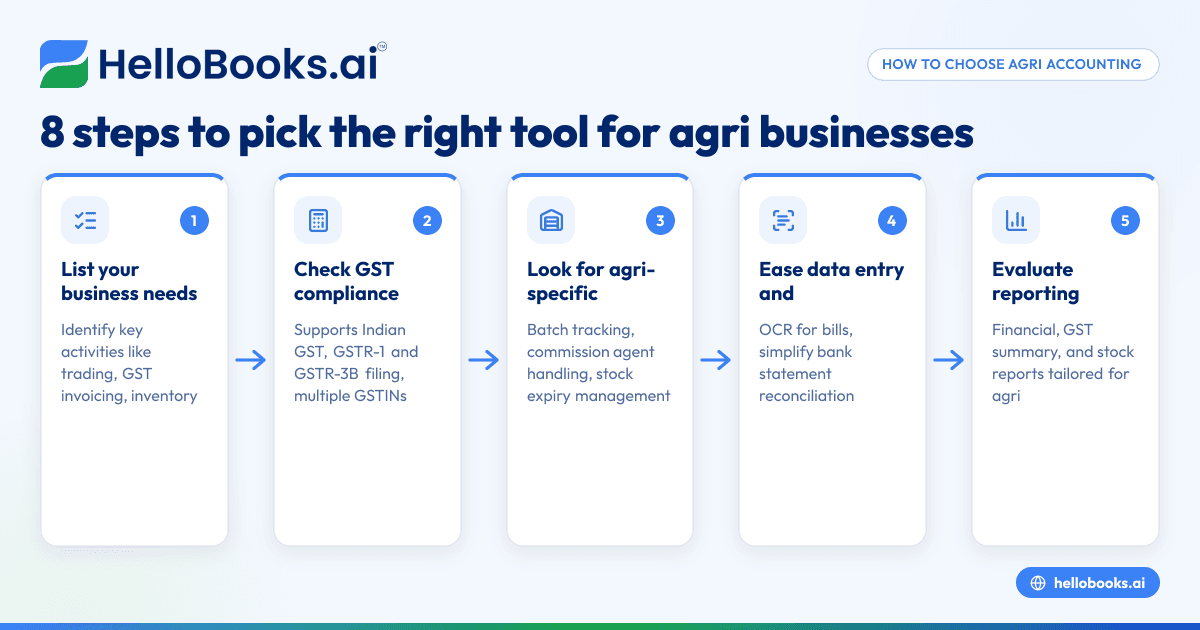
- List your business needs: Identify your key activities—trading, inventory management, GST invoicing, expense tracking, or farm accounting. Check if you need features like batch tracking for seeds or automatic GST filing.
- Check software compatibility: Ensure the software supports Indian GST compliance including GSTR-1 and GSTR-3B filing. Confirm it handles multiple GSTINs if you operate in several states.
- Look for agriculture-specific features: Features like inventory management for agri inputs, handling of commission agent transactions, and batch-wise stock tracking are helpful.
- Ease of data entry and reconciliation: Check if the software supports OCR for purchase bills to avoid manual data entry and if it simplifies bank statement reconciliation.
- Evaluate reporting capabilities: The software should generate financial reports, GST summaries, and stock reports tailored to agriculture businesses.
- Test user interface and support: Choose software that is easy for your team to learn and has accessible customer support.
- Consider integration options: If you use other tools like Excel or Tally, check if the software can import or export data.
- Review pricing and plans: Compare pricing plans and features to ensure they fit your budget and transaction volume.
See also accounting software for small business and accounting software in India for broader options.
Example (fictional figures)
A seed and fertiliser dealer in Guntur records a purchase and sale in March 2024.
- Purchased 500 kg of fertiliser at ₹1,200 per 50 kg bag on 05/03/2024.
Calculation:
₹1,200 × 10 bags = ₹12,000 (purchase amount)
Assumed GST rate: 5%
GST on purchase = ₹12,000 × 5% = ₹600
Total purchase bill = ₹12,000 + ₹600 = ₹12,600
- Sold 300 kg fertiliser at ₹1,500 per 50 kg bag on 20/03/2024.
Calculation:
₹1,500 × 6 bags = ₹9,000 (sale amount)
GST on sale = ₹9,000 × 5% = ₹450
Total sale invoice = ₹9,000 + ₹450 = ₹9,450
This dealer needs to record these transactions accurately to claim Input Tax Credit (ITC) on purchase GST and report sales GST in GSTR-1 and GSTR-3B.
Common mistakes
- Manual data entry errors: Typing mistakes in bills or invoices cause reconciliation problems. Prevent by using OCR-enabled software or scanning bills.
- Ignoring GST filing deadlines: Late filing can lead to penalties. Use software reminders and automated filing features.
- Poor inventory tracking: Not updating stock after sales or purchases causes mismatch. Use software with real-time inventory updates.
- Not reconciling GSTR-2B with purchase records: This leads to missed ITC claims. Regularly reconcile purchase bills with GST portal data.
- Mixing personal and business expenses: Causes confusion in accounting. Maintain separate books or software accounts.
- Overlooking agriculture-specific needs: Using generic software without batch or expiry tracking can cause compliance issues. Choose agriculture-friendly software.
Learn more about avoiding bookkeeping errors in AI bookkeeping.
Doing this in HelloBooks
HelloBooks offers OCR for purchase bills, allowing agriculture businesses to capture supplier bills from photos or PDFs instead of manual entry. This reduces errors and saves time, especially useful for commission agents and input dealers who handle many bills daily. HelloBooks also supports GST invoicing, e-invoicing, and filing GSTR-1 and GSTR-3B, helping you stay compliant easily. Visit HelloBooks for India to explore these features.
Frequently asked questions
What is agriculture accounting software?
Agriculture accounting software is designed to handle bookkeeping, GST compliance, inventory management, and financial reporting tailored to farming and agri trading businesses. It simplifies managing multiple products, seasonal sales, and GST filings.
Which accounting software is best for agriculture business?
The best software supports GST invoicing, inventory tracking for seeds and fertilisers, purchase bill capture, and easy reconciliation. HelloBooks is one option that offers OCR for purchase bills and GST filing features suitable for agriculture businesses.
How do agriculture businesses manage bookkeeping?
They track sales, purchases, expenses, and stock daily. Using software with features like OCR for bills and automated GST filing reduces manual work and errors.
Can I use generic accounting software for agriculture?
Generic software may lack features like batch tracking or commission agent transaction support, which are important for agriculture. Choose software that addresses agriculture-specific needs for accuracy.
How does GST affect agriculture accounting?
GST compliance requires timely invoicing, filing GSTR-1 and GSTR-3B, and claiming ITC on purchases. Software that integrates GST filing and reconciliation simplifies this process.
See also Agricultural trading and agri businesses for related insights.
Key takeaways
- Choose accounting software that supports GST compliance and agriculture-specific inventory tracking.
- Use OCR-enabled software to reduce manual data entry errors in purchase bills.
- Regular reconciliation of purchase bills with GSTR-2B ensures correct ITC claims.
- Avoid mixing personal and business expenses to maintain clear books.
- Evaluate software ease of use, support, and integration with your existing tools.
Start managing your agriculture business accounts efficiently with software tailored to your needs. Start on the Free plan (200 transactions a year, GSTR-1 and 3B filing for one GSTIN) with HelloBooks today.


