


Key takeaways
What this article covers, in order:
- Why this comes up / what goes wrong
- Step-by-step
- Example (fictional figures)
- Common mistakes
- Doing this in HelloBooks
- Frequently asked questions
For aggregate production businesses, managing billing for material sales manually can be time-consuming and prone to errors. Automated accounting software that supports GST invoicing, e-invoicing, and inventory tracking can streamline your billing process, ensure compliance, and save time.
Why this comes up / what goes wrong
Owners and accountants in aggregate production face challenges such as manually creating GST-compliant invoices, calculating CGST/SGST/IGST correctly, and managing large volumes of sales transactions. Mistakes in tax details or missing mandatory fields under Rule 46 can lead to compliance issues. Businesses with turnover exceeding ₹5 crore must generate e-invoices with IRN and QR codes, which can be complex without software support. Without automation, reconciling sales, inventory, and GST returns becomes cumbersome, especially when data is maintained in spreadsheets or traditional bill books.
Step-by-step
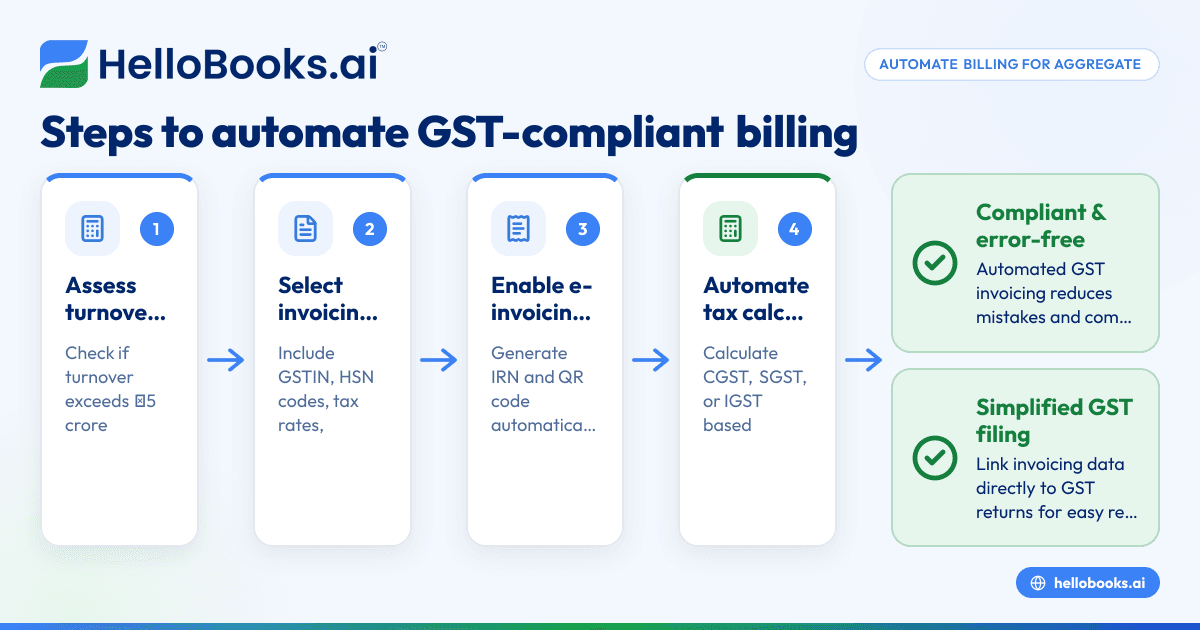
- Assess your business turnover and GST requirements: Check if your aggregate turnover exceeds ₹5 crore. If yes, you must generate e-invoices for B2B sales as per the Notification No. 10/2023-Central Tax (source: Notification No. 10/2023-Central Tax).
- Identify the invoicing features needed: Your software should create GST-compliant invoices including supplier and recipient GSTIN, HSN codes for goods, tax rates, and delivery details as required by Rule 46 (source: Rule 46 particulars).
- Check for e-invoicing support: For businesses above the ₹5 crore threshold, software must generate the Invoice Reference Number (IRN) and embed a QR code on invoices automatically.
- Ensure automated tax calculation and compliance: The software should calculate CGST, SGST, or IGST automatically based on the place of supply.
- Look for inventory and purchase bill management: Automated capture of supplier bills via OCR can reduce manual data entry errors.
- Verify reporting and GST filing support: The software should help prepare GSTR-1 and GSTR-3B returns efficiently.
- Test with sample invoices: Validate invoices using tools like a GST invoice validator to ensure compliance.
- Train your team and integrate with your accounting workflow: Whether you use Excel, Tally, or manual books, the software should simplify data entry and reconciliation.
For more on choosing software, see our guide on accounting software for small business and accounting software in India.
Example (fictional figures)
An aggregate production business in Pune sells 1,000 tonnes of crushed stone to a construction company on 15/03/2024. The rate per tonne is ₹1,200 (assumed illustrative GST rate is 18%).
- Taxable value = 1,000 × ₹1,200 = ₹12,00,000
- CGST @ 9% = ₹12,00,000 × 9% = ₹1,08,000
- SGST @ 9% = ₹12,00,000 × 9% = ₹1,08,000
- Total tax = ₹1,08,000 + ₹1,08,000 = ₹2,16,000
- Total invoice value = ₹12,00,000 + ₹2,16,000 = ₹14,16,000
The software generates an invoice with:
- Supplier and recipient GSTIN
- HSN code for crushed stone
- Consecutive invoice number
- Date of issue
- Taxable value and tax breakup
- Delivery address
- IRN and QR code (if turnover above ₹5 crore)
This invoice can be saved as PDF and emailed directly to the customer.
Common mistakes
- Incorrect GST details or missing mandatory fields: Prevent by using software that auto-fills GSTIN and HSN/SAC codes from customer data and validates invoices.
- Failure to generate e-invoice when required: Check turnover regularly and ensure software supports IRN generation to avoid penalties.
- Manual tax calculations leading to errors: Use software with automatic GST tax calculation to ensure accuracy.
- Not updating delivery address or place of supply correctly: Confirm these details for each invoice to comply with Rule 46.
- Delays in filing GSTR-1 and GSTR-3B due to data mismatch: Use software that links invoicing with GST filing to reduce reconciliation issues.
Doing this in HelloBooks
HelloBooks offers GST invoicing that creates compliant tax invoices with the correct CGST/SGST or IGST split and HSN/SAC codes based on the customer's GSTIN, fulfilling Rule 46 requirements. For businesses over the ₹5 crore e-invoicing threshold, HelloBooks generates the IRN and signed QR code at the time of saving the invoice, saving time compared to manual portal uploads. Additionally, HelloBooks uses OCR to capture purchase bills from photos or PDFs, reducing manual entry. Learn more about HelloBooks GST invoicing at GST invoicing.
Frequently asked questions
What is the turnover threshold for mandatory e-invoicing in aggregate production businesses?
A registered person with aggregate turnover exceeding ₹5 crore in any financial year from 2017-18 onwards must issue e-invoices for B2B supplies from 1 August 2023 (source: Notification No. 10/2023-Central Tax).
Can I use Excel or Tally with automated billing software?
Yes, many accounting software solutions integrate or allow data import/export with Excel or Tally, helping you automate billing while retaining your existing records.
What are the key fields required in a GST invoice for material sales?
As per Rule 46, a tax invoice must include supplier and recipient details, GSTIN, HSN code, invoice number and date, taxable value, tax rates and amounts, place of supply, and delivery address if different (source: Rule 46 particulars).
How does automated billing help with GST compliance?
Automated billing software calculates taxes correctly, generates compliant invoices with mandatory fields, supports e-invoicing, and links sales data to GST returns, reducing errors and saving time.
Is it mandatory to generate e-invoices for sales below ₹50,000 to unregistered recipients?
No. For unregistered recipients, if the taxable value is ₹50,000 or more, the invoice must carry recipient details; below that, these are required only if requested (source: Rule 46 unregistered ₹50k).
Key takeaways
- Automated billing software must support GST-compliant invoicing with Rule 46 fields.
- Businesses with turnover above ₹5 crore must generate e-invoices with IRN and QR codes.
- Automated tax calculation reduces errors in CGST, SGST, and IGST.
- OCR capture of purchase bills cuts manual data entry.
- Integration with GST filing simplifies return preparation and reconciliation.
- Validate invoices using tools like a GST invoice validator to ensure compliance.
Start automating your aggregate production business billing and GST compliance with HelloBooks. Start on the Free plan (200 transactions a year, GSTR-1 and 3B filing for one GSTIN).


