


Key takeaways
What this article covers, in order:
- Why this comes up / what goes wrong
- Step-by-step
- Example (fictional figures)
- Common mistakes
- Doing this in HelloBooks
- Frequently asked questions
Top rated inventory features in accounting software include real-time stock tracking, multiple units of measure, reorder point alerts, batch and lot management, and stock transfers. These features help small businesses maintain accurate stock levels, reduce manual errors, and improve order fulfilment. This article covers why these features matter, how to evaluate them step-by-step, a worked example, common mistakes, and how HelloBooks supports inventory management.
Why this comes up / what goes wrong
Small business owners often face challenges managing inventory alongside accounting. Many still use spreadsheets, Tally, or manual registers, which can lead to errors like stock mismatches, delayed reorder alerts, and inaccurate financial reports. Without integrated inventory features, stock movements from sales and purchases require separate tracking, increasing workload and risk of mistakes. As businesses grow, these issues impact cash flow, customer satisfaction, and GST compliance. Hence, owners look for accounting software with top rated inventory features that automate stock updates and provide clear visibility.
Step-by-step
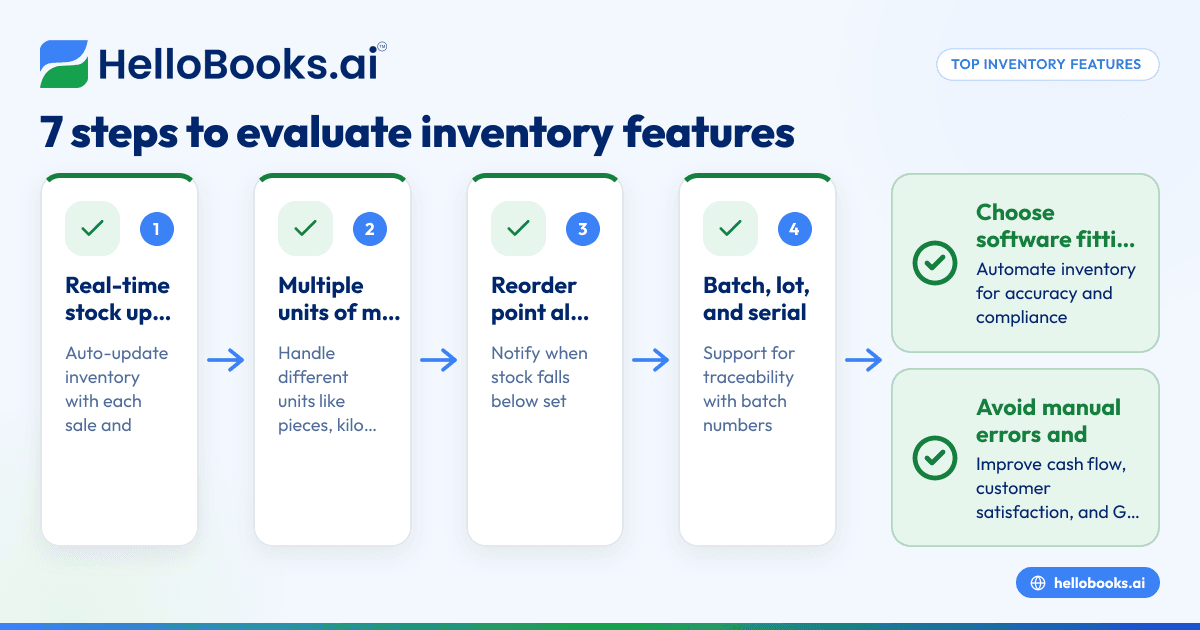
- Check real-time stock updates: Ensure the software updates inventory automatically with every sale and purchase. This avoids separate stock registers and keeps closing stock accurate.
- Look for multiple units of measure: Useful if your business sells or buys items in different units (e.g., pieces, kilograms). The software should handle conversions seamlessly.
- Evaluate reorder point alerts: The software should notify you when stock falls below a set level, helping avoid stockouts.
- Consider batch, lot, and serial tracking: For businesses needing traceability, check if the software supports lot/batch numbers and expiry dates.
- Check support for stock transfers and warehouses: If you operate multiple locations, the software should allow stock transfers and maintain separate warehouse inventories.
- Review reporting capabilities: Inventory reports should be easy to generate and help with decision-making.
- Assess integration with GST compliance: Inventory data should link with invoicing and GST filing for accurate tax reporting.
These steps help shortlist software that fits your business needs. For more on inventory management, see inventory management and to understand software options, visit accounting software for small business.
Example (fictional figures)
ABC Traders sells packaged spices. On 01/05/2024, they start with 500 packets in stock.
- Purchased 200 packets on 05/05/2024 at ₹80 each.
- Sold 300 packets on 10/05/2024 at ₹120 each.
Calculate closing stock on 15/05/2024 assuming no other transactions.
Step 1: Calculate opening stock value
Opening stock = 500 packets × ₹80 = ₹40,000
Step 2: Calculate purchase value
Purchase = 200 packets × ₹80 = ₹16,000
Step 3: Calculate total stock available
Total packets = 500 + 200 = 700 packets
Total stock value = ₹40,000 + ₹16,000 = ₹56,000
Step 4: Calculate closing stock quantity
Closing stock = 700 - 300 = 400 packets
Step 5: Calculate closing stock value
Closing stock value = 400 × ₹80 = ₹32,000
This example shows how automatic stock movement tracking avoids manual errors and keeps the closing stock figure current without a separate register.
Common mistakes
- Not updating stock with every transaction: Leads to inaccurate stock levels. Prevent by choosing software with automatic stock movement updates.
- Ignoring reorder alerts: Results in stockouts or overstocking. Set reorder points and monitor alerts regularly.
- Using single unit of measure only: Causes confusion if you buy and sell in different units. Use software supporting multiple units.
- No batch or lot tracking when needed: Makes product recalls or expiry management difficult. Select software with batch/lot features if applicable.
- Manual reconciliation of inventory and accounts: Increases errors and workload. Prefer integrated inventory and accounting modules.
- Not linking inventory with GST invoicing: Can cause mismatches in tax filings. Ensure software integrates inventory with GST compliance.
For more on avoiding these mistakes, see accounting software in India.
Doing this in HelloBooks
HelloBooks offers inventory management where stock moves with every sale and purchase, keeping the closing stock figure current without a separate register. It supports items, variants, units of measure, bills of materials, and stock transfers. The Business plan adds reorder points, low-stock alerts, lot/batch tracking, and multi-warehouse allocations. This helps small businesses maintain accurate inventory and integrate it with accounting and GST compliance. Learn more at HelloBooks for India and inventory management.
Frequently asked questions
What are the must-have inventory features in accounting software for small businesses?
Must-have features include real-time stock updates with every transaction, support for multiple units of measure, reorder point alerts, and stock transfers. Batch and lot tracking are important if your business needs product traceability.
How does inventory management help with GST compliance?
Inventory management integrated with invoicing ensures stock data matches sales and purchase records. This reduces errors in GST returns like GSTR-1 and GSTR-3B and helps with accurate ITC claims.
Can I use accounting software for inventory without prior experience?
Yes, many accounting software options designed for small businesses have user-friendly inventory modules. Look for features like automatic stock updates and simple reorder alerts to ease management.
Is batch and lot tracking necessary for all businesses?
No, it is mainly needed for businesses handling perishable goods, pharmaceuticals, or items requiring traceability. For others, basic stock tracking may suffice.
How do reorder point alerts improve inventory management?
Reorder alerts notify you when stock levels fall below a set threshold, helping prevent stockouts and ensuring timely replenishment.
Key takeaways
- Real-time stock updates with every sale and purchase are essential for accurate inventory.
- Multiple units of measure and reorder point alerts help manage diverse stock efficiently.
- Batch, lot, and warehouse tracking add value for businesses needing traceability or multiple locations.
- Avoid manual stock registers by choosing integrated inventory and accounting software.
- Inventory features linked with GST invoicing simplify tax compliance and reporting.
Start managing your inventory better today. Explore HelloBooks' inventory features and start on the Free plan (200 transactions a year, GSTR-1 and 3B filing for one GSTIN) at HelloBooks pricing.


