


Key takeaways
What this article covers, in order:
- Why this comes up / what goes wrong
- Step-by-step
- Example (fictional figures)
- Common mistakes
- Doing this in HelloBooks
- Frequently asked questions
The top 10 accounting software in India include Tally, Zoho Books, QuickBooks, Marg ERP, Busy, ClearTax, SAP Business One, FreshBooks, Wave, and HelloBooks. This article covers how to evaluate these options, what features to check, common mistakes to avoid, and a worked example to guide your choice.
Why this comes up / what goes wrong
Small business owners in India often search for the top accounting software when they want to move beyond manual bookkeeping in Excel, Tally, or bill books. They face challenges like time-consuming data entry, errors in reconciliation, and complex GST compliance. Choosing the right software can help automate GST invoicing, bank reconciliation, and filing returns like GSTR-1 and GSTR-3B. However, with many options available, owners need a clear way to compare features, pricing, and suitability for their business size and GST requirements.
Step-by-step
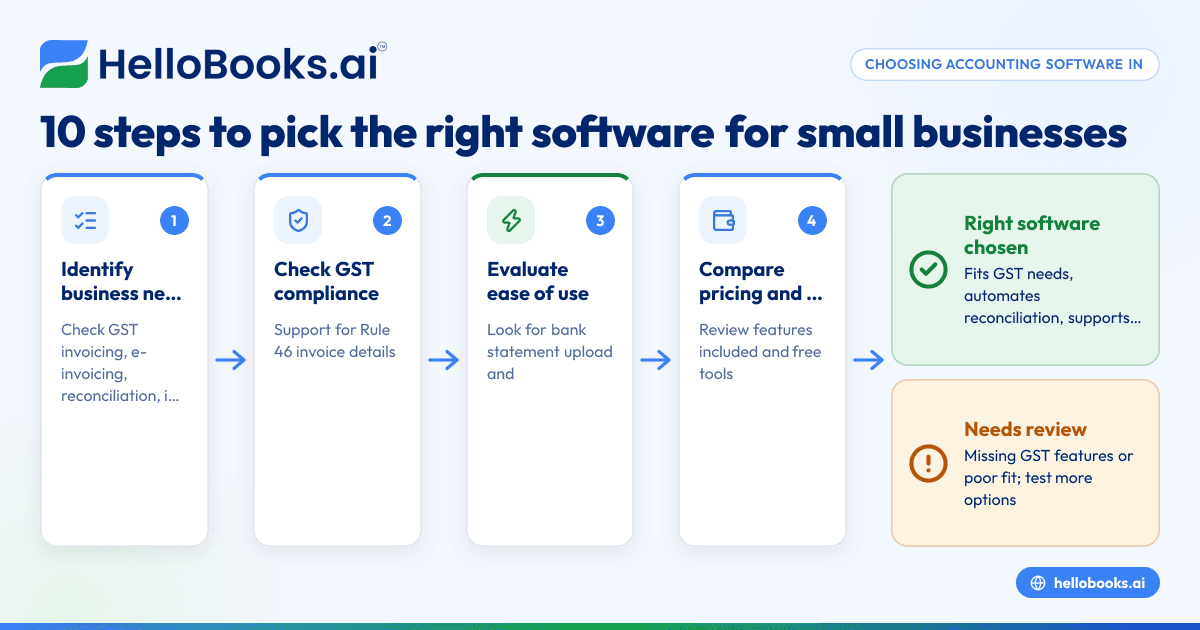
- Identify your business needs: Check if you require features like GST invoicing, e-invoicing compliance (mandatory for turnover over ₹5 crore from August 2023), bank reconciliation, inventory management, and filing GSTR returns.
- Check GST compliance support: Ensure the software supports GST invoicing with all mandatory invoice particulars as per Rule 46, and can file returns like GSTR-1 and GSTR-3B directly or through integration.
- Evaluate ease of use: Look for software that reduces manual data entry, with features like bank statement upload and AI-assisted reconciliation to match receipts with invoices without retyping.
- Consider pricing and plans: Compare pricing models, including free plans or trial periods, and what features are included. Some software offer free tools like GSTIN validation or invoice verification without signup.
- Review integration capabilities: Check if the software integrates with your existing tools or supports import/export of Excel or Tally data.
- Assess customer support and updates: Reliable customer service and timely updates for GST rule changes are important.
- Test with a trial or demo: Use free trials or demos to check how the software fits your workflow.
- Check user reviews and ratings: Look for feedback from other small businesses in India.
- Confirm scalability: Choose software that can grow with your business, handling multiple GSTINs and expanding transaction volumes.
- Verify security and data privacy: Ensure the software complies with data protection standards.
For more details on accounting software options, see our accounting software in India and accounting software for small business pages.
Example (fictional figures)
A Delhi-based retailer with an annual turnover of ₹1,20,00,000 wants to choose accounting software to handle GST invoicing and bank reconciliation.
- Monthly sales: ₹10,00,000
- GST rate assumed: 18%
- Bank statement shows ₹11,80,000 credited (including GST)
Step 1: Calculate GST portion of sales
₹10,00,000 × 18% = ₹1,80,000 (GST amount)
Step 2: Calculate taxable value
₹10,00,000 - ₹1,80,000 = ₹8,20,000
Step 3: Match bank receipt with invoice value
Taxable value + GST = ₹8,20,000 + ₹1,80,000 = ₹10,00,000
Bank statement shows ₹11,80,000, which includes ₹1,80,000 GST and ₹10,00,000 sales amount.
Using software with bank statement upload and AI reconciliation, the shop owner uploads the monthly bank statement and the software matches the ₹11,80,000 receipt to the sales invoices automatically, reducing manual entry and errors.
Common mistakes
- Ignoring GST compliance features: Choose software that supports mandatory GST invoice particulars and filing to avoid penalties.
- Overlooking bank reconciliation automation: Manual reconciliation leads to errors; use software with bank statement upload and AI reconciliation.
- Choosing software without scalability: Select software that can handle your business growth and multiple GSTINs.
- Not verifying pricing details: Hidden costs can add up; compare pricing and included features carefully.
- Skipping trial runs: Always test software before committing to ensure it fits your business processes.
- Neglecting data security: Confirm software follows data protection standards.
Doing this in HelloBooks
HelloBooks allows you to upload bank statements (PDF, CSV, Excel) from any Indian bank and uses AI to match transactions with invoices without requiring your online banking login. This reduces manual data entry and speeds up reconciliation. Additionally, HelloBooks offers free India tools where you can validate GSTINs or check invoice fields without creating an account. Learn more at HelloBooks for India.
Frequently asked questions
What is the best accounting software price in India for small businesses?
Pricing varies widely; some software offer free plans with limited transactions, while others charge monthly fees based on features and users. It’s best to compare pricing against your required features and transaction volume. HelloBooks offers a free plan with 200 transactions a year and GSTR-1 and 3B filing for one GSTIN.
Which accounting software supports GST e-invoicing in India?
Software like Tally, Zoho Books, and HelloBooks support GST e-invoicing, mandatory for businesses with turnover exceeding ₹5 crore since August 2023. Ensure your software can generate IRN-compliant invoices.
Can I use Excel or Tally data with new accounting software?
Many accounting software allow importing data from Excel or Tally to ease transition. Check if the software supports your current data format.
How do I ensure my accounting software is GST compliant?
Verify that it includes all invoice particulars as per Rule 46 and supports filing GSTR-1 and GSTR-3B returns. Free GST tools can help validate your invoices before filing.
Is bank statement reconciliation automated in accounting software?
Some software, including HelloBooks, offer bank statement upload and AI reconciliation that matches transactions automatically, reducing manual work.
Key takeaways
- Choose accounting software that supports GST invoicing, filing, and compliance.
- Automate bank reconciliation with statement upload and AI to save time.
- Compare pricing, scalability, and integration before deciding.
- Test software with free trials to ensure it fits your business needs.
- Use free GST tools to validate invoices and GSTINs.
- Prioritize data security and customer support.
Start simplifying your accounting today. Start on the Free plan (200 transactions a year, GSTR-1 and 3B filing for one GSTIN).


