
Key takeaways
What this article covers, in order:
- Before you start
- Step 1: What is GSTR-2B and why is it important for input tax credit reconciliation?
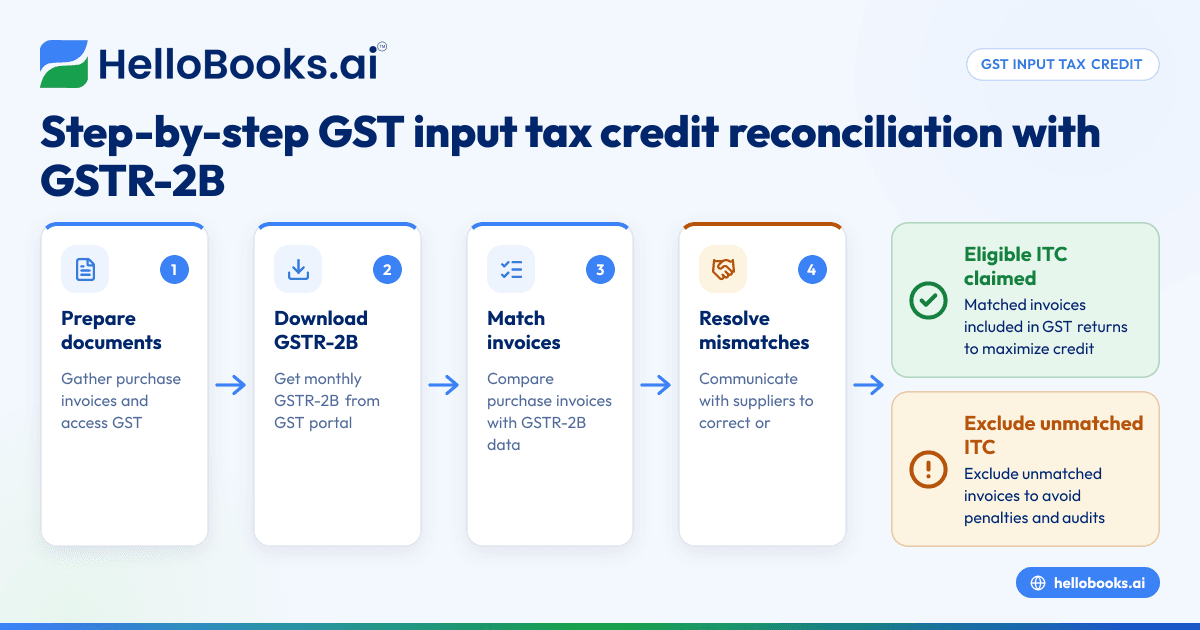
- Step 2: How do I download GSTR-2B from the GST portal?
- Step 3: How do I match my purchase invoices with GSTR-2B data?
- Step 4: What should I do if there are mismatches or missing invoices?
- Step 5: How does AI GST input reconciliation software help?
Step-by-Step Guide to GST Input Tax Credit Reconciliation Using GSTR-2B for Indian SMEs
This guide is for small business owners, finance leads, and accountants in India who want to streamline their GST input tax credit reconciliation with GSTR-2B. By the end, you will know how to reconcile your purchase records accurately, avoid common errors, and use automation like AI GST input tools to save time.
Before you start
- Have your purchase invoices and bills ready, including those from vendors registered under GST.
- Ensure you have access to the GST portal to download your GSTR-2B for the relevant tax period.
- Use accounting software or spreadsheets where your purchase data is maintained.
- Understand the basics of GST input tax credit (ITC) eligibility and compliance deadlines.
Step 1: What is GSTR-2B and why is it important for input tax credit reconciliation?
GSTR-2B is a static auto-drafted statement generated monthly for every GST-registered taxpayer. It shows the eligible input tax credit based on your suppliers’ filed GSTR-1 returns and other GST data. Using GSTR-2B helps you verify and reconcile the ITC you can claim in your GSTR-3B return. This reduces errors, mismatches, and the risk of penalties.
Common mistake: Relying solely on your purchase invoices without cross-checking with GSTR-2B can lead to claiming ineligible ITC or missing credits.
Step 2: How do I download GSTR-2B from the GST portal?
Log in to the GST portal with your credentials. Navigate to the ‘Returns Dashboard’ and select the month you want to reconcile. Click on GSTR-2B and download the Excel or PDF file. This file contains details of inward supplies, eligible and ineligible ITC, and other summary data for your business.
Common mistake: Ignoring the monthly nature of GSTR-2B. It is generated every month and not cumulative, so download it for each tax period separately.
Step 3: How do I match my purchase invoices with GSTR-2B data?
Start by listing all your purchase invoices for the month in your accounting system or spreadsheet. Then, compare each invoice’s GSTIN, invoice number, date, taxable value, and tax amounts with the corresponding details in GSTR-2B. Mark invoices that appear in GSTR-2B as matched.
For invoices not appearing in GSTR-2B, check if your supplier has filed their GSTR-1 correctly or if there are data entry errors. These invoices are currently ineligible for ITC until the supplier updates their return.
Common mistake: Claiming ITC on unmatched invoices without supplier reconciliation can lead to disallowance during audits.
Step 4: What should I do if there are mismatches or missing invoices?
Communicate with your suppliers promptly to resolve discrepancies. They may need to amend their GSTR-1 or provide missing invoices. Keep a record of communications. For invoices that remain unmatched by the due date of your GSTR-3B filing, exclude their ITC from the claim to avoid penalties.
Common mistake: Delaying supplier follow-up often leads to blocked credit and cash flow issues.
Step 5: How does AI GST input reconciliation software help?
AI GST input tools analyze your purchase data and automatically match it with GSTR-2B details. They flag mismatches, missing invoices, and ineligible credits in real time, reducing manual effort and errors. Such software can also prepare reconciliation reports for audit readiness and assist in timely GST return filing.
Common mistake: Using manual reconciliation only, which is time-consuming and prone to mistakes, especially for businesses with many suppliers.
Worked example of GST input tax credit reconciliation with GSTR-2B
Suppose a Bengaluru-based SME, “ABC Traders,” has the following inward supplies for April 2024:
| Invoice No. | Supplier GSTIN | Invoice Date | Taxable Value (₹) | CGST (₹) | SGST (₹) | IGST (₹) |
|---|---|---|---|---|---|---|
| INV001 | 29AAAPL1234C1ZV | 05/04/2024 | 1,00,000 | 9,000 | 9,000 | 0 |
| INV002 | 29BBBP5678D2ZX | 12/04/2024 | 50,000 | 0 | 0 | 9,000 |
| INV003 | 29CCCD9876E3ZY | 18/04/2024 | 75,000 | 6,750 | 6,750 | 0 |
ABC Traders downloads their GSTR-2B for April 2024 and finds:
- INV001 and INV002 appear with matching details.
- INV003 is missing, as the supplier has not yet filed GSTR-1.
Reconciliation steps:
- Mark INV001 and INV002 as matched and eligible for ITC.
- Communicate with supplier of INV003 to file GSTR-1.
- Exclude INV003 ITC from April 2024 claim to avoid disallowance.
- Use AI GST input software to automate this matching process next month.
This process ensures ABC Traders claims ₹33,750 (₹9,000+₹9,000+₹9,000+₹6,750+₹6,750 from matched invoices) as ITC correctly and avoids penalties.
How do I ensure timely GST input tax credit reconciliation every month?
Set up a monthly schedule aligned with your GST return filing deadlines. Download GSTR-2B as soon as it is available and start reconciliation within a few days. Use reminders or automation tools to track supplier filings and follow-ups.
Consistent monthly reconciliation reduces last-minute workload and cash flow surprises. Integrating accounting software in India with AI features can make this process efficient and error-free.
What is the best way to handle ineligible or blocked input tax credit?
Input tax credit blocked under GST rules (such as on personal expenses or non-compliant suppliers) must be excluded from your ITC claim. Maintain clear records of ineligible credits identified during reconciliation. If a credit is blocked due to supplier non-compliance, follow up regularly but do not claim it until the issue is resolved.
Understanding these exclusions helps avoid costly GST notices or interest payments on wrongly claimed ITC.
Next steps
Start your first GST input tax credit reconciliation with GSTR-2B this month. Gather your purchase records, download your GSTR-2B, and begin matching invoices. If your current process is manual and slow, consider using AI bookkeeping tools that automate GST input reconciliation and reduce errors.
You can book a demo with HelloBooks to see how AI-powered GST reconciliation fits your business needs or compare plans at pricing. This will save you hours each month and improve your GST compliance accuracy.
Remember, accurate GST input tax credit reconciliation with GSTR-2B is key to maximising your eligible credit and maintaining smooth cash flow for your business.
Related reading
- GST return filing software
- Navigating Quarterly Estimated Tax Payments for US Freelancers: A Step-by-Step Guide
- How to Calculate IFTA Fuel Tax: Step-by-Step Guide
Read next
This article covers one part of a bigger topic. For the complete picture, read our guide to supported with caveat.