


Key takeaways
What this article covers, in order:
- Why this comes up / what goes wrong
- Step-by-step
- Example (fictional figures)
- Common mistakes
- Frequently asked questions
- Key takeaways
Retail accounting software is specialised to meet the needs of retail businesses by managing sales, purchases, inventory, and GST compliance in one place. It helps automate daily bookkeeping tasks like invoicing, stock updates, and GST return filing, which are critical for retail shops to run smoothly and comply with tax laws.
Why this comes up / what goes wrong
Retail business owners or accountants often rely on spreadsheets, Tally, or physical bill books to record daily transactions. This manual process is time-consuming and prone to errors, especially when handling GST invoicing, inventory tracking, and reconciling bank statements. Retail shops face unique challenges such as managing multiple product categories with different HSN codes, tracking stock across multiple outlets, and handling both cash and credit sales daily. Without dedicated retail accounting software, these tasks become cumbersome, increasing the risk of mistakes and delayed GST filings.
For retail shops in India, compliance with GST rules like GSTR-1 and GSTR-3B filing is mandatory. Missing deadlines or errors in filing can lead to penalties. Retailers also need to reconcile their purchase invoices with GSTR-2B to claim ITC correctly. Efficient software can simplify these processes.
Step-by-step
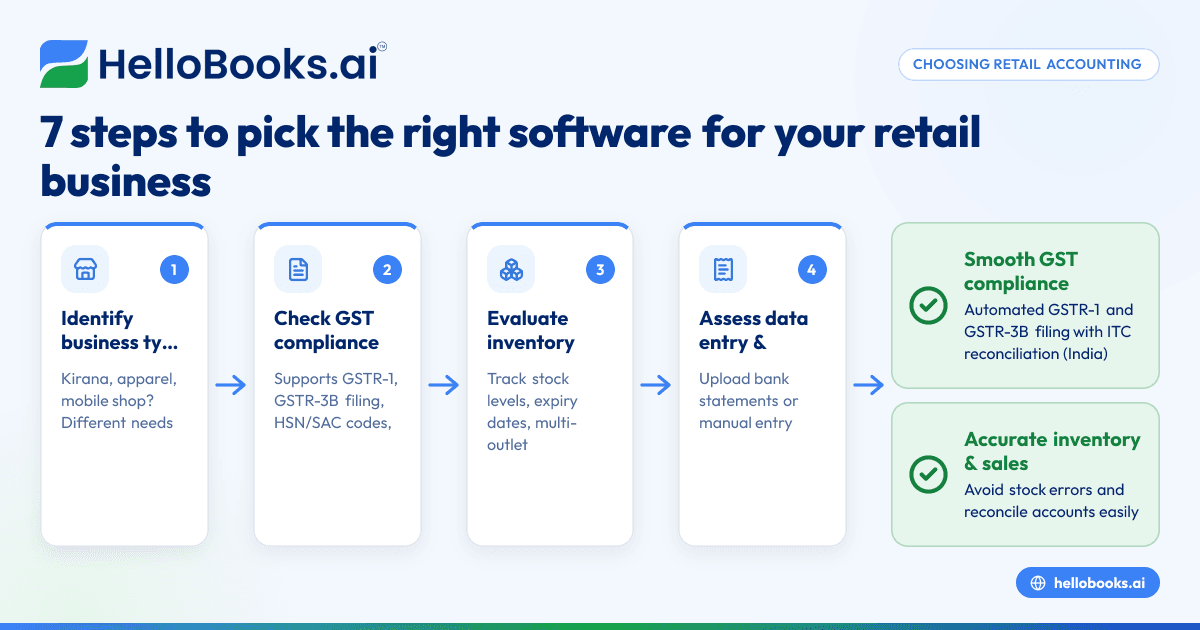
- Identify your retail business type and scale: Determine whether you operate a kirana store, a mobile accessories shop, or an apparel store with multiple outlets. Each type has different inventory and sales tracking needs.
- Check GST compliance features: Confirm the software supports GST invoicing with HSN/SAC codes, e-invoicing if applicable, and filing of GSTR-1 and GSTR-3B returns. This ensures legal compliance and smooth tax filing.
- Evaluate inventory management capabilities: Look for features that allow tracking stock levels, batch-wise expiry dates (important for kirana stores), and multi-outlet stock management (critical for apparel stores with more than one location).
- Assess ease of data entry and reconciliation: Verify if the software allows uploading bank statements or manual entry for reconciling sales and purchases. This helps maintain accurate financial records.
- Review reporting and analytics: Ensure the software provides financial reports, sales summaries by product category, and GST reports. These help in understanding business performance and making informed decisions.
- Consider scalability and user access: For growing retail businesses, select software that supports multiple users and outlets, so your accounting system can grow with your business.
- Test usability and support: Use free trials to check how easy the software is to use and confirm availability of customer support for queries and troubleshooting.
For more guidance on software suited for smaller businesses, see accounting software for small business.
Example (fictional figures)
Consider a kirana store in Indore for the month of March 2024.
- Total taxable sales: ₹1,20,000
- Assumed CGST rate: 2.5%
- Assumed SGST rate: 2.5%
Calculate CGST:
₹1,20,000 × 2.5% = ₹3,000
Calculate SGST:
₹1,20,000 × 2.5% = ₹3,000
Total GST collected:
₹3,000 + ₹3,000 = ₹6,000
Assuming purchases for the month are ₹80,000 with the same GST rates:
Calculate input CGST:
₹80,000 × 2.5% = ₹2,000
Calculate input SGST:
₹80,000 × 2.5% = ₹2,000
Total ITC available:
₹2,000 + ₹2,000 = ₹4,000
Net GST payable:
₹6,000 (output GST) - ₹4,000 (input ITC) = ₹2,000
The software should automatically generate GST-compliant invoices showing CGST and SGST separately, prepare GSTR-1 and GSTR-3B returns with these figures, and help reconcile ITC claims.
Common mistakes
- Ignoring GST compliance features: Retailers often pick software without proper GST invoicing and filing support. Prevent this by confirming the software supports GSTR-1 and GSTR-3B filing and e-invoicing if applicable.
- Overlooking inventory management needs: Some software lacks detailed stock tracking, which leads to stockouts or overstocking. Choose software that tracks inventory accurately, especially for multi-outlet stores.
- Choosing software without easy reconciliation: Without bank statement upload or manual reconciliation features, errors in sales and purchase records increase. Ensure the software supports these features.
- Not verifying report accuracy: Reports that don’t match actual sales and purchases cause confusion. Test report accuracy before finalising software.
- Underestimating scalability: Small businesses often outgrow basic software quickly. Pick software that can scale with your business and allow multiple users and outlets.
For more on software options in India, see accounting software in India.
Frequently asked questions
What is the best retail accounting software for small business?
The best software depends on your retail business size, inventory complexity, and GST compliance needs. Look for features like GST invoicing, inventory management, and easy reconciliation. Trying free versions helps you decide.
Can retail accounting software handle GST filing?
Yes, most retail accounting software supports filing GSTR-1 and GSTR-3B returns. Some also support e-invoicing and GSTR-2B reconciliation, which are essential for GST compliance.
Is accounting software for retail shops different from general accounting software?
Yes, retail accounting software often includes inventory management, multi-outlet support, and sales tracking tailored to retail businesses, unlike general accounting software.
Can I use retail accounting software for online retail business?
Many retail accounting software options support online sales integration, GST invoicing, and inventory management suited for online retail businesses.
How to choose accounting software for a retail store?
Assess your business size, product types, GST compliance needs, inventory complexity, and budget. Check for ease of use, reporting features, and customer support.
For more on AI bookkeeping benefits, see AI bookkeeping.
Key takeaways
- Retail accounting software automates GST invoicing, filing, and inventory management.
- Choose software that fits your retail business type, scale, and GST compliance needs.
- Inventory tracking and reconciliation features are vital to avoid errors.
- Confirm the software supports GSTR-1 and GSTR-3B filing and e-invoicing if required.
- Test software usability and support with free trials before purchasing.
Start managing your retail accounts efficiently by exploring options and starting on the Free plan (200 transactions a year, GSTR-1 and 3B filing for one GSTIN) at HelloBooks pricing.


