


Key takeaways
What this article covers, in order:
- Why this comes up / what goes wrong
- Step-by-step
- Example (fictional figures)
- Common mistakes
- Doing this in HelloBooks
- Frequently asked questions
Online accounting software with inventory integrates your bookkeeping and stock management, so every sale or purchase updates your financial records and inventory levels automatically. This saves time, reduces errors, and provides up-to-date insights into your business health.
Why this comes up / what goes wrong
Small business owners often juggle separate systems or manual methods for accounting and inventory. For example, they may keep sales and purchase details in Excel or Tally, while tracking stock in physical registers or standalone spreadsheets. This separation causes delays and errors in stock valuation, affects GST compliance, and makes financial reporting cumbersome. It also leads to difficulties in knowing your exact closing stock without separate stock registers or manual reconciliation.
Choosing online accounting software with integrated inventory helps avoid these issues by connecting your stock movements directly with your accounting entries.
Step-by-step
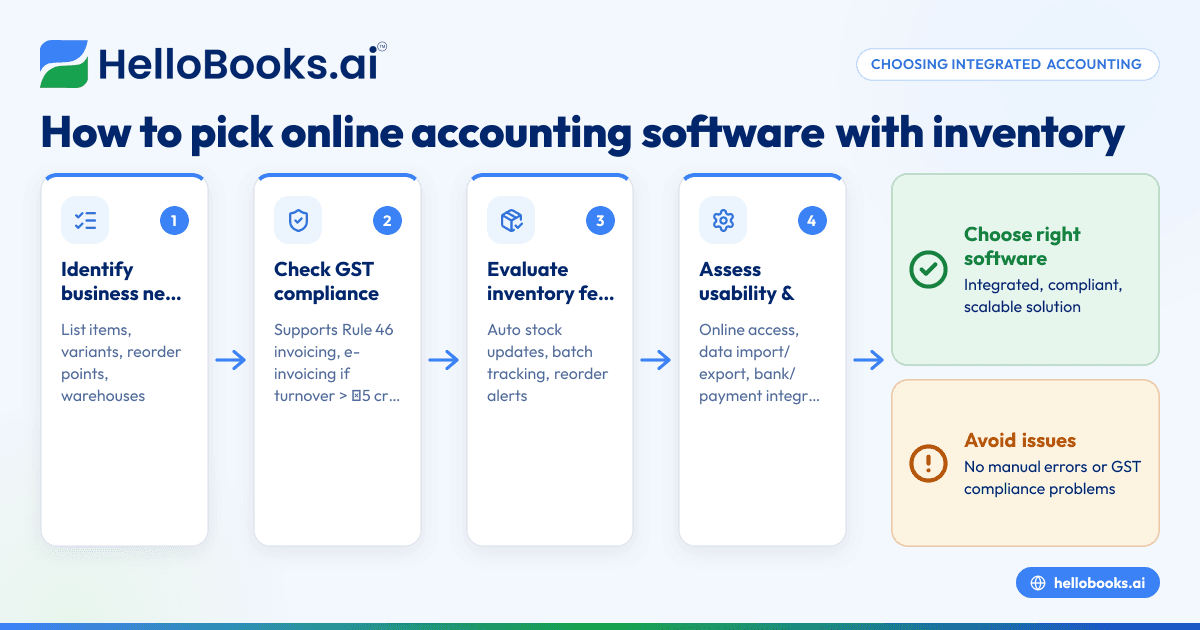
- Identify your business needs: List your inventory requirements such as number of items, variants, units of measure, and whether you need features like reorder points, batch tracking, or multiple warehouses.
- Check GST compliance features: Ensure the software supports GST invoicing with all mandatory particulars as per Rule 46, including supplier and recipient details, HSN/SAC codes, tax rates, and digital signatures. Also verify support for e-invoicing if your turnover exceeds ₹5 crore (Notification No. 10/2023-Central Tax).
- Evaluate inventory management capabilities: Confirm if stock movements update automatically with sales and purchases, so closing stock is current without separate registers. Look for additional features like stock transfers, reorder alerts, and batch or serial number tracking if needed.
- Assess ease of use and integration: The software should be accessible online, support data import/export (Excel or CSV), and integrate with your bank statements or payment gateways for reconciliation.
- Compare pricing and scalability: Choose a plan that fits your current transaction volume and can scale as your business grows.
- Read user reviews and support options: Reliable customer support and clear documentation are important for smooth adoption.
For more on selecting software tailored for Indian small businesses, see accounting software for small business.
Example (fictional figures)
Consider "ABC Traders," a small business selling electronic accessories with the following transactions in April 2024:
- Opening stock on 01/04/2024: 100 units @ ₹500 each
- Purchase on 10/04/2024: 50 units @ ₹520 each
- Sales on 20/04/2024: 120 units @ ₹750 each
Calculate closing stock value assuming FIFO method and an assumed GST rate of 18%:
Step 1: Calculate opening stock value
100 units × ₹500 = ₹50,000
Step 2: Calculate purchase value
50 units × ₹520 = ₹26,000
Step 3: Calculate total units available
100 + 50 = 150 units
Step 4: Calculate units sold
120 units
Step 5: Calculate closing stock units
150 - 120 = 30 units
Step 6: Calculate closing stock value using FIFO
Since 120 units sold, 100 units from opening stock sold first, then 20 units from purchase.
Remaining stock = 30 units from purchase batch.
30 units × ₹520 = ₹15,600
Step 7: Calculate GST on sales (assumed 18%)
Sale value = 120 units × ₹750 = ₹90,000
GST = ₹90,000 × 18% = ₹16,200
This example shows how integrated inventory and accounting software can track stock levels and GST accurately without manual registers.
Common mistakes
- Keeping separate records for stock and accounting: Leads to discrepancies. Use software where stock moves update accounting automatically.
- Ignoring GST invoice requirements: Missing supplier or recipient GSTIN, HSN codes, or digital signatures can cause compliance issues. Verify invoicing features match Rule 46 requirements.
- Not updating stock after every transaction: Causes inaccurate closing stock. Choose software with real-time stock updates.
- Overlooking reorder alerts: Results in stockouts. Software with low-stock notifications helps maintain inventory levels.
- Choosing software without scalability: Limits growth. Pick solutions that can add batch tracking or warehouses as needed.
For more on avoiding bookkeeping errors, see AI bookkeeping.
Doing this in HelloBooks
HelloBooks offers inventory management where stock moves with every sale and purchase, so the closing stock figure is current without a separate register. It supports items, variants, units of measure, bills of materials, stock transfers, reorder points, and low-stock alerts. Business plans add lot/batch and multi-warehouse allocations. This integration simplifies your bookkeeping and inventory tracking in one system. Learn more at inventory management.
Frequently asked questions
What is the benefit of using online accounting software with inventory?
It saves time by automatically updating stock levels and accounting records together, reduces errors, and helps with accurate GST invoicing and financial reports.
Can I use free online accounting software with inventory?
Some free options exist but may have limited inventory features or transaction limits. Evaluate if the software meets your stock tracking and GST compliance needs.
Does online accounting software support GST e-invoicing?
Many solutions support e-invoicing for businesses with turnover over ₹5 crore, including generation of IRN and QR codes as per GST rules.
How does inventory tracking help with GST compliance?
Accurate stock tracking ensures correct valuation of closing stock, which affects taxable income and GST returns like GSTR-1 and GSTR-3B.
Is it possible to manage multiple warehouses in such software?
Yes, advanced plans often support multi-warehouse inventory and stock transfers, helping businesses with complex logistics.
For more on accounting software in India, see accounting software in India.
Key takeaways
- Integrated accounting and inventory software keeps stock and financial data synchronized.
- Ensure software complies with GST invoicing rules including e-invoicing if applicable.
- Real-time stock updates prevent errors and simplify closing stock valuation.
- Look for reorder alerts and multi-warehouse support if needed.
- Choose scalable software that grows with your business needs.
Start managing your accounting and inventory together efficiently. Start on the Free plan (200 transactions a year, GSTR-1 and 3B filing for one GSTIN) with HelloBooks today.


