


Key takeaways
What this article covers, in order:
- Why this comes up / what goes wrong
- Step-by-step
- Example (fictional figures)
- Common mistakes
- Doing this in HelloBooks
- Frequently asked questions
Mobile accounting software for quick bookkeeping lets small business owners enter invoices and expenses directly from their phone and capture supplier bills by OCR, reducing manual data entry. This article explains why mobile accounting matters, the steps to choose the right software, common mistakes to avoid, and how HelloBooks supports quick mobile accounting in India.
Why this comes up / what goes wrong
Small businesses in India often struggle with slow bookkeeping processes because they rely on spreadsheets, Tally, or manual bill books. When business owners or accountants are on the move, entering data later from paper bills or desktop software causes delays and errors. They want a mobile accounting software that allows quick entry of invoices and expenses on the spot, and automatic capture of purchase bills to save time and improve accuracy. This need is especially urgent for those managing GST compliance and stock on the go.
Step-by-step
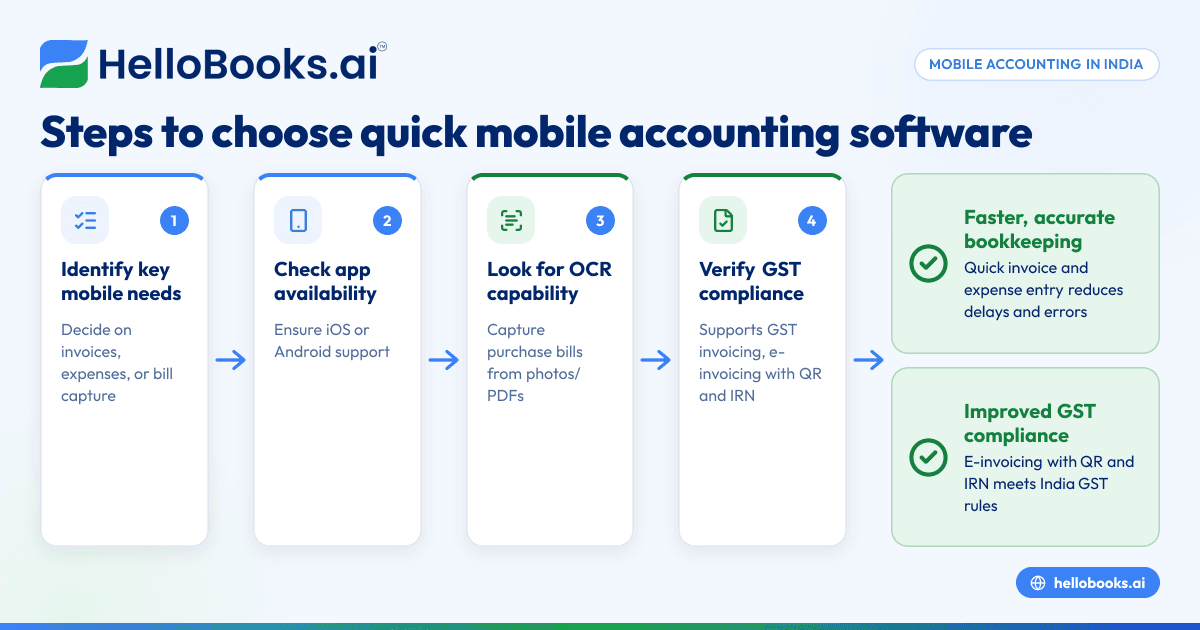
- Identify your key mobile needs: Decide if you mainly want to enter sales invoices, record expenses, or capture purchase bills quickly from your phone.
- Check mobile platform availability: Ensure the software offers a mobile app compatible with your phone (iOS or Android).
- Look for OCR capability: Find out if the app can read purchase bills from photos or PDFs, reducing manual entry.
- Verify GST compliance features: Confirm the software supports GST invoicing, e-invoicing with QR and IRN, and filing GSTR-1 and GSTR-3B.
- Review ease of use: Test the app’s user interface for quick data entry without complicated steps.
- Assess integration with your current systems: Check if it works well with your existing accounting method, like Excel or Tally, or if it can import/export data easily.
- Understand limitations: Some mobile apps may not support all accounting workflows on the phone, so clarify which features are mobile-enabled.
- Compare pricing plans: Look for plans that include mobile apps and OCR features without hidden costs.
- Read reviews and ask for demos: Get feedback from other Indian small businesses and request a trial to test speed and reliability.
- Ensure data security: Confirm the software follows standard security practices to protect your financial data.
For more on choosing software, see accounting software for small business and accounting software in India.
Example (fictional figures)
Rajesh runs a small electronics store in Pune. On 01/05/2024, he received a purchase bill from a supplier for ₹48,000 (assumed GST rate 18%). He uses mobile accounting software with OCR to capture the bill instantly.
Purchase amount = ₹48,000
GST @ 18% = ₹48,000 × 18% = ₹8,640
Total bill = ₹48,000 + ₹8,640 = ₹56,640
Instead of typing all details later, Rajesh takes a photo of the bill with his phone. The OCR reads the bill lines and matches items to his inventory automatically. This saves him about 30 minutes of manual entry and reduces errors.
He also creates a sales invoice on the phone for ₹60,000 with GST, which generates an e-invoice carrying a QR code and IRN as per [CGST Rule 46] (https://taxinformation.cbic.gov.in/content/html/tax_repository/gst/rules/cgst_rules/active/chapter6/rule46_v1.00.html).
Common mistakes
- Not checking mobile app availability: Some accounting software claim mobile support but only offer limited features. Always verify which workflows are fully mobile-enabled.
- Ignoring OCR capability: Without OCR, entering purchase bills manually is slow and error-prone. Choose software with reliable OCR to speed up bill capture.
- Skipping GST compliance checks: Mobile software must support GST invoicing and filing requirements like e-invoicing with QR and IRN.
- Overlooking ease of use: A complicated app slows down bookkeeping. Test the app for simple navigation and quick data entry.
- Not validating integration: If you use Tally or Excel, ensure the software can import/export data to avoid duplicate work.
- Neglecting data security: Mobile apps handle sensitive info; confirm the software uses encryption and secure login.
Doing this in HelloBooks
HelloBooks offers a mobile app for iOS and Android that allows you to enter invoices and expenses directly from your phone, making bookkeeping faster and more convenient. It also features OCR for purchase bills, which captures supplier bills from photos or PDFs and auto-matches line items to your inventory, reducing manual data entry. To learn more, visit HelloBooks for India.
Frequently asked questions
What is the best accounting software for mobile phone use in India?
The best mobile accounting software depends on your business needs. Look for apps that support invoice and expense entry, OCR for bills, and GST compliance. HelloBooks offers these features with a mobile app for iOS and Android.
Can mobile accounting software handle GST e-invoicing?
Yes, many mobile accounting apps support GST e-invoicing, generating invoices with QR codes and IRNs as required by law. HelloBooks supports GST invoicing and e-invoicing.
Is OCR for purchase bills reliable on mobile apps?
OCR technology has improved and can accurately read purchase bills from photos or PDFs, saving time on manual entry. HelloBooks includes OCR to capture supplier bills effectively.
Can I reconcile bank statements on mobile accounting software?
Some software allow bank statement reconciliation via mobile, but this depends on the app’s capabilities. HelloBooks supports bank statement reconciliation, though the mobile app focuses on invoice and expense entry.
How do I ensure data security when using mobile accounting software?
Choose software with secure login, data encryption, and compliance with data protection standards. Always use strong passwords and avoid public Wi-Fi when accessing financial data.
For more details, see accounting software for small business.
Key takeaways
- Mobile accounting software speeds up bookkeeping by enabling invoice and expense entry on the phone.
- OCR for purchase bills reduces manual data entry and errors.
- Ensure the software supports GST invoicing, e-invoicing with QR and IRN.
- Verify mobile app availability and ease of use before choosing.
- Confirm integration with your existing accounting methods.
- Data security is crucial when using mobile accounting apps.
Start your quick bookkeeping journey with HelloBooks. You can start on the Free plan (200 transactions a year, GSTR-1 and 3B filing for one GSTIN) to experience mobile invoicing, expense entry, and OCR bill capture.


