


Key takeaways
What this article covers, in order:
- Why this comes up / what goes wrong
- Step-by-step
- Example (fictional figures)
- Common mistakes
- Doing this in HelloBooks
- Frequently asked questions
Inventory management software is a tool that automates tracking of stock movements including purchases and sales, so your closing stock figure is always current without needing a separate stock register. Small businesses often struggle with manual inventory tracking, leading to errors and wasted time. This article explains why inventory software matters, guides you through choosing one, shows a worked example with Indian figures, highlights common mistakes, and describes how HelloBooks supports inventory management.
Why this comes up / what goes wrong
Small business owners in India often start with manual methods like spreadsheets, bill books, or Tally for inventory tracking. As sales and purchase volumes grow, maintaining accurate stock levels becomes difficult. Manual entry errors, delayed updates, and lack of real-time stock visibility cause issues like stockouts or excess inventory. This wastes money and time, complicates GST compliance, and affects customer satisfaction. Evaluating inventory management software helps businesses automate stock tracking, reduce errors, and improve decision-making.
Step-by-step
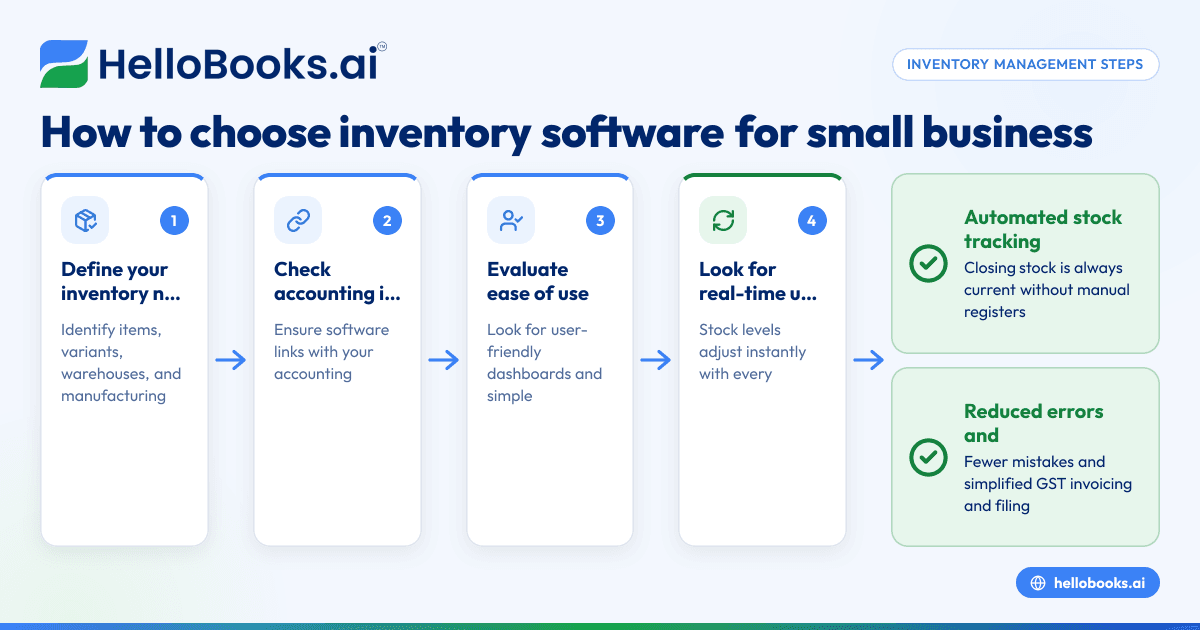
- Define your inventory needs: Determine the types of items you stock, whether you need to track variants, units of measure, or batches. Think about whether you require multi-warehouse management or manufacturing features.
- Check integration with accounting: Choose software that integrates with your accounting system or offers combined accounting and inventory features to avoid duplicate data entry. For Indian businesses, this helps with GST invoicing and filing compliance (see accounting software for small business).
- Evaluate ease of use: The software should be user-friendly for your team, with clear dashboards and simple stock movement recording.
- Look for real-time stock updates: Good software updates stock levels instantly with every sale or purchase, so your closing stock is accurate without manual registers.
- Consider alerts and reorder points: Features like low-stock alerts help prevent stockouts by notifying you when to reorder.
- Assess reporting capabilities: Ensure it can generate inventory reports that support business decisions and GST compliance.
- Check for GST compliance features: Integration with GST invoicing and returns filing tools saves time and reduces errors (see GST invoicing).
- Review pricing and scalability: Pick software that fits your budget and can grow with your business.
Example (fictional figures)
ABC Traders started using inventory management software on 01/04/2024. On that day, their opening stock was ₹1,00,000. They purchased goods worth ₹50,000 and made sales worth ₹60,000.
- Opening stock = ₹1,00,000
- Purchases = ₹50,000
- Sales = ₹60,000 (assumed cost of goods sold is ₹45,000)
Closing stock = Opening stock + Purchases - Cost of goods sold
Closing stock = ₹1,00,000 + ₹50,000 - ₹45,000 = ₹1,05,000
The software automatically updated stock with every purchase and sale, so ABC Traders had a current closing stock figure of ₹1,05,000 without manual calculation.
Common mistakes
- Not defining inventory needs clearly: Prevent by listing what items, variants, and warehouses you manage before choosing software.
- Choosing software without accounting integration: Avoid duplicate data entry and errors by selecting software that links with your accounting (see accounting software in India).
- Ignoring real-time stock updates: Prevent stock inaccuracies by ensuring the software updates stock with every transaction.
- Overlooking reorder alerts: Prevent stockouts by using software with low-stock notifications.
- Neglecting GST compliance features: Choose software that supports GST invoicing and filing to avoid compliance issues (see GST invoice validator).
- Underestimating user training needs: Prevent errors by training your team on software usage.
Doing this in HelloBooks
HelloBooks offers inventory management where stock moves with every sale and purchase, so your closing stock figure is current without a separate register. It supports items, variants, units of measure, bills of materials, stock transfers, reorder points, and low-stock alerts. The Business plan adds lot/batch and multi-warehouse allocations. This integration helps small businesses maintain accurate stock while simplifying accounting and GST compliance. Learn more at HelloBooks inventory management.
Frequently asked questions
What is the best inventory management software for small businesses?
The best software depends on your business size, inventory complexity, and budget. Look for ease of use, real-time stock updates, accounting integration, and GST compliance features. HelloBooks is one option that integrates inventory with accounting for Indian small businesses.
Is there free inventory management software available?
Yes, some free or freemium inventory software options exist but may have limited features or transaction limits. Evaluate if free plans meet your needs or if paid plans offer better integration and support.
Can accounting software handle inventory management?
Many accounting software options include basic inventory features, which can reduce duplicate entry and improve accuracy. Combining accounting and inventory in one system simplifies GST invoicing and filing (see accounting software for small business).
What features should I look for in warehouse inventory management software?
Key features include multi-warehouse support, stock transfers, batch/lot tracking, reorder points, and real-time stock updates. Advanced plans like HelloBooks Scale offer manufacturing and warehouse depth features.
How does inventory management software help with GST compliance?
By integrating stock movements with sales and purchase records, software ensures accurate reporting and invoicing. This reduces errors in GSTR-1 and GSTR-3B filing and helps with ITC reconciliation.
Key takeaways
- Inventory management software automates stock tracking, updating closing stock with every sale and purchase.
- Define your inventory needs clearly before choosing software.
- Integration with accounting and GST invoicing simplifies compliance and reduces errors.
- Real-time stock updates and reorder alerts prevent stockouts and excess inventory.
- HelloBooks offers inventory management with current stock figures without a separate register.
Start managing your inventory efficiently and reduce manual errors. You can Start on the Free plan (200 transactions a year, GSTR-1 and 3B filing for one GSTIN) with HelloBooks today.


