


Key takeaways
What this article covers, in order:
- Why this comes up / what goes wrong
- Step-by-step
- Example (fictional figures)
- Common mistakes
- Doing this in HelloBooks
- Frequently asked questions
Integrated CRM and accounting software combines customer relationship management (CRM) with accounting functions into a single platform. This integration helps small businesses streamline customer data, sales tracking, invoicing, and financial record-keeping without switching between separate systems. This article covers why small businesses seek integrated solutions, step-by-step evaluation guidance, a realistic example, common pitfalls, and a brief overview of HelloBooks features related to accounting and GST compliance.
Why this comes up / what goes wrong
Small business owners often manage customer data and accounting separately, using spreadsheets, Tally, or standalone bill books. This causes duplicated data entry, errors in invoices, difficulty reconciling sales with accounting, and challenges in GST compliance. Without integration, sales teams lack visibility into payment status, and finance teams spend extra time matching customer records with invoices. As businesses grow, this inefficiency can increase costs and delay financial reporting, making integrated CRM and accounting software attractive for better control and time savings.
Step-by-step
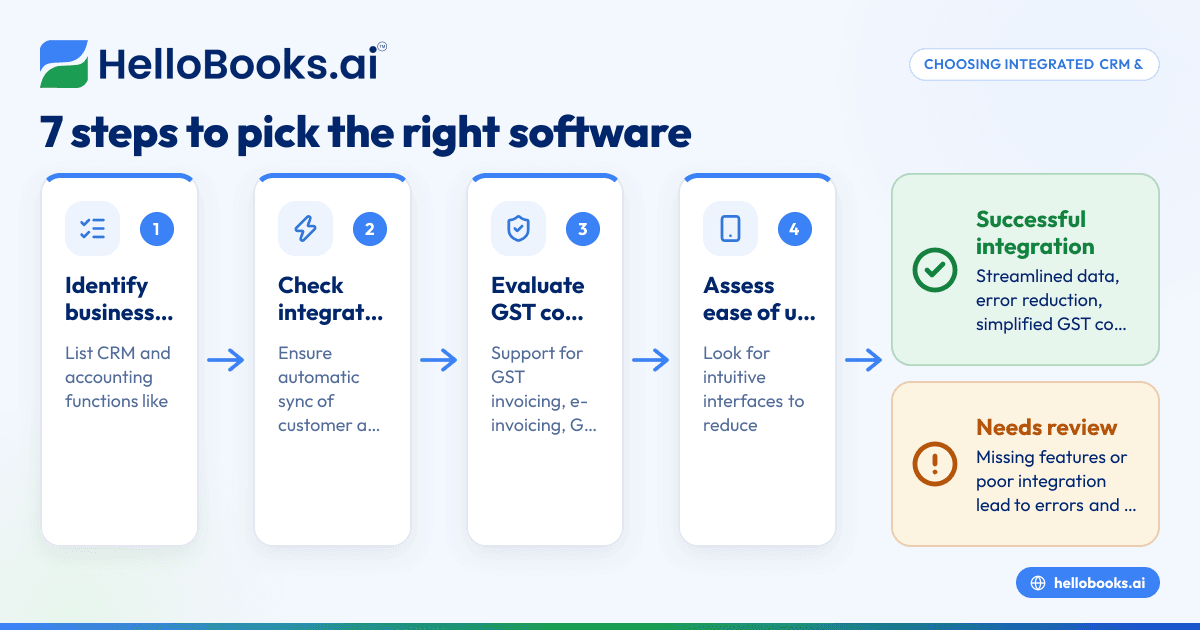
- Identify your business needs: List the key functions you require from CRM and accounting software, such as contact management, sales pipeline, invoicing, GST filing, and reconciliation.
- Check integration level: Confirm if the software offers true integration where customer and financial data sync automatically, or if it requires manual data transfer.
- Evaluate GST compliance features: Ensure the software supports GST invoicing, e-invoicing if applicable, GSTR-1 and GSTR-3B filing, and GSTR-2B reconciliation for input tax credit tracking.
- Assess ease of use: Look for intuitive interfaces that reduce data entry errors and simplify invoice creation and filing.
- Review reporting capabilities: Check if the software provides financial reports, sales summaries, and GST return reports that help with decision-making.
- Consider scalability and support: Choose software that can handle multiple GSTINs if your business expands and offers reliable customer support.
- Test integration with existing tools: If you already use software like Salesforce or Tally, verify if the new system can integrate or import data smoothly.
For more on invoicing, see GST invoicing and for accounting options, visit accounting software for small business.
Example (fictional figures)
Consider "Sharma Traders," a small business in Delhi making B2B sales. They want integrated software to manage CRM and accounting.
- On 01/04/2024, Sharma Traders issues an invoice of ₹1,20,000 for goods sold.
- GST assumed at 18% for illustration.
Calculations:
₹1,20,000 × 18% = ₹21,600 (GST amount)
₹1,20,000 + ₹21,600 = ₹1,41,600 (Total invoice value)
With integrated software, the invoice is created once, customer data is linked, and the GST details are recorded automatically.
When filing GSTR-1 and GSTR-3B, the invoice data is used directly, avoiding manual entry errors. The software also reconciles purchase invoices against GSTR-2B to track input tax credit.
Common mistakes
- Using separate CRM and accounting tools without integration: Leads to duplicated data entry and reconciliation errors. Prevent by choosing software with built-in integration.
- Ignoring GST compliance features: Results in incorrect return filing and penalties. Always verify e-invoicing, GSTR-1, and GSTR-3B support.
- Overlooking user-friendliness: Complex software increases training time and mistakes. Opt for intuitive interfaces.
- Not verifying scalability: Software that cannot handle multiple GSTINs or business growth causes future migration headaches. Check scalability upfront.
- Skipping data migration checks: Incompatible data formats cause loss or errors. Test import/export functions before switching.
For validating GST invoices, use the GST invoice validator.
Doing this in HelloBooks
HelloBooks offers e-invoicing with IRN and signed QR codes for businesses above the ₹5 crore threshold, saving time by generating IRN on save. It supports direct filing of GSTR-1 and GSTR-3B built from recorded invoices, ensuring accuracy and compliance. Additionally, HelloBooks reconciles your purchase register against GSTR-2A/2B nightly, flagging missing or mismatched invoices before ITC claims, helping you avoid errors in your GST returns. Learn more on HelloBooks for India.
Frequently asked questions
Can I integrate HelloBooks with Salesforce or other CRM software?
HelloBooks focuses on accounting and GST compliance features. Integration with external CRM systems like Salesforce requires checking for API compatibility or third-party connectors, which may not be directly available. Consider software that offers native CRM or built-in integration for smoother workflows.
What is the benefit of integrated CRM and accounting software over separate tools?
Integrated software eliminates duplicate data entry, reduces errors, provides real-time visibility into customer payments and financials, and simplifies GST compliance by linking sales and accounting data.
Does HelloBooks support billing along with accounting?
Yes, HelloBooks supports GST invoicing including e-invoicing, which covers billing needs. It automates invoice generation with GST details, IRN, and QR codes for B2B sales, streamlining billing and accounting.
How does integrated software help with GST return filing?
By linking invoices to GST returns, integrated software ensures GSTR-1 and GSTR-3B figures match issued invoices. Reconciliation with GSTR-2B helps track input tax credit accurately, reducing the risk of mismatches and penalties.
Is HelloBooks suitable for small businesses starting with spreadsheets?
HelloBooks is designed for small businesses looking to move beyond spreadsheets or manual books. It offers automated GST invoicing, filing, and reconciliation features that save time and improve accuracy.
Key takeaways
- Integrated CRM and accounting software reduces duplicate data entry and errors.
- Confirm software supports GST invoicing, e-invoicing, and direct GST return filing.
- Evaluate ease of use, scalability, and reporting features.
- Avoid common mistakes like ignoring GST compliance or poor data migration.
- HelloBooks offers e-invoicing, GSTR-1/3B filing, and GSTR-2B reconciliation to simplify accounting and compliance.
Getting started with integrated software can streamline your business processes and compliance tasks. To try HelloBooks, start on the Free plan (200 transactions a year, GSTR-1 and 3B filing for one GSTIN).


