Key takeaways
What this article covers, in order:
- Before you start
- Step 1: Why should you combine Marg ERP with AI bookkeeping?
- Step 2: How do I connect AI Marg ERP tools to my existing setup?
- Step 3: What tasks can AI bookkeeping automate with Marg ERP data?
- How does AI Marg ERP help with GST return filing?
- Step 4: How do I maintain data security and privacy when using AI tools?
How to Use Marg ERP with AI Bookkeeping for Small Businesses in India
This guide is for small business owners and accountants in India who use Marg ERP and want to enhance their bookkeeping with AI-powered automation. By the end, you will know how to integrate Marg ERP with AI bookkeeping tools to save time on data entry, improve accuracy, and simplify GST compliance.
Before you start
- Have your Marg ERP software installed and running with your business data.
- Ensure you have access to your bank statements and invoices in digital format (e.g., PDFs, Excel, or CSV).
- Prepare your GST registration details, GSTIN, and login credentials for the GST portal.
- Choose an AI bookkeeping solution compatible with Marg ERP for Indian SMEs, capable of handling GST, e-invoicing, and bank reconciliation.
- Back up your Marg ERP data before starting integration or exports to avoid data loss.
Step 1: Why should you combine Marg ERP with AI bookkeeping?
Marg ERP is a widely used software in India for inventory management, billing, and accounting. It helps keep track of stock, generate invoices, and maintain ledgers. However, many small businesses find that manual data entry, reconciliation, and GST return preparation still consume significant time.
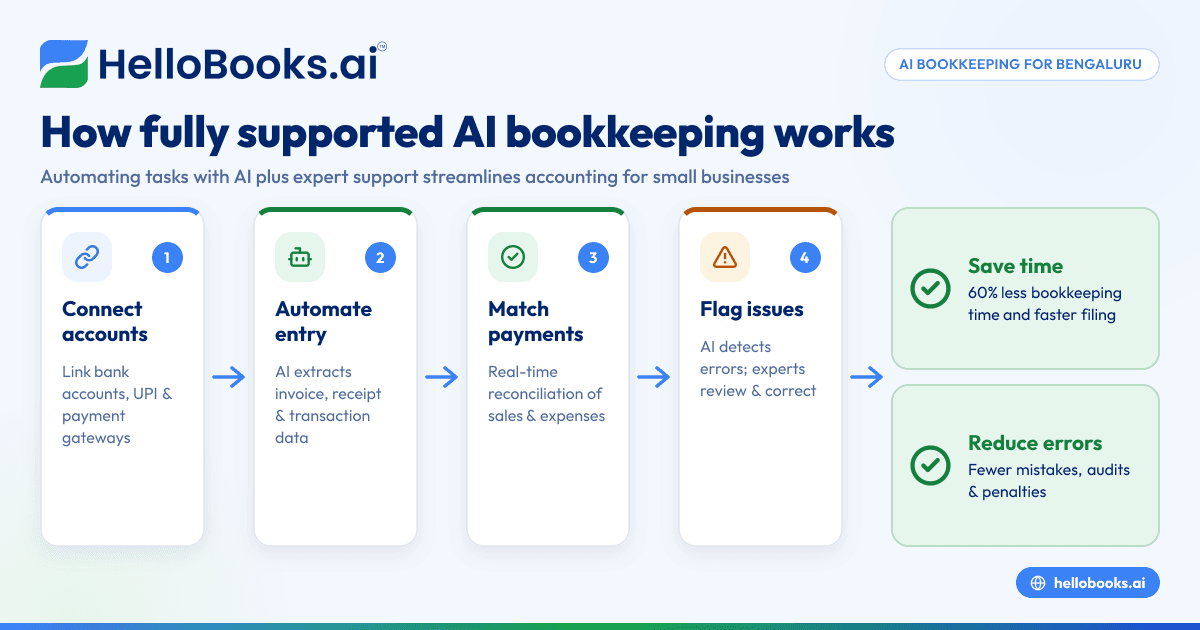
AI bookkeeping automates many of these repetitive tasks by using machine learning to process invoices, match payments, and prepare GST-compliant returns quickly. This reduces human errors, speeds up bookkeeping, and frees up time to focus on business growth.
For example, instead of manually entering each invoice into Marg ERP or cross-verifying payments with bank statements, AI tools can do this automatically by reading your exported data. This also helps avoid mistakes that could trigger GST penalties.
Common mistake: Relying solely on Marg ERP reports without verifying data accuracy or automating repetitive tasks leads to delays and errors in compliance.
Step 2: How do I connect AI Marg ERP tools to my existing setup?
The key to integrating AI bookkeeping with Marg ERP lies in data exchange. Marg ERP allows you to export accounting data such as ledgers, invoices, and payment details in formats like Excel, CSV, or XML.
Here’s how to proceed:
- Export Data from Marg ERP:
- Go to the relevant module (e.g., sales, purchases, ledgers).
- Export your data monthly or as needed, preferably in Excel or XML formats supported by your AI bookkeeping software.
- Upload or Connect to AI Software:
- If your AI tool supports direct API integration with Marg ERP, connect using credentials or API keys provided.
- Otherwise, upload the exported files manually to the AI bookkeeping platform.
- Verify Data Mapping:
- Ensure the AI software correctly recognises fields like invoice number, GSTIN, amounts, and dates.
- Configure any required settings, such as expense categories or bank statement formats.
- Test with Sample Data:
- Before full migration, test the integration with a few transactions to check for accuracy.
Common mistake: Skipping data backup before integration risks losing critical financial information or overwriting records.
Step 3: What tasks can AI bookkeeping automate with Marg ERP data?
AI bookkeeping can handle many tasks that would otherwise take hours:
- Expense Classification: Automatically categorise expenses into rent, utilities, salaries, etc., based on invoice descriptions or vendor details.
- Invoice Matching: Match supplier invoices with payments made via UPI, bank transfers, or cash, reducing reconciliation time.
- GST-Compliant E-Invoicing: Generate and validate e-invoices according to government rules, ensuring all mandatory fields and QR codes are included.
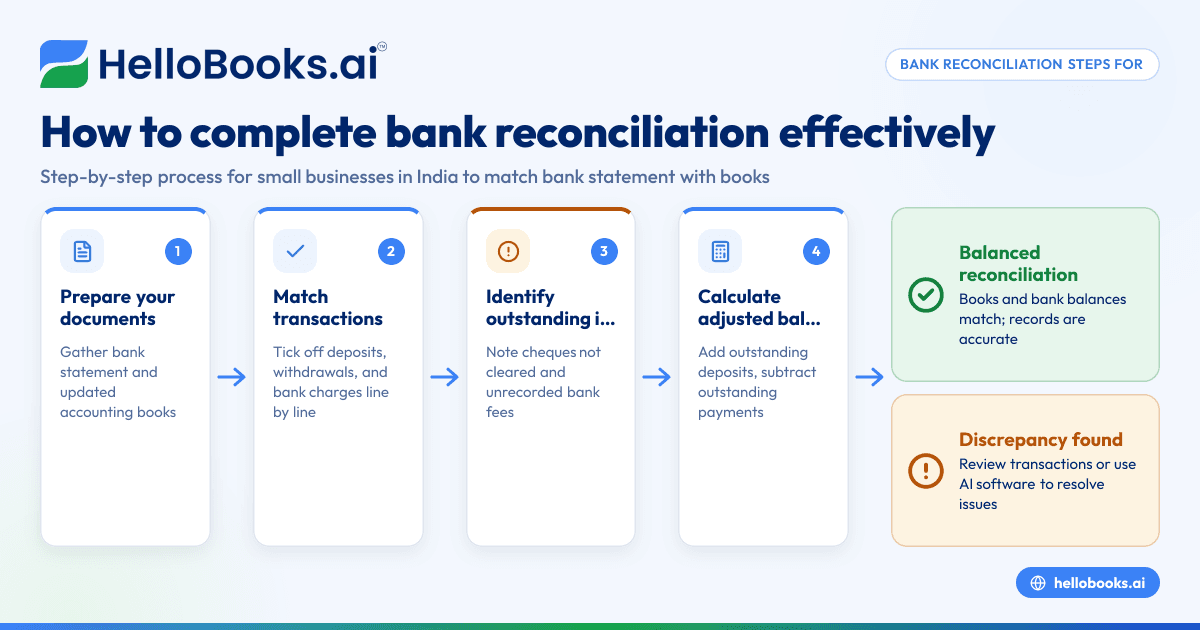
- Bank Reconciliation: Match bank statement entries with Marg ERP transactions to identify discrepancies quickly.
- Anomaly Detection: Flag duplicate entries, mismatched GST rates, or missing invoices that require attention.
- GST Return Drafting: Prepare GSTR-1 (outward supplies) and GSTR-3B (summary return) drafts using accurate data, ready for filing.
This automation helps avoid common errors such as incorrect GST rates, unclaimed input tax credits, or delayed filings.
Common mistake: Ignoring AI suggestions without review can cause compliance issues; always validate automated classifications and reconciliations before finalising.
How does AI Marg ERP help with GST return filing?
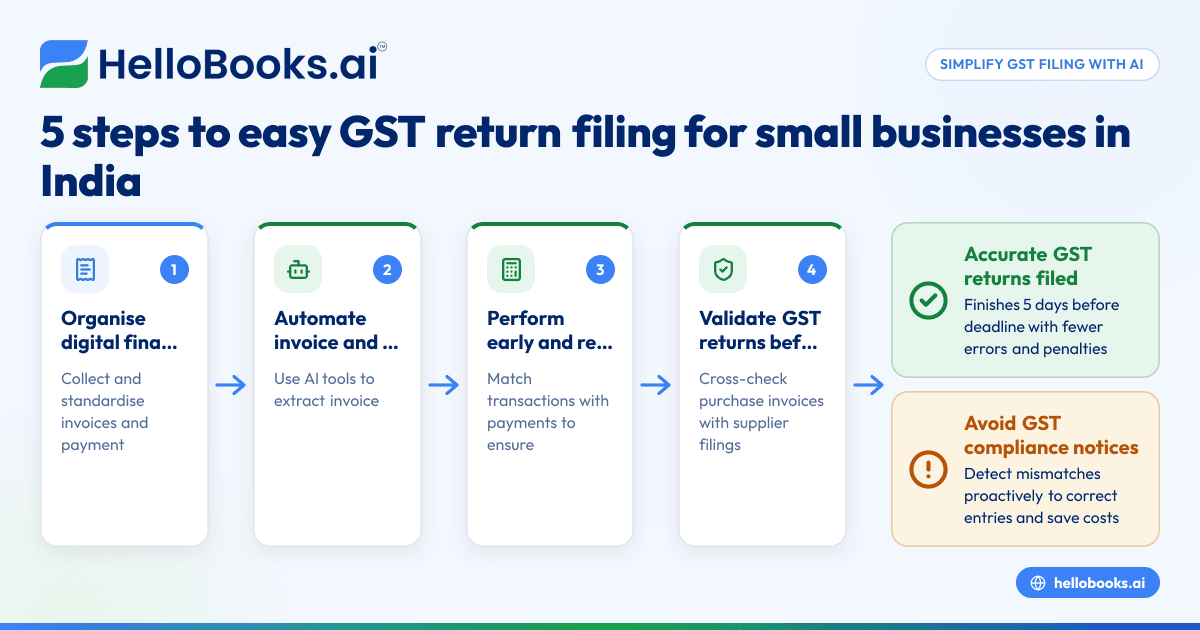
GST return filing is a critical monthly or quarterly task for Indian businesses. With AI integration, the process becomes smoother:
- Data Extraction: AI extracts invoice and payment details from Marg ERP exports.
- GSTIN Validation: It cross-checks GSTINs of suppliers and customers against official GST databases.
- Return Preparation: Automatically compiles GSTR-1 and GSTR-3B returns with accurate tax amounts.
- Error Detection: Flags mismatches like inverted charges, missing invoices, or rate discrepancies.
- Timely Filing: Sends reminders for due dates and facilitates electronic filing through the GST portal.
This reduces the risk of penalties and interest for late or incorrect returns. However, it is important to cross-check the AI-prepared return summaries before submission, as tax laws and rules can change.
Note: This is general information and not tax or legal advice. Consult a GST practitioner for complex cases.
Step 4: How do I maintain data security and privacy when using AI tools?
Handling financial data demands strict security practices:
- Choose Compliant Software: Use AI bookkeeping platforms that comply with Indian data privacy laws such as the DPDP Act 2023.
- Encryption: Ensure data is encrypted during transfer (SSL/TLS) and while stored on servers.
- Access Controls: Limit access to sensitive data within your team using role-based permissions.
- Strong Passwords and Authentication: Use complex passwords and enable two-factor authentication (2FA) where possible.
- Secure Networks: Avoid uploading financial data over public or unsecured Wi-Fi networks.
- Regular Backups: Maintain backups of your Marg ERP and AI bookkeeping data to prevent loss.
Common mistake: Sharing login credentials or uploading data on unsecured networks exposes your business to data breaches.
Worked example: Automating bookkeeping for a Mumbai-based retail store
Shivani runs a retail store in Mumbai selling handicrafts. She uses Marg ERP to manage stock and billing but spends about 10 hours monthly reconciling accounts and preparing GST returns, which delays her focus on marketing.
Here’s how Shivani applies the steps above:
- Prepare Data: At the end of each month, she exports sales, purchase, and ledger data from Marg ERP in Excel format. She also downloads her bank statement from her SBI account as a CSV file.
- Upload to AI Bookkeeping Software: Shivani uploads these files to an AI bookkeeping platform compatible with Marg ERP data formats. The platform offers a simple upload interface and supports GST compliance.
- Automation in Action:
- The AI tool categorises expenses such as rent (₹40,000), utilities (₹12,000), and inventory purchases (₹2,50,000).
- It automatically matches supplier invoices paid via UPI and flags any payment mismatches.
- The system generates GST-compliant e-invoices for online sales and prepares draft GSTR-1 and GSTR-3B returns.
- Review and File: Shivani reviews the draft GST returns, confirms all data, and files them electronically through the integrated GST portal feature in the AI software.
- Bank Reconciliation: The tool matches bank transactions with Marg ERP ledger entries, highlighting ₹5,000 in payments pending clearance for follow-up.
By automating these tasks, Shivani reduces her bookkeeping time from 10 hours to 3 hours monthly. This gives her more time to focus on sourcing new products and growing her customer base in Mumbai.
What else can I do to improve my accounting process?
Beyond Marg ERP and AI bookkeeping integration, consider these steps:
- Use accounting software in India that supports end-to-end AI capabilities, including automated invoicing, expense management, and bank reconciliation.
- Explore e-invoicing software compliant with the Indian government’s e-invoicing mandate for businesses above ₹10 crore turnover.
- Adopt expense management software to streamline employee reimbursements and track petty cash.
- Evaluate bank reconciliation software tools that connect directly to your bank to import statements automatically.
- If you rely on Tally, consider a Tally alternative with AI features to modernise your accounting workflow.
- If using QuickBooks, look into a QuickBooks alternative tailored for Indian GST and compliance.
- If you want professional help, find an accountant familiar with AI bookkeeping and Marg ERP integration.
Ready to take the next step? Book a demo at /book-a-demo to see how AI bookkeeping works with your Marg ERP data or compare plans at /pricing to find the best fit for your business.
By combining Marg ERP with AI bookkeeping, you reduce errors, save time, and stay compliant with GST regulations — empowering your small business to grow with confidence.
Related reading
- AI bookkeeping
- How Small Businesses Can Use AI Bookkeeping Tools Without Losing Control, Supported with Caveats
- How AI Bookkeeping Supports Small Businesses While Highlighting Limitations in India
Read next
This article covers one part of a bigger topic. For the complete picture, read our guide to marg erp.