
Key takeaways
What this article covers, in order:
- Before you start
- What is state code 30 in GST?
- Why should a small business in Maharashtra use state code 30?
- How do I check if I am using the ai state code correctly in my GST returns?
- What are common mistakes businesses make with state code 30?
- Step 1: Confirm your GST registration state code is 30
How Small Businesses in Maharashtra Can Use State Code 30 for Accurate GST Return Filing
This guide is for small business owners, finance leads, and accountants in Maharashtra who want to correctly use state code 30 while filing GST returns. By the end, you will understand what state code 30 signifies, why it matters, and how to apply it accurately to ensure compliance and reduce errors.
Before you start
- Have your GST registration details handy, including your GSTIN and state information.
- Collect your sales and purchase invoices sorted by location.
- Ensure your accounting software or spreadsheet tracks transactions by state.
- Familiarize yourself with GST return filing deadlines relevant in Maharashtra.
What is state code 30 in GST?
State code 30 is the official two-digit numeric code assigned to Maharashtra under the GST system in India. Each state and union territory has a unique state code required for constructing the GSTIN (Goods and Services Tax Identification Number) and for reporting transactions correctly in GST returns. For Maharashtra, the code is always 30.
Using the correct state code is essential in your invoices, returns, and e-way bills because it identifies the jurisdiction for tax collection and compliance monitoring. Mistakes in this code can lead to mismatches in input tax credits or rejection of your GST returns.
Why should a small business in Maharashtra use state code 30?
State code 30 confirms that your business is registered in Maharashtra. This affects tax rates, filing portals, and authorities you interact with. Goods and services supplied within or to Maharashtra must be reported with this code in the GSTIN section of invoices and returns to avoid confusion or penalties.
Wrongly using another state code or omitting the code might delay your GST refund or increase audit risks. Since Maharashtra includes large cities like Mumbai, Pune, and Nagpur, compliance authorities strictly check returns with accurate codes to avoid fraud or errors.
How do I check if I am using the ai state code correctly in my GST returns?
The ai state code is simply the correct two-digit state number, “30” for Maharashtra, automatically applied by good accounting software. Make sure your GST software or your manual spreadsheets include this code for every transaction where Maharashtra is the location or your GST registration state.
If you run a business with branches in other states, allocate sales and purchases per state carefully and assign their respective state codes. Roof your process using accounting software with built-in ai state code validation — it flags mismatches and missing codes so that your GST returns will be accurate.
What are common mistakes businesses make with state code 30?
One common mistake is mixing state codes on invoices, especially for inter-state supplies. For example, a Mumbai-based business that delivers goods to Karnataka must use state code 29 for the recipient state in e-way bills or invoices, not 30. Another error is excluding the state code section or inputting an incorrect number while filing returns.
Neglecting to update your billing system or account books with the right state code can cause mismatch errors during GST return reconciliation. This leads to notices from tax authorities or blocked input tax credits. Regularly verifying your data against GSTN records helps you catch these issues early.
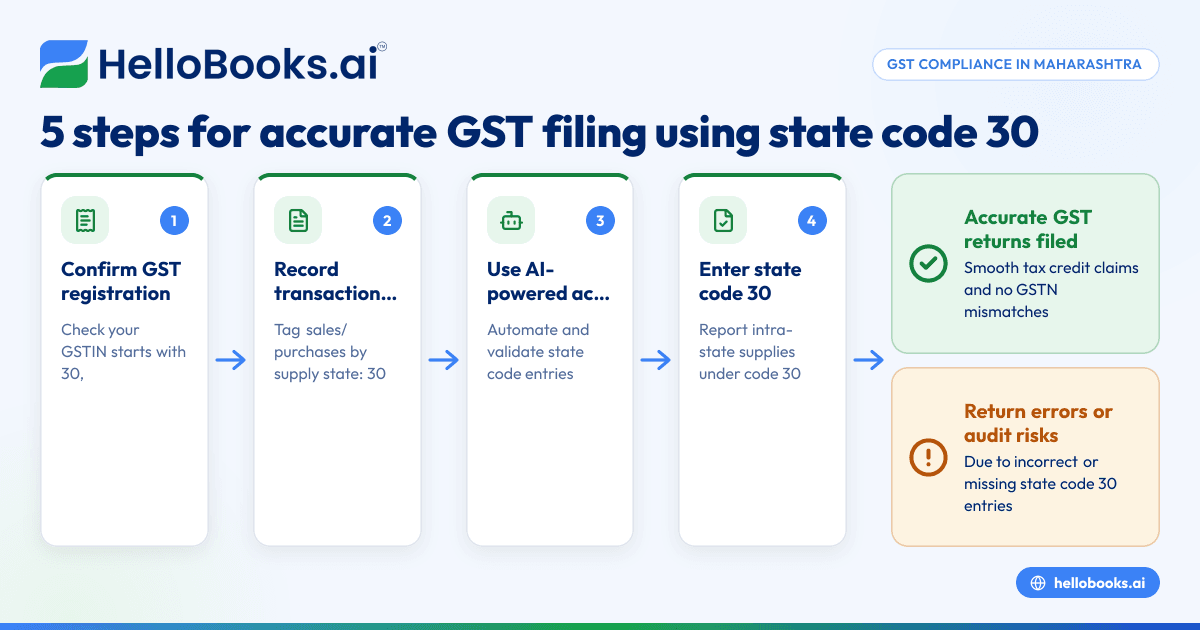
Step 1: Confirm your GST registration state code is 30
Your GST registration certificate (GSTIN) starts with your state code—in Maharashtra’s case, “30”. This confirms your principal place of business falls under the Maharashtra GST jurisdiction.
Check this first in your GST document or online GST portal. Using state code 30 aligns your tax filings to Maharashtra GST authorities and avoids confusion with out-of-state offices.
Mistake to avoid: Using a different state code in returns because branches or warehouses exist outside Maharashtra without correct GST registration.
Step 2: Record each transaction with accurate state codes
Separate your sales and purchase invoices according to the state where the supply happened. For sales within Maharashtra, tag the state code as 30; for inter-state sales, use the relevant other states’ codes.
Accurately flagged state codes ensure invoice-wise GST computations, input tax credits, and reverse charge mechanisms apply correctly.
Mistake to avoid: Using a single default state code for all transactions regardless of geographic supply location. This causes errors in return reconciliation.
Step 3: Use accounting software to automate state code accuracy
Leverage accounting software in India or tools like hellobooks.ai that have AI features to auto-fill and verify state codes.
The AI checks if invoices reflect appropriate state codes and flags mismatches to help you fix them before you file your GST returns. Automation reduces manual errors linked to forgetting or mistyping state code 30.
Mistake to avoid: Relying entirely on manual entry or outdated software that lack such AI checks, increasing your risk of filing invalid returns.
Step 4: Reflect state code 30 correctly in your GST returns
When filing returns like GSTR-1 (outward supplies) and GSTR-3B, ensure transactions within Maharashtra are reported under state code 30.
In GSTR-1, enter place of supply data with the correct state code for each invoice while filing. This supports accurate tax calculations for intra-state supplies.
Mistake to avoid: Mixing state codes or omitting them in GST returns can cause data mismatches and rejection by the GST portal.
How do I identify transactions that belong to state code 30?
Transactions with a place of supply in Maharashtra must use state code 30. This means the delivery or service location is within Maharashtra’s boundaries, including cities like Mumbai, Pune, Nashik, and Aurangabad.
Check your purchase and sales records. If the goods or services are consumed or received in Maharashtra, tag the transactions accordingly in your books and invoices. This ensures the right state GST applies, whether CGST and SGST for intra-state or IGST for inter-state sales.
Step 5: Reconcile your GST returns and e-way bills with state code 30 details
Cross-check the data submitted in returns with invoices recorded under state code 30 and ensure e-invoices and e-way bills also contain the correct state code.
Mismatches cause return filing errors and delays in tax credits. Harmonising data helps your filings go through without hitches.
Mistake to avoid: Filing returns before reconciling invoices and e-way bills by state code, leading to multiple corrections and notices from tax authorities.
Worked example: Using state code 30 for a Pune manufacturer’s GST return
Suppose a Pune-based textiles manufacturer makes ₹10 lakh worth of sales within Maharashtra in April 2024. The business’s GSTIN begins with 27 (Maharashtra’s correct initial digits including 30 as the state code inside), indicating Maharashtra as their registration state.
- All ₹10 lakh of sales are tagged with state code 30 because deliveries happen within Maharashtra.
- The company’s purchase invoices from suppliers in Mumbai are also recorded with state code 30.
- For ₹2 lakh sales sent to a customer in Gujarat, the invoice uses state code 24 for Gujarat.
- Before filing GSTR-1, the manufacturer uses hellobooks.ai’s AI bookkeeping features to verify all invoices have correct state codes — no errors found.
- On filing GSTR-1, the company reports ₹10 lakh intra-state sales under state code 30 correctly, and ₹2 lakh inter-state sales under code 24.
- This accurate use of state code 30 avoids mismatches on GSTN and ensures smooth input tax credit claims.
Next steps
Apply these steps to your accounting system to ensure accurate GST compliance with state code 30. Start by checking your GSTIN and the places of supply in your invoices. Consider using accounting software for small business to help automate and manage state code allocations seamlessly.
For a more efficient, error-free GST return process tailored to Maharashtra businesses, explore hellobooks.ai's intelligent tools. You can book a demo to see how AI can simplify your GST return filing or compare features on our pricing page.
Related reading
- GST return filing software
- How to Correctly Use State Code 10 in GST Returns for Small Businesses in Karnataka
- How Small Businesses in the United States Can Use AI for Accurate Sales Tax Tracking and Filing
Read next
This article covers one part of a bigger topic. For the complete picture, read our guide to state code 30.