


Key takeaways
What this article covers, in order:
- Why this comes up / what goes wrong
- Step-by-step
- Example (fictional figures)
- Common mistakes
- Frequently asked questions
- Key takeaways
Hotel accounting automation means using digital tools to handle your hotel’s financial records, billing, GST compliance, and reporting without relying on manual spreadsheets or paper books. This saves time, reduces errors, and helps you focus on running your hotel. This article covers why hotel owners and accountants seek automation, detailed steps to automate accounting, a practical example with Indian figures, common pitfalls, and answers to common questions.
Why this comes up / what goes wrong
Hotel owners and accountants in India often face challenges managing accounting manually. Hotels, restaurants, and cloud kitchens have multiple revenue streams like room bookings, food sales, and services, each with different GST rates and invoicing needs. Manual bookkeeping using Tally, Excel, or bill books can lead to errors in GST invoicing, delayed filing of GSTR-1 and GSTR-3B, and difficulty reconciling bank statements and expenses. This wastes time and can risk penalties.
For example, a 40-seat restaurant in Pune may struggle to track daily sales from dine-in, takeaways, and online orders separately. A cloud kitchen in Gurugram selling on Swiggy and Zomato needs to reconcile platform payments with invoices. A bakery in Kochi may have multiple suppliers and inventory items to manage. Automation helps streamline these processes and maintain accurate books.
Step-by-step
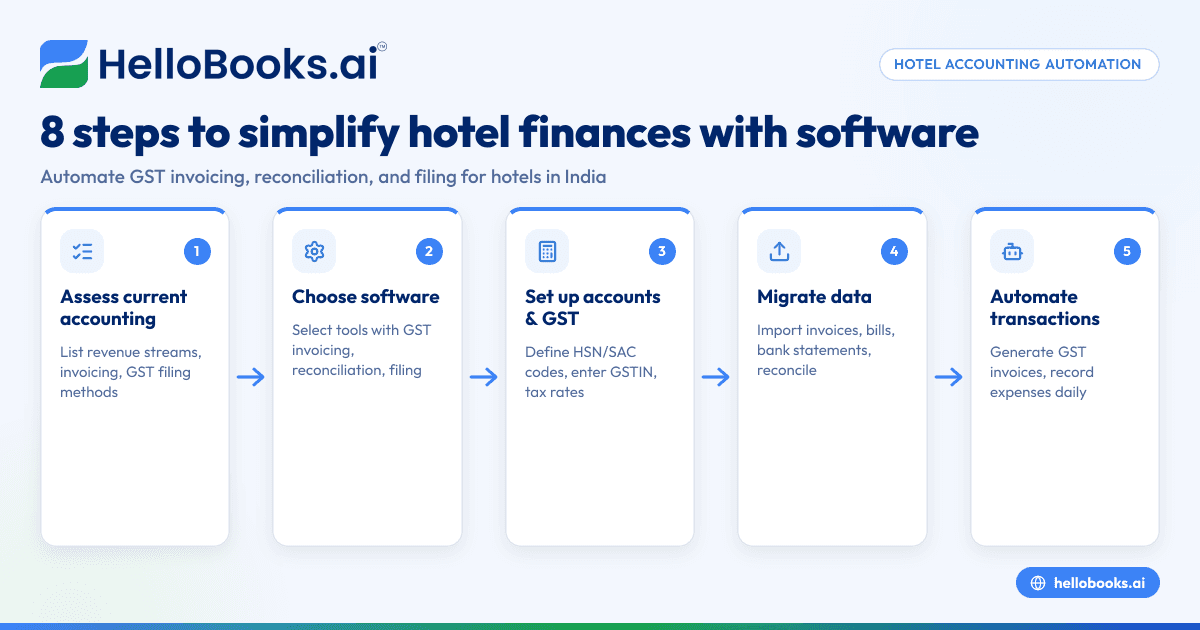
- Assess Your Current Accounting Process
- List all revenue streams (room, food, services).
- Identify how invoices and bills are currently created and stored.
- Check how GST returns (GSTR-1, GSTR-3B) are filed and reconciled.
- Choose Suitable Accounting Software
- Look for features like GST invoicing, e-invoicing, GSTR filing, bank statement reconciliation, and expense tracking.
- Verify if the software supports your business size and transaction volume.
- Set Up Your Chart of Accounts and GST Details
- Define HSN or SAC codes for your products and services.
- Enter your GSTIN and configure tax rates (CGST, SGST, IGST) as applicable.
- Migrate Existing Data
- Import previous invoices, bills, and bank statements.
- Reconcile opening balances to ensure accuracy.
- Automate Daily Transactions
- Use the software to generate GST-compliant invoices for room bookings and food sales.
- Record expenses and supplier bills promptly.
- Perform Regular Reconciliation
- Match bank statements with recorded transactions to catch discrepancies.
- Reconcile input tax credit (ITC) using GSTR-2B.
- File GST Returns on Time
- Prepare and file GSTR-1 and GSTR-3B using software-generated reports.
- Review reports for accuracy before submission.
- Review Financial Reports Periodically
- Analyze profit and loss, inventory status, and cash flow to make informed decisions.
For hotels and restaurants, using industry-specific software or modules can ease management. See Restaurants, cafes and cloud kitchens for tailored solutions.
Example (fictional figures)
A 40-seat restaurant in Pune recorded the following for March 2024:
- Room service sales: ₹1,20,000 (assumed GST 5%)
- Food sales (dine-in and takeaway): ₹3,00,000 (assumed GST 12%)
- Supplier bills for ingredients: ₹1,50,000 (GST 5%)
Calculations:
Room service GST = ₹1,20,000 × 5% = ₹6,000
Food sales GST = ₹3,00,000 × 12% = ₹36,000
Supplier GST input credit = ₹1,50,000 × 5% = ₹7,500
Total GST collected = ₹6,000 + ₹36,000 = ₹42,000
GST credit = ₹7,500
GST payable = ₹42,000 - ₹7,500 = ₹34,500
This GST payable amount is reported in GSTR-3B for March. The restaurant uses software to generate invoices with HSN codes, record supplier bills, and reconcile bank payments. This automation reduces errors and speeds up filing.
Common mistakes
- Mixing GST rates without proper classification
- Prevent by assigning correct HSN/SAC codes and tax rates for each service or product.
- Delaying invoice generation and data entry
- Prevent by automating invoicing and entering expenses daily to avoid backlog.
- Ignoring reconciliation of bank statements and ITC
- Prevent by scheduling regular reconciliation to catch mismatches early.
- Not updating software with latest GST rules
- Prevent by choosing software that updates automatically or regularly checking GST portal notifications.
- Overlooking integration with sales platforms
- Prevent by ensuring software can handle orders from Swiggy, Zomato, or other channels to avoid manual entry errors.
For more on GST invoicing and filing, see GST invoicing.
Frequently asked questions
What is hotel accounting automation?
Hotel accounting automation uses software to manage invoicing, expenses, GST filing, and reconciliation digitally, reducing manual work and errors.
Can automation handle multiple GST rates for hotels?
Yes, good accounting software allows you to apply different GST rates for services like room rent, food sales, and other amenities using HSN/SAC codes.
How does automation help with GST filing?
Automation generates GST-compliant invoices, prepares reports for GSTR-1 and GSTR-3B, and assists in reconciling input tax credit, making filing faster and more accurate.
Is it difficult to switch from Tally or Excel to automated software?
Migration requires careful data import and validation. Most software offers tools or support to ease this transition.
Does automation integrate with food delivery platforms?
Some accounting solutions can import orders and payments from platforms like Swiggy and Zomato, reducing manual reconciliation.
For more industry details, visit Restaurants, cafes and cloud kitchens.
Key takeaways
- Hotel accounting automation reduces manual errors and saves time on GST invoicing and filing.
- Set up correct GST rates and HSN/SAC codes for different hotel services.
- Regular reconciliation of bank statements and ITC is critical.
- Automate daily transactions to avoid backlog and delays.
- Choose software that supports integration with sales platforms like Swiggy and Zomato.
Start automating your hotel’s accounting today. You can start on the Free plan (200 transactions a year, GSTR-1 and 3B filing for one GSTIN) to experience simplified GST compliance and bookkeeping.


