


Key takeaways
What this article covers, in order:
- Why this comes up / what goes wrong
- Step-by-step
- Example (fictional figures)
- Common mistakes
- Doing this in HelloBooks
- Frequently asked questions
A GST bill calculator is a practical tool for small business owners to calculate GST accurately on invoices. It ensures compliance with Rule 46 of the CGST Rules, which requires specific invoice details including correct tax rates and HSN/SAC codes. Using a calculator or format reduces errors in tax amounts and invoice particulars, which helps avoid delays in GST filing and ITC claims.
Why this comes up / what goes wrong
Many small businesses still prepare GST invoices manually using spreadsheets, bill books, or basic calculators. This often leads to mistakes like applying incorrect GST rates, failing to split CGST and SGST correctly for intra-state sales, or missing mandatory invoice details such as HSN codes. Such errors cause reconciliation issues, delay tax credit claims, and increase the risk of penalties.
A ready-to-use GST bill calculator or format saves time and reduces errors by automatically calculating tax and including all mandatory fields, making GST compliance easier.
Step-by-step
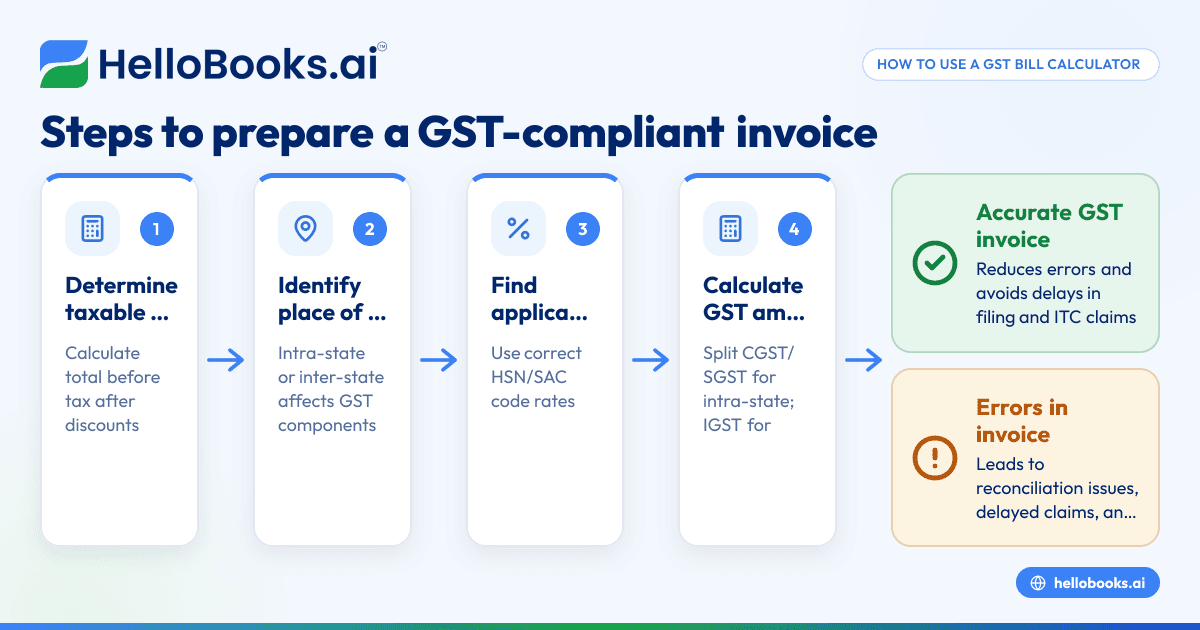
- Determine the taxable value: Calculate the total value of goods or services before tax, after deducting any discounts.
- Identify the place of supply: Check if the supply is intra-state (within the same state) or inter-state (between states) to decide which GST components apply.
- Find the applicable GST rate: Use the correct GST rate for your goods or services based on the HSN (for goods) or SAC (for services) codes.
- Calculate the GST amount:
- For intra-state supply: Calculate CGST and SGST separately, each equal to half of the total GST rate.
- For inter-state supply: Calculate IGST at the full GST rate.
- Prepare the invoice with mandatory fields: Include supplier and recipient details, GSTINs, invoice number, date, description, quantity, unit, taxable value, GST rate, tax amount, place of supply, and signature as required by Rule 46 [cgst-rule-46/rule46-particulars].
- Validate the GSTIN and invoice details: Use free tools like the GST invoice validator and GST calculator to check accuracy before issuing the invoice.
Example (fictional figures)
Assume a business in Maharashtra sells goods worth ₹1,00,000 on 15/05/2024 to a registered customer in Maharashtra. The applicable GST rate is 18% (assumed illustrative rate).
Taxable value = ₹1,00,000
Total GST rate = 18%
CGST rate = 9%
SGST rate = 9%
Calculate CGST:
₹1,00,000 × 9% = ₹9,000
Calculate SGST:
₹1,00,000 × 9% = ₹9,000
Total GST = CGST + SGST = ₹9,000 + ₹9,000 = ₹18,000
Invoice total = Taxable value + Total GST = ₹1,00,000 + ₹18,000 = ₹1,18,000
The invoice must include all mandatory fields such as supplier and recipient GSTIN, HSN code, invoice number, date, and place of supply Maharashtra.
Common mistakes
- Using incorrect GST rates: Always verify GST rates for your products or services using official HSN/SAC codes to avoid charging wrong tax amounts.
- Not splitting CGST and SGST for intra-state sales: For intra-state supplies, calculate CGST and SGST each as half the GST rate. Use IGST only for inter-state sales.
- Missing mandatory invoice details: Ensure your invoice complies with Rule 46, including GSTINs, invoice number, date, and place of supply.
- Not validating GSTIN and invoice fields: Use the GST invoice validator to check invoice correctness before sending.
- Manual calculation errors: Manual GST calculations can lead to errors; use a GST calculator tool or software to automate tax calculations.
Doing this in HelloBooks
HelloBooks provides GST invoicing that creates compliant tax invoices with the correct CGST/SGST or IGST split and HSN/SAC codes automatically from your customer's GSTIN. It fills all fields required by Rule 46 consistently, reducing errors. Businesses with aggregate turnover over ₹5 crore get the IRN and signed QR code generated automatically when saving a B2B invoice, saving time compared to manual JSON upload to the government portal. You can also use HelloBooks' free India tools to validate GSTINs and check invoice fields without needing an account. Learn more about GST invoicing and free GST calculator.
Frequently asked questions
What is a GST bill calculator?
A GST bill calculator is a tool or format that helps calculate the GST amount on your sales invoice by applying the correct tax rates and splitting CGST, SGST, or IGST as needed. It simplifies preparing GST-compliant invoices.
How do I calculate GST on a bill manually?
Calculate the taxable value, determine if the supply is intra-state or inter-state, find the applicable GST rate, then calculate CGST and SGST (each half the GST rate) for intra-state or IGST for inter-state. Add the tax to the taxable value to get the total invoice amount.
Can I validate my GST invoice online?
Yes, you can use free tools like the GST invoice validator to check if your invoice contains all mandatory fields and correct GSTINs without creating an account.
Do I need to generate e-invoices for all sales?
No, only businesses with aggregate turnover over ₹5 crore must generate e-invoices (with IRN and signed QR) for B2B supplies from 1 August 2023 [einvoice-threshold-5cr/einv-5cr-from-2023-08-01].
What are the deadlines for filing GSTR-1 and GSTR-3B?
Monthly GSTR-1 is due by the 11th of the following month [gstr1-due-date/gstr1-monthly-11th], and GSTR-3B is due by the 20th [gstr3b-due-date/gstr3b-monthly-20th]. Quarterly filers under QRMP have different deadlines [qrmp-scheme/qrmp-dates].
Key takeaways
- Use a GST bill calculator to accurately compute GST amounts and split CGST/SGST or IGST.
- Include all mandatory invoice particulars as per Rule 46 to ensure GST compliance.
- Validate GSTIN and invoice details using free online tools before issuing invoices.
- Automate GST invoicing and e-invoicing using HelloBooks to save time and reduce errors.
- Know your filing deadlines for GSTR-1 and GSTR-3B to avoid penalties.
Start preparing your GST invoices confidently with a GST bill calculator or HelloBooks. To get started, Start on the Free plan (200 transactions a year, GSTR-1 and 3B filing for one GSTIN).
This article is general information, not tax or legal advice. Rules change; confirm the current position on gst.gov.in or with your chartered accountant before acting.


