


Key takeaways
What this article covers, in order:
- Why this comes up / what goes wrong
- Step-by-step
- Example (fictional figures)
- Common mistakes
- Doing this in HelloBooks
- Frequently asked questions
E invoice software automates the creation of GST-compliant invoices that include all mandatory details like the supplier’s GSTIN, HSN/SAC codes, tax amounts, and the Invoice Reference Number (IRN) with a QR code for B2B transactions above the ₹5 crore turnover threshold. This software reduces manual entry, ensures rule compliance, and integrates with GST returns and e-way bills.
Why this comes up / what goes wrong
Small businesses in India often struggle with manual invoice creation using spreadsheets, Tally, or bill books. This leads to errors in GST invoice particulars required by Rule 46, such as missing GSTINs, incorrect tax splits (CGST/SGST/IGST), or absent HSN/SAC codes. For businesses with aggregate turnover over ₹5 crore, e-invoicing is mandatory for B2B supplies, requiring an IRN and a QR code generated through the NIC portal. Without software, uploading JSON files and managing cancellations manually is time-consuming and error-prone. Duplicate data entry for e-way bills adds to the workload. E invoice software streamlines these processes, ensuring compliance and saving time.
Step-by-step
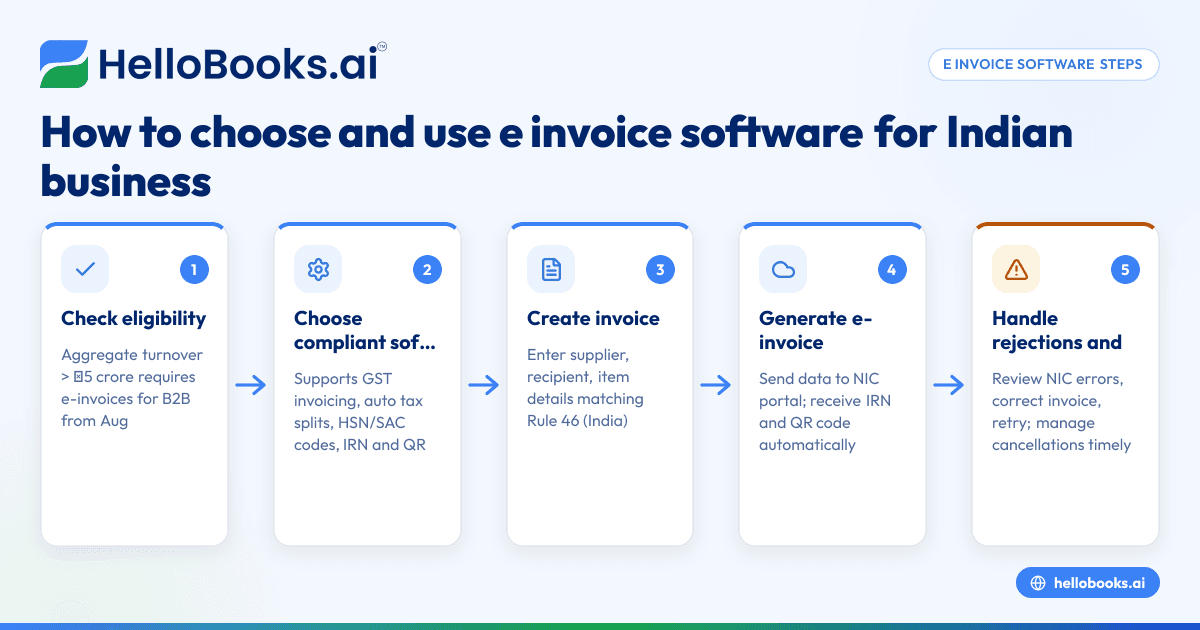
- Check your eligibility for e-invoicing: Confirm if your aggregate turnover exceeded ₹5 crore in any financial year from 2017-18 onwards; if yes, you must issue e-invoices for B2B supplies from 1 August 2023 [source: einvoice-threshold-5cr/einv-5cr-from-2023-08-01].
- Choose software that supports GST invoicing and e-invoicing: Verify it can create invoices with CGST/SGST or IGST splits, include HSN/SAC codes from the customer's GSTIN, and generate IRN and QR codes automatically.
- Create your invoice: Enter supplier and recipient details, description, quantity, unit, taxable value, and applicable tax rates. Ensure the invoice matches Rule 46 requirements, including unique serial numbering and signatures [source: cgst-rule-46/rule46-particulars].
- Generate the e-invoice: For B2B invoices above the threshold, the software should send invoice data to the NIC portal and retrieve the IRN and signed QR code automatically.
- Handle NIC rejections and cancellations: If the NIC rejects the e-invoice, review the error code, correct the invoice, and retry. Manage cancellations within the permitted window directly from the software.
- Raise the e-way bill: Use the same invoice record to create an e-way bill, avoiding duplicate entry of consignment details.
- File your GST returns: Use the invoice data to prepare GSTR-1 and GSTR-3B, ensuring the e-invoice details are consistent with your filings.
Example (fictional figures)
Suppose "ABC Traders" issues a B2B invoice on 15/07/2023 for goods worth ₹1,00,000 with a GST rate of 18% (CGST 9%, SGST 9%).
- Taxable value = ₹1,00,000
- CGST = ₹1,00,000 × 9% = ₹9,000
- SGST = ₹1,00,000 × 9% = ₹9,000
- Total tax = ₹9,000 + ₹9,000 = ₹18,000
- Invoice total = ₹1,00,000 + ₹18,000 = ₹1,18,000
The software generates the invoice with all required details, sends it to the NIC portal, obtains the IRN and QR code, and embeds them in the PDF. The e-way bill is raised from the same invoice, so consignment details are not re-entered.
Common mistakes
- Missing or incorrect GSTINs: Always verify the supplier’s and recipient’s GSTINs from official sources to avoid errors. Use software that auto-fills these from GSTIN.
- Incorrect tax splits and rates: Manually calculating CGST/SGST/IGST can cause mistakes; use software with automated tax calculation.
- Not generating IRN or QR code for eligible invoices: Businesses over ₹5 crore turnover must e-invoice B2B supplies; failing to do so leads to non-compliance.
- Duplicate data entry for e-way bills: Raising e-way bills separately wastes time; choose software that creates e-way bills from the invoice.
- Ignoring NIC rejection codes: If the NIC portal rejects an invoice, review the error and correct it promptly.
- Using inconsistent invoice numbering: Rule 46 requires unique serial numbers per financial year; maintain this strictly.
For validation of invoice particulars, tools like the GST invoice validator can help.
Doing this in HelloBooks
HelloBooks creates GST-compliant invoices with the correct CGST/SGST or IGST split and HSN/SAC codes from the customer's GSTIN, fulfilling Rule 46 requirements consistently. For businesses above the ₹5 crore e-invoicing threshold, HelloBooks automatically generates the IRN and signed QR code upon saving a B2B invoice, saving time compared to manual JSON uploads. E-way bills are raised directly from the invoice, eliminating duplicate consignment data entry. Learn more about HelloBooks’ GST invoicing, e-invoicing (IRN and QR), and e-way bill features.
Frequently asked questions
What is e-invoice software and who needs it?
E-invoice software generates GST-compliant invoices with mandatory details and obtains the Invoice Reference Number (IRN) and QR code from the NIC portal for B2B supplies. Businesses with aggregate turnover above ₹5 crore must use it for B2B invoices from 1 August 2023.
Can small businesses below ₹5 crore turnover use e-invoice software?
Yes, small businesses can use e-invoice software voluntarily to simplify invoicing and GST compliance, but the mandatory e-invoicing requirement applies only to those exceeding ₹5 crore turnover.
How does e-invoice software help with GST compliance?
It ensures invoices meet Rule 46 particulars, calculates taxes automatically, generates IRN and QR codes for eligible invoices, and integrates with GST return filing and e-way bill generation, reducing errors and manual work.
What happens if the NIC portal rejects an e-invoice?
The software shows the rejection error code, allowing you to correct the invoice and resend it. Timely correction avoids compliance issues.
Does e-invoice software handle e-way bills too?
Good e-invoice software generates e-way bills from the same invoice record, so you don’t have to enter consignment details twice.
Where can I validate my GST invoices?
You can use a GST invoice validator tool to check if your invoice meets Rule 46 requirements.
Key takeaways
- E invoice software automates GST-compliant invoice creation with mandatory Rule 46 details.
- Businesses with turnover above ₹5 crore must generate e-invoices with IRN and QR codes for B2B supplies.
- Using software reduces manual errors, handles NIC portal interactions, and integrates with e-way bills.
- Common mistakes include incorrect GSTINs, tax calculations, missing IRN, and duplicate data entry.
- HelloBooks supports GST invoicing, e-invoicing with IRN/QR, and e-way bill generation from one interface.
Start with HelloBooks on the Free plan (200 transactions a year, GSTR-1 and 3B filing for one GSTIN) at HelloBooks pricing to simplify your e-invoicing and GST compliance.


