HelloBooks.ai home

E-Way Bill Software — Generate & Manage EWBs From Your Invoices | HelloBooks.ai E-way bill software: create the EWB from your invoice, auto-fill transporter details, get distance-based validity and expiry alerts, and extend or cancel on mobile. Free Plan.

E-way bill software, EWB generation, e-way bill software India, e-way bill from invoice, and GST e-way bill — HelloBooks creates e-way bills from your invoices with auto-populated transporter details, distance-based validity, expiry alerts, and mobile extend/cancel.

Inter-state ₹50,000 and state-specific intra-state thresholds are applied automatically, and the EWB shares the invoice record with the e-invoice IRN and GSTR-1.

E-Way Bill

E-way bills from the invoice you already raised

HelloBooks creates the e-way bill from the same invoice record — transporter and vehicle details auto-populated, validity derived from the route distance, and the IRN already attached for e-invoiced supplies. Extend or cancel from the mobile app, and get an alert before the EWB lapses in transit.

Free Plan with 5,000 AI credits/month — no credit card.

What e-way bill software should do

An e-way bill is required when goods worth more than the threshold move, and an expired or missing EWB can mean a detained consignment and a penalty. E-way bill software should generate the EWB from the document you already raised, keep its validity visible, and let the dispatch team manage it from the road — not from a separate NIC login.

HelloBooks creates the e-way bill from the same invoice record, so the consignment, tax and party details are already correct.
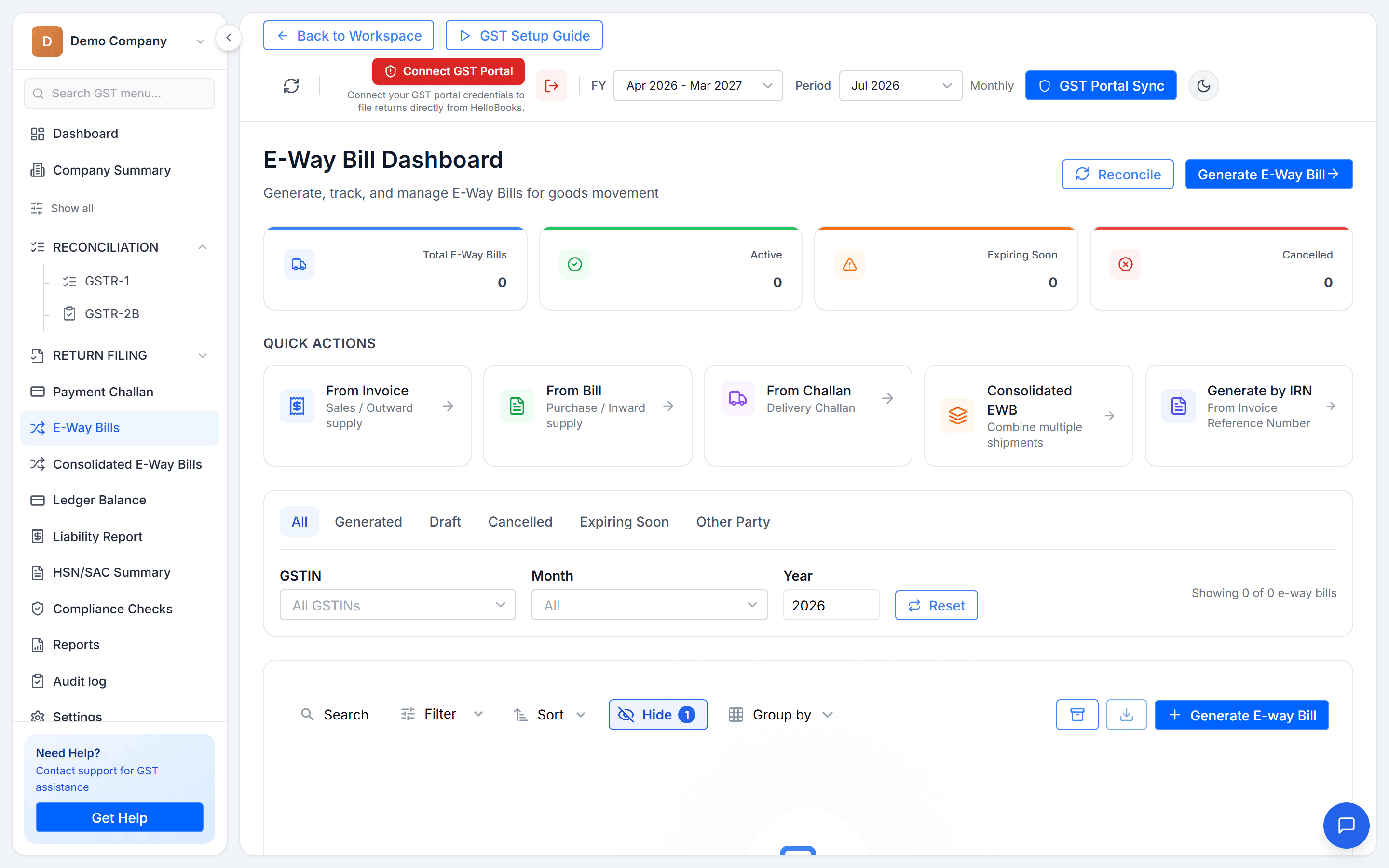

Generated from the invoice, with details auto-populated

Raise the invoice and the e-way bill flows from it — HSN, value and party details pulled through, transporter and vehicle added once, and the IRN attached automatically for e-invoiced supplies.

  • EWB created from the same invoice record — no re-keying
  • Transporter ID, vehicle number and mode captured once
  • IRN attached automatically for e-invoiced B2B supplies
  • Bulk generation for multiple consignments

Validity from distance, with expiry alerts

E-way bill validity is a function of distance — a short intra-city run is a one-day bill, a long inter-state haul gets more. HelloBooks derives the validity window from the route, shows it on the consignment, and alerts the dispatch team before it lapses, so a truck is never stopped on an expired EWB on the highway.

  • Validity derived from the route distance
  • Expiry alerts before the EWB lapses in transit
  • Extend the validity from the mobile app when a vehicle is delayed
  • Cancel within the permitted window from the same screen

Inter-state and intra-state thresholds handled

Goods crossing a state boundary follow the ₹50,000 inter-state rule, while several states set their own intra-state thresholds. HelloBooks derives the requirement from the buyer’s location and the consignment value, so the right EWB is raised — or correctly skipped — for each movement.

Manage it from the road

Dispatch teams do not sit at the NIC portal. HelloBooks lets them extend or cancel e-way bills, update the vehicle number on a transhipment, and check validity from the mobile app — so the people moving the goods can manage the paperwork that moves with them.

How it works

How to generate e-way bills with HelloBooks

Create and manage e-way bills from your invoices, with distance-based validity and mobile control.

  1. Step 1

    Raise the invoice

    Create the invoice; HSN, value and party details are captured for the EWB.

  2. Step 2

    Add transporter and vehicle

    Enter the transporter ID and vehicle number once — the EWB is generated from the invoice.

  3. Step 3

    Check validity

    HelloBooks derives the validity window from the route and shows it on the consignment.

  4. Step 4

    Manage from mobile

    Extend, cancel or update the vehicle from the mobile app, with alerts before expiry.

FAQ

Frequently asked questions

How is the e-way bill created?
From the same invoice record. HSN, value and party details are pulled through, you add the transporter and vehicle once, and for e-invoiced supplies the IRN is attached automatically — no re-keying into the NIC portal.
How is validity calculated, and what happens before it expires?
Validity is derived from the route distance, shown on the consignment, and HelloBooks alerts the dispatch team before it lapses so a vehicle is never stopped on an expired EWB. You can extend the validity from the mobile app if a vehicle is delayed.
Can I extend or cancel an e-way bill from my phone?
Yes. Dispatch can extend or cancel e-way bills, update the vehicle number on a transhipment, and check validity from the mobile app, within the NIC-permitted windows.
Does it handle inter-state and intra-state thresholds?
Yes. Inter-state movement follows the ₹50,000 rule, while several states set their own intra-state thresholds; HelloBooks derives the requirement from the buyer’s location and consignment value so the correct EWB is raised or skipped.
Does it connect to e-invoicing and GST returns?
Yes. The e-way bill shares the invoice record with the e-invoice (IRN attached) and the GST return, so your EWB register, e-invoice log and GSTR-1 reconcile automatically.

Start automating your books today

Free Plan with full access to the AI accountant — no credit card, no time limit.

Subscribe to our newsletter

Stay up to date with the latest news and announcements. No credit card required.

By subscribing, you agree to our Privacy Policy.
