
Key takeaways
What this article covers, in order:
- Why this comes up / what goes wrong
- Step-by-step
- Example (fictional figures)
- Common mistakes
- Frequently asked questions
- Key takeaways
Cloud based accounting software allows Indian small businesses to maintain books, track expenses, generate GST-compliant invoices, and file GST returns online without the need to install software on a specific computer. You can access your financial data anytime from any internet-connected device, enabling real-time updates and easier collaboration with your accountant.
Why this comes up / what goes wrong
Many small and growing businesses in India still rely on spreadsheets, Tally, or manual bill books to manage their accounts. These methods often result in excessive time spent on data entry, frequent errors during reconciliation, and challenges in meeting GST compliance deadlines. As business operations grow more complex, owners and finance leads look for more efficient ways to automate bookkeeping, ensure accuracy, and enable remote access. Cloud based accounting software addresses these needs but selecting the right one requires understanding features, pricing, and compliance capabilities.
Step-by-step
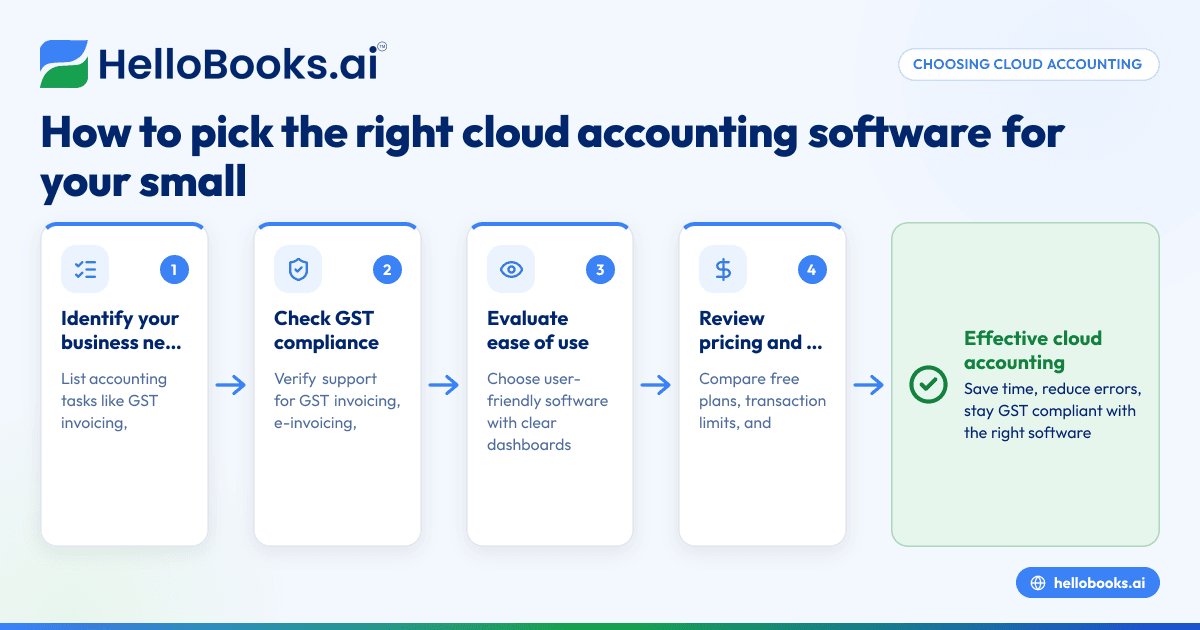
- Identify your business needs: List the accounting functions you want to manage, such as GST invoicing, bank statement reconciliation, expense tracking, inventory management, or financial reporting. Determine if you need multi-user access or integration with other tools.
- Check GST compliance features: Verify that the software supports GST invoicing, e-invoicing if applicable, and filing of GSTR-1 and GSTR-3B returns, essential for Indian businesses.
- Evaluate ease of use: Choose software that is user-friendly for both you and your accountant, with clear dashboards and simple navigation.
- Review pricing and plans: Compare pricing models including free plans or trials, transaction limits, and costs for additional users or features. Consider how pricing will scale as your business grows.
- Assess data security and backups: Confirm that the provider has strong data security measures and performs regular backups to prevent data loss.
- Look for customer support: Check whether support is available via chat, email, or phone and how responsive it is to queries.
- Test with a trial or demo: Use free trials or demos to see if the software fits your workflow and meets your requirements.
Example (fictional figures)
On 01/04/2024, a small retailer with monthly sales of ₹1,00,000 wants to select cloud based accounting software for GST compliance, invoicing, and bank reconciliation.
Step 1: Needs - GST invoicing, filing GSTR-1 and GSTR-3B, bank reconciliation.
Step 2: Software A offers these features with a free plan allowing 200 transactions per year.
Step 3: Software B offers similar features but charges ₹1,000 annually (assumed illustrative figure).
Calculation for Software A (free plan):
₹0 (no cost for up to 200 transactions)
Calculation for Software B:
₹1,000 × 1 year = ₹1,000 annually
Since the retailer’s monthly sales generate fewer than 200 transactions per year (₹1,00,000 × 12 = ₹12,00,000 annual turnover, assuming one transaction per sale), Software A’s free plan is cost-effective initially.
Common mistakes
- Ignoring GST compliance features: Selecting software without proper GST invoicing and filing support risks incorrect returns. Always verify GST return filing capabilities.
- Overlooking transaction limits on free plans: Free cloud accounting software often limits the number of transactions. Check these limits to avoid unexpected costs.
- Choosing software that’s too complex or too simple: The software should match your business size and accounting knowledge. Avoid overly complex tools without adequate support or overly simple ones lacking critical features.
- Neglecting data backup and security: Ensure the provider uses strong security protocols and automatic backups to safeguard your financial data.
- Not testing before buying: Avoid purchasing without trying the software first. Trials help identify usability issues and feature gaps.
- Forgetting integration needs: If you use CRM or inventory software, check if the accounting software integrates smoothly to avoid duplicate data entry.
Frequently asked questions
What is the difference between cloud based and desktop accounting software?
Cloud based software is accessed via the internet and stores data on remote servers, allowing access from any device. Desktop software installs on your computer and stores data locally, limiting access to that device.
Are there free cloud accounting software options for small businesses?
Yes, some providers offer free plans with limited transactions or features, suitable for very small businesses. As your business grows, you may need to upgrade. See options listed under accounting software for small business.
Can cloud accounting software handle GST compliance in India?
Many cloud accounting software options support GST invoicing, e-invoicing, and filing of GSTR-1 and GSTR-3B returns. Confirm these features before choosing. Learn more at accounting software in India.
What is AI based accounting software and should I consider it?
AI based accounting software uses artificial intelligence to automate data entry, reconciliation, and error detection. It can save time but may cost more. Evaluate if the benefits justify the investment. See our guide on AI bookkeeping.
Does cloud accounting software support project based accounting?
Some cloud accounting software includes features for project tracking, budgeting, and billing. If your business is project-driven, look specifically for cloud project accounting software.
Key takeaways
- Cloud based accounting software enables remote access and automates bookkeeping tasks.
- Confirm GST compliance features like invoicing and return filing before choosing.
- Evaluate pricing, transaction limits, ease of use, and support availability.
- Use free trials to test software suitability before purchasing.
- Avoid mistakes such as ignoring GST support and neglecting data security.
Choosing the right cloud based accounting software helps you save time, reduce errors, and stay GST compliant. To begin, explore options and Start on the Free plan (200 transactions a year, GSTR-1 and 3B filing for one GSTIN).