


Key takeaways
What this article covers, in order:
- Why this comes up / what goes wrong
- Step-by-step
- Example (fictional figures)
- Common mistakes
- Doing this in HelloBooks
- Frequently asked questions
Bank feed software is a tool that automatically imports your bank transactions into your accounting software, reducing the need for manual entry and minimizing errors. It helps small business owners keep their books accurate and up to date by matching bank transactions to invoices, expenses, and ledger entries.
Why this comes up / what goes wrong
Small business owners in India often maintain their financial records manually using spreadsheets, Tally, or bill books. Entering bank transactions manually from bank statements is time-consuming and prone to errors, especially when reconciling payments received and made with invoices and bills. This manual process can delay GST filing and financial reporting, and errors can lead to incorrect tax calculations or missed ITC claims.
Because direct live bank feeds are rarely available in India, many software solutions require uploading bank statements in PDF, CSV, or Excel formats. Business owners look for bank feed software that can simplify this upload process and automatically reconcile transactions, saving time and improving accuracy.
Step-by-step
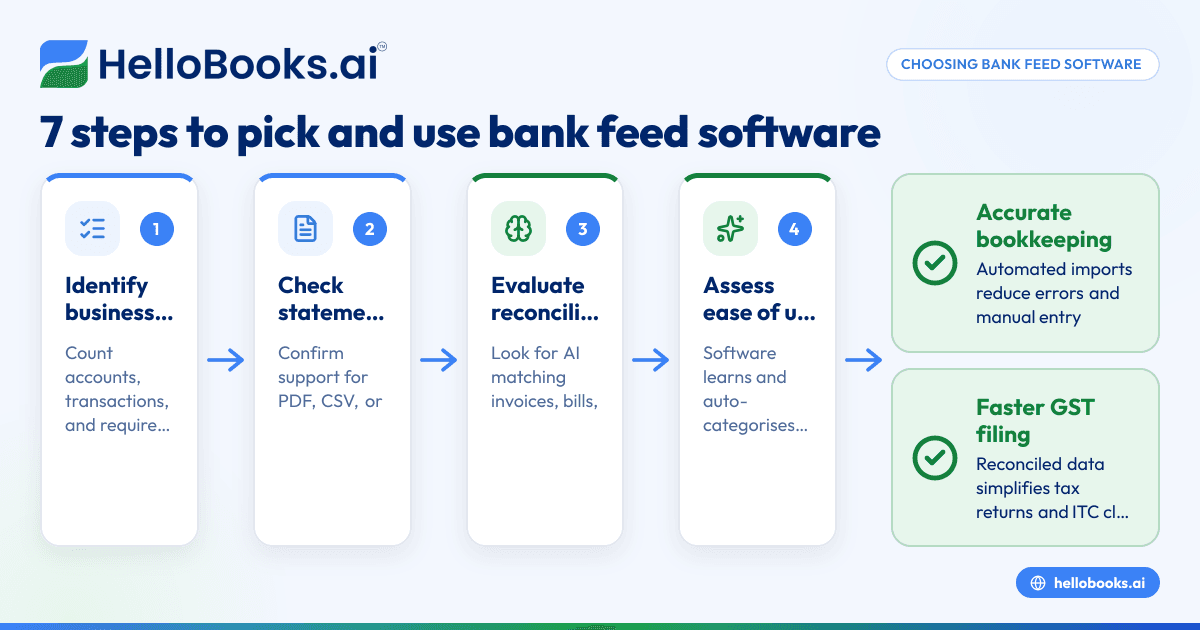
- Identify your business needs: Count your bank accounts and estimate your monthly transaction volume. Determine if you need just bank feed functionality or a full accounting solution with GST compliance features.
- Check supported bank statement formats: Confirm the software accepts your bank's statement formats—PDF, CSV, or Excel are common. Since live feeds are uncommon in India, statement upload is the standard.
- Evaluate reconciliation capabilities: Look for AI or automated matching that compares bank transactions to your invoices, bills, and ledger entries by date, amount, and vendor details.
- Assess ease of use: The software should reduce manual corrections by learning from your inputs and auto-categorising transactions accurately.
- Confirm data security: Ensure the software does not require your online banking login credentials and handles your data securely.
- Verify GST compliance support: If you file GST, check if the software supports GST invoicing, GSTR-1 and GSTR-3B filing, and integrates bank data for ITC reconciliation.
- Trial and support: Use free trials to test the software’s features and confirm available customer support.
Example (fictional figures)
A small Delhi-based retail shop owner uploads the bank statement for March 2024 dated 31/03/2024. It contains these transactions:
- Customer payment received: ₹1,20,000 on 15/03/2024
- Payment to supplier: ₹50,000 on 20/03/2024
- Bank charges: ₹500 on 31/03/2024
The software matches these transactions as follows:
Receipt match:
₹1,20,000 (bank) = ₹1,20,000 (invoice)
Payment match:
₹50,000 (bank) = ₹50,000 (purchase bill)
Bank charges categorised as expense:
₹500 (bank) = ₹500 (expense)
Reconciliation summary:
2 transactions matched automatically
1 transaction flagged for manual review
This reduces manual entry and speeds up reconciliation.
Common mistakes
- Ignoring statement format compatibility: Always confirm your bank’s statement formats are supported to avoid upload failures.
- Expecting live bank feeds in India: Prevent disappointment by verifying if the software uses bank statement uploads instead.
- Skipping reconciliation review: Regularly check exceptions and mismatches to keep your books accurate.
- Not verifying GST compliance: Ensure the software supports your GST filing requirements to avoid compliance issues.
- Neglecting data security: Choose software that does not ask for online banking login credentials to protect your financial data.
- Overlooking software usability: Select software that is easy to use and reduces manual corrections through AI or automation.
For more on bookkeeping software options, see our guides on accounting software for small business and accounting software in India.
Doing this in HelloBooks
HelloBooks lets you upload bank statements in PDF, CSV, or Excel formats from any Indian bank. Its AI reconciliation feature automatically matches transactions to ledger entries by date, amount, memo, and vendor pattern, without requiring your online banking login. High-confidence matches clear automatically, while exceptions go to a review queue. The AI learns from your corrections to improve accuracy over time. This helps small business owners save time and reduce errors. Learn more at bank reconciliation software.
Frequently asked questions
What is bank feed software and how does it work?
Bank feed software automates the import of bank transactions into your accounting system by uploading bank statements or through direct feeds. It matches these transactions to invoices, bills, and expenses, reducing manual data entry and errors.
Does bank feed software support Indian banks?
Most Indian accounting software supports uploading bank statements in PDF, CSV, or Excel formats from Indian banks, as direct live feeds are uncommon. Always confirm that your bank’s statement format is supported.
Can bank feed software help with GST filing?
Yes, many bank feed-enabled accounting solutions support GST invoicing and filing, helping reconcile ITC by matching bank payments to supplier invoices, which simplifies GSTR-1 and GSTR-3B filing.
How secure is bank feed software?
Reputable software does not require your online banking login credentials. Instead, you upload bank statements manually, which reduces security risks.
What should I look for when choosing bank feed software?
Look for compatibility with your bank statement format, AI or automated reconciliation features, ease of use, GST compliance support, and strong data security.
Can I use bank feed software if I currently use Tally or Excel?
Yes, many bank feed solutions complement existing bookkeeping methods like Tally or Excel by simplifying bank reconciliation and reducing manual data entry. For more details, see accounting software for small business.
Key takeaways
- Bank feed software automates importing bank transactions, reducing manual work and errors.
- In India, bank feed software mainly works by uploading bank statements, not live feeds.
- AI reconciliation matches transactions to invoices and expenses, improving accuracy.
- Confirm GST compliance and data security before choosing software.
- HelloBooks supports bank statement upload and AI reconciliation without requiring banking login credentials.
- Trial software to ensure it supports your bank formats and business needs.
Start simplifying your bookkeeping by trying HelloBooks. You can Start on the Free plan (200 transactions a year, GSTR-1 and 3B filing for one GSTIN) today.
For more on managing your books, see our guides on accounting software in India and bank reconciliation.


