


Key takeaways
What this article covers, in order:
- Why this comes up / what goes wrong
- Step-by-step
- Example (fictional figures)
- Common mistakes
- Doing this in HelloBooks
- Frequently asked questions
Accounting software with stock control integrates your financial records with inventory management, automatically updating stock quantities and values with every sale or purchase. This avoids the need for separate stock registers or manual reconciliation, ensuring your closing stock figure is always current and accurate.
Why this comes up / what goes wrong
Many small businesses in India still maintain accounting records in spreadsheets, Tally, or physical bill books while tracking stock separately in registers or manually. This separation causes delays and errors when reconciling stock with accounting data, leading to inaccurate profit calculations and stock management issues like stockouts or overstocking. As businesses grow, the complexity of managing GST compliance alongside inventory increases, making integrated software essential. Business owners search for accounting software with stock control to reduce manual data entry, improve accuracy, and save time.
Step-by-step
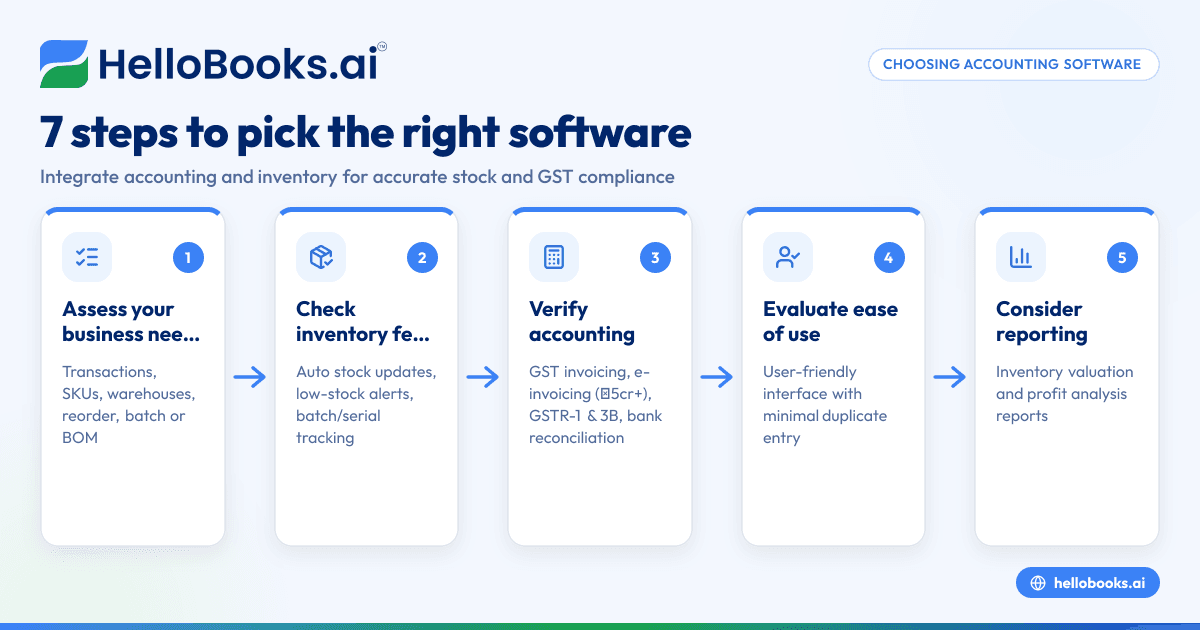
- Assess your business needs: Identify how many transactions you process monthly, the number of SKUs and variants you handle, and whether you have multiple warehouses. Consider if you require features like reorder points, batch or lot tracking, or bills of materials for manufacturing.
- Check inventory features: Ensure the software updates stock automatically with every sale and purchase. Look for support of multiple units of measure, alerts for low stock, stock transfers, and if applicable, bills of materials and batch or serial tracking.
- Verify accounting capabilities: Confirm the software supports GST invoicing, e-invoicing if your turnover exceeds ₹5 crore, GSTR-1 and GSTR-3B filing, and bank statement reconciliation. Integration between accounting and inventory is crucial for accuracy.
- Evaluate ease of use: The software interface should be user-friendly for you or your accountant, with minimal duplicate data entry.
- Consider reporting: Check if the software provides financial reports that include inventory valuation and profit analysis to help with business decisions.
- Review support and updates: GST rules and business requirements change frequently. Choose software with regular updates and reliable customer support.
- Test with a trial or demo: Use sample data to verify how well stock and accounting data sync and how reports reflect your business.
Example (fictional figures)
On 01/04/2024, a small electronics retailer buys 10 smartphones at ₹15,000 each and sells 6 at ₹18,000 each. Assume GST is 18% (9% CGST + 9% SGST).
Purchase invoice:
Cost of 10 smartphones = ₹15,000 × 10 = ₹1,50,000
GST on purchase = ₹1,50,000 × 18% = ₹27,000
Total purchase value = ₹1,50,000 + ₹27,000 = ₹1,77,000
Sale invoice:
Sale of 6 smartphones = ₹18,000 × 6 = ₹1,08,000
GST on sale = ₹1,08,000 × 18% = ₹19,440
Total sale value = ₹1,08,000 + ₹19,440 = ₹1,27,440
Stock after sale:
Opening stock = 0
Add purchase = 10 units
Less sale = 6 units
Closing stock = 10 - 6 = 4 units
Closing stock value:
4 smartphones × ₹15,000 = ₹60,000
This example shows how stock quantity and value update with each transaction, ensuring accurate accounting and inventory control.
Common mistakes
- Using separate systems for accounting and stock: This causes mismatches and extra reconciliation work. Prevent this by using integrated software that keeps data synced.
- Ignoring stock valuation in financial reports: Without updated stock values, profit and loss statements are inaccurate. Choose software that updates stock with each transaction.
- Not setting reorder points: Leads to stockouts or excess stock. Select software with low-stock alerts to maintain optimal inventory.
- Overlooking GST compliance: Inventory affects taxable supplies and GST filing. Ensure your software supports GST invoicing, e-invoicing, and returns filing.
- Failing to train users: Incorrect data entry can corrupt records. Provide proper training or choose user-friendly software.
- Neglecting to test software before purchase: This can lead to choosing software that doesn’t fit your business needs. Always test with your own data.
Doing this in HelloBooks
HelloBooks offers inventory management where stock moves automatically with every sale and purchase, so the closing stock figure is current without a separate register. It supports items, variants, units of measure, bills of materials, and stock transfers. Reorder points and low-stock alerts help manage inventory efficiently. For more details, see inventory management.
Frequently asked questions
What is accounting software with inventory control?
It is software that combines bookkeeping and inventory tracking, automatically updating stock levels when you record sales or purchases. This integration reduces manual work and errors.
Can accounting software handle GST compliance and stock control together?
Yes. Modern software for small businesses in India supports GST invoicing, e-invoicing (mandatory if turnover exceeds ₹5 crore), GSTR-1 and GSTR-3B filing, along with inventory management to keep your tax and stock data aligned.
How do I choose accounting software for small business with stock control?
Look for features like automatic stock updates, GST compliance, ease of use, and reporting. Testing software with your data helps ensure it fits your business needs. See our guide on accounting software for small business.
Is HelloBooks suitable for Indian small businesses needing stock control?
Yes, HelloBooks integrates accounting and inventory management, updating stock with every transaction and supporting GST compliance. Learn more on HelloBooks for India.
What are the benefits of accounting software with stock control over separate systems?
Integrated software eliminates duplicate data entry, reduces errors, provides real-time inventory valuation, and simplifies GST filing by linking stock and sales.
Key takeaways
- Accounting software with stock control automatically updates inventory with every transaction, keeping your records accurate.
- It reduces manual reconciliation and improves accuracy in profit and stock reports.
- Important features include GST invoicing, reorder alerts, support for multiple item variants, and batch tracking.
- Testing software with your business data ensures it meets your specific needs.
- HelloBooks offers inventory management that keeps stock current without a separate register.
Start managing your accounts and stock together efficiently. Start on the Free plan (200 transactions a year, GSTR-1 and 3B filing for one GSTIN).


