


Key takeaways
What this article covers, in order:
- Why this comes up / what goes wrong
- Step-by-step
- Example (fictional figures)
- Common mistakes
- Doing this in HelloBooks
- Frequently asked questions
Accounting software with bank statement upload and AI reconciliation helps Indian small businesses automate bank transaction entry without manual typing. Since direct live bank feeds are not widely available in India, uploading bank statements in PDF, CSV, or Excel format and using AI to match transactions is the practical alternative. This article covers why business owners seek such software, step-by-step evaluation, a worked example, common mistakes, and how HelloBooks supports this process.
Why this comes up / what goes wrong
Small business owners in India often maintain books manually in Excel, Tally, or bill books. They spend many hours entering bank transactions by hand, which is time-consuming and prone to errors. Manual reconciliation of bank statements with invoices and expenses can result in missed entries, duplicates, or delayed GST compliance. Owners searching for "accounting software with bank feeds" want to reduce this effort. However, direct live bank feeds from banks to accounting software are rarely available in India. Instead, uploading monthly bank statements and using AI to reconcile transactions is the common solution.
Step-by-step
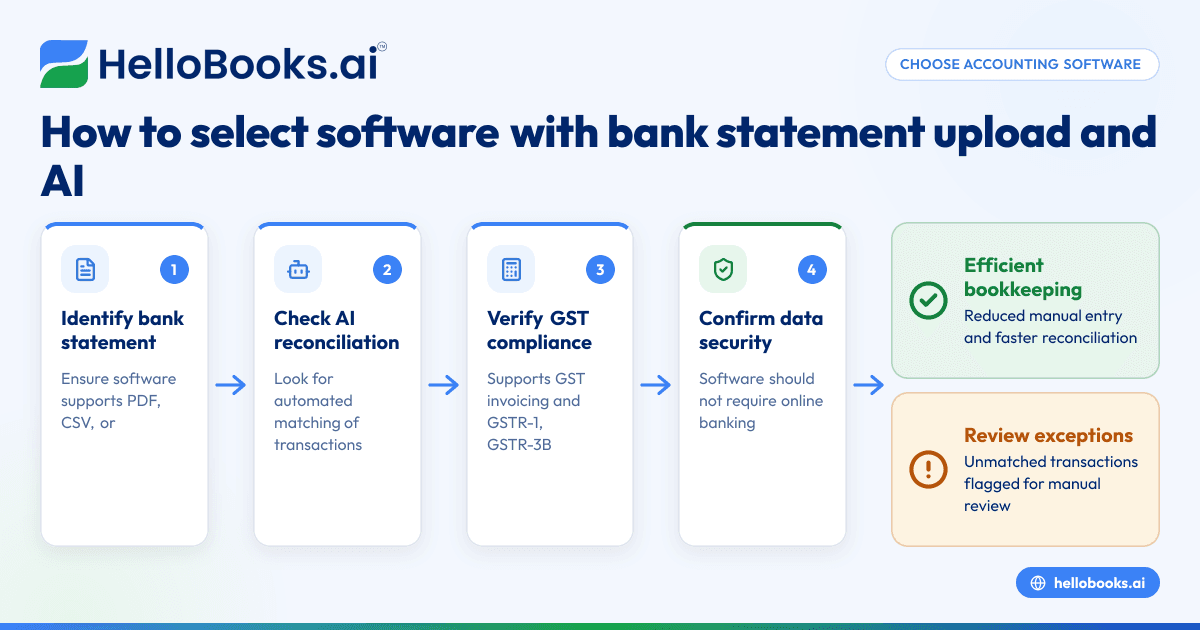
- Identify your bank statement formats: Confirm which formats your bank provides (PDF, CSV, Excel) and ensure the software supports them.
- Check reconciliation capabilities: Look for AI or automated matching features that link bank transactions to invoices, expenses, or ledger entries without manual re-entry.
- Verify GST compliance features: The software should support GST invoicing, GSTR-1 and GSTR-3B filing, and facilitate reconciliation with GST returns.
- Confirm data security: Ensure the software does not require your online banking login and uses secure upload methods.
- Evaluate the user interface: Choose software with simple upload and exception handling workflows to reduce errors and save time.
- Compare pricing and transaction limits: Make sure the plan fits your transaction volume and GST filing needs.
- Test with sample statements: Upload sample bank statements to check matching accuracy before committing.
For more on choosing software for your business, see accounting software for small business and accounting software in India.
Example (fictional figures)
A retail shop owner uploads a bank statement for March 2024 containing these transactions:
- Receipt from customer invoice on 05/03/2024: ₹1,20,000
- Payment to supplier on 10/03/2024: ₹48,000
- Bank charges on 15/03/2024: ₹500
The AI reconciliation matches transactions as follows:
₹1,20,000 (receipt) = ₹1,20,000 (invoice amount)
₹48,000 (payment) = ₹48,000 (supplier bill)
₹500 (bank charge) = ₹500 (bank expense)
This reduces manual entry and highlights any unmatched transactions for review.
Common mistakes
- Expecting live bank feeds in India: Many assume real-time feeds are available, but most Indian software uses statement uploads. Prevent this by confirming feed types before purchase.
- Ignoring bank statement format compatibility: Uploads fail if the software does not support your bank’s statement format. Check supported formats early.
- Not verifying reconciliation accuracy: Poor AI matching causes errors. Test with sample statements to ensure reliability.
- Overlooking GST compliance integration: Missing GST features mean extra work. Choose software that integrates bank statement reconciliation with GST filing.
- Neglecting data security: Sharing online banking credentials is risky. Use software that requires only statement uploads.
- Underestimating training needs: Users must learn reconciliation workflows. Provide adequate training or choose simpler interfaces.
For more on avoiding errors, see bank reconciliation.
Doing this in HelloBooks
HelloBooks allows you to upload monthly bank statements in PDF, CSV, or Excel from any Indian bank. Its AI parses and matches transactions against your ledger entries by date, amount, memo, and vendor patterns. High-confidence matches clear automatically, while exceptions go to a review queue. This reduces re-typing and speeds up reconciliation. HelloBooks never asks for your online banking login, ensuring data security. Learn more at HelloBooks for India.
Frequently asked questions
What is accounting software with bank feeds?
It is software that automates importing bank transactions into your accounting system. In India, this usually means uploading bank statements and using AI to reconcile transactions, rather than live feeds.
Are direct bank feeds available in India?
Direct live bank feeds are limited in India. Most software, including HelloBooks, uses bank statement uploads for reconciliation.
How does automated bank feed reconciliation work?
The software matches transactions from bank statements to invoices, expenses, or ledger entries using AI based on date, amount, and vendor patterns. High-confidence matches clear automatically.
Can I file GST returns using software with bank statement upload?
Yes, many accounting software solutions integrate GST invoicing and filing, including GSTR-1 and GSTR-3B, alongside bank statement reconciliation.
Is it safe to upload bank statements?
Uploading bank statements is secure since it does not require sharing your online banking credentials. Confirm the software provider follows good data security practices.
What should I consider before choosing accounting software with bank statement upload?
Check bank statement format support, reconciliation accuracy, GST compliance features, data security, user experience, and pricing.
For more, see accounting software for small business, accounting software in India, and bank reconciliation.
Key takeaways
- Indian small businesses mostly use bank statement uploads, not live feeds, for bank data integration.
- AI-powered reconciliation reduces manual data entry and errors.
- Verify software supports your bank’s statement format and GST filing.
- Avoid sharing online banking login; prefer statement uploads for security.
- Test reconciliation accuracy before committing to software.
- HelloBooks offers bank statement upload and AI reconciliation tailored for India.
Start simplifying your accounting with bank statement upload and AI reconciliation. Start on the Free plan (200 transactions a year, GSTR-1 and 3B filing for one GSTIN).


