


Key takeaways
What this article covers, in order:
- Why this comes up / what goes wrong
- Step-by-step
- Example (fictional figures)
- Common mistakes
- Frequently asked questions
- Key takeaways
Accounting software integration with Salesforce links your sales and customer data directly to your accounting system, reducing manual data entry and improving accuracy. This integration helps small businesses automate invoicing, track payments, and generate financial reports based on real-time sales information.
Why this comes up / what goes wrong
Many small business owners in India use Salesforce to manage customer relationships but keep their accounting records separately in spreadsheets, Tally, or standalone software. This disconnect causes duplicated effort, errors in data entry, delays in invoicing, and difficulty reconciling sales with accounts. As businesses grow, manual processes become time-consuming and prone to mistakes, prompting the search for accounting software integration with Salesforce.
Owners want to avoid:
- Re-entering sales data into accounting systems
- Missing invoices or delayed billing
- Difficulty tracking payments and outstanding amounts
- Complex GST compliance due to fragmented data
Integrating accounting software with Salesforce can resolve these issues by syncing data automatically, but choosing the right solution requires careful evaluation.
Step-by-step
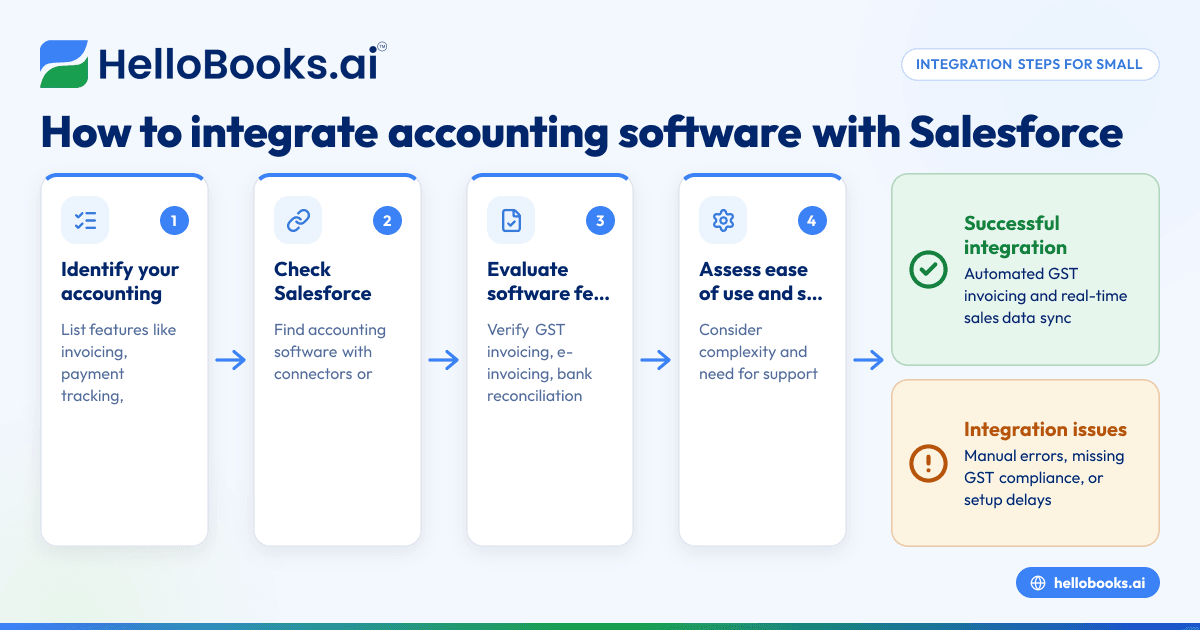
- Identify your accounting needs: List what you want from the integration, such as automated invoicing, payment tracking, GST compliance, or financial reporting.
- Check Salesforce compatibility: Verify which accounting software products support integration with Salesforce. Look for pre-built connectors or APIs that enable data exchange.
- Evaluate software features: Compare features like GST invoicing, e-invoicing, bank reconciliation, expense management, and report generation to ensure they meet your business requirements.
- Assess ease of use and setup: Consider how complex the integration process is and whether you need technical support or custom development.
- Review security and data privacy: Confirm that the software complies with Indian data protection laws and safeguards financial and customer data.
- Consider costs and scalability: Analyze pricing plans and whether the solution can grow with your business.
- Test with a trial or demo: Use free trials to validate the integration workflow and confirm it reduces manual work.
- Plan for implementation and training: Prepare your team for the new system and document processes to ensure smooth adoption.
For more on choosing the right system, see accounting software for small business and accounting software in India.
Example (fictional figures)
Consider "ABC Traders," a small wholesaler in Mumbai using Salesforce for sales and a separate accounting tool.
- On 15/04/2024, ABC Traders sells goods worth ₹1,20,000 to a registered customer.
- GST rate assumed: 18% (CGST 9% + SGST 9%)
Calculations:
Taxable value = ₹1,20,000
CGST = ₹1,20,000 × 9% = ₹10,800
SGST = ₹1,20,000 × 9% = ₹10,800
Total invoice value = ₹1,20,000 + ₹10,800 + ₹10,800 = ₹1,41,600
Without integration, the sales team enters the sale in Salesforce, and the accounting team manually creates the invoice and records GST.
With integration:
- The sale in Salesforce automatically generates the GST invoice in the accounting software.
- The invoice includes all mandatory fields such as supplier and recipient GSTIN, HSN codes, invoice number, date, and tax details per Rule 46 [cgst-rule-46/rule46-particulars].
- The system can generate an e-invoice with IRN and QR code if applicable [cgst-rule-46/rule46-qr-irn].
This saves time and reduces errors in tax filing and reconciliation.
Common mistakes
- Ignoring GST compliance in integration: Not all accounting software connected to Salesforce handle GST invoicing and e-invoicing properly. Prevent this by verifying GST features before purchase.
- Choosing software without Salesforce support: Some accounting tools lack official Salesforce connectors. Check compatibility to avoid costly custom integration.
- Underestimating setup complexity: Integration may require technical skills or vendor support. Plan for training and assistance.
- Neglecting data security: Financial and customer data must be protected. Confirm software security standards.
- Not testing before full rollout: Skipping trial runs can lead to workflow disruptions. Always test the integration with sample data.
- Overlooking scalability: Select software that can handle your growing transaction volume and GST compliance needs, such as quarterly filing under the QRMP scheme for turnovers up to ₹5 crore [qrmp-scheme/qrmp-eligibility-5cr].
Frequently asked questions
What accounting software is compatible with Salesforce?
Several accounting software products offer Salesforce integration through APIs or connectors. Popular options include cloud-based tools with GST compliance features. Check the vendor’s documentation to confirm Salesforce compatibility.
Does Salesforce have its own accounting software?
Salesforce is primarily a CRM platform and does not provide built-in accounting software. Businesses typically integrate third-party accounting solutions to handle finance and GST compliance.
How does integration help with GST compliance?
Integration ensures that sales data flows directly into your accounting system, which can generate GST-compliant invoices, e-invoices with IRN and QR codes, and assist in filing GSTR-1 and GSTR-3B returns accurately.
What should I ask vendors before buying?
Confirm Salesforce compatibility, GST invoicing and e-invoicing support, ease of integration, security features, customer support, and pricing. Also, check if the software supports Indian tax rules and reporting.
Can I use Excel with Salesforce for accounting?
Excel is commonly used but lacks automation and GST compliance features. Integration with accounting software reduces manual entry and errors compared to using Excel alone.
For more details on suitable software, visit accounting software for small business.
Key takeaways
- Integration connects Salesforce sales data directly with accounting software, saving time and reducing errors.
- Verify GST compliance features like invoicing, e-invoicing, and tax return filing before choosing software.
- Check for official Salesforce connectors or APIs to ensure smooth data exchange.
- Plan for setup complexity, data security, and scalability to support your growing business.
- Test the integration thoroughly before full implementation.
Start your integration journey with confidence and explore options that fit your needs.
To begin, try HelloBooks’ free plan with 200 transactions a year and GSTR-1 and 3B filing for one GSTIN at Start on the Free plan (200 transactions a year, GSTR-1 and 3B filing for one GSTIN).


