


Key takeaways
What this article covers, in order:
- Why this comes up / what goes wrong
- Step-by-step
- Example (fictional figures)
- Common mistakes
- Frequently asked questions
- Key takeaways
Accounting software consulting means helping consulting firms or their accountants choose accounting software tailored to their business needs. This includes managing client projects, billing, GST compliance, and financial reporting efficiently. This article explains why consulting businesses need such advice, the step-by-step process to select software, a detailed example, common pitfalls to avoid, frequently asked questions, and key takeaways.
Why this comes up / what goes wrong
Consulting businesses such as IT services firms in Chennai, digital agencies in Pune, or consulting practices in Noida often struggle with accounting software selection because their requirements differ from product-based businesses. They need software that handles project-based billing, multi-entity accounting if they operate multiple offices, and GST compliance specific to service providers. Many still use Excel, Tally, or manual bill books, leading to errors, time-consuming reconciliation, and difficulty in filing GST returns like GSTR-1 and GSTR-3B.
Without expert guidance, consulting firms may pick software that lacks features like multi-client billing, expense tracking by project, or easy integration with bank statements. This leads to inefficient bookkeeping, delayed invoicing, and compliance risks.
Step-by-step
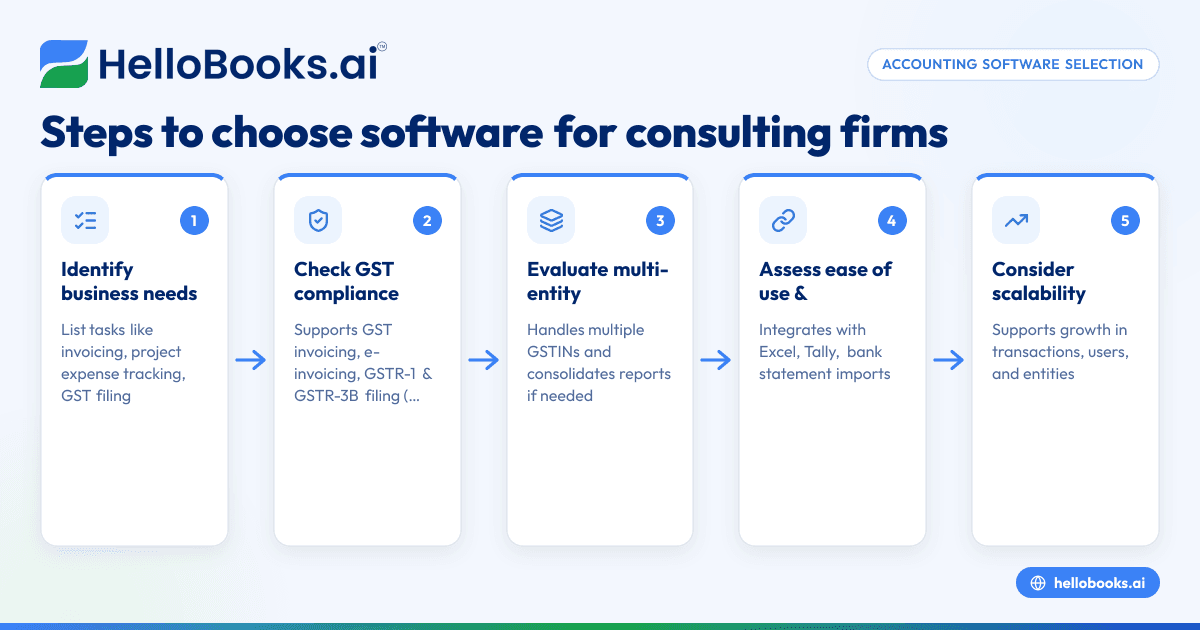
- Identify your business needs clearly: List your key accounting tasks such as invoicing clients, tracking expenses per project, managing multiple entities if applicable, and GST filing. Check if you need features like time tracking or inventory (usually not for consulting).
- Check GST compliance features: Ensure the software supports GST invoicing, e-invoicing if your turnover exceeds the threshold, and filing of GSTR-1 and GSTR-3B returns. Also, verify if it supports reconciliation with GSTR-2B and bank statements.
- Evaluate multi-entity and multi-currency support: If your consulting firm operates in multiple locations or countries, check if the software handles separate GSTINs and consolidates reports.
- Assess ease of use and integration: Choose software that integrates well with your existing tools like Excel or Tally, or offers easy data import/export. Check if it supports uploading bank statements for reconciliation.
- Consider scalability: Pick software that can grow with your business, supporting more transactions, users, or entities as needed.
- Request demos and trial versions: Test shortlisted software with your actual data to check usability and feature fit.
- Compare pricing and support: Review costs and availability of customer support, especially for GST compliance queries.
- Make an informed decision: Choose the software that best balances your needs, ease of use, compliance, and cost.
For more on choosing software, see accounting software for small business and accounting software in India.
Example (fictional figures)
Consider a digital agency in Pune with the following monthly transactions in April 2024:
- Client invoicing: ₹5,00,000
- Expenses on software subscriptions: ₹50,000
- Salaries paid: ₹1,50,000
- GST collected (assumed 18% on services): ₹5,00,000 × 18% = ₹90,000
Steps for accounting:
- Record sales invoice: ₹5,00,000
- Record expenses: ₹50,000
- Record salaries: ₹1,50,000
- Calculate GST payable:
GST on sales = ₹5,00,000 × 18% = ₹90,000
Assume input tax credit on expenses (software subscription GST at 18%):
Input GST = ₹50,000 × 18% = ₹9,000
Net GST payable = ₹90,000 - ₹9,000 = ₹81,000
- File GSTR-1 with sales and GSTR-3B with net GST payable.
This example shows the need for software that tracks invoices, expenses, and GST calculations automatically.
Common mistakes
- Choosing software without GST compliance: Prevent by verifying that the software supports GST invoicing and filing GSTR-1 and GSTR-3B returns.
- Ignoring multi-entity needs: If operating in multiple states or entities, ensure the software can handle multiple GSTINs and consolidate reports.
- Overlooking integration capabilities: Avoid software that cannot import/export data easily or work with your bank statements.
- Not testing usability: Prevent by using trial versions to check if the software suits your workflow.
- Neglecting scalability: Choose software that can handle growth in transactions and users.
- Underestimating support needs: Select vendors who provide good customer service for GST and accounting queries.
Refer to IT and professional services for more on software suited to consulting firms.
Frequently asked questions
What is the best accounting software for consulting firms?
The best software depends on your specific needs like GST compliance, multi-entity handling, and project billing. Popular options support GST invoicing, GSTR-1 and GSTR-3B filing, and bank reconciliation. Testing software with your data helps identify the best fit.
Does accounting software for consulting firms support multi-entity accounting?
Many advanced accounting software options support multi-entity accounting, allowing you to manage separate GSTINs and financials for different branches or subsidiaries, consolidating reports as needed.
How does accounting software help with GST compliance for consulting businesses?
It automates GST invoicing, calculates GST on sales and expenses, prepares GSTR-1 and GSTR-3B returns, and helps reconcile input tax credit with GSTR-2B, reducing errors and saving time.
Can I use Tally or Excel for consulting accounting?
Yes, many consulting firms use Tally or Excel initially, but these may require manual entry and reconciliation, increasing error risk. Dedicated accounting software can automate many tasks and improve accuracy.
What questions should I ask when choosing accounting software consulting services?
Ask if the consultant understands your industry needs, GST compliance requirements, software features like multi-entity support, integration capabilities, scalability, and customer support.
Key takeaways
- Identify your consulting business’s specific accounting and GST needs before selecting software.
- Ensure the software supports GST invoicing, e-invoicing if applicable, and GSTR-1 and GSTR-3B filing.
- Check for multi-entity accounting and easy integration with your existing tools.
- Test software usability with your actual data before committing.
- Avoid common mistakes by verifying compliance features and scalability.
- Ask consulting software providers about their understanding of IT and professional services requirements.
Start choosing your accounting software with confidence. Start on the Free plan (200 transactions a year, GSTR-1 and 3B filing for one GSTIN) to explore features and get comfortable with the process.


