


Key takeaways
What this article covers, in order:
- Why this comes up / what goes wrong
- Step-by-step
- Example (fictional figures)
- Common mistakes
- Frequently asked questions
- Key takeaways
Accounting software is a digital tool that helps small business owners record, manage, and report their financial transactions, including invoicing, expenses, bank reconciliation, and GST compliance. It replaces manual bookkeeping methods like spreadsheets, Tally, or bill books, reducing errors and saving time.
Why this comes up / what goes wrong
Many small businesses in India start by maintaining accounts manually using spreadsheets or traditional methods. As they grow, this approach becomes inefficient and error-prone. Common issues include delays in bank statement reconciliation, incorrect GST filings, missed deadlines, and difficulty in generating timely financial reports. These problems often lead business owners to search for accounting software that can simplify bookkeeping, automate GST invoicing and filing, and provide accurate financial insights. However, the wide range of available software options causes confusion about which product fits their needs best, what features to prioritise, and how to evaluate costs and benefits.
Step-by-step
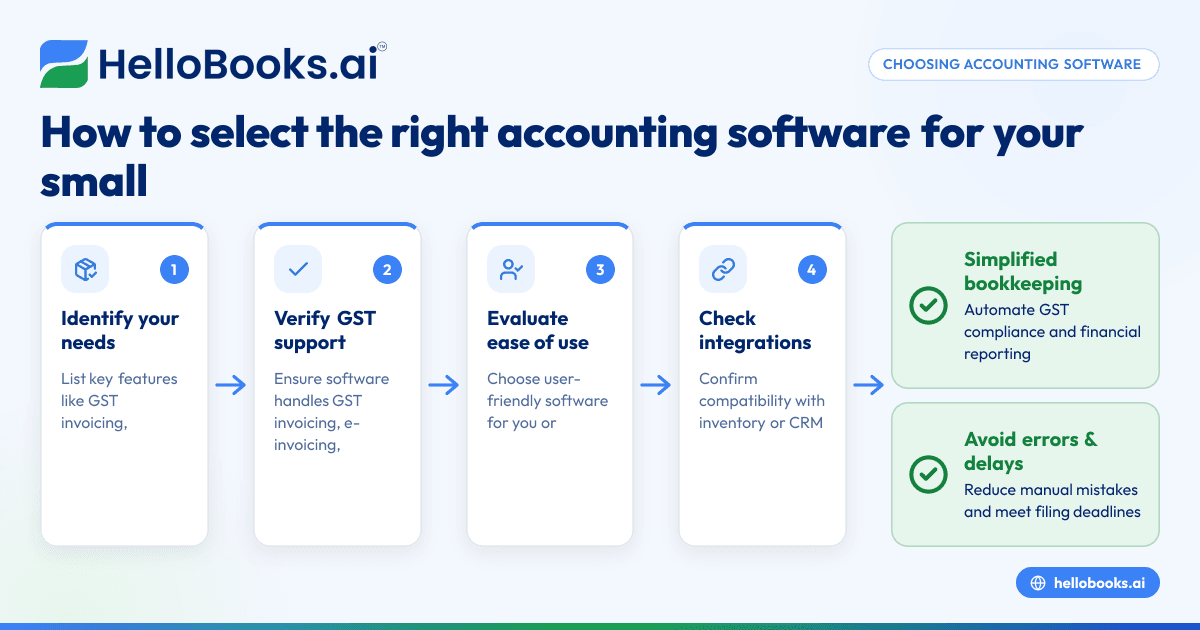
- Identify your business requirements: List the key features you need, such as GST-compliant invoicing, e-invoicing if applicable, bank statement reconciliation, expense tracking, inventory management, and financial reporting.
- Verify GST compliance support: Ensure the software supports GST invoicing, e-invoicing if your turnover requires it, and filing of GSTR-1 and GSTR-3B returns.
- Evaluate ease of use: Choose software with a user-friendly interface, especially if you or your accountant have limited technical skills.
- Check integration capabilities: If you use other tools like inventory management or CRM software, confirm that the accounting software can integrate or work alongside them.
- Assess data security and backup: Your financial data must be securely stored with automatic backups to prevent loss.
- Compare pricing and plans: Look for transparent pricing that fits your business size and transaction volume. Watch out for hidden charges.
- Decide between cloud or desktop software: Cloud accounting software allows access from anywhere with internet and automatic updates, while desktop software may be preferred if internet access is limited.
- Request demos and read reviews: Try demos to evaluate usability and reliability. Feedback from other users can provide practical insights.
For more details on software suited for small businesses, see accounting software for small business and learn about accounting software in India.
Example (fictional figures)
Consider "Anil's Electronics", a small retail business in Delhi tracking sales, purchases, and GST returns monthly for April 2024.
- Total sales: ₹75,00,000
- Assumed GST rate: 18%
- Input GST on purchases: ₹7,20,000
- Output GST collected: ₹13,50,000
Calculations:
Output GST = ₹75,00,000 × 18% = ₹13,50,000
GST payable after input credit = Output GST - Input GST
= ₹13,50,000 - ₹7,20,000 = ₹6,30,000
Anil needs accounting software that can generate GST-compliant invoices, track these amounts automatically, and prepare GSTR-1 and GSTR-3B returns for timely filing.
Common mistakes
- Choosing software without GST features: Confirm the software supports GST invoicing and return filing to avoid compliance issues.
- Ignoring scalability: Select software that can grow with your business to avoid switching later.
- Overlooking ease of use: Test the software or watch demos to ensure it is straightforward for you or your accountant.
- Neglecting data backup: Use software with automatic backups to prevent data loss.
- Not verifying integration options: Ensure compatibility with inventory or CRM tools; see inventory management.
- Failing to clarify pricing: Read pricing details carefully to avoid unexpected costs.
Frequently asked questions
What is the best accounting software for small business?
The best software depends on your business size, industry, and required features. Look for software that supports GST compliance, is easy to use, and fits your budget. Explore options tailored for small businesses in India at accounting software for small business.
Is free accounting software reliable for GST filing?
Free software can work for very small businesses with limited transactions but may lack full GST filing support or have restricted features. Verify if the free version supports GSTR-1 and GSTR-3B filing before relying on it.
What is cloud accounting software?
Cloud accounting software stores your financial data online, allowing access from any device with internet. It includes automatic updates and backups, making it convenient for businesses with multiple users or remote teams. Learn more about cloud options under accounting software in India.
Can accounting software help with inventory management?
Some accounting software includes inventory management features or integrates with dedicated inventory tools. This helps track stock levels, cost of goods sold, and simplifies financial reporting. Check integration options in your software choice; see inventory management.
Is AI accounting software beneficial for small businesses?
AI accounting software automates data entry, bank reconciliation, and error detection, reducing manual effort. For small businesses, this can save time and improve accuracy. Explore AI bookkeeping options at AI bookkeeping.
Key takeaways
- Identify your business needs before selecting accounting software.
- Ensure the software supports GST invoicing and filing for compliance.
- Prioritise ease of use and data security.
- Check integration with other business tools like inventory and CRM.
- Compare pricing plans to find a cost-effective solution.
- Consider cloud software for flexibility and automatic updates.
Choosing the right accounting software simplifies bookkeeping and GST compliance, freeing you to focus on growing your business.
Start your accounting journey by exploring options and Start on the Free plan (200 transactions a year, GSTR-1 and 3B filing for one GSTIN) to get hands-on experience with software tailored for Indian small businesses.


