Paperless kitchen tickets with station routing | HelloBooks POS A Kitchen Display System that replaces paper KOTs with live screens at every station. Orders fire from the till the instant they ring, route to the right station, and bump to Ready with colour-coded timers — dine-in, takeaway and Swiggy/Zomato in one queue.
Paperless kitchen tickets with station routing
A Kitchen Display System that replaces paper KOTs with live screens at every station. Orders fire from the till the instant they ring, route to the right station, and bump to Ready with colour-coded timers — dine-in, takeaway and Swiggy/Zomato in one queue.
Part of HelloBooks POS · Restaurant & kitchen
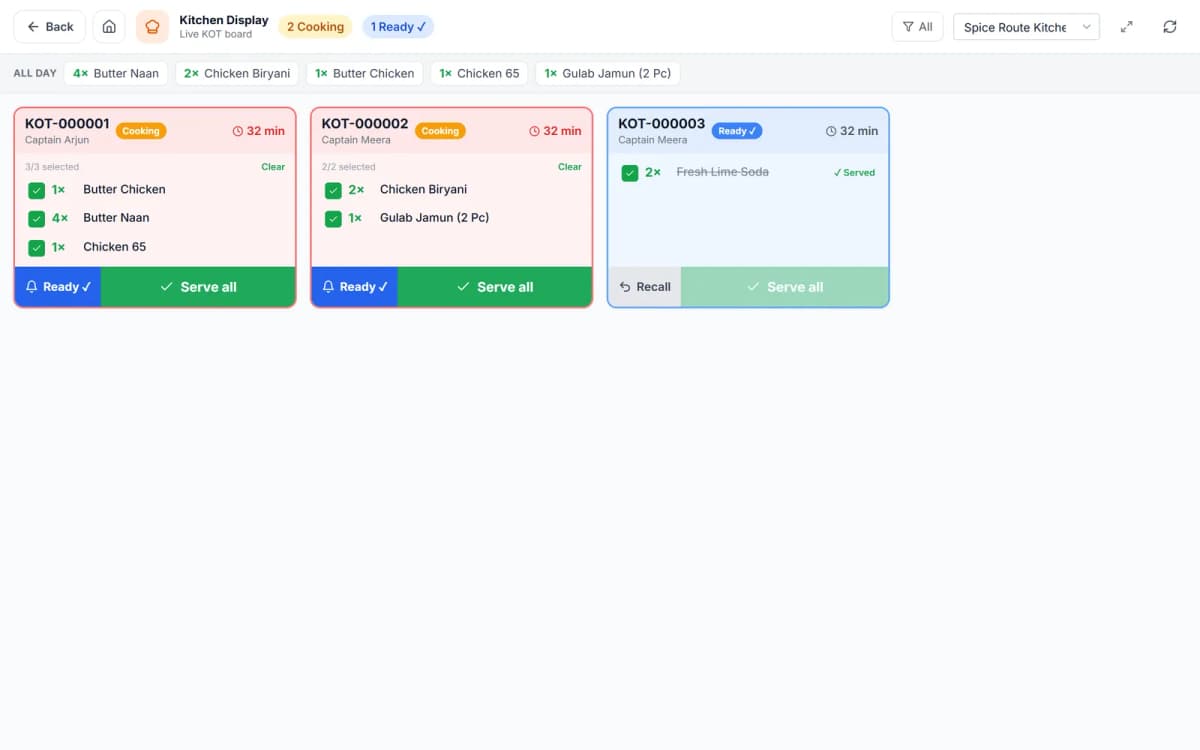
Paper kitchen tickets jam, tear, get lost and give you no data. A Kitchen Display System puts every order on a screen at the station that has to cook it, timestamps each ticket, and lets the line bump items as they go out. HelloBooks KDS is wired directly to the POS — no third-party bridge — so dine-in, takeaway and aggregator orders all flow into the same kitchen queue and every bump is auditable against the sale.
0
Paper KOTs
Multi
Station routing (grill, tandoor, bar)
All
Channels in one queue
Live
Colour-coded prep timers
Every detail, dialled in
Built for the till, validated against the canonical accounting engine — so every POS sale closes the books cleanly.
Station routing, not one big screen
Each menu item is tagged to a station — grill, tandoor, cold bar, dessert — so a mixed order splits automatically and each station only sees the lines it cooks. The expo screen shows the whole ticket for the pass.
- Per-item station tags
- Auto-split of a mixed order across stations
- Dedicated expo / pass view
- Course firing (appetiser → main → dessert)
Timers and bump, colour-coded
Every ticket carries a live timer that shifts from green to amber to red as it ages, so the line always knows what is running late. Cooks bump items to Ready; the counter or server sees the state instantly and calls the token or runs the plate.
- Green / amber / red ageing timers
- Item-level and ticket-level bump
- Ready state pushed back to till and token queue
- Recall a bumped ticket in one tap
Native to the POS, every channel
No middleware licence, no sync lag. Dine-in KOTs, QSR counter tokens and Swiggy/Zomato delivery orders all land in the same kitchen queue, and each bump is tied to the underlying order for reporting on prep time and throughput.
- Direct POS-to-KDS, no third-party bridge
- Dine-in, takeaway and aggregator in one queue
- Prep-time and throughput analytics
- Runs on any tablet or kitchen monitor
- Every order carries its channel tag (dine-in/takeaway/delivery/aggregator) so throughput and prep-time reporting can be sliced per channel, not just per station
Why teams move off legacy tills
- Paper KOTs printed and hand-carried
- One printer per kitchen, no routing
- No idea which ticket is running late
- Separate KDS licence bolted onto the POS
- Screens at every station, zero paper
- Item-level station routing
- Colour-coded ageing timers on every ticket
- KDS native to the POS, one system
Questions, answered
What is a Kitchen Display System?
A Kitchen Display System (KDS) replaces printed kitchen order tickets with digital screens at prep stations. Orders appear the moment they are rung, route to the correct station, carry prep timers, and are bumped to Ready when done — giving the kitchen speed and the manager data that paper never could.
Can I route items to different stations?
Yes. Each item is tagged to a station — grill, tandoor, cold bar, dessert — so a mixed order splits automatically and each station only sees its own lines, while an expo screen shows the full ticket for the pass.
Do delivery orders show on the KDS?
They do. Because the KDS is native to the POS, Swiggy and Zomato orders land in the same kitchen queue as dine-in and takeaway, so the line works one screen instead of juggling tablets.
What hardware does the KDS run on?
Any Android tablet or a monitor driven by a small PC works. There is no proprietary KDS box to buy and no separate licence — it is part of HelloBooks POS.
Related POS features
Ready to automate your books?
Let AI handle the bookkeeping and reclaim hours every month. Get started free — no credit card required.