Sub-10-second billing for quick-service counters | HelloBooks POS A quick-service layout built for token queues, combo meals and drive-in speed. Fire the kitchen, take a UPI tap, print the token and settle — in one flow that posts a GST-compliant journal the instant it rings, online or offline.
Sub-10-second billing for quick-service counters
A quick-service layout built for token queues, combo meals and drive-in speed. Fire the kitchen, take a UPI tap, print the token and settle — in one flow that posts a GST-compliant journal the instant it rings, online or offline.
Part of HelloBooks POS · Industry verticals
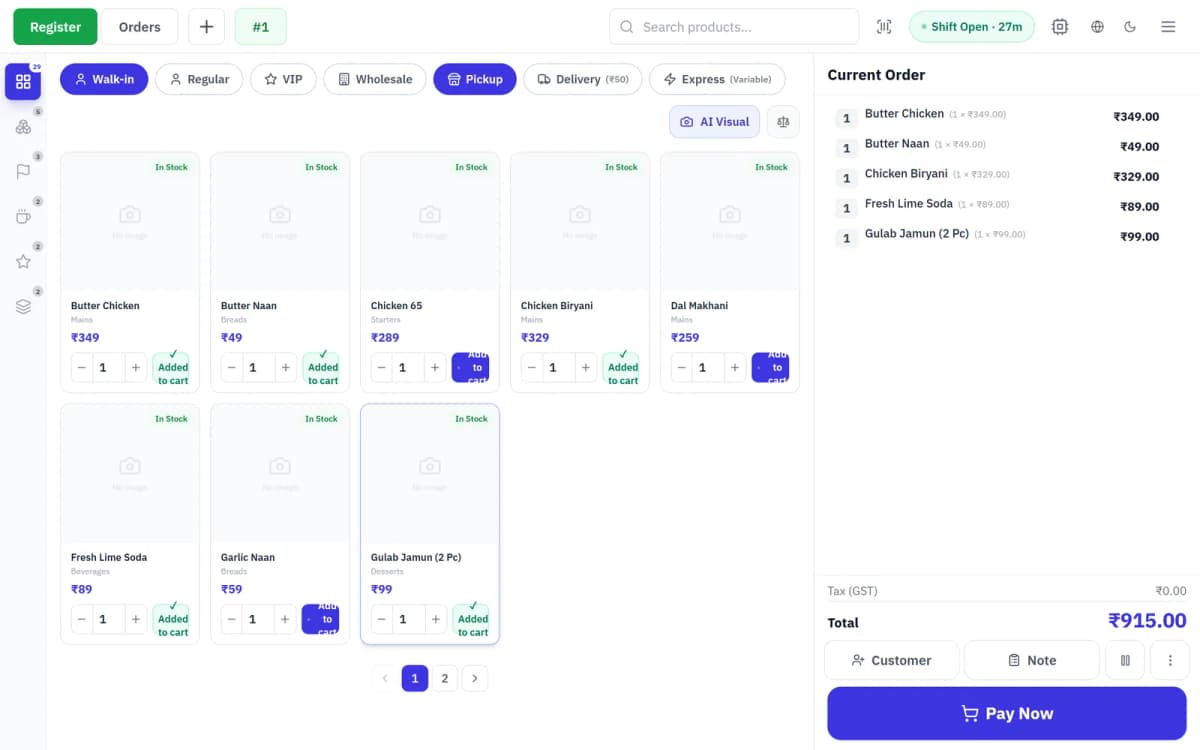
Quick-service is a speed game — the difference between a 6-second bill and a 20-second one is the length of your lunch-rush queue. HelloBooks ships a dedicated QSR layout: a quick-add pad, combo builder, token-queue display and one-tap kitchen firing, all on top of the same accounting engine that runs your books. Every order is a real journal, every GST line rolls into GSTR, and the counter keeps selling even when the internet drops.
<10s
Average bill time
100%
Offline-capable counter
2
Aggregators wired (Swiggy, Zomato)
0
End-of-day reconciliation
Every detail, dialled in
Built for the till, validated against the canonical accounting engine — so every POS sale closes the books cleanly.
Quick-add pad and combo builder
Cashiers ring the top-sellers from a fixed grid, stack modifiers (extra cheese, no onion, spice level) in a tap, and drop a full combo — burger + fries + drink — as one line with combo pricing. No hunting through menus mid-rush.
- Fixed quick-add grid for top-movers
- Modifier groups: size, add-ons, preparation
- Combo / meal-deal pricing as a single line
- Keyboard and touch parity for speed
Token queue and kitchen firing
Every counter order gets a pickup token that shows on a customer-facing queue display and fires straight to the Kitchen Display System. Kitchen bumps items to Ready; the counter calls the token. No paper KOTs, no shouting order numbers.
- Auto token number per order
- Customer-facing token queue screen
- One-tap fire to KDS with station routing
- Ready / bump state visible at the counter
GST, UPI and aggregators built in
CGST/SGST/IGST split per line, HSN inherited from the item master, round-off, and UPI QR at settle — all inherited from the HelloBooks compliance pipeline. Swiggy and Zomato orders drop into the same till so your online and counter sales reconcile as one.
- GST split + HSN + round-off automatic
- UPI QR + six EDC vendors at settle
- Swiggy & Zomato orders into one till
- Offline-first with idempotent replay
Why teams move off legacy tills
- Fast billing app, separate accounting export
- Aggregator orders keyed in by hand
- Paper KOT shuttled to the kitchen
- GST reconciled from a nightly dump
- Bill and journal are the same event
- Swiggy / Zomato land straight in the till
- Digital KDS firing with token queue
- GSTR-ready in real time
Questions, answered
How fast can a cashier bill an order?
The QSR layout is built for sub-10-second billing — a quick-add grid for top-sellers, combo lines in one tap, and UPI QR at settle. The bottleneck becomes the customer paying, not the software.
Does it handle combos and meal deals?
Yes. The combo builder lets you define a combo (for example burger + fries + drink) with its own price; it rings as a single line but still tracks each component for inventory and food-cost reporting.
Can Swiggy and Zomato orders come into the same system?
Yes — aggregator orders land in the same order inbox and settle against the same till, so your delivery and counter sales reconcile together with no double entry.
Does the counter keep working offline?
It does. Orders queue locally with an idempotent order ID and batch-sync on reconnect; the server rejects duplicates, so a lost signal never loses a sale or double-bills a customer.
Ready to automate your books?
Let AI handle the bookkeeping and reclaim hours every month. Get started free — no credit card required.