
Key takeaways
What this article covers, in order:
- Key takeaways
- Why are so many US small businesses moving to cloud accounting software?
- What benefits does AI accounting software add for small businesses?
- How secure is my financial data in cloud accounting?
- How easy is it to switch from desktop or spreadsheets to cloud accounting software?
- What accounting tasks can cloud software with AI features handle for my business?
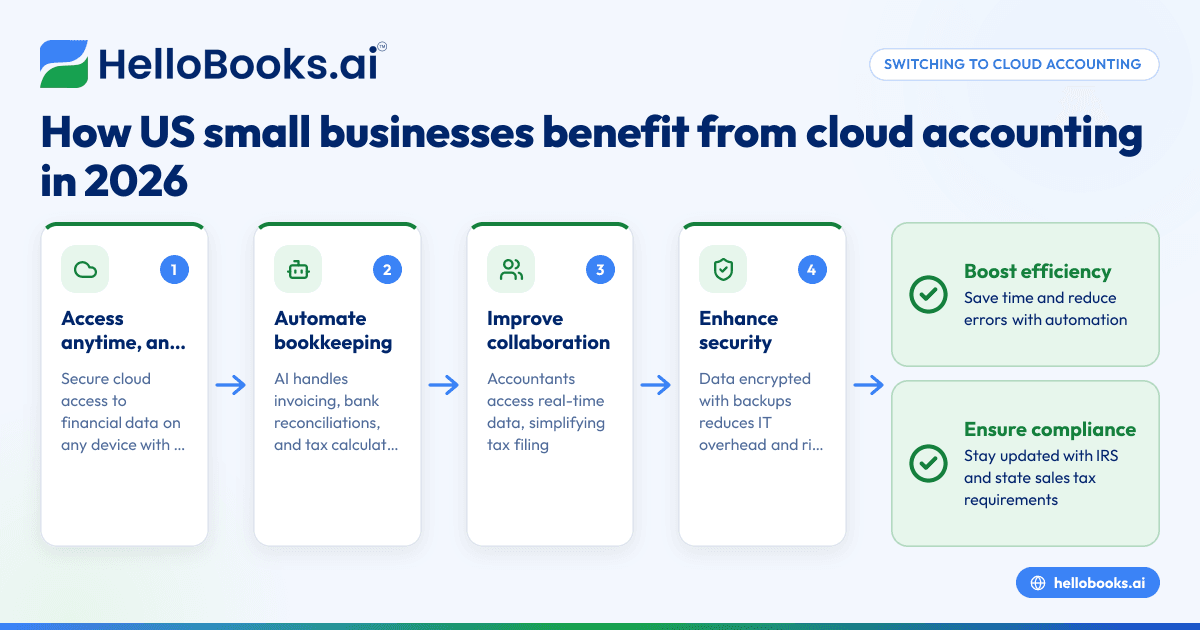
Switching to cloud accounting software means small businesses can access and manage their finances anytime, anywhere with secure, real-time data. AI accounting software automates routine tasks like invoicing, bank reconciliations, and tax calculations, saving time, reducing errors, and simplifying compliance for US businesses.
Key takeaways
- Cloud accounting software offers real-time access to financial data anytime, from any device with internet.
- Automation with features like AI accounting software reduces manual data entry and speeds up bookkeeping.
- Cloud solutions improve collaboration with accountants and streamline tax filing, including managing state sales tax.
- Security and data backups are handled by providers, reducing IT overhead for small businesses.
- Adopting cloud accounting prepares businesses for growing compliance demands and digital-first financial management.
- Transitioning from legacy software like spreadsheets or desktop QuickBooks is straightforward and scalable.
Why are so many US small businesses moving to cloud accounting software?
Cloud accounting software lets businesses securely access financial data online—from offices in Chicago to home offices in Houston. Unlike desktop programs, it works on browsers or apps. This flexibility means you can update invoices, check expenses, or approve payments in real time, wherever you are.
For small business owners who juggle multiple tasks, cloud accounting reduces tedious bookkeeping. It automates bank reconciliations by matching transactions automatically, reducing errors caused by manual entry. The software can generate financial reports on demand, helping you make timely decisions.
Using cloud software also simplifies working with your accountant. Instead of sending files back and forth, your accountant can log in directly or receive real-time updates. This speeds up tax preparation and supports meeting IRS and state sales tax requirements efficiently.
What benefits does AI accounting software add for small businesses?
AI accounting software automates complex tasks such as data categorization, invoice processing, and expense management. It learns from your business patterns to suggest categorizations and spot anomalies, improving accuracy.
This kind of automation frees up time traditionally spent on manual bookkeeping, eliminating repetitive tasks like entering transaction details or confirming payments. It also helps catch errors and inconsistencies before they become bigger problems, which is critical for compliance.
In US small businesses, AI-enabled features can speed up preparing 1099 forms or automating sales tax calculations, especially useful for businesses with multistate operations. This means less time worrying about tax code changes and more time focusing on growing your business.
How secure is my financial data in cloud accounting?
Cloud accounting providers use encryption and rigorous cybersecurity measures to protect your financial data. Unlike local desktop software, cloud data is stored in secure data centers with multiple backups to prevent loss from hardware failure or disasters.
In the United States, many providers also comply with relevant standards improving data security and privacy. Small business owners should review a provider’s security policies and ask about data encryption, access controls, and disaster recovery plans.
Using cloud software can reduce IT management overhead and risk, especially for businesses without dedicated IT staff. However, users should also maintain strong passwords and enable two-factor authentication for additional protection.
How easy is it to switch from desktop or spreadsheets to cloud accounting software?
Switching is simpler than many expect. Most cloud accounting tools allow importing data from spreadsheets or popular desktop software like QuickBooks. This helps migrate transactions, customer lists, and chart of accounts with minimal manual effort.
The cloud platform then automates ongoing data entry using bank feeds, receipt scanning, and AI-driven categorization, reducing future workload. Many providers offer onboarding support or tutorials to help users and their accountants get started.
Because cloud software is scalable, it grows with your business. You can add users, integrate payment processors like Stripe, or manage multiple locations in cities like Detroit without upgrading hardware or buying new software.
What accounting tasks can cloud software with AI features handle for my business?
Cloud accounting software with AI features can automate bookkeeping, invoicing, expense tracking, tax compliance, financial reporting, and collaboration, greatly reducing manual work and errors.
Expanded details
- Bookkeeping Automation: It imports and categorizes bank transactions automatically, reconciling them with invoices and expenses.
- Invoice and Payment Processing: Generates customizable invoices and sends automated payment reminders via email.
- Expense Management: Captures expenses using receipt scanning and AI-powered categorization.
- Tax Compliance Support: Calculates state sales taxes, prepares IRS forms like 1099s, and helps with tax filings.
- Financial Reporting: Provides real-time profit and loss statements, balance sheets, and cash flow projections.
- Collaboration: Securely shares data with accountants and employees to streamline workflows and approvals.
Cloud software ensures these processes flow smoothly with less manual intervention, lowering errors and keeping your business compliant.
How do cloud accounting tools handle state sales tax and US tax compliance?
Cloud accounting software automatically applies state-specific sales tax rates and rules based on customer location, helping businesses in Texas, Illinois, or Michigan stay compliant.
They calculate taxes on invoices and create reports needed for filing returns. For contractors, cloud tools track payments eligible for 1099 forms, reducing year-end workload.
These platforms update regularly to reflect changes in tax laws, ensuring you remain compliant across all states where you operate.
Why is cloud accounting especially relevant for growing small businesses in 2026?
The digital-first economy demands real-time financial insights and automated processes that scale. As small businesses expand—opening new locations in cities like Chicago or employing remote teams—cloud accounting provides seamless, flexible access.
It reduces reliance on manual bookkeeping and spreadsheet errors that can slow growth. Increased regulatory complexity and buyer demands for organized financial data make cloud accounting essential for efficient and accurate reporting.
AI features continue to evolve, helping businesses adapt quickly to market and compliance changes. For US small businesses aiming to compete and grow, cloud accounting software is a future-proof choice.
What are common concerns about cloud accounting and how to address them?
Security worries are common but choosing a reputable provider with strong encryption and backups mitigates risks. Transparent policies and user controls add confidence.
Switching software may seem daunting, but import tools and onboarding support make migration straightforward. Training resources help your team learn quickly.
Cost concerns are balanced by savings in bookkeeping time, reduced errors, and fewer third-party tools. Flexible plans let businesses scale according to needs.
Ready to make the switch?
Cloud accounting software is essential for US small businesses wanting efficiency, accuracy, and growth. With real-time financial control, streamlined compliance, and AI automation, you can focus on running your business—not your books.
Discover how cloud accounting can transform your bookkeeping. You can book a demo of HelloBooks’ AI accounting software or compare plans at pricing to find the right fit for your business.
Frequently asked questions
What is cloud accounting software, exactly?
Cloud accounting software is an online platform that lets you manage your business finances through a web browser or mobile app. It stores data securely online and automates tasks like invoicing, reconciliation, and reporting without needing desktop installation.
How does AI accounting software improve bookkeeping?
AI accounting software uses machine learning to automate repetitive tasks such as categorizing transactions and spotting errors. This reduces manual effort, improves accuracy, and speeds up financial processes for small businesses.
Can cloud accounting software handle multi-state sales tax?
Yes. Most cloud accounting platforms allow you to configure state-by-state sales tax rates and rules. They automatically calculate taxes on invoices and generate reports required for state tax filings, making compliance easier for US businesses.
Is my financial data safe in the cloud?
Reputable cloud accounting providers use encryption, multi-factor authentication, and secure data centers to protect your information. They also perform regular backups and monitor for threats, often exceeding the security of traditional desktop systems.
Will switching to cloud accounting be complicated?
Switching is straightforward. Data import tools support popular formats and software. Providers offer dedicated onboarding assistance and tutorials, making it easy for small business owners and accountants to adapt quickly.
Does cloud accounting software comply with IRS and state tax requirements?
Cloud software keeps up with IRS and state tax laws by updating tax rates, forms, and filing deadlines within the platform. It can help you prepare accurate tax forms such as 1099s and automate reporting, but it’s not a substitute for professional tax advice.
Read next
This article covers one part of a bigger topic. For the complete picture, read our guide to accounting software.