


Key takeaways
What this article covers, in order:
- Why this comes up / what goes wrong
- Step-by-step
- Example (fictional figures)
- Common mistakes
- Doing this in HelloBooks
- Frequently asked questions
Accounting firms that let founders email transaction details which are automatically categorized and reconciled use AI-based bookkeeping software. These firms receive your emailed transaction data, extract key information, categorize expenses and income, and reconcile the entries with your bank and purchase records. This automation reduces manual data entry and helps meet GST compliance deadlines.
Why this comes up / what goes wrong
Small business owners in India often maintain their accounting records in Excel, Tally, or manual bill books. They spend excessive time entering transaction data, categorizing expenses, and reconciling bank statements manually. This can cause delays in GST return filing and increase the risk of errors or missed input tax credits (ITC). Founders want a simpler way to share transaction details without repeatedly logging into software or uploading files.
Emailing transaction details to an accounting firm that supports automatic categorization and reconciliation solves this problem. The firm's software reads the emailed data, assigns categories based on rules, and matches transactions to bank statements or purchase invoices. This reduces workload and improves accuracy.
Step-by-step
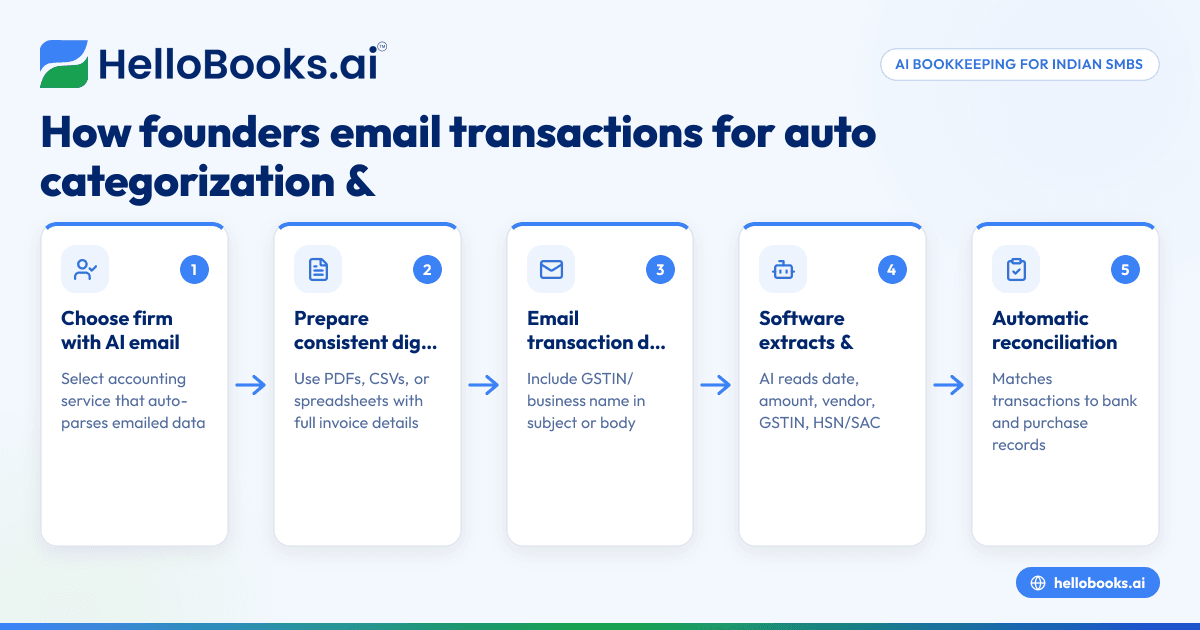
- Select an accounting firm or service that supports emailed transaction processing with AI tools. Confirm they can parse emailed data automatically.
- Prepare your transaction details in a consistent digital format. This could be scanned bills, digital invoices, spreadsheet exports, or bank statements saved as PDFs or CSVs.
- Email the transaction details to the designated address provided by the firm. Include identifiers like your business name or GSTIN in the email subject or body.
- The firm's software extracts key data such as date, amount, vendor, GSTIN, and HSN/SAC codes. It categorizes transactions into expense or income heads.
- Automatic reconciliation matches these transactions against bank statements and purchase registers. Any mismatches or missing invoices are flagged for review.
- Review the categorized and reconciled data sent back by the firm. Verify if all transactions are correctly classified and reconciled.
- Approve the data for GST filing or further accounting processes. This ensures your GSTR-1 and GSTR-3B returns are accurate and ready to file.
Example (fictional figures)
A Delhi-based small business emails transaction details for April 2024 to their accounting firm.
- Total purchase invoices emailed: ₹1,20,000
- Total sales invoices emailed: ₹2,00,000
- Bank statement shows ₹1,15,000 debited for purchases and ₹2,05,000 credited for sales.
The software extracts and categorizes purchase invoices:
₹1,20,000 (purchase invoices)
Matches bank debit ₹1,15,000
Difference = ₹1,20,000 - ₹1,15,000 = ₹5,000 (flagged for review)
Sales invoices:
₹2,00,000 (invoices)
Matches bank credit ₹2,05,000
Difference = ₹2,05,000 - ₹2,00,000 = ₹5,000 (flagged for review)
The firm contacts the business to clarify these ₹5,000 variances before final reconciliation.
Common mistakes
- Sending inconsistent or incomplete transaction details. Prevent by standardizing the format and including all invoice details like GSTIN, HSN/SAC, and amounts.
- Not including identifiers like GSTIN or business name in emails. This causes processing delays; always mention these clearly.
- Not reviewing flagged mismatches promptly. Respond quickly to queries from the firm to avoid delays in reconciliation and GST filing.
- Relying on manual reconciliation after emailing data. Use firms that provide automatic reconciliation to save time and reduce errors.
- Ignoring deadlines for GST filing after reconciliation. Keep track of due dates such as the 13th for GSTR-1 and 22nd or 24th for GSTR-3B under the QRMP scheme to avoid penalties qrmp-dates.
Doing this in HelloBooks
HelloBooks supports Indian small businesses with features like e-invoicing (IRN and signed QR) for businesses over the ₹5 crore threshold, which saves time by generating IRNs automatically instead of manual JSON uploads e-invoicing (IRN and QR). It also enables direct filing of GSTR-1 and GSTR-3B returns built from invoices recorded in the system, ensuring accurate returns matching your books GST invoicing. Additionally, HelloBooks provides GSTR-2A/2B reconciliation and ITC tracking to flag missing or mismatched supplier invoices before claiming ITC in GSTR-3B gst-filing.
Frequently asked questions
Can I email transaction details in any format to accounting firms for automatic processing?
Most firms prefer digital formats like PDFs, Excel, or CSV files containing invoice or bank statement data. Scanned images may be accepted but can reduce accuracy. Check with your firm for supported formats.
How does automatic categorization work with emailed transactions?
AI-powered software extracts key data such as vendor name, GSTIN, invoice number, and amount. It then assigns categories based on predefined rules or past classifications, reducing manual sorting.
What if my emailed transactions don’t match bank statements?
The software flags mismatches for review. You or your accountant must verify the differences, correct errors, or provide missing invoices to ensure accurate reconciliation.
Does this process help with GST return filing deadlines?
Yes, automatic categorization and reconciliation speed up bookkeeping so you can prepare and file GSTR-1 and GSTR-3B returns on time under schemes like QRMP qrmp-dates.
Can I use HelloBooks to support GST filing and reconciliation?
HelloBooks offers features like e-invoicing, direct GST return filing, and GSTR-2A/2B reconciliation that help reduce manual work and errors once transactions are recorded HelloBooks for India.
Key takeaways
- Some accounting firms use AI software to process emailed transaction details automatically.
- Send consistent, complete transaction data with identifiers like GSTIN.
- Automatic categorization and reconciliation reduce manual data entry and errors.
- Review flagged mismatches promptly to ensure accurate GST filing.
- HelloBooks supports e-invoicing, GST filing, and reconciliation features for Indian businesses.
To try automated GST invoicing and reconciliation features yourself, start on the Free plan (200 transactions a year, GSTR-1 and 3B filing for one GSTIN) at HelloBooks pricing.


