


Key takeaways
What this article covers, in order:
- Why this comes up / what goes wrong
- Step-by-step
- Example (fictional figures)
- Common mistakes
- Doing this in HelloBooks
- Frequently asked questions
A virtual office is an office space or address that a business uses for official communication and GST registration without physically occupying the premises full time. For GST registration, the government requires a valid business address where the business can be contacted and inspected if needed. Using a virtual office means you provide this address, which may be a coworking space or a service provider’s location, instead of a traditional owned or rented office.
Why this comes up / what goes wrong
Small business owners often use virtual offices because they do not have a permanent physical office or want to save costs on rent. They may run their business from home or remotely but still need a professional address for GST registration. However, problems arise if the virtual office address is not acceptable to GST authorities or if the business cannot receive official notices and documents there. Incorrect or unverifiable addresses can lead to GST registration rejection or penalties.
Step-by-step
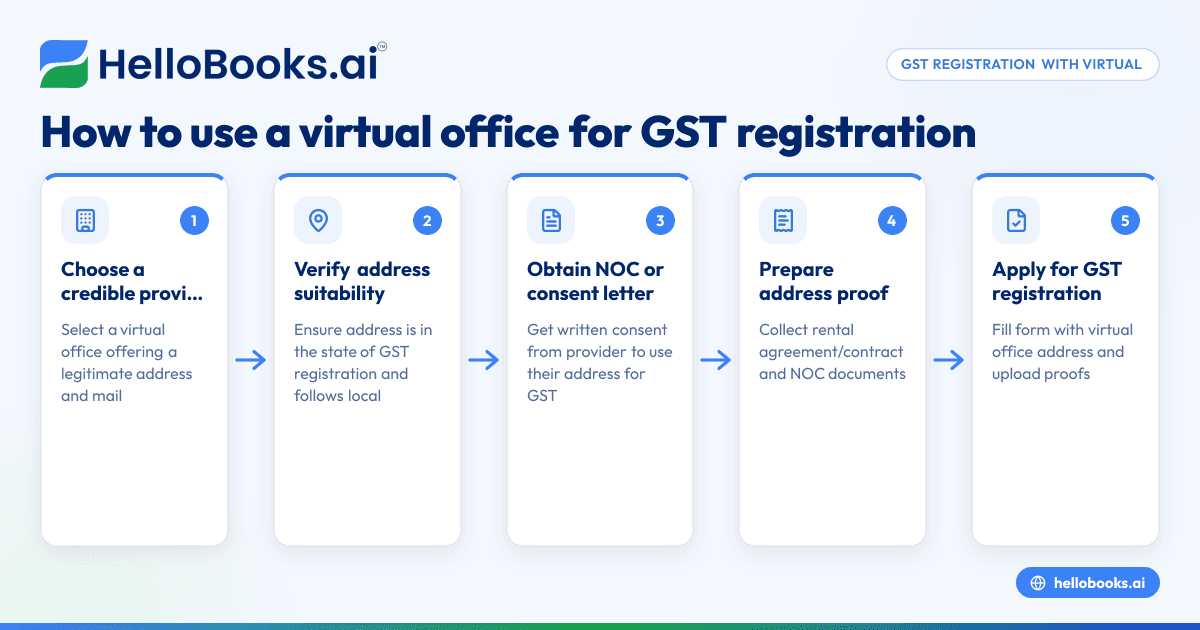
- Choose a credible virtual office provider: Ensure the provider offers a legitimate office address with facilities to receive your business mail and official documents.
- Verify the address suitability: Confirm that the virtual office address is within the state where you want to register your GST and that it complies with local municipal and GST rules.
- Get a No Objection Certificate (NOC) or consent letter: Obtain a written consent or NOC from the virtual office provider allowing you to use their address for GST registration.
- Prepare address proof documents: Collect documents such as the rental agreement or contract with the virtual office provider and the NOC.
- Apply for GST registration: Fill the GST registration form with the virtual office address as your principal place of business. Upload the address proof and NOC along with other required documents.
- Be ready for verification: GST officers may verify the address by visiting or contacting the virtual office. Ensure the provider can facilitate such verification.
- Maintain communication: Keep the virtual office contact active to receive GST notices, e-way bills, and other communications promptly.
- Use HelloBooks for GST compliance: After registration, use HelloBooks to create GST-compliant invoices with correct CGST/SGST or IGST splits, file GSTR-1 and GSTR-3B directly, and manage purchase bills using OCR scanning.
Example (fictional figures)
A Delhi-based online retailer uses a virtual office at a coworking space in New Delhi for GST registration on 01/04/2024.
- Monthly sales: ₹1,50,000
- GST rate (assumed): 18%
GST calculation on sales:
Taxable value = ₹1,50,000
CGST (9%) = ₹1,50,000 × 9% = ₹13,500
SGST (9%) = ₹1,50,000 × 9% = ₹13,500
Total GST = ₹13,500 + ₹13,500 = ₹27,000
The retailer issues GST invoices with the virtual office address, files monthly GSTR-1 by the 11th and GSTR-3B by the 20th, using HelloBooks to automate tax calculation and filing.
Common mistakes
- Using an unverifiable or fake address: Prevent by choosing a reputable virtual office provider and getting a proper NOC.
- Not having a consent letter or rental agreement: Always obtain and keep these documents ready for GST application and verification.
- Ignoring state jurisdiction rules: Check that the virtual office address falls in the state where you want GST registration to avoid rejection.
- Not updating GST records with address changes: Inform GST authorities promptly if you change the virtual office address.
- Failing to receive official communications: Ensure the virtual office provider forwards all GST-related mail and notices to you immediately.
- Mixing virtual office address with personal home address without clarity: Maintain clear documentation to avoid confusion during audits.
Doing this in HelloBooks
HelloBooks helps you manage your GST compliance efficiently once registered with a virtual office address. It offers GST invoicing that creates compliant tax invoices with the correct CGST/SGST or IGST split and HSN/SAC codes based on your customer’s GSTIN, ensuring Rule 46 particulars are consistently filled. You can file GSTR-1 and GSTR-3B returns directly from your recorded invoices, so your returns match your sales exactly. Additionally, HelloBooks uses OCR to capture purchase bills from photos or PDFs, reducing manual entry. Learn more about GST invoicing and e-invoicing (IRN and QR) with HelloBooks.
Frequently asked questions
Can I use any virtual office address for GST registration?
You must use a virtual office address that is verifiable, located in the state where you want to register, and for which you have proper consent documents. The GST authorities may verify the address before approving your registration.
Is a virtual office address acceptable for GST compliance documents?
Yes, as long as the address is legitimate and you can receive all official communications there, it is acceptable for GST invoices, returns, and notices.
What documents are needed to prove the virtual office address?
You typically need the rental agreement or contract with the virtual office provider and a No Objection Certificate (NOC) or consent letter allowing you to use the address for GST registration.
What happens if GST verification fails at the virtual office address?
Your GST registration application may be rejected or cancelled. To avoid this, ensure the virtual office provider cooperates with verification and that the address is genuine.
Can I file GSTR-1 and GSTR-3B using HelloBooks after registering with a virtual office?
Yes, HelloBooks allows you to file GSTR-1 and GSTR-3B directly from your recorded invoices, ensuring your returns match your sales records accurately.
How does HelloBooks help with GST invoicing for virtual office businesses?
HelloBooks creates GST-compliant invoices with the correct tax splits and HSN/SAC codes automatically, helping you stay compliant with Rule 46 and simplifying your invoicing process.
Key takeaways
- A virtual office can be used for GST registration if it is a legitimate, verifiable business address with proper consent.
- Obtain a rental agreement and NOC from the virtual office provider before applying for GST registration.
- Verify the address complies with state jurisdiction and GST rules to avoid rejection.
- Maintain clear communication and document handling through the virtual office.
- Use HelloBooks for GST invoicing, return filing, and purchase bill management to simplify compliance.
- Regularly update GST records if your virtual office address changes.
Start using your virtual office address confidently for GST registration and streamline your GST compliance with HelloBooks. Start on the Free plan (200 transactions a year, GSTR-1 and 3B filing for one GSTIN).
This article is general information, not tax or legal advice. Rules change; confirm the current position on gst.gov.in or with your chartered accountant before acting.


