
Key takeaways
What this article covers, in order:
- Key takeaways
- What “Tally vs cloud accounting” really means in India
- Tally: where it still works well
- Cloud accounting: why more Indian SMEs are considering it
- Tally vs cloud accounting in India: feature-by-feature comparison
- Where Tally may be better than cloud accounting
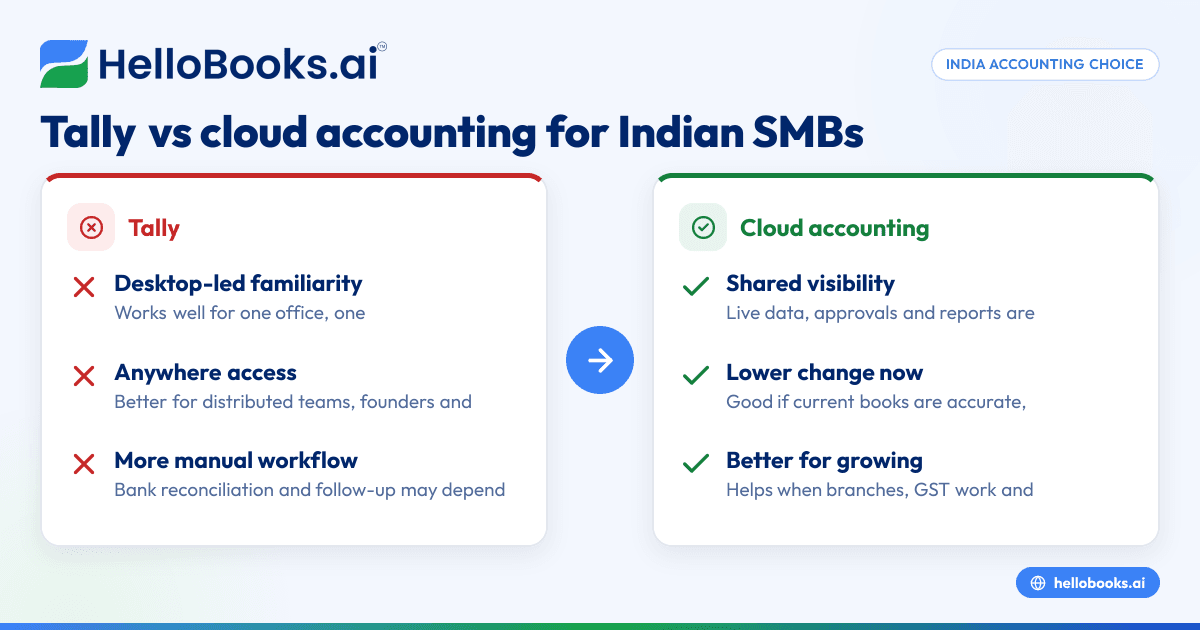
Tally and cloud accounting both help Indian businesses keep books, raise invoices and track taxes. The better choice depends on how your team works today: if you want local, desktop-first control and already know Tally well, Tally may fit; if you want easier collaboration, automation and access from anywhere, cloud accounting is often the better option for small businesses in India.
For most growing businesses, the real question is not which tool is more famous. It is which one reduces manual work, improves visibility and helps your team close books faster without depending on one computer or one operator.
Key takeaways
- Tally is familiar to many Indian businesses, especially those moving from manual books or spreadsheet-based accounting.
- Cloud accounting is usually better for remote access, team collaboration, backups and real-time visibility.
- If your business handles many bank entries, invoices and GST tasks, automation can save significant time.
- The right choice depends on your workflow, team size, locations, accountant involvement and reporting needs.
- Businesses using WhatsApp, UPI, Razorpay and shared approval flows often benefit more from cloud systems.
- Before switching, map your current process, data quality and GST needs so migration is smoother.
What “Tally vs cloud accounting” really means in India
When people search for “tally vs cloud accounting india”, they are usually comparing two ways of running finance operations.
Tally is commonly used as desktop accounting software. Many Indian businesses have used it for years. It is familiar to accountants, tax consultants and internal finance teams. It is especially common in trading, manufacturing and service businesses in cities such as Mumbai, Pune, Surat and Coimbatore.
Cloud accounting means your accounting system runs online. You log in through a browser. Your data is available securely over the internet. Team members can work from different locations with role-based access. This is useful when the owner is travelling, the accountant is external, or the team works across branches.
The difference is not just where the software sits. It affects how fast you invoice, how you reconcile bank entries, how easily your CA gets access, how you manage approvals, and how quickly you can see your cash position.
For a small business in India, that matters because finance work rarely happens in one place anymore. Sales may happen on WhatsApp. Payments may come by UPI or Razorpay. Expenses may be shared by staff over mobile. Inventory may move between branches. Your books need to reflect all this without constant manual entry.
Tally: where it still works well
Tally remains a practical choice for many businesses. It is deeply familiar in India. Many accountants already know how to use it. If your business has a stable process and a finance person who is comfortable with Tally, you may not feel pressure to change immediately.
Tally is a good fit when your setup is simple
Tally can work well if:
- Your books are handled mostly by one trained operator.
- Your business works from one office or one main location.
- You do not need frequent owner access when away from office.
- Your accounting volume is manageable.
- Your external accountant is already comfortable with your current workflow.
A small distributor in Pune with one accounts executive may find this sufficient. If entries come in batches and the owner reviews reports weekly, a desktop-led setup can still function.
Tally suits businesses with established habits
A major reason businesses stay with Tally is process familiarity. The team knows the shortcuts. The ledger structure is already set up. Historical data exists. The CA understands the system. Retraining feels like effort.
That is a valid consideration. Software change affects habits, not just features. If your existing process is stable and accurate, staying with a known system may reduce short-term disruption.
But familiarity can hide inefficiency
Many businesses do not realise how much time is being spent on avoidable manual work. The pain often shows up as:
- delayed bank reconciliation
- invoice follow-up done outside the system
- duplicate data entry from spreadsheets
- dependence on one person for reports
- difficulty checking numbers from outside office
- month-end closing that drags on for days
In such cases, the issue is not that Tally is unusable. The issue is that the business has outgrown a desktop-first workflow.
Cloud accounting: why more Indian SMEs are considering it
Cloud accounting is attractive because it matches how modern small businesses actually operate. Teams are distributed. Owners want access on mobile or laptop. Accountants and founders want the same numbers without sending files back and forth.
A good accounting software in India setup can reduce manual entry, improve visibility and help businesses move away from spreadsheet-heavy processes.
Access from anywhere
This is one of the biggest differences. In cloud accounting, the owner in Bengaluru, the accountant in Mumbai and the sales manager in Jaipur can work with the same live data, based on access permissions.
You do not need to wait for someone to be at the office desktop. You do not need to send backups or export files repeatedly. This matters if your business has multiple branches, remote staff or an external accountant.
Better collaboration across roles
In many Indian businesses, accounting is not done by the accounts team alone. Sales raises invoices. Operations confirms dispatch. Founders approve payments. Admin submits expenses. The CA reviews GST figures.
A cloud system supports this better because each user can work in the same environment. That reduces confusion, duplicate files and approval delays.
Automation reduces routine work
Automation is often the strongest reason to switch. If your team spends hours on repetitive tasks, cloud systems can make a clear difference.
Examples include:
- automatic bank transaction import and matching
- recurring invoices
- expense capture and categorisation
- real-time dashboards
- faster report generation
- easier audit trails
For businesses evaluating AI bookkeeping, this is where the value becomes practical. The aim is not to replace judgement. It is to reduce repetitive work so the team can focus on review and decisions.
Tally vs cloud accounting in India: feature-by-feature comparison
The best way to compare is by daily use, not marketing labels.
1. Setup and access
Tally: Usually desktop-led. Access often depends on a specific machine, local setup or internal IT arrangements.
Cloud accounting: Browser-based access. Easier for business owners, accountants and distributed teams.
If you travel often or run operations across locations, cloud usually wins.
2. Team collaboration
Tally: Collaboration can be workable, but often depends on how your system is configured and managed internally.
Cloud accounting: Multi-user workflows are usually more natural, especially for approvals and shared visibility.
If your business involves sales, ops and finance working together daily, cloud has an edge.
3. Bank reconciliation
Tally: Often more manual, depending on workflow and imports.
Cloud accounting: Usually faster with connected feeds, matching logic and status visibility.
For businesses with high transaction volumes, bank reconciliation software style automation can save serious time each month.
4. Invoicing and collections
Tally: Invoicing is possible, but follow-up and online-first workflows may sit outside the system.
Cloud accounting: Better suited to digital invoicing, tracking dues and sharing documents quickly.
If your team sends invoices over email or WhatsApp and wants a cleaner process, cloud tools can help. Some businesses also look for dedicated invoice software when invoicing is a pain point.
5. GST workflows
Tally: Widely used for GST-related accounting, depending on how your team manages returns and data preparation.
Cloud accounting: Helpful when you want cleaner transaction data, easier review and connected workflows.
If GST is a major pain point, businesses often compare accounting tools alongside GST return filing software. This is general information, not tax or legal advice. Always confirm current filing requirements with your tax adviser.
6. E-invoicing readiness
For businesses that fall under India’s e-invoicing rules, workflow matters. You need accuracy, speed and less manual correction.
A cloud setup may be easier if you want smoother invoice generation and cleaner records across locations. If this is important, review whether your process needs dedicated e-invoicing software.
7. Reporting and visibility
Tally: Reporting is familiar to many accountants.
Cloud accounting: Reporting is often easier for founders and non-accountants to access in real time.
If you want to check receivables, cash flow and monthly trends without waiting for exported reports, cloud is usually better.
8. Backups and business continuity
Tally: Backup responsibility often sits with your business.
Cloud accounting: Backups and availability are generally easier from a user perspective because the system is online.
For many small businesses, this reduces dependence on one device or one office setup.
Where Tally may be better than cloud accounting
Cloud is not automatically the right answer for everyone. Tally may be better if:
- Your team is highly efficient in Tally already.
- Your business has low complexity and low transaction volume.
- One accounts person handles the entire process well.
- Your reporting needs are basic.
- You do not need frequent multi-user access.
- You want minimal change in the near term.
For example, a small service firm in Nagpur with one office, limited monthly entries and a long-time accountant may not gain enough from switching immediately.
The key question is simple: are your current books accurate, timely and easy to access? If yes, change may not be urgent.
Where cloud accounting is better for small businesses in India
Cloud accounting tends to be better when the business is growing, distributed or process-heavy.
You have more than one person involved in finance
If invoices, expenses, approvals and follow-ups involve different people, a cloud system reduces chasing and file sharing.
You work across locations
This is common in India now. A founder may sit in Mumbai, warehouse in Bhiwandi, accountant in Thane and sales team across states. A desktop-bound process slows everyone down.
You want faster month-end closing
When bank data, invoices and expenses are updated continuously, the month-end close becomes easier. That gives management quicker visibility.
You are trying to reduce spreadsheet dependence
Many businesses say they use accounting software, but still run half the process on Excel. That often means the system is not fitting the workflow. Cloud tools can reduce this patchwork.
You need cleaner controls
Access permissions, approval trails and activity logs become more important as your team grows. This also matters when handling customer and employee data. Businesses should think carefully about data access and privacy under India’s DPDP Act 2023 where personal data is involved.
Hidden costs to think about before choosing
Do not compare only licence or subscription style. Compare effort.
Cost of manual work
If your team spends 3 to 4 hours daily on repetitive tasks, that cost is real. It affects salaries, delays and decision-making.
Cost of poor visibility
When the owner cannot see collections, bank balances or payables quickly, decisions get delayed. That can hurt cash flow more than software cost ever will.
Cost of person dependency
If only one operator knows how things work, your finance process is fragile. Leave, turnover or mistakes can create major disruption.
Cost of migration
Switching systems takes planning. You need data cleanup, opening balances, ledger mapping and team training. That effort is real too. So make the decision based on the next 3 to 5 years, not just the next 30 days.
How to decide: a practical checklist for Indian small businesses
Use this simple decision framework.
Choose Tally if most of these are true
- One office, one finance operator
- Limited monthly volume
- Current reports are sufficient
- Low need for founder access outside office
- Existing workflow is accurate and stable
- Your CA and team are happy with the setup
Choose cloud accounting if most of these are true
- Multiple users need access
- You run branches or remote teams
- You want live visibility into cash and receivables
- Bank reconciliation takes too long
- GST and invoicing involve too much manual effort
- You rely heavily on spreadsheets beside your accounting system
- You want less dependence on one person
If your business is in that second list, it may be time to review a modern accounting software for small business setup.
Planning a move from Tally to cloud accounting
If you decide to switch, do it in a controlled way. A rushed migration creates confusion.
Step 1: Clean your masters and balances
Check customers, vendors, ledgers, stock items and tax mappings. Remove duplicates where possible. Confirm opening balances.
Step 2: Define your processes
Decide how invoices will be created, how expenses will be approved, who can post entries, and who reviews reports.
Step 3: Involve your accountant early
Your CA or finance adviser should review chart of accounts, GST treatment and reporting expectations from the start.
Step 4: Import historical data carefully
Not every business needs full historical migration. Some need summary balances only. Some need detailed records. Choose based on compliance and reporting needs.
Step 5: Run parallel for a short period
For one cycle, compare outputs from old and new systems. Check receivables, payables, tax figures and bank balances.
Step 6: Train the team
The success of migration depends less on software and more on habits. Keep roles clear and train each user on only what they need.
Businesses looking for a Tally alternative should focus on process fit, not just feature lists.
Final verdict: which is better?
For many small businesses in India, cloud accounting is better because it supports how teams work today. It improves collaboration, visibility and automation. It is especially useful when your business is growing, multi-location or spending too much time on reconciliation, invoicing and reporting.
Tally is still a valid choice if your process is simple, your team is comfortable and your current setup is working well. But if you often face delays, manual effort and dependency on one operator or one machine, cloud accounting is likely the better long-term option.
If you are comparing options, HelloBooks can help you move from spreadsheets or legacy tools to modern AI accounting software built for Indian businesses. You can book a demo to see the workflow or compare options on the pricing page.
Frequently asked questions
Is Tally outdated for small businesses in India?
Not necessarily. Tally is still widely used and can work well for businesses with simple, stable accounting needs. The problem usually starts when the business needs more collaboration, automation and real-time access.
Is cloud accounting safe for Indian businesses?
Cloud accounting can be a safe option when access controls, passwords and user permissions are managed properly. It can also reduce risks linked to one-device dependency, local file loss and informal file sharing.


