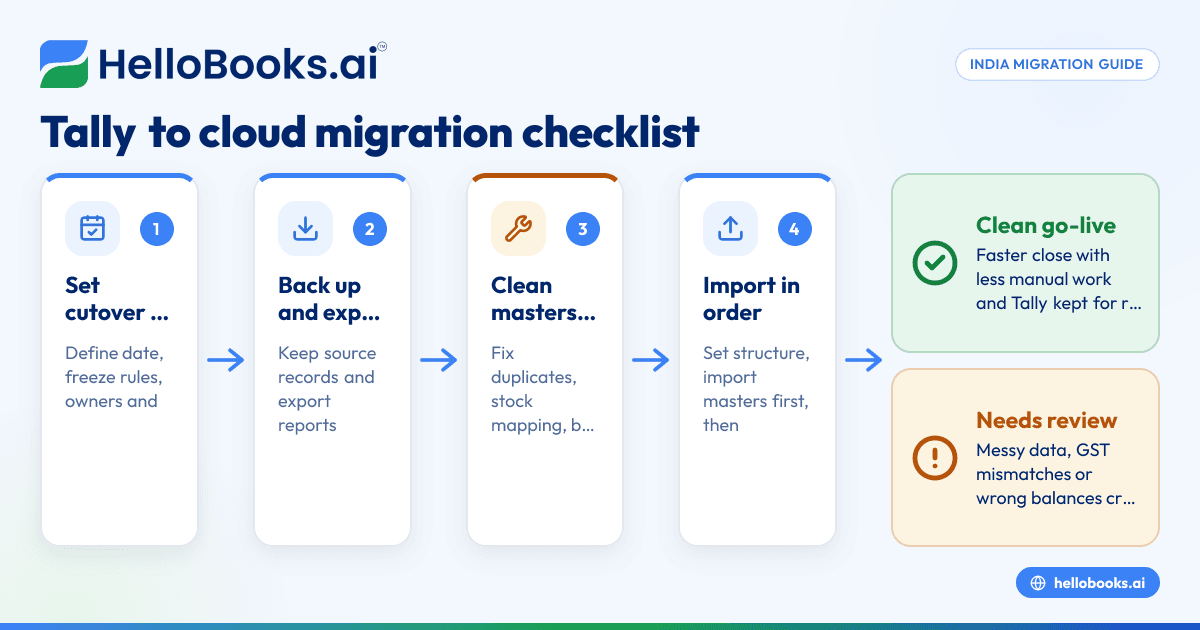

Key takeaways
What this article covers, in order:
- Key takeaways
- What is Tally to cloud accounting migration in India?
- Why businesses in India are moving from Tally to cloud accounting
- Before you migrate: choose the right cutover approach
- Tally to cloud accounting migration India: complete checklist
- Data cleanup before migration
Moving from Tally to cloud accounting in India is not just a software switch. It is a finance process change that affects masters, opening balances, GST workflows, bank reconciliation, reporting and who does what every day. A good migration keeps your books clean, preserves audit trails where needed and helps your team close faster with less manual work.
Key takeaways
- A Tally to cloud accounting migration in India works best when you clean masters and balances before import.
- The biggest problems usually come from duplicate ledgers, poor stock mapping, uncleared bank items and GST mismatches.
- You should define a cutover date, freeze rules and who owns each migration task before moving data.
- Not every old voucher needs to be imported into the new system. Many businesses move masters and opening balances, then keep Tally as historical reference.
- Test reports after migration, especially trial balance, receivables, payables, stock and GST summaries.
- If your current process is too manual, moving to accounting software in India can reduce data entry and month-end delays.
What is Tally to cloud accounting migration in India?
Tally to cloud accounting migration in India means moving your books, masters and ongoing finance workflows from a desktop or local Tally setup to a cloud-based accounting system.
In practice, this usually includes customer and vendor masters, chart of accounts, items, taxes, opening balances, invoices, bills, bank transactions and reports. It may also include GST workflows, user approvals, expense capture and invoicing.
For Indian businesses, the migration matters because accounting is tied closely to GST, collections, vendor payments and bank reconciliation. If the move is rushed, the errors show up quickly in outstanding reports, return working and month-end closing.
Why businesses in India are moving from Tally to cloud accounting
Tally remains familiar to many teams. But the way businesses operate has changed. Sales happen over WhatsApp. Payments come through UPI and Razorpay. Owners want reports on their phone. Finance teams work across branches in Mumbai, Bengaluru, Pune or smaller cities.
That is where cloud systems help.
Common reasons teams migrate
- Remote access Desktop access and backups become painful when multiple people need the same data.
- Faster collaboration Owners, accountants and external CAs can work from the same system without emailing files.
- Less manual data entry Cloud tools often improve importing, reconciliation and routine bookkeeping workflows.
- Stronger controls It is easier to set user roles, approval flows and standard processes.
- Better visibility Teams want live receivables, payables, cash flow and GST-ready data.
If your current setup relies heavily on manual posting and spreadsheet checks, moving to AI accounting software can make the migration worthwhile beyond just “being on the cloud”.
Before you migrate: choose the right cutover approach
A migration fails when teams try to move everything without deciding what “done” means. The first decision is your cutover method.
Option 1: Move masters and opening balances only
This is the most common approach for SMEs in India.
You migrate:
- chart of accounts
- customers and vendors
- items and tax settings
- unpaid invoices and bills
- bank opening balances
- stock opening balances
- overall ledger opening balances
You keep old years in Tally for reference.
Best for: businesses that want a clean start from a new month or new financial year.
Option 2: Move current financial year transactions
You import masters plus transaction-level data from the current year.
Best for: businesses that need in-system comparatives and drill-down for the ongoing year.
Option 3: Move multiple years of history
This is the hardest path. It takes more mapping, more validation and more time.
Best for: businesses with strong internal finance capacity and a real need for detailed historical analysis inside the new system.
For many Indian SMEs, Option 1 is the safest. You get clean books faster. You also reduce the risk of carrying old errors into the new setup.
Tally to cloud accounting migration India: complete checklist
Use this checklist before you touch imports.
1. Set a migration date
Choose a cutover date such as 01/04/YYYY or the first day of a month. Avoid switching in the middle of a busy filing or payment cycle unless you must.
Define:
- last posting date in Tally
- first posting date in the cloud system
- who can still edit Tally after freeze
- when reports will be matched
2. Decide the scope
Write down exactly what will move:
- masters only
- opening balances
- unpaid AR and AP
- stock
- current-year vouchers
- fixed assets
- cost centres
- GST configuration
- bank transactions
If the scope is vague, the cleanup never ends.
3. Take backups and preserve source records
Before any export:
- take a full Tally backup
- save reports in PDF or Excel
- keep a copy of ledgers, vouchers and GST summaries
- preserve supporting files for audit and tax work
Do not rely on memory later.
4. Lock responsibility
Assign owners for:
- finance lead
- accountant or bookkeeper
- operations owner for customer and item masters
- tax reviewer
- implementation or software support contact
One owner should sign off each imported dataset.
5. Export core reports from Tally
At minimum, export:
- trial balance as of cutover
- customer receivables ageing
- vendor payables ageing
- stock summary
- bank book
- GST summaries relevant to your period
- fixed asset register, if maintained
- list of cost centres or projects, if used
These will be your validation base.
Data cleanup before migration
Cleanup is the most important part of tally to cloud accounting migration india. If your Tally data has years of shortcuts, duplicates or inconsistent naming, the cloud system will only make those problems more visible.
Clean the chart of accounts
Look for:
- duplicate ledgers with similar names
- personal expenses mixed into business ledgers
- old ledgers no longer used
- wrong grouping
- inconsistent names across branches
Examples:
- “Sundry Debtors”, “Debtors”, “Trade Receivables”
- “Bank Charges”, “Bank chgs”, “Bank fee”
- “Razorpay”, “Gateway Charges”, “PG Charges”
Decide what to merge, what to archive and what to map separately.
Clean customer and vendor masters
This step matters more than most teams expect.
Check:
- duplicate names
- spelling variations
- missing GSTIN
- old addresses
- wrong state codes
- inactive parties
- contact numbers that changed
In India, GST place of supply and state details affect tax treatment. Wrong master data can create downstream errors in invoicing and reporting.
Clean item and stock masters
If you sell products, standardise:
- item names
- SKU codes
- unit of measure
- HSN where maintained
- tax mapping
- opening stock quantities and values
Do not keep ten names for the same product. That ruins stock reports and sales analysis.
Review receivables and payables
Before migration, clear what should be cleared.
Check:
- old credit notes not adjusted
- duplicate invoices
- vendor bills already paid but still outstanding
- customer advances not mapped properly
- debit and credit balances sitting in the wrong party account
If a customer’s outstanding is wrong in the old system, it will remain wrong after migration.
Review bank and cash balances
This is a major source of post-migration panic.
Check:
- unreconciled bank entries
- stale cheques
- duplicate payment entries
- direct bank charges not posted
- UPI settlements grouped incorrectly
- payment gateway collections not split clearly
If you plan to use bank reconciliation software, your opening bank position still needs to be clean first.
Review GST-related data carefully
For Indian businesses, GST errors can multiply during migration.
Review:
- tax ledgers used for sales and purchase
- customer and vendor GSTINs
- intra-state versus inter-state treatment
- RCM cases, if applicable to your business
- credit notes and debit notes
- invoice numbering continuity
- pending return working
This article is general information, not tax or legal advice. If you are unsure about GST treatment or filing impact, review the migration with your CA or GST advisor.
How to migrate step by step
A structured process reduces rework.
1. Create the new system structure
Set up:
- financial year
- chart of accounts
- GST settings
- invoice templates
- user roles
- approval rules
- branches or business units, if relevant
If you also want digital invoicing workflows, review whether invoice software or e-invoicing software features are needed in your process.
2. Import masters first
Import in this order:
- chart of accounts
- tax settings
- customers
- vendors
- items and services
- cost centres or projects
Then review samples manually.
3. Import opening balances
Import:
- ledger opening balances
- customer invoice-wise balances
- vendor bill-wise balances
- stock opening balances
- bank and cash opening balances
- loans and statutory balances, where relevant
Be careful with control accounts. If receivables are imported invoice-wise, do not also load the same value as a separate overall receivable opening balance.
4. Import open transactions if required
If your scope includes current-period open transactions, import only what is necessary and test links properly:
- open sales invoices
- open purchase bills
- unadjusted credit notes
- advances
- post-dated obligations, where used in your process
5. Reconcile and validate reports
This is not optional.
Match the new system against Tally for the cutover date:
- trial balance
- customer outstanding
- vendor outstanding
- stock summary
- bank balances
- GST ledgers
- profit and loss, if transactions were imported
- balance sheet
A migration is not complete just because the data imported.
6. Train the team and freeze old posting
After validation:
- train users on day-to-day entries
- define naming rules
- define approval steps
- stop parallel posting unless there is a short controlled overlap
- keep Tally as read-only reference after cutover
For businesses still deciding whether to move, comparing a Tally alternative can help clarify what changes in daily workflow, not just features.
Common mistakes during migration
Most migration issues are predictable. Here are the ones seen most often.
1. Migrating messy data “as is”
Teams assume they will clean later. They rarely do. The result is poor reports from day one.
2. No clear cutover date
When some entries continue in Tally and some begin in the new system, duplicate or missing transactions become likely.
3. Importing both summary balances and invoice-level balances
This creates double counting in receivables, payables or stock.
4. Ignoring bank reconciliation
A wrong bank opening balance can waste days of finance time after go-live.
5. Poor GST master mapping
Wrong GSTINs, state codes or tax categories affect invoice accuracy and return working.
6. Moving unnecessary old history
Many businesses import too much because it feels safer. In reality, it slows the project and increases mapping errors.
7. No report sign-off
If nobody signs off the trial balance, everyone assumes someone else checked it.
8. Skipping user training
Even a clean migration can fail if staff continue old habits, use wrong ledgers or bypass the new process.
A practical validation checklist after go-live
Once you start using the cloud system, review the first two to four weeks closely.
Daily checks
- new sales invoices posting correctly
- receipts mapped to the right customers
- vendor bills created properly
- bank feeds or imports categorised correctly
- UPI and gateway settlements recorded correctly
Weekly checks
- receivables ageing
- vendor ageing
- bank reconciliation status
- expense coding quality
- GST tax ledger movement
- stock movement, if inventory is active
Month-end checks
- trial balance
- profit and loss
- balance sheet
- GST purchase and sales summaries
- fixed asset additions, if any
- accruals and prepaid entries
- management reports
If your goal is less manual posting after the move, tools built for AI bookkeeping or expense management software can help standardise the work after migration, not just during it.
Should you migrate at the start of the financial year?
Usually, yes. For Indian businesses, 01/04/YYYY is often the cleanest cutover date. It simplifies opening balances, reporting periods and internal comparisons.
But it is not the only good option.
You can also migrate:
- at the start of a quarter
- after completing a GST filing cycle
- at the start of a month when receivables and payables are well reviewed
Do not wait for the “perfect” date if your books are already slowing the business down. A well-planned monthly cutover is better than a delayed annual project that never happens.
Who should own the migration?
In a small business, the owner often sponsors the migration but should not run every detail.
A better setup is:
- owner or CFO/finance lead: scope, timelines, approvals
- accountant or finance manager: data export, cleanup, validation
- operations or sales admin: customer and item master checks
- CA or external advisor: tax review where needed
If you do not have a strong in-house finance person, it may help to find an accountant before starting the migration.
When cloud accounting migration is worth it
The switch is worth it when your current process creates repeated delays:
- books close late every month
- invoices and collections are hard to track
- bank reconciliation is always pending
- GST working depends on spreadsheets
- only one person understands the books
- management reports arrive too late to act
At that point, the question is not whether to move. It is how to move without carrying old errors into the new system.
A good cloud migration is less about software and more about clean data, clear ownership and strong post-go-live discipline. If you want to evaluate a practical accounting software for small business setup for your team, focus on the workflows you use every day, not just feature lists.
If you are planning a move from Tally and want a simpler way to manage bookkeeping, invoicing, GST and reconciliations in one place, you can book a demo or compare options on the pricing page.
Frequently asked questions
How long does a Tally to cloud accounting migration take in India?
For a small business with clean data, masters and opening balances can often be migrated in days, not months. If your data has duplicates, stock issues or GST mismatches, cleanup usually takes longer than the import itself.
Should I migrate all past transactions from Tally?
Not always. Many Indian SMEs move masters and opening balances, then keep Tally as a historical reference. This is often faster, cheaper and less risky than importing several years of old vouchers.
What is the most common issue after migration?
The most common issue is mismatched balances after go-live. This usually comes from duplicate imports, uncleared bank items, wrong party openings or incomplete validation of reports.
Can I migrate in the middle of the financial year?
Yes, you can. A month-start cutover is usually easier than a random date in the middle of a period. Just make sure the scope, freeze rules and report matching are clearly defined.
Will migration affect GST filing?
It can if tax masters, invoice data or state mapping are wrong. Review GST-related masters and balances carefully before cutover, and check summaries in the new system before relying on them for filing. For businesses focused on smoother compliance workflows, GST return filing software can also be part of the wider process review.


