
Key takeaways
What this article covers, in order:
- Key takeaways
- What is a startup expense approval workflow in United States?
- Why do startups lose control of team spend?
- What should an expense approval workflow include?
- How do you build a simple workflow that actually works?
- How much approval is enough?
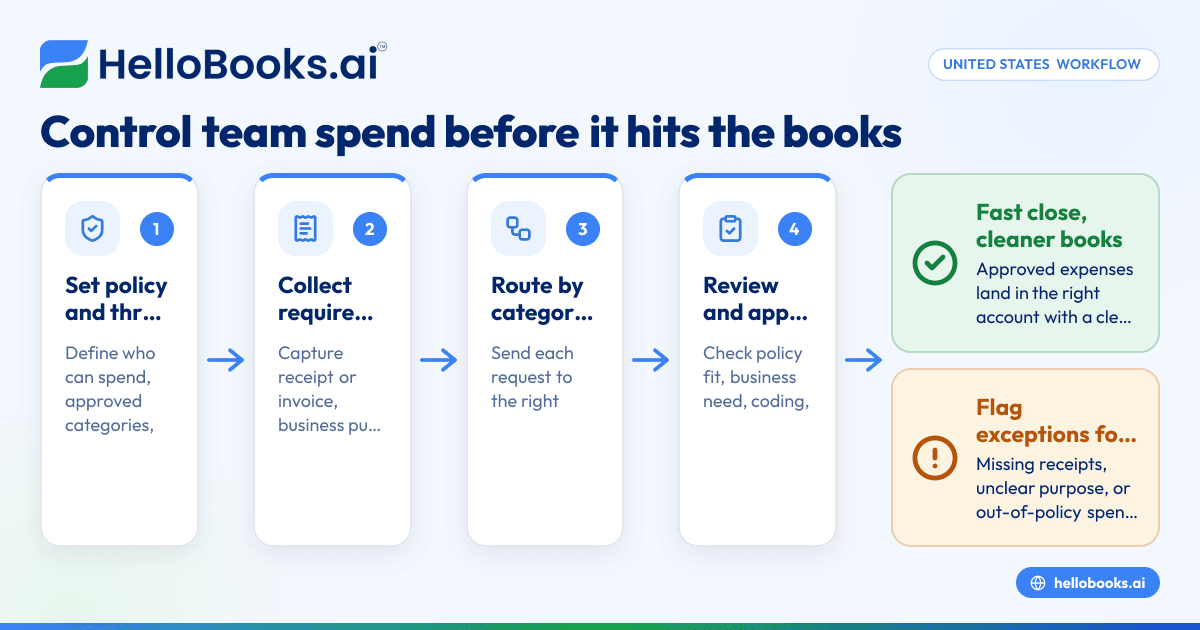
A startup expense approval workflow in United States is the set of rules and steps you use to review, approve, record, and reimburse team spending before it creates accounting problems. The goal is simple: stop unnecessary spend early, speed up legitimate purchases, and make sure every approved expense lands in the right account with the right support.
Key takeaways
- A good workflow controls spend before employees use cards, submit receipts, or request reimbursement.
- Clear approval thresholds reduce delays and prevent founders from approving every small purchase.
- The best process connects policy, receipts, coding, reimbursement, and bank reconciliation in one flow.
- U.S. startups should design workflows with state sales tax, contractor payments, and 1099 support in mind where relevant.
- Automation helps most with receipt capture, policy checks, approval routing, and posting approved expenses to the books.
- Review the workflow every quarter as headcount, vendors, and spending limits change.
What is a startup expense approval workflow in United States?
A startup expense approval workflow in United States is a documented process that decides who can spend money, how much they can spend, what proof they must submit, and who must approve it before accounting records the transaction. It applies to card purchases, employee reimbursements, software subscriptions, travel, meals, contractors, and one-off vendor bills.
For a startup in Chicago or Houston, the risk is not just overspending. It is also messy books, missing receipts, duplicate reimbursements, poor visibility by department, and month-end cleanup that drags on for days. When approvals happen in Slack, email, and spreadsheets, finance loses the audit trail.
A strong workflow creates three controls at once:
- Budget control Teams know what they can spend and when they need approval.
- Policy control Expenses are checked against your rules before they are reimbursed or posted.
- Accounting control Approved expenses are coded correctly and matched to bank and card activity.
This matters more as soon as a startup moves beyond a founder card and a simple spreadsheet. Once you have team leads, recurring software tools, remote employees, or multiple payment methods, your process needs structure.
Why do startups lose control of team spend?
Most startups do not have a fraud problem first. They have a process problem first. Team spend gets messy because the path from purchase to bookkeeping is full of gaps.
Common causes include:
- No written expense policy
- No approval thresholds by role
- Reimbursements submitted weeks late
- Missing receipts for card charges
- Duplicate software subscriptions
- Personal and business expenses mixed together
- Founders approving everything manually
- No category mapping for the chart of accounts
- No follow-up when a transaction has no support
A startup might look fine during the month, then finance discovers the damage at close. A $49 software purchase is not the issue by itself. Hundreds of unreviewed transactions are the issue. They slow close, weaken forecasting, and make audits, investor reporting, and tax prep harder.
If your team uses email threads and spreadsheets to manage approvals, this is where tools like expense management software and bank reconciliation software become useful. The point is not to add complexity. It is to remove manual chasing.
What should an expense approval workflow include?
A good workflow should answer five questions before any expense hits the books:
- Who can spend? Define authorized employees, team leads, and budget owners.
- What can they spend on? List approved categories such as software, travel, office supplies, client meals, and marketing.
- How much can they spend without extra approval? Set dollar thresholds by person or department.
- What documentation is required? Require receipts, invoices, business purpose, attendees for meals where needed, and project or department tags.
- How is the approved spend recorded? Decide how approved items are coded, reimbursed, and reconciled.
That structure should cover different types of spend:
Employee reimbursements
This is for out-of-pocket spending. The employee pays first, then requests reimbursement with support. This needs strict receipt rules and clear submission deadlines.
Company card purchases
This is faster for the team, but it needs stronger transaction review. If you skip receipt collection, finance still ends up chasing support at month-end.
Vendor invoices
These often need approval before payment. The workflow should confirm the service was requested, received, and coded correctly.
Recurring subscriptions
These are easy to ignore and hard to unwind later. Assign an owner to each subscription and review active tools regularly.
Travel and meals
These need a tighter policy. Define booking rules, nightly limits if you choose to use them, and what business purpose must be documented.
How do you build a simple workflow that actually works?
Start with a short written policy, then build the process around it. Keep the first version simple enough that managers will follow it.
Step 1: Set approval thresholds
Use clear thresholds tied to decision rights. For example:
- Up to $100: employee can submit, manager approves
- $101 to $1,000: manager and department head approve
- Over $1,000: finance or founder approval required
The exact numbers depend on your business. A seed-stage software startup in Detroit may need tighter limits than a later-stage team with approved department budgets. The key is consistency.
Step 2: Define required fields
Every request or reimbursement should include:
- Date of purchase
- Vendor name
- Amount in USD ($)
- Receipt or invoice
- Business purpose
- Department or project
- Client or attendee details if relevant
Without these fields, accounting has to guess. Guessing leads to bad coding and weak records.
Step 3: Separate pre-approval from post-spend review
Not every purchase needs approval before it happens. But many do. Draw a clear line:
- Pre-approval: travel, software, contractors, large equipment, new vendors
- Post-spend review: small routine expenses within policy
This reduces friction for small, normal purchases while keeping control over larger commitments.
Step 4: Build routing by category and amount
Approval should not depend on who sees the email first. It should route automatically based on rules. That is where an ai startup expense workflow can help. It can read receipts, identify category, check amount thresholds, and send the request to the right approver without finance retyping every detail.
Step 5: Connect approval to accounting
Approval is not the end of the process. Once approved, the transaction still needs to be:
- coded to the right account
- assigned to the right department or project
- matched to the bank or card transaction
- included in reports
This is why many startups move from spreadsheets to AI accounting software or accounting software in the USA as spending grows.
How much approval is enough?
Enough approval means high-risk spending is reviewed before money goes out, while low-risk routine spending moves quickly. If every $20 purchase needs founder sign-off, the system breaks. If no one reviews recurring software bills, waste builds quietly.
You can think of approval in layers:
Layer 1: Policy guardrails
This is your first filter. If an expense is outside policy, it should not move forward without exception approval.
Layer 2: Manager review
The direct manager confirms business purpose and budget fit.
Layer 3: Finance review
Finance checks support, coding, tax treatment, duplicate risk, and reimbursement details. This is general information, not tax or legal advice.
Layer 4: Periodic audit
Review a sample of approved expenses every month. Look for repeat issues such as missing receipts, late submissions, or the same vendor charged by multiple teams.
What should founders approve themselves?
Founders should approve exceptions, large commitments, new budget areas, and strategic vendor decisions. They should not be the approval bottleneck for normal team spend.
A better setup is:
- Founders approve annual or quarterly department budgets
- Managers approve routine spend within those budgets
- Finance reviews compliance and booking quality
- Founders step in only for exceptions or major vendor commitments
This gives the team speed without giving up control. It also protects founder time. In many startups, founder time is the most expensive approval queue.
How do reimbursements fit into the workflow?
Reimbursements are where many startups lose visibility. Employees often submit them late. Receipts are missing. Personal and business items are mixed. Finance ends up processing a stack of claims right before close.
To fix that, use a standard reimbursement path:
- Employee submits claim within a set window Many teams choose a simple internal deadline such as within the same month.
- Employee attaches receipt and business purpose No receipt, no reimbursement unless an exception is approved.
- Manager approves business need This confirms the purchase was appropriate.
- Finance reviews coding and duplication Check that the same expense was not already charged on a company card.
- Approved claim is paid and recorded The record should link support, approval, payment, and accounting entry.
If you still track this in spreadsheets, moving to AI bookkeeping or accounting software for small business can reduce month-end cleanup.
What happens after approval?
Approval should trigger the next accounting actions automatically or through a controlled checklist. Otherwise, approved expenses still pile up in finance.
Record the expense correctly
Map each approved expense to the right account. Examples may include software, travel, meals, office supplies, marketing, or contractor costs. Consistent coding makes monthly reporting far more useful.
Capture any tax detail needed
If an invoice includes sales tax, keep the source document. Startups operating across states should keep records organized by vendor and state where relevant. Do not rely on memory at filing time.
Match to payment activity
If the expense was paid by card or bank, match it to the transaction. This step prevents duplicates and makes close faster. This is where bank reconciliation software is often worth it.
Keep support in one place
Every approved expense should have a searchable trail:
- who requested it
- who approved it
- when it was approved
- what document supports it
- how it was coded
- how it was paid
That trail matters for audits, investor diligence, and internal reviews.
What does a healthy workflow look like at month-end?
A healthy month-end means finance already has most approvals, receipts, and coding in place. Close should focus on review and reconciliation, not chasing basic details.
You should be able to answer these questions quickly:
- Which expenses are approved but unpaid?
- Which card transactions are missing receipts?
- Which reimbursements are submitted but not approved?
- Which subscriptions renewed this month?
- Which departments exceeded budget?
- Which transactions are still uncategorized?
If you cannot answer those questions without opening five spreadsheets, the workflow is not strong enough.
A good month-end routine looks like this:
- Lock submissions after a cut-off date
- Follow up on exceptions and missing support
- Review uncategorized transactions
- Reconcile card and bank activity
- Post accruals if needed for approved but unpaid items
- Share department spend summaries with managers
This is where automation helps most. Software can collect receipts, route approvals, and push approved data into the books. It can also flag unusual transactions for review rather than forcing finance to inspect every line manually.
How can startups use automation without losing control?
Use automation for data capture, routing, reminders, and matching. Keep policy design, approval authority, and exception handling with people.
That balance matters. Startups should not automate bad policy. They should automate repetitive work inside a good policy.
Here is the practical split:
Good uses of automation
- Reading receipt details
- Matching receipts to card charges
- Routing approvals by amount or department
- Flagging duplicate claims
- Reminding employees about missing documents
- Posting approved expenses to the ledger
- Supporting faster close and cleaner reports
Decisions to keep with people
- Approving policy exceptions
- Selecting new strategic vendors
- Changing department budgets
- Judging unclear business purpose
- Handling sensitive or unusual expenses
A modern setup can work especially well when finance already uses tools common in U.S. startups, such as QuickBooks and Stripe. If you are evaluating a QuickBooks alternative, focus on whether the system can handle approvals, expense capture, and reconciliation in one workflow instead of creating more exports.
What mistakes should U.S. startups avoid?
The biggest mistakes are unclear policy, too many manual approvals, weak receipt collection, and poor follow-through after approval. Startups also lose control when they ignore recurring software spend, mix reimbursement records with payroll processes, or wait until month-end to review expenses.
1. Treating approvals as optional
If employees know receipts and approvals are only checked sometimes, the process will fail.
2. Letting one person approve everything
This slows the business and weakens control. Use role-based thresholds.
3. Ignoring recurring spend
Software waste can become a major leak. Review subscriptions at least quarterly.
4. Posting before support is complete
If accounting records expenses with weak documentation, you create cleanup later.
5. Mixing reimbursement and payroll logic
Expense reimbursement is not the same as payroll. Keep records distinct and documented.
6. Forgetting contractor documentation
If payments to independent contractors are part of your expense flow, keep vendor records organized for 1099 reporting where applicable.
7. Building a policy no one can understand
A two-page plain-English policy is usually better than a long document nobody reads.
What should your expense policy say?
Keep it short and specific. State who can spend, what needs pre-approval, what documents are required, who approves by dollar amount, and when claims must be submitted.
You do not need a long manual. Start with these sections:
Purpose
State that the company requires timely, documented, business-related expenses and defined approvals before recording or reimbursing spend.
Scope
List who the policy covers, such as employees, managers, and contractors if applicable.
Allowed expense categories
List common categories the company will reimburse or pay.
Non-allowed categories
List items the company will not reimburse without written exception approval.
Approval thresholds
Define who approves what amounts.
Documentation rules
Require receipts, invoices, and business purpose notes.
Submission deadlines
State when reimbursements and support must be submitted.
Exception handling
Define who can approve policy exceptions.
Accounting treatment
State that approved expenses will be coded and reconciled based on company accounting rules.
Once this is live, review compliance monthly. Adjust thresholds when headcount or budgets change.
Should you use software or keep this in spreadsheets?
Spreadsheets work for very small teams, but they break once approvals, reimbursements, cards, and vendor bills spread across departments. Software is usually the better choice when finance needs speed, control, and a clean audit trail.
Software becomes useful when you need:
- approval routing
- receipt collection
- reimbursement tracking
- searchable audit trails
- faster reconciliation
- cleaner month-end close
If your finance team wants fewer manual steps, look at invoice software, expense management software, and broader AI accounting software options based on the workflows you actually need.


