
Key takeaways
What this article covers, in order:
- Key takeaways
- What is a sales tax return checklist?
- Why do small businesses need a sales tax return checklist?
- What should be on a sales tax return checklist?
- What documents do you need before filing?
- How do you prepare a sales tax return accurately?
A sales tax return checklist is a practical list of records, totals, and review steps you need before you file a state or local sales tax return in the United States. For small businesses, the checklist matters because most filing mistakes come from missing documents, incorrect taxable sales totals, or using the wrong filing period.
Key takeaways
- A strong sales tax return checklist starts with sales records, exemption documents, marketplace data, and bank deposits.
- You need to confirm gross sales, taxable sales, exempt sales, discounts, refunds, and tax collected before filing.
- Sales tax rules vary by state and locality, so always use the instructions for the state where you file.
- Reconciliation is critical. Your return should tie back to invoices, payment processors, and your books.
- Keep exemption certificates, resale documents, and filing support in one place in case of an audit.
- This article is general information, not tax or legal advice.
What is a sales tax return checklist?
A sales tax return checklist is the set of documents and review steps you complete before submitting a sales tax return to a state tax agency. It helps you confirm that the numbers on the return match your actual sales activity for the filing period.
For a small business in Chicago, Houston, or Detroit, this usually means pulling data from your invoicing system, ecommerce platform, payment processor, bank account, and accounting records. If your team still works from spreadsheets, the checklist becomes even more important because manual reporting increases the risk of errors.
The goal is simple. You want to file a complete return, on time, with numbers you can support later. That matters if the state questions your filing, requests backup, or audits your account.
A good checklist also reduces the month-end scramble. If you know what you need before filing day, you spend less time searching for missing invoices or trying to explain why your Stripe deposits do not match your reported sales.
Why do small businesses need a sales tax return checklist?
A sales tax return checklist helps you file with fewer errors and less stress. It gives you one repeatable process for every filing period, even when your sales channels, staff, or volume change.
Small businesses often run into the same problems:
- Sales are recorded in more than one system
- Taxable and exempt sales are mixed together
- Refunds are not reflected correctly
- Marketplace sales are duplicated
- Bank deposits do not match sales reports
- Missing resale or exemption certificates create exposure later
A checklist turns those problems into review items. That is much easier to manage than trying to remember every detail on filing day.
It also helps when responsibilities are shared. The owner may approve filings, the bookkeeper may prepare reports, and an outside accountant may review the return. A written checklist keeps everyone aligned.
If your team is moving from spreadsheets or desktop bookkeeping tools to accounting software in the USA, this is one of the first processes worth standardizing.
What should be on a sales tax return checklist?
Start with your sales data, taxability review, and reconciliation. Then confirm filing details, support documents, and approval steps before you submit.
Below is a practical checklist you can use each month, quarter, or filing period.
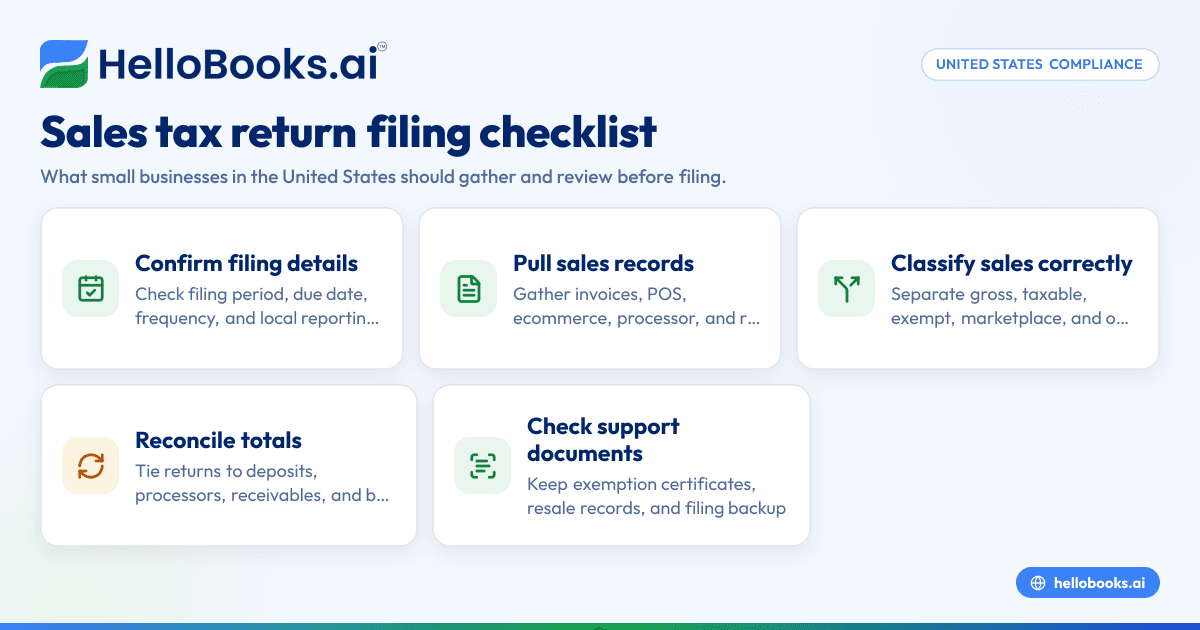
1. Confirm the filing period and filing frequency
Start with the basics:
- Identify the exact filing period.
- Confirm the due date for that state.
- Verify whether you file monthly, quarterly, or annually.
- Check whether you also need local reporting in that state.
This step sounds obvious, but it prevents rushed filing. It also helps if your state changed your filing frequency based on sales volume.
2. Pull total gross sales for the filing period
Gather your full sales total before adjustments. Use the same date basis across systems for the filing period.
Sources may include:
- Invoices issued
- Point-of-sale reports
- Ecommerce platform reports
- Stripe or merchant processor reports
- Manual sales logs
- Credit memos and refund reports
Gross sales should reflect total sales activity before backing out exempt sales, returns, or discounts if the state instructions require separate reporting lines.
3. Separate taxable, exempt, and non-taxable sales
This is one of the most important parts of any sales tax return checklist.
Review your sales and classify them correctly:
- Taxable sales
- Exempt sales
- Resale sales
- Sales for which tax was not required
- Marketplace-facilitated sales, where applicable
- Out-of-state sales that are not reportable on that return
Do not assume all untaxed sales are exempt. You need support for those classifications. In many businesses, this is where filing errors begin.
4. Gather exemption and resale certificates
If you treated sales as exempt, make sure you have the support on file.
That can include:
- Resale certificates
- Exemption certificates
- Customer tax-exempt documentation
- Internal notes that support the treatment
Review whether certificates are complete and current. Missing or invalid certificates can create problems during an audit, even if the customer should have qualified for exemption.
5. Review tax collected by channel
If you sell in multiple ways, break out tax collected by source:
- Direct invoices
- Retail or POS sales
- Ecommerce checkout
- Marketplace platforms
- Manual transactions
The purpose is to avoid double counting or missing tax. A business that sells through both its own website and a marketplace often needs careful mapping here.
6. Match sales reports to deposits and books
This is where many returns improve. Reconcile your filing totals to:
- Bank deposits
- Merchant processor settlements
- Accounts receivable reports
- Your general ledger
- Month-end financial statements
Timing differences can happen. Refund timing, processor fees, or delayed deposits may explain some gaps. But your reported sales should still be explainable from your records.
Using bank reconciliation software and expense management software can make this review much faster when you have frequent transactions.
7. Account for discounts, returns, and credit memos
Check how your state treats these items on the return and make sure your reports reflect them correctly.
Look at:
- Sales discounts
- Customer refunds
- Returned merchandise
- Credit memos
- Canceled invoices
- Bad debt adjustments, if applicable under state rules
Do not reduce taxable sales unless the state instructions allow the adjustment and you have support.
8. Check use tax obligations, if applicable
Some states require businesses to report use tax on taxable purchases where sales tax was not paid at the time of purchase.
Review purchases such as:
- Equipment
- Office supplies
- Software or subscriptions
- Materials consumed by the business
- Items bought online without tax charged
This area is often missed by small businesses because the focus stays on customer sales. If your return includes a use tax line, review your purchase activity before filing.
9. Confirm jurisdiction-level totals where required
Some states require reporting by city, county, district, or other local jurisdiction. If that applies, make sure your location mapping is correct.
This matters for businesses with:
- Multiple store locations
- Delivery sales
- Remote sales within a state
- Jobs performed at customer sites
- Warehouse or fulfillment activity
A Houston business selling statewide, for example, may need to confirm where sales were sourced under that state's rules.
10. Review prior notices or carryforwards
Before you file, check whether the state previously sent:
- Balance due notices
- Return corrections
- Registration updates
- Filing frequency changes
- Payment credits
These can affect the current return. A prior overpayment or unresolved balance should not be ignored.
11. Save support before submission
Create a filing packet for the period. Save:
- Sales reports
- Tax summary reports
- Exemption documents
- Reconciliation workpapers
- Copy of the filed return
- Payment confirmation
- Any internal approval notes
Keep this in one folder by month or filing period. That habit saves hours if you need to answer questions later.
What documents do you need before filing?
You usually need sales reports, exemption support, refund details, tax collected totals, and reconciliations to your books and bank activity. The exact return format depends on the state, but most small businesses should have one organized file that supports every number reported.
Here is a practical way to think about the documents.
Sales documents
These show what you sold:
- Invoice reports
- POS summaries
- Ecommerce sales reports
- Customer statements
- Accounts receivable aging
- Credit memo reports
If you use invoice software, pull a report for the exact filing period and save it before making late edits.
Tax support documents
These show why tax was or was not charged:
- Sales tax summary by state or location
- Exemption certificates
- Resale certificates
- Marketplace settlement reports
- Product taxability mapping notes
Cash and reconciliation documents
These show whether the return ties back to the money received:
- Bank statements
- Stripe payout reports
- Merchant account statements
- Deposit detail reports
- General ledger detail
Purchase documents for use tax review
These support any tax due on business purchases:
- Vendor bills
- Expense reports
- Purchase receipts
- Fixed asset purchases
- Credit card statements
Filing support documents
These show what was filed and approved:
- Draft return
- Reviewer notes
- Final submitted return
- Payment receipt
- Prior period notices
How do you prepare a sales tax return accurately?
Use one source of truth for sales, separate taxable and exempt transactions, and reconcile totals before you file. Accuracy comes from clean records and a repeatable review process, not from filling out the return faster.
Below is a practical process small businesses can follow.
Step 1: Close the period first
Do not start filing while sales records are still changing. Finish posting invoices, refunds, credit memos, and deposit activity for the filing period.
If you file before your books are stable, you may have to amend the return later.
Step 2: Export reports from every sales channel
Pull reports from all systems used during the period. That may include your ecommerce platform, POS, invoicing tool, and payment processor.
Make sure the date ranges match exactly. A one-day mismatch can change the return.
Step 3: Map sales into return categories
Most returns require categories such as gross sales, exempt sales, taxable sales, and tax due. Build a simple worksheet that maps each report into those buckets.
This is where many teams benefit from AI bookkeeping. It can reduce manual sorting and make period-end reviews easier to repeat.
Step 4: Reconcile before entering return totals
Compare your worksheet to:
- General ledger revenue
- Accounts receivable activity
- Processor settlements
- Bank deposits
If totals differ, explain the difference before you file. Common reasons include fees, timing delays, refunds, and duplicated marketplace sales.
Step 5: Review exception items
Look at transactions that often cause mistakes:
- Large invoices
- Untaxed invoices
- Manual journal entries affecting revenue
- End-of-month refunds
- Customer exemptions
- Sales in new locations
Step 6: Enter the return and review it line by line
Once your support is ready, complete the state return. Then review each line against your worksheet.
Check:
- Filing period
- Registration number
- Gross sales
- Deductions or exemptions
- Taxable sales
- Tax due
- Prepayments or credits
- Payment amount
Step 7: Save support and confirm payment
After filing, save the submitted return and payment confirmation. Then store your backup in one place.
A business using AI accounting software can often cut this process down by keeping invoices, reconciliations, and reports connected in one workflow.
Where do small businesses make mistakes on sales tax returns?
The most common mistakes are incomplete records, weak reconciliations, and wrong assumptions about exempt or marketplace sales. Most filing issues are not math problems. They are process problems.
Here are the biggest trouble spots.
Double counting marketplace sales
A business may report marketplace sales in gross sales and again in direct sales reports. If the marketplace handled tax collection, the reporting treatment may differ by state. Review those transactions separately.
Missing exemption support
You may know a customer is exempt. That does not replace having the right certificate on file. If the document is missing, the state may treat the sale as taxable during an audit.
Filing from bank deposits only
Bank deposits are useful for reconciliation, but they are not enough for return prep. Deposits can be net of fees, delayed, combined, or reduced by refunds.
Ignoring local detail
State-level totals may not be enough. If your state requires jurisdiction reporting, a single statewide number can lead to errors.
Not reviewing untaxed purchases
Use tax is easy to overlook. If your business buys taxable items without tax charged, the return may require reporting that amount.
Relying on manual spreadsheets too long
Spreadsheets work for a while. Then volume grows, channels multiply, and review becomes harder. Some businesses begin exploring ai sales tax workflows to reduce repetitive classification and reconciliation work, especially when monthly filings consume too much staff time.
If you are at that stage, it may be worth reviewing accounting software for small business that can centralize your records and reduce manual filing prep.
How can you make sales tax filing easier each month?
Create a monthly close routine, keep documents in one place, and reconcile continuously instead of at the deadline. Sales tax filing gets easier when the work is spread across the month, not packed into one stressful day.
Here are practical ways to reduce effort.
Standardize your monthly checklist
Turn your review steps into a repeatable process. Use the same report names, folder structure, and approval steps each period.
Keep exemption records current
Do not wait until filing day to find certificates. Collect and store them when customers are onboarded.
Review nexus and registrations separately
Do not mix return prep with broader sales tax strategy. Filing is about accurate reporting for states where you are already registered.
Reconcile weekly if transaction volume is high
If you process many orders, weekly review is easier than monthly catch-up. This is especially true for ecommerce, retail, and multi-location operations.
Use software that reduces duplicate work
When your invoices, books, and reconciliation process live in separate systems, filing becomes slower. A system designed to support bookkeeping and reporting can reduce that friction. Businesses comparing options beyond legacy tools often look at a QuickBooks alternative when they want simpler workflows.
A simple monthly sales tax return checklist
Use this short version as your working list before every filing:
- Confirm filing period and due date.
- Export gross sales by channel.
- Separate taxable, exempt, and marketplace sales.
- Gather exemption and resale certificates.
- Review refunds, discounts, and credit memos.
- Reconcile sales to books and bank activity.
- Review untaxed purchases for use tax.
- Confirm jurisdiction reporting, if required.
- Complete the return and review each line.
- Save support, submission proof, and payment receipt.
If you can complete these ten steps consistently, your filings will be more accurate and much easier to defend.


