
Key takeaways
What this article covers, in order:
- Key takeaways
- What is the sales tax filing process in United States?
- Which businesses need to file sales tax returns?
- How do online and in-store sales affect your filing?
- Step-by-step sales tax filing process in United States
- What records do you need before you file?
Sales tax filing in the United States means collecting the right state and local sales tax, keeping clear records, filing returns on time, and paying what you owe. For small businesses that sell online and in-store, the process gets easier when you break it into repeatable steps by state, filing period, and sales channel.
Key takeaways
- Sales tax filing starts with registration in each state where you have sales tax nexus.
- You need accurate records for taxable sales, exempt sales, returns, discounts, and tax collected.
- Online and in-store sales must be combined correctly by state and local jurisdiction.
- Filing frequency depends on the state and your sales volume, so check each state notice.
- Clean books and regular reconciliation reduce filing errors, notices, and late payments.
- This article is general information, not tax or legal advice.
What is the sales tax filing process in United States?
The sales tax filing process in United States is the routine of registering, collecting, tracking, reporting, and remitting sales tax to the right state tax agencies. If you sell from a store in Chicago, ship products to customers in Houston, or do both, you need a system that matches each sale to the correct tax treatment.
For most small businesses, the challenge is not just calculating tax. The real challenge is keeping records clean across your store, ecommerce checkout, payment processor, and accounting system. A sale may happen in person, online, over the phone, or through an invoice. Each one still needs to land in the right state return.
This matters because sales tax is state-based. Rules, rates, filing frequency, and portal workflows vary by state. If your business has nexus in more than one state, your filing calendar gets more complex fast.
A good process helps you avoid four common problems:
- Collecting tax in the wrong places.
- Missing taxable sales from one channel.
- Filing based on gross revenue instead of taxable revenue.
- Paying late because your records are not ready.
If your team still tracks sales tax in spreadsheets, this is where modern AI accounting software can help. It can keep sales, invoices, expenses, and bank activity organized so month-end data is ready before filing deadlines.
Which businesses need to file sales tax returns?
If you are registered for sales tax in a state, you usually need to file returns there for each assigned filing period, even when no tax is due. That is true for many retailers, ecommerce sellers, wholesalers with taxable transactions, and service businesses that sell taxable items.
You may need to register and file if you have nexus in a state. Nexus can come from physical presence, such as:
- A store
- An office
- Inventory
- Employees
- Temporary booths or events
It can also come from economic activity. Many states require registration after you cross a sales or transaction threshold. Because state rules differ, confirm thresholds and filing obligations directly with each state where you sell.
Small businesses often trigger filings in these situations:
- A boutique with a storefront and a Shopify store
- A hardware seller with warehouse inventory in one state and customers in several states
- A maker selling at weekend markets and from a website
- A wholesaler that also makes direct retail sales
- A business issuing invoices for taxable goods
If you are unsure whether your business should be filing in a state, document your sales by state and speak with a qualified tax professional. The filing process itself is much easier when nexus is clear from the start.
How do online and in-store sales affect your filing?
You must combine all taxable sales by state, even when they come from different channels. In-store POS sales, website orders, phone orders, marketplace payouts, and invoice payments should all flow into one state-by-state view before you file.
That sounds simple, but the work sits in the details. Your in-store system may track tax at the register, while your ecommerce platform may export order-level tax data and your accounting system only sees deposits. If you rely on bank deposits alone, you can miss returns, fees, and tax collected.
For example, a retailer in Detroit might have:
- Counter sales from a physical location
- Website orders shipped to multiple states
- Invoices for local business customers
- Card deposits net of processor fees
If the books only reflect net deposits, the sales tax return will likely be wrong. You need gross sales, tax collected, refunds, and exemptions separated clearly.
This is where disciplined bookkeeping matters as much as tax setup. Tools like bank reconciliation software help tie sales activity to deposits so your return is based on complete data, not estimates.
Step-by-step sales tax filing process in United States
Below is a practical workflow that works well for most small businesses.
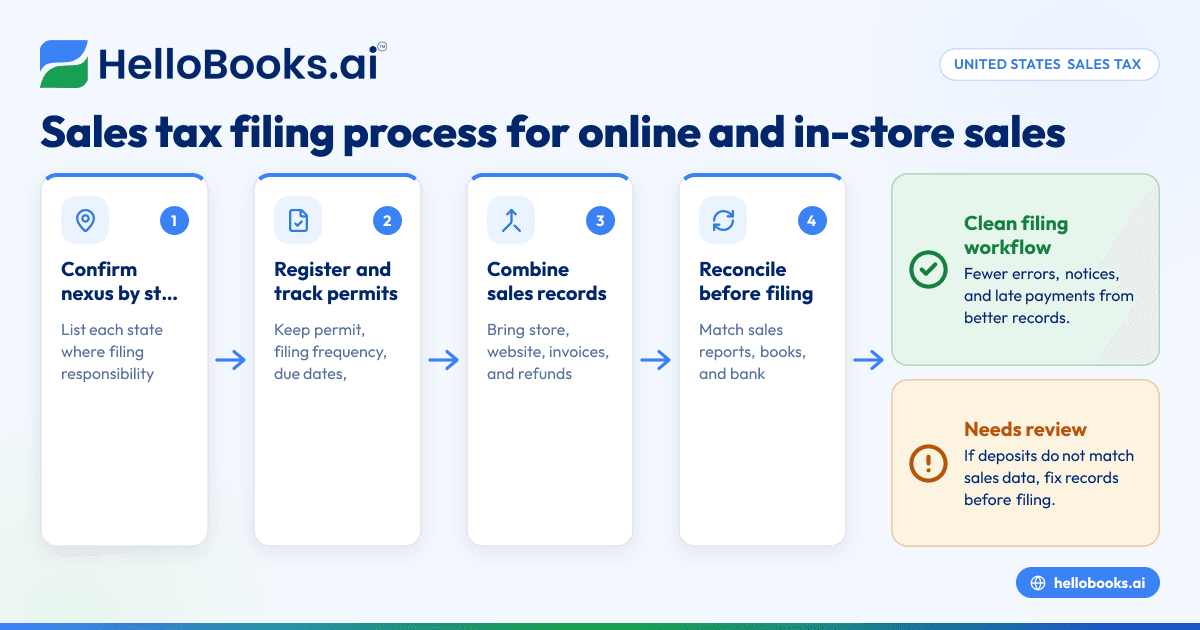
1. Confirm where you have nexus
Start with a list of every state where you may have filing responsibility. Review:
- Store, warehouse, or office locations
- Employees and contractors
- Inventory locations
- Trade show or temporary selling activity
- Sales volume by state
Create one sheet with each state, why nexus may exist, and whether you are already registered. This becomes your control list.
2. Register for sales tax permits
Before collecting sales tax in a state, register with that state when required. Keep a record of:
- Registration date
- Permit number
- Filing frequency
- Portal login details
- Assigned due dates
Store this in one secure place. Many filing issues happen because login access is lost or notices go to an old email address.
3. Set up tax collection correctly in every sales channel
Your point-of-sale system, ecommerce checkout, and invoicing process should all apply tax correctly where needed. Review product taxability and shipping tax treatment based on the states where you are registered.
If you send invoices for taxable items, make sure tax appears clearly on the invoice and posts correctly in your books. Many businesses benefit from using invoice software so invoices, payments, and tax amounts are captured consistently.
4. Record sales by state and jurisdiction
Your accounting records should separate:
- Gross sales
- Taxable sales
- Exempt sales
- Sales tax collected
- Discounts
- Returns and refunds
- Marketplace or processor fees
Do this at least weekly. Monthly is the minimum for most small businesses. Waiting until the due date creates avoidable errors.
5. Keep exemption certificates organized
If you make exempt sales, keep valid exemption documents on file. Your books should mark those transactions clearly. During an audit, missing support can turn an exempt sale into a taxable one.
Create a simple rule: no exemption coding without backup documentation.
6. Reconcile sales data before filing
Compare three records before you prepare the return:
- Sales system reports
- Accounting reports
- Bank deposits and refunds
The totals will not always match exactly at first because of timing and fees. Your job is to explain the differences and document them. Reconciliation is what turns raw transaction data into return-ready numbers.
If your expense and payment records are spread across cards, reimbursements, and bank feeds, expense management software can make month-end cleaner and reduce missing entries.
7. Prepare the return for each state
Use your reconciled totals to complete each state return. The return may ask for:
- Total sales
- Taxable sales
- Deductions or exemptions
- Sales by local jurisdiction
- Tax due
- Prepayments or credits
Be careful with labels. “Total sales” is not the same as “taxable sales.” This is one of the most common filing mistakes.
8. File and pay by the due date
Submit the return through the state portal and make the payment. Save:
- Filing confirmation
- Return copy
- Payment confirmation
- Workpapers used to prepare the return
Use one shared folder by month and state. That makes later reviews much easier.
9. Review notices and update your calendar
After filing, watch for confirmation emails, payment clears, or state notices. If your volume changes, the state may update your filing frequency. Add all changes to your compliance calendar right away.
What records do you need before you file?
You need sales reports, exemption support, refund records, and reconciled deposit data. The goal is to prove how you got from total sales to taxable sales and then to tax due in each state.
Build a monthly filing pack with the same documents every time. A simple pack can include:
- Sales by state report
- Sales tax collected report
- Exempt sales report
- Returns and refunds report
- Invoice summary
- Marketplace payout reports
- Bank deposit reconciliation
- Prior period adjustments
- Copy of filed return
For an online and in-store business, consistency matters more than complexity. The cleaner your monthly file, the faster you can answer questions from your bookkeeper, accountant, or a state agency.
This is where AI bookkeeping can help. It can categorize transactions faster, flag missing records, and reduce the manual cleanup that usually happens right before filing week.
What mistakes cause sales tax filing problems?
Late filings, wrong taxable sales totals, and missing local detail are the biggest issues. Most problems start earlier in the month, when sales, refunds, and tax collected are not recorded cleanly across systems.
Here are the mistakes small businesses make most often.
Filing from bank deposits instead of sales reports
Deposits are often net of fees and refunds. They do not show gross sales clearly. If you file from deposits, your return may understate sales.
Ignoring one sales channel
A business may file based on its store register totals and forget website invoices or manual orders. Every taxable sale counts, no matter how it was captured.
Mixing taxable and exempt sales
If exempt sales are not labeled correctly, your business may overpay or underpay. Both create work later.
Missing returns and refunds
Refunds reduce taxable sales in some cases, but only if they are recorded correctly and in the right period.
Using outdated filing frequencies
A state may move you from quarterly to monthly. If your calendar does not change, you can miss deadlines without realizing it.
Poor documentation
If your team cannot show how the numbers were built, corrections take longer and notices become harder to resolve.
Can ai sales tax tools make filing easier?
Yes, if they improve data quality before the return is prepared. The best use of ai sales tax support is to organize transactions, spot mismatches, and surface missing records so your team can review exceptions faster.
That does not remove your responsibility to file accurately. It does reduce repetitive work. For a small business, the best automation often happens in the bookkeeping layer first. When sales, invoices, expenses, and bank activity are clean, sales tax filing becomes a shorter review task instead of a month-end scramble.
For businesses evaluating better systems, accounting software in the USA should support clear transaction records, simple reporting, and faster close workflows.
How often do you file sales tax returns?
Your filing frequency depends on the state and your sales level. Many states assign monthly, quarterly, or annual filing, and they may change your frequency over time.
Here is a practical way to manage it:
Monthly filers
Monthly filers need tighter closing routines. Reconcile sales and deposits every week. Do not wait until month-end.
Quarterly filers
Quarterly filing feels easier, but it creates bigger cleanup jobs if you ignore monthly reconciliation. Close each month anyway. Then the quarter-end return becomes a review, not a rebuild.
Annual filers
Annual filing still requires good records. You do not want to reconstruct a full year from bank statements and email receipts.
A simple compliance calendar should include:
- Filing period
- Return due date
- Payment due date
- Person responsible
- Status
- Confirmation saved
Small teams often manage this in a shared task system. The key is one owner, one checklist, and one folder for support.
A simple monthly workflow for small businesses
If your business sells both online and in-store, this monthly process works well.
Week 1: Close the prior month
- Export sales reports by channel.
- Review refunds and chargebacks.
- Confirm tax collected totals.
- Reconcile deposits to sales.
Week 2: Clean exceptions
- Fix missing invoices.
- Reclassify exempt transactions.
- Check manual journal entries.
- Confirm state-level totals.
Week 3: Prepare returns
- Pull final sales by state.
- Complete draft returns.
- Review unusual changes from the prior month.
- Get approval if needed.
Week 4: File and archive
- Submit returns.
- Pay tax due.
- Save confirmations.
- Update the compliance calendar.
This process works whether you file monthly or quarterly. Quarterly filers can simply roll the monthly close into a quarter-end review.
When should you get help?
Get help when you register in new states, cross economic nexus thresholds, receive a notice, or cannot tie sales reports to filed returns. If your books are behind, fix the records before trying to solve filing issues one return at a time.
You should also get help if:
- Your store and online numbers do not reconcile
- You have many exempt customers
- You sell through multiple systems
- You have prior period errors
- You are opening new locations
If you need broader finance cleanup first, good accounting software for small business can make the handoff to your accountant much smoother by keeping the source data organized.
If you want a simpler way to keep books clean before sales tax deadlines hit, book a demo at book a demo or compare options at pricing.
Frequently asked questions
Do I need to file a sales tax return if I had no sales?
In many states, yes, if you are registered and the state expects a return for that period. These are often called zero returns. Check the filing notice or portal instructions for each state where you are registered.
Is sales tax based on gross sales or taxable sales?
Returns often ask for both total sales and taxable sales. Tax is generally calculated on taxable sales after allowed deductions, exemptions, or adjustments shown on the return.
Can I file sales tax using my accounting software reports?
You can use accounting reports as part of your process, but only after reconciling them to sales system reports and deposits. Filing from one report alone can create errors if refunds, fees, or channel-specific sales are missing.
What is the best way to prepare for a sales tax filing deadline?
Close your books before the due date, not on the due date. Reconcile sales, refunds, and tax collected every month, keep exemption records organized, and save a filing pack with support for each return.
What happens if I file late?
States may charge penalties and interest for late returns or payments. If you missed a deadline, file as soon as possible and keep copies of the submitted return and payment confirmation.


