
Key takeaways
What this article covers, in order:
- Key takeaways
- Why businesses in India look for a QuickBooks replacement
- What to look for in a QuickBooks replacement in India
- How to choose the right replacement for your business
- A step-by-step switching plan
- Mistakes to avoid during the switch
If you are searching for a QuickBooks replacement in India, you likely need three things: reliable bookkeeping, smoother GST work, and less manual reconciliation. The best replacement is not just software that looks familiar. It should fit how Indian businesses actually run, including GST, UPI collections, bank matching, invoicing, and accountant collaboration.
Key takeaways
- A good QuickBooks replacement in India should support day-to-day bookkeeping, GST-ready workflows, invoicing, expense tracking, and bank reconciliation.
- The right switch depends on your business stage, transaction volume, compliance needs, and how your team works today.
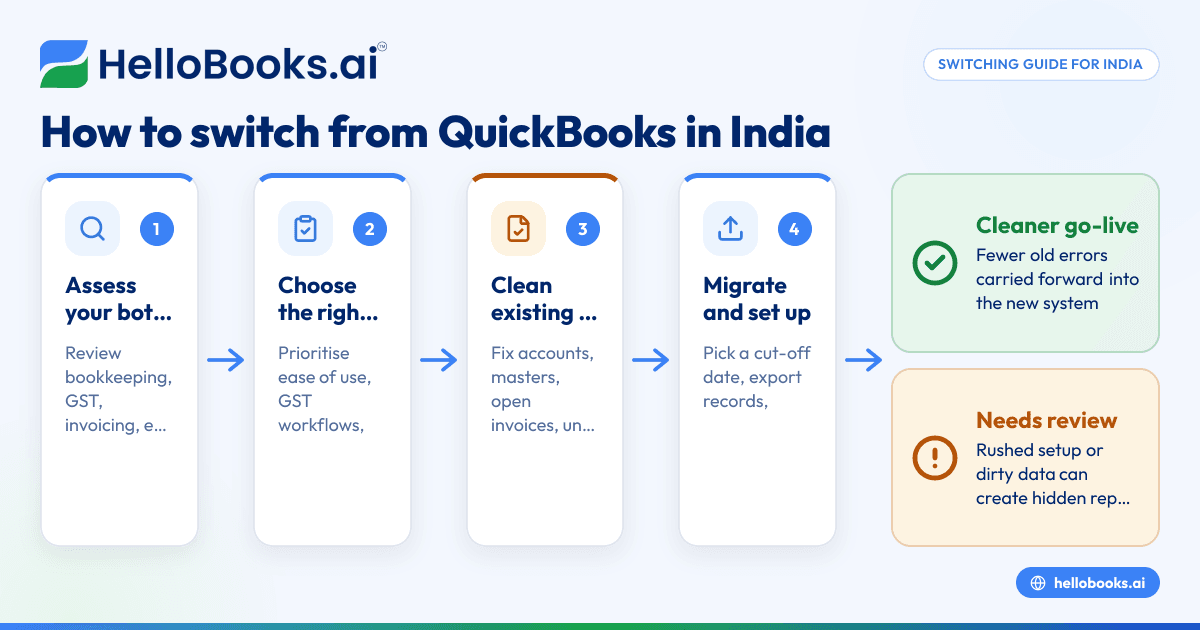
- Before migrating, clean your chart of accounts, customer and vendor masters, and open invoices to avoid carrying old errors forward.
- Plan the move in steps: choose a cut-off date, export your data, validate opening balances, and test reports before going live.
- Small businesses in India should prioritise ease of use, GST workflows, and accountant access over long feature checklists.
- If you are evaluating modern options, look at AI accounting software that reduces data entry and follow-up work.
Why businesses in India look for a QuickBooks replacement
Many Indian businesses outgrow their accounting setup slowly, then all at once. At first, the software may feel manageable. Then the real work starts piling up. GST entries need checking. Bank transactions need matching. Expenses arrive on WhatsApp. Sales teams want faster invoices. Founders want cleaner reports every month.
That is usually when the search for a quickbooks replacement india begins.
For small businesses in Mumbai, Bengaluru, Pune, Jaipur, or Coimbatore, accounting is rarely just accounting. It touches collections, vendor payments, GST, and monthly reporting. If your finance process still depends on spreadsheets, exports, and manual follow-up, the problem is not just the tool. It is the amount of operational effort required to keep the books current.
Common signs your current setup is slowing you down
You may need to switch if any of these feel familiar:
- Books are updated only once a week or once a month.
- Your accountant spends too much time cleaning imports and fixing categorisation.
- Bank reconciliation takes days at month-end.
- GST data needs extra checking before filing.
- Customer invoices and payment follow-up happen outside the accounting system.
- You rely on one person who “knows how everything works”.
- Reports are available, but not trusted.
A replacement should reduce this dependency on manual work. It should not simply move the same problems into a different screen.
What to look for in a QuickBooks replacement in India
The best choice depends on your business model. A services firm in Bengaluru has different needs from a distributor in Surat or a D2C brand shipping across India. Still, a few capabilities matter almost every time.
1. Bookkeeping that stays current
If bookkeeping happens after the fact, decision-making suffers. You need software that helps keep books updated continuously, not only at month-end. This is where AI bookkeeping can help. It reduces repetitive entry work and makes routine categorisation and matching faster.
Look for:
- Simple transaction capture
- Fast ledger categorisation
- Easy review workflows
- Real-time or near real-time books
- Clean audit trails of edits and approvals
2. GST-ready workflows
For Indian businesses, GST is not an optional add-on. It is part of daily accounting. Your replacement should make it easier to maintain tax-ready data from the start. That means correct invoice fields, tax treatment visibility, and cleaner records for filing.
If GST compliance is a frequent pain point, evaluate tools that work well with GST return filing software. Even if filing is handled by your accountant, your source data still needs to be accurate.
This is general information, not tax or legal advice. GST treatment can vary by transaction type, place of supply, and business setup.
3. Invoicing that matches how Indian businesses collect money
A lot of Indian small businesses still create invoices in one place and track payments somewhere else. That causes delays and missed follow-ups. A practical replacement should connect invoicing with bookkeeping and collections.
Useful capabilities include:
- Fast invoice creation
- Customer-wise payment tracking
- Payment reminders
- Support for common business workflows
- Better visibility on overdue receivables
If invoicing is a weak point today, invoice software is worth reviewing as part of the switch.
4. Reliable bank reconciliation
This is often the biggest time drain. Businesses receive payments through bank transfers, UPI, payment gateways, and mixed references. Without a strong reconciliation process, books stay behind and collections become harder to track.
A good replacement should help your team identify:
- Which payments match which invoices
- Which entries need review
- Which expenses are recurring
- Which bank items remain uncleared
This is especially useful for businesses with high transaction counts or multiple accounts. Bank reconciliation software can reduce a lot of manual month-end work.
5. Expense control and proof collection
Expenses usually arrive through email, WhatsApp, or physical bills. Then finance teams spend hours chasing missing details. A replacement should make this easier for both employees and accountants.
Look for:
- Simple expense capture
- Centralised storage of bills
- Better categorisation
- Approver visibility
- Cleaner month-end review
For growing teams, expense management software can remove a lot of chasing and back-and-forth.
How to choose the right replacement for your business
Do not start with a feature comparison sheet. Start with your current bottlenecks. The right software is the one that removes the most friction from your day-to-day work.
Ask these questions first
- How many transactions do you handle each month? A business with 200 entries a month needs simplicity. A business with 5,000 needs stronger automation and controls.
- Who uses the system? Is it only the founder and accountant? Or also operations, sales, and finance staff?
- How important is GST accuracy at source? If your team often fixes tax data later, your next system must support cleaner entry earlier.
- How do you collect payments? If you receive money through UPI, bank transfer, and Razorpay, reconciliation should be a major evaluation point.
- What reports do you actually use? Most small businesses mainly need P&L, balance sheet, receivables, payables, cash flow visibility, and GST-ready records.
- How comfortable is your team with change? The best tool on paper can fail if daily users find it confusing.
Prioritise outcomes, not just features
It helps to score each option against practical outcomes such as:
- Time saved on bookkeeping
- Time saved on bank reconciliation
- Accuracy of GST-related records
- Speed of invoice creation
- Ease of finding supporting documents
- Quality of month-end reports
- Ease of working with your accountant
This keeps the decision grounded. It also helps you avoid paying for features your team will never use.
A step-by-step switching plan
Switching accounting software feels risky because your books sit at the centre of the business. The safest approach is a planned migration with a clean cut-off date and proper checks.
Step 1: Choose your migration date
Pick a date that makes sense operationally. In India, many businesses prefer to switch at the start of a month or financial year. A month-start is practical if you want cleaner reconciliation and easier opening balances.
Avoid switching in the middle of a busy filing or closing period unless there is a strong reason.
Step 2: Clean your existing data
Do not migrate clutter if you can avoid it. Review and clean:
- Chart of accounts
- Customer master
- Vendor master
- Open invoices
- Unpaid bills
- Bank accounts
- GST-related fields
- Duplicate contacts
- Old inactive items
This step matters more than most teams realise. Poor master data causes errors long after the software switch is complete.
Step 3: Export the records you need
At a minimum, keep secure copies of:
- Trial balance
- General ledger
- Customer list
- Vendor list
- Open receivables
- Open payables
- Recent bank statements
- Tax reports used for past filings
- Invoice history if required for operations
Also decide what stays as historical reference and what must be imported for active use.
Step 4: Set up the new system carefully
During setup, define:
- Financial year settings
- Chart of accounts structure
- Tax settings
- Invoice format and workflow
- User access
- Expense categories
- Bank accounts
- Customer and vendor masters
If you are moving away from older systems, you may also want to compare a Tally alternative if your team is considering more than one path.
Step 5: Import opening balances and active records
Usually, you do not need every old transaction from the beginning of time. Many small businesses move opening balances plus open items and keep older records archived. This keeps the setup cleaner and easier to validate.
Be careful with:
- Debtors and creditors totals
- Tax balances
- Bank balances
- Advance receipts
- Outstanding expenses
- Loans and liabilities
Step 6: Test before going live
Before your team starts using the new system fully, test the basics:
- Create a sales invoice.
- Record a payment.
- Enter an expense.
- Reconcile bank transactions.
- Review GST-related output.
- Check receivables and payables reports.
- Compare the opening trial balance with your previous records.
This test phase catches setup mistakes early.
Step 7: Run a short parallel review
For the first few weeks, compare key reports with your old process or accountant’s records. You do not need full duplicate bookkeeping forever. But a short parallel check reduces the risk of hidden errors.
Focus on:
- Bank balance
- Revenue
- Expenses
- GST-related ledger balances
- Customer outstanding
- Vendor outstanding
Mistakes to avoid during the switch
A software migration usually goes wrong because teams rush the basics.
Migrating without cleaning masters
If customer names, vendor names, tax details, or ledgers are inconsistent today, they will remain inconsistent tomorrow. Clean them first.
Choosing only on familiarity
A familiar interface feels safe. But if the workflow still requires too much manual effort, the switch will not solve the real problem.
Ignoring accountant workflows
Many founders choose software based only on what they want to see. But your accountant or finance lead needs efficient review, corrections, and report access too. If needed, you can also find an accountant who is comfortable with modern workflows.
Underestimating reconciliation work
For many businesses, the real challenge is not invoice entry. It is matching collections and expenses correctly. If your business has a high payment volume, make reconciliation a top criterion.
No internal owner for the transition
Someone must own the migration. Even in a small business, one person should coordinate exports, checks, user access, training, and go-live readiness.
When a modern replacement makes more sense
Some businesses do not just need different software. They need a different way of working.
If your team still depends heavily on manual entry, spreadsheet tracking, and back-and-forth on WhatsApp, a modern accounting software for small business setup can be a bigger improvement than a like-for-like replacement.
This is especially true when:
- Founders want quicker monthly visibility
- Finance teams are small
- Collections and reconciliation consume too much time
- GST preparation is stressful every month
- Supporting documents are hard to track
- The business is growing faster than internal processes
For Indian businesses, it is also sensible to prioritise accounting software in India that reflects local workflows, tax expectations, and operating habits.
A practical evaluation checklist
Here is a simple checklist you can use when reviewing options for quickbooks replacement india:
Must-have checklist
- Bookkeeping is easy for non-experts
- GST-ready records are maintained properly
- Invoicing is simple and fast
- Bank reconciliation is efficient
- Expense records and bills are easy to manage
- Reports are clear and reliable
- Accountant access is straightforward
- User permissions are manageable
- Setup and onboarding feel realistic for your team
Nice-to-have checklist
- Better automation for repetitive entries
- Faster month-end closing
- Improved payment follow-up
- Cleaner document organisation
- Less dependence on spreadsheets
- Better collaboration between founder and accountant
When comparing options, ask for a real workflow demo. Do not just watch feature screens. Ask to see how the system handles one full cycle from invoice to payment to reconciliation to reporting.
Is hellobooks.ai a good fit?
If you want a QuickBooks replacement in India that reduces manual work across bookkeeping, invoicing, GST-related workflows, expenses, and reconciliation, HelloBooks is worth evaluating. It is built for small businesses and accountants who want simpler operations and cleaner books without the usual amount of data entry.
The strongest fit is usually for businesses that want a practical move from spreadsheets, legacy tools, or disconnected workflows into one system. If that sounds like your situation, compare the options on pricing or book a demo to see how it would work for your business.
Frequently asked questions
What is the best QuickBooks replacement in India for a small business?
The best choice depends on your transaction volume, GST needs, and how your team works. For most small businesses in India, the right replacement is one that simplifies bookkeeping, invoicing, reconciliation, and accountant collaboration rather than just copying an old workflow.
How hard is it to switch from QuickBooks to another accounting system?
It is usually manageable if you plan the migration properly. The key steps are choosing a cut-off date, cleaning your masters, importing opening balances carefully, and validating reports before full go-live.
Should I migrate all historical data when switching?
Not always. Many small businesses move opening balances and active open items, then keep older records as reference. This is often simpler, cleaner, and faster to validate than importing every old transaction.
What should Indian businesses prioritise in a replacement?
Indian businesses should prioritise GST-ready workflows, bank reconciliation, invoicing, expense tracking, and clear reports. Ease of use matters a lot, especially if founders and accountants both need to work in the system.
Can a QuickBooks replacement help reduce GST and reconciliation errors?
Yes, if the new system improves data capture and matching at the source. Cleaner invoice records, better categorisation, and stronger bank matching usually reduce the amount of manual correction later.
How do I know if my business has outgrown its current accounting setup?
You have likely outgrown it if books are always delayed, reports are not trusted, reconciliation takes too long, or your team depends on spreadsheets and manual follow-up to close the month. Those are strong signs that a more modern setup will save time and reduce risk.


