
Key takeaways
What this article covers, in order:
- Key takeaways
- Why businesses look for QuickBooks competitors for small business
- What should a small business actually look for?
- Which QuickBooks competitors are best for simplicity?
- How do you compare QuickBooks alternatives without wasting weeks?
- Signs you have outgrown QuickBooks for your current workflow
If QuickBooks feels heavier than your business needs, you have options. The best QuickBooks competitors for small business owners in the United States are tools that reduce manual entry, speed up reconciliation, simplify invoicing, and give you clean books without a steep learning curve.
Key takeaways
- The right QuickBooks alternative depends on your volume, team size, and reporting needs.
- Small businesses usually switch because of complexity, manual cleanup, and rising time spent on bookkeeping.
- A simpler system should handle invoicing, expenses, bank reconciliation, and basic financial reports in one place.
- AI features matter most when they reduce coding work, duplicate entry, and month-end cleanup.
- Before switching, review your chart of accounts, open invoices, bank feeds, and historical reports.
- If you want less manual work, look at QuickBooks alternative options built for automation first.
Why businesses look for QuickBooks competitors for small business
QuickBooks is widely used in the United States. Many accountants know it. Many businesses start there because it is familiar. But over time, some teams outgrow the way they use it, even if they have not outgrown the business itself.
The problem is often not accounting. It is workflow.
A business owner in Houston may still send invoices from one tool, accept payments through Stripe, track receipts in email, and then spend hours cleaning everything up in QuickBooks. A small distributor in Chicago may rely on spreadsheets for job costing because the bookkeeping system feels hard to adapt. A growing services firm in Detroit may close the month late because reconciliations and categorization still depend on one finance person.
That is why people search for quickbooks competitors for small business. They are not always looking for more features. They are often looking for fewer steps.
The best alternatives usually solve a few practical issues:
- Too much manual categorization
- Slow bank reconciliation
- Inconsistent invoice tracking
- Messy expense capture
- Delayed month-end reporting
- A system that owners avoid using
A better choice should make daily bookkeeping easier. It should also make the handoff to your accountant cleaner. That matters if you file sales tax across states, issue 1099s to contractors, or need organized records for year-end tax prep.
What should a small business actually look for?
Choose software based on the jobs your team does every week. Ignore long feature lists at first. Focus on the work that causes delays, errors, or stress.
1. Fast setup and simple navigation
If the owner or office manager cannot learn the basics quickly, adoption will stall. Simpler menus matter. So do clear workflows for invoices, expenses, and reconciliation.
2. Strong bank reconciliation
For most small businesses, reconciliation is where time disappears. Good bank reconciliation software should help match transactions quickly and flag exceptions clearly.
3. Easy invoicing and payment tracking
A service business needs to create invoices fast, follow unpaid balances, and understand what was paid and when. Good invoice software cuts billing delays and improves cash flow visibility.
4. Better expense capture
The best systems reduce receipt chasing and simplify coding. This matters for owners who make purchases on the go and for teams with multiple cards. Reliable expense management software helps keep records clean.
5. Useful reports without extra cleanup
You should be able to pull profit and loss, balance sheet, and cash flow reports without exporting everything to spreadsheets first. Reports should be usable by both management and outside accountants.
6. Automation that saves real time
This is where ai quickbooks competitors stand out. The useful AI features are not gimmicks. They help suggest categories, organize transaction data, reduce duplicate entry, and speed up month-end review.
Which QuickBooks competitors are best for simplicity?
The best QuickBooks competitors for small business are the ones that remove bookkeeping friction. If your team wants cleaner books with less effort, prioritize automation, easier reconciliation, and less dependence on spreadsheets.
That short answer is the real filter. Simplicity is not just a cleaner screen. It means fewer manual steps from sale to report.
When comparing options, ask simple questions:
- Can a non-accountant create and send an invoice in minutes?
- Can bank transactions be reviewed and matched quickly?
- Can expense records stay organized without constant chasing?
- Can your accountant get the reports they need without cleanup?
- Can you close the month without a long checklist?
If the answer is no to several of these, the system may not be simple enough for your current stage.
For many businesses, simplicity also means reducing tool sprawl. If invoicing, bookkeeping, and reconciliation happen in separate places, errors increase. Context gets lost. A payment is recorded in one app, a fee appears in another, and the books are adjusted later by hand.
That is why all-in-one systems can be a better fit than stacks of disconnected apps. The goal is not to replace every specialized workflow. The goal is to keep your core accounting routine clean and consistent.
How do you compare QuickBooks alternatives without wasting weeks?
Start with your current pain points, not product demos. List the tasks that take the most time each week, then test whether each option handles those tasks with fewer clicks and less manual cleanup.
Once you have that short answer, use a basic comparison process. Keep it practical. Do not turn it into a giant software project.
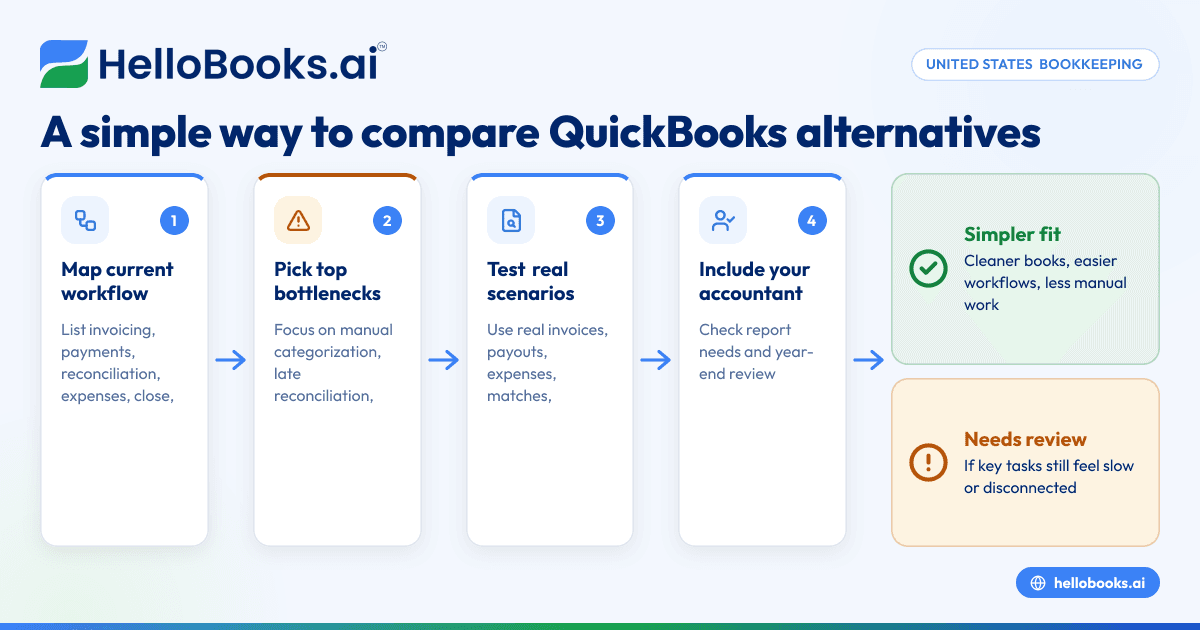
A simple 5-step comparison method
1. Map your current bookkeeping flow
Write down how work moves today:
- Sales and invoicing
- Payment collection
- Bank transaction review
- Expense capture
- Month-end close
- Reporting for owners and accountants
This shows where the real friction sits.
2. Identify the biggest bottlenecks
Usually, the top issues are:
- Manual categorization
- Late reconciliations
- Missing receipts
- Duplicate entries
- Confusing reports
- Poor visibility into cash
Pick the top three. Those should drive your evaluation.
3. Test with real examples
Use real scenarios from your business. For example:
- A $2,400 invoice to a client in Chicago
- A Stripe payout with fees
- A recurring software expense
- A bank transaction that needs matching
- A contractor payment that must be tracked for 1099 preparation
If the product handles these cleanly, it is a good sign.
4. Include your accountant early
Your accountant or bookkeeper may not choose the software, but they often deal with the consequences. Ask what reports they need. Ask how easy year-end review will be. If needed, you can also find an accountant for implementation support.
5. Set a clear decision deadline
Do not compare tools forever. Give yourself two weeks to narrow the list and one month to switch, if needed. Long evaluations usually mean the criteria are unclear.
Signs you have outgrown QuickBooks for your current workflow
Many businesses do not outgrow QuickBooks because they become large. They outgrow it because their finance process becomes harder to manage than it should be.
Here are common signs:
You still rely on spreadsheets for core bookkeeping
If your books only make sense after spreadsheet cleanup, your accounting software is not doing enough.
Reconciliation takes too long
If matching transactions is still a weekly headache, the system may be slowing your team down.
Invoicing and bookkeeping are disconnected
This leads to missed follow-up, unclear payment status, and weak cash visibility.
The owner avoids the system
If the business owner only looks at numbers after someone exports them, the tool may be too complex for daily use.
Month-end close slips every month
A delayed close means delayed decisions. That affects hiring, inventory, marketing, and cash planning.
Your team needs more automation, not more training
More training can help, but only to a point. If the workflow is too manual, automation matters more than education.
This is where AI bookkeeping can make a real difference. The best systems reduce repetitive work instead of asking users to become part-time accountants.
What makes a simpler bookkeeping tool better than QuickBooks?
A simpler bookkeeping tool is better when it helps your team finish everyday work faster and with fewer errors. The best option gives you clean records, timely reports, and less manual correction at month-end.
That is the standard to use. Better does not mean more advanced on paper. Better means more usable in real life.
Simpler does not mean weaker
Some owners worry that a simpler tool will lack accounting depth. That can happen, but complexity is not the same as capability. Many small businesses need strong fundamentals, not enterprise-style layers.
For most small teams, the winning formula is:
- Clean transaction capture
- Easy categorization
- Fast reconciliation
- Straightforward invoicing
- Clear reports
- Easy collaboration with an accountant
Automation is now part of simplicity
A few years ago, “simple” often meant stripped down. Today, simple should also mean automated. Good AI accounting software reduces repetitive tasks while keeping controls visible.
That includes:
- Suggested categorization
- Faster transaction review
- Organized receipt capture
- Cleaner month-end workflows
- Better visibility into outstanding invoices
The software should fit your business stage
A solo consultant, a five-person agency, and a 25-person wholesale business do not need the same setup. Simplicity depends on fit.
If your business is still small but growing, look for room to scale without adding bookkeeping chaos. You want something easier today, but not something you will replace again in six months.
A practical checklist for choosing a QuickBooks alternative
Use this checklist before making a switch.
Bookkeeping workflow
- Can you review transactions quickly?
- Can recurring entries be handled cleanly?
- Can you reconcile accounts without heavy manual work?
Billing and collections
- Can invoices be created and sent easily?
- Can you see unpaid invoices at a glance?
- Can owners check status without asking finance?
Expense control
- Can receipts and expenses stay organized?
- Can card spending be reviewed quickly?
- Can the team keep supporting records attached?
Reporting
- Are the main reports easy to generate?
- Can your accountant use them without reformatting?
- Can you get a clear monthly snapshot of performance?
Practical adoption
- Will your current team actually use it?
- Can the owner understand the dashboard?
- Can you move data without a painful rebuild?
If you want software designed around these basics, accounting software for small business should be your comparison starting point.
How to switch from QuickBooks with less disruption
A switch goes well when you keep the scope tight. The goal is not perfect historical rebuilding. The goal is a clean go-forward process.
Step 1: Pick a start date
Many businesses switch at the beginning of a month or quarter. That makes reporting cleaner. Keep a copy of old reports before any migration.
Step 2: Clean your chart of accounts
Archive duplicates. Fix obvious naming issues. Keep the structure simple. A messy chart creates messy reports in any system.
Step 3: Review open items
Check:
- Open invoices
- Unpaid bills
- Outstanding customer credits
- Uncleared bank transactions
- Loan balances
- Payroll-related balances, if applicable
Step 4: Reconcile key accounts first
Complete your bank and credit card reconciliations through the cutover date. Do not carry confusion into the new system.
Step 5: Move only what you need
For many small businesses, current balances, open items, customer lists, vendor lists, and recent reports are enough. Not every old transaction must be rebuilt if historical records remain accessible.
Step 6: Run the new workflow for 30 days
Watch for bottlenecks. Make small fixes fast. The first month reveals whether the software is actually simpler.
If your team wants a modern option focused on automation and cleaner workflows, accounting software in the USA is the right lens to use when evaluating fit.
Where HelloBooks fits
HelloBooks is built for businesses that want bookkeeping to take less effort. It is especially useful if your current process depends on spreadsheets, manual reconciliation, separate invoicing steps, and too much month-end cleanup.
In practice, that means a small business can use HelloBooks to:
- Automate everyday bookkeeping work
- Send and track invoices
- simplify bank reconciliation
- organize expenses
- generate financial reports faster
For owners comparing quickbooks competitors for small business, the appeal is straightforward. You get a simpler operating rhythm. Your books stay more current. Your accountant gets cleaner records. And your team spends less time fixing avoidable errors.
This article is general information, not tax or legal advice. If your switch affects tax reporting, sales tax workflows, or 1099 preparation, confirm the details with your accountant.
Frequently asked questions
What are the best QuickBooks competitors for small business in the United States?
The best option depends on your workflow. Most small businesses should prioritize ease of use, bank reconciliation, invoicing, expense tracking, and reporting. If your main issue is manual work, look for automation first.
Why do small businesses leave QuickBooks?
Most do not leave because they dislike accounting. They leave because too much work still happens outside the system. Common reasons include spreadsheet dependence, slow reconciliation, disconnected invoicing, and confusing daily workflows.
Are ai quickbooks competitors worth considering?
Yes, if the AI features solve real bookkeeping problems. Useful AI should reduce coding time, improve transaction organization, and make month-end review faster. It should not add complexity or hide important accounting details.
Is switching accounting software risky?
It can be if you switch without clean reconciliations or a clear start date. The risk drops when you prepare open balances, save historical reports, and keep the migration scope focused. Many small businesses can switch smoothly with basic planning.
Can a simpler tool still work with an accountant?
Yes. In fact, simpler systems often help accountants because the books are cleaner and more current. The key is making sure the software produces standard financial reports and keeps supporting records organized.
If you want to see whether HelloBooks can simplify your bookkeeping workflow, book a demo. If you are comparing options first, review the plans at pricing.


