
Key takeaways
What this article covers, in order:
- Key takeaways
- Why businesses in the United States look for QuickBooks alternatives
- What to look for in a QuickBooks alternative
- Types of QuickBooks alternatives for small businesses
- How to evaluate QuickBooks alternatives step by step
- Common mistakes when switching from QuickBooks
If you are looking for quickbooks alternatives for small businesses in United States, the main goal is simple: find software that fits how your business actually runs. A good alternative should reduce manual bookkeeping, make invoicing and reconciliation easier, and give you clean financial reports without adding more admin work.
Key takeaways
- The best QuickBooks alternative depends on your business size, workflow, and reporting needs.
- Small businesses in the United States usually need strong invoicing, bank reconciliation, expense tracking, and simple tax-ready books.
- Manufacturers, agencies, retail businesses, and service companies often need different features and approval workflows.
- Before switching, map your current processes, reports, users, and historical data requirements.
- Compare software on usability, automation, support, and migration effort, not just feature lists.
- If your team spends too much time on data entry, a modern QuickBooks alternative may save time every month.
Why businesses in the United States look for QuickBooks alternatives
QuickBooks is widely used in the United States. Many small businesses start with it because accountants know it, and it covers the basics. But as a business grows, the gaps become more obvious.
Some businesses outgrow the workflow. Others find that cleanup takes too much time. Many teams still rely on spreadsheets beside QuickBooks for approvals, cash tracking, or reporting. That usually creates duplicate work.
Here are common reasons businesses start looking for another option:
- Too much manual categorization
- Slow month-end close
- Reconciliation takes longer than expected
- Invoicing and expense workflows feel disconnected
- Reports do not match what management needs
- Multi-user processes are hard to control
- The software feels built around bookkeeping, not operations
A small business in Chicago may need cleaner receivables tracking and faster monthly reporting. A contractor in Houston may care more about expense capture and job-related visibility. A small distributor in Detroit may need stronger process control as transaction volume grows.
The right alternative depends on the problem you want to solve first. If you are only replacing one tool with another without fixing the process, the result may not be much better.
What to look for in a QuickBooks alternative
The best accounting system is not always the one with the longest feature list. It is the one your team will use correctly every day.
1. Easy bookkeeping and month-end close
Look for software that reduces repetitive entries. Good systems help with categorization, matching, and transaction review. The close should feel structured, not chaotic.
If your team spends hours cleaning books after the fact, you may need more automation. This is where tools built around AI bookkeeping can make a real difference.
2. Strong bank reconciliation
For most small businesses, reconciliation is where time disappears. Transactions come from banks, cards, payment processors, and transfers. If your system does not make matching easy, month-end gets delayed.
Look for:
- Clear match suggestions
- Duplicate detection
- Easy handling of refunds and fees
- Visibility into unmatched items
- A simple review process
A business comparing options should pay close attention to bank reconciliation software features, because this affects accuracy every month.
3. Invoicing and collections support
If you send invoices often, billing should not sit outside the accounting workflow. A good platform lets you create invoices quickly, monitor due dates, and track payment status without extra spreadsheets.
Useful invoicing features include:
- Branded invoices
- Recurring invoices
- Payment tracking
- Customer aging visibility
- Credit notes and adjustments
For many service businesses, invoicing is one of the first reasons to compare invoice software options.
4. Expense management
Expense capture matters more than many owners expect. If receipts, employee reimbursements, and card spends are messy, your books will be messy too.
Look for:
- Receipt capture
- Approval workflows
- Spend categorization
- Vendor tracking
- Reimbursement records
If this is a weak point today, review systems with better expense management software capabilities.
5. Reports that management actually uses
Standard profit and loss and balance sheet reports are important. But many small businesses also need more practical operating views.
Examples include:
- Cash flow visibility
- Customer-wise revenue
- Expense trends
- Month-over-month comparisons
- Outstanding receivables
- Payables by due date
A good accounting system should help owners make decisions, not just satisfy year-end filing needs.
Types of QuickBooks alternatives for small businesses
Not every alternative serves the same kind of business. It helps to group the market by use case.
Basic small business accounting tools
These tools are best for businesses with straightforward books. Think freelancers, small agencies, local consulting firms, and owner-managed service businesses.
They usually focus on:
- Invoicing
- Expense tracking
- Bank feeds
- Basic reporting
- Accountant access
These are a good fit if your monthly transaction volume is manageable and your team is small.
Automation-first accounting platforms
These are better for businesses that want to reduce manual bookkeeping. They focus on workflow efficiency, automation, and cleaner records.
These systems often help with:
- Auto-categorization
- Reconciliation support
- Faster close
- Better review workflows
- Cleaner books for the accountant
If your team still spends too much time posting entries manually, look at modern AI accounting software rather than just another legacy tool.
Operations-led finance systems
Some businesses need accounting that follows operations more closely. This is common in inventory-heavy businesses, multi-location businesses, and companies with more complex approvals.
Examples include:
- Light manufacturing companies
- Distributors
- Ecommerce sellers
- Multi-entity service groups
- Project-driven businesses
These teams often need stronger controls, better audit trails, and more structured workflows than simple bookkeeping software can provide.
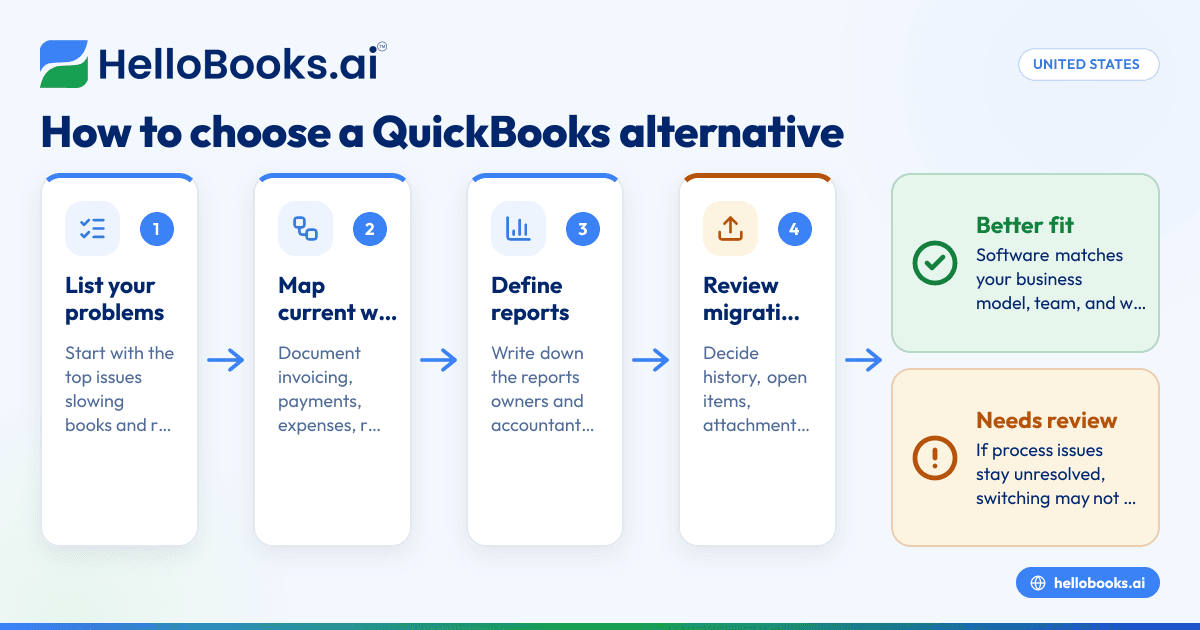
How to evaluate QuickBooks alternatives step by step
Switching accounting software affects your books, processes, and team habits. A structured evaluation reduces risk.
Step 1: List the problems you need to solve
Start with the top three issues. Be specific.
For example:
- Bank reconciliation takes six hours every week.
- Customer invoices are tracked in a separate spreadsheet.
- Expense approvals happen over email and are often missed.
- Month-end reports are delayed by ten days.
This gives you a practical scorecard for comparison.
Step 2: Map your current workflow
Document how money moves through the business.
Include:
- Sales and invoicing
- Customer payments
- Vendor bills
- Card expenses
- Bank reconciliation
- Month-end reporting
- Accountant review
You may discover that your problem is not only the software. It may also be the process around it.
Step 3: Define must-have reports
Do not assume every tool will support the reports you need in a useful format.
Write down the reports your owner, finance lead, or external accountant uses each month. Also note any board or lender reporting requirements if relevant.
Examples:
- Profit and loss by month
- Cash balance and runway
- Accounts receivable aging
- Accounts payable aging
- Sales by customer
- Spend by vendor
- Department-wise expenses
Step 4: Review migration needs
Migration is often where projects slow down. Decide early how much history you need.
Questions to answer:
- Do you need one year or several years of historical detail?
- Will open invoices and bills be migrated?
- Will old attachments move too?
- Who will validate opening balances?
- How will you handle bank reconciliation cutover?
If your books are messy today, consider cleaning them before migration. Moving bad data into a new system rarely helps.
Step 5: Test real scenarios, not just demos
Ask vendors to show your actual workflow. Generic demos can hide important limitations.
Use real examples such as:
- A customer invoice with partial payment
- A vendor bill with split expense categories
- A bank feed with processor fees
- A refund transaction
- End-of-month reconciliation review
This is the fastest way to see whether the software fits your team.
Common mistakes when switching from QuickBooks
Many businesses choose software too quickly. The result is frustration, partial adoption, or a failed migration.
Choosing based only on price
Low cost is attractive, but the real cost includes cleanup time, workarounds, and reporting gaps. A cheaper tool that creates more manual work may cost more overall.
Ignoring accountant involvement
Even if the owner drives the decision, your accountant or finance lead should be involved early. They know what is required for clean books and year-end readiness.
If you need outside support before switching, it can help to find an accountant who understands software transitions.
Moving without process cleanup
If customer records are duplicated, expense categories are inconsistent, and reconciliation items are unresolved, migration will be harder. Clean key lists and balances first.
Not assigning an internal owner
Every software switch needs one accountable person. This person should coordinate setup, testing, training, and cutover.
Without an owner, decisions drift and timelines slip.
Expecting instant perfection
Even a strong migration needs adjustment. The first month may involve rule tuning, report validation, and user training. Plan for a short stabilization period.
Which small businesses should consider a QuickBooks alternative now
Not every business needs to switch immediately. But some signs suggest it is worth evaluating options now.
Your books rely on too many spreadsheets
If invoices, cash tracking, expenses, and reporting all live partly outside the system, your process is fragile. A more connected setup will usually save time and reduce errors.
Reconciliation is always behind
If your books are never current because matching transactions takes too long, software with better automation may help you close faster.
You cannot get reliable reports quickly
When owners must wait days for basic numbers, decision-making suffers. Better systems improve visibility into cash, receivables, and expenses.
Your business has grown beyond the original setup
A business that started with one owner and a few transactions may now have multiple users, approval needs, or more entities. The original tool may no longer fit the operating reality.
Your team wants less manual entry
Manual entry is one of the clearest signs that your current stack is underpowered. Many growing companies now want accounting software in the USA that reduces repetitive work and supports a cleaner review process.
QuickBooks alternatives: questions to ask before you decide
Before selecting a new system, ask these practical questions.
How much bookkeeping work will it remove?
Do not just ask what the software can do. Ask what work your team will stop doing every week.
This may include:
- Fewer manual entries
- Faster matching
- Less spreadsheet tracking
- Easier expense review
- Cleaner invoice follow-up
Will it support your accountant?
Your accountant needs proper access, reports, and clean records. A system that owners love but accountants dislike may create year-end problems.
How easy is onboarding?
A powerful platform that takes too long to set up may not suit a lean business. Ask about setup effort, data migration, and training expectations.
Can it scale with your business?
Think ahead 12 to 24 months. Will the system still fit if you double invoice volume, add locations, or expand your finance team?
Does it reduce compliance risk?
For US businesses, your accounting system should help maintain complete, organized records. It should support sales records, vendor records, and year-end reporting preparation. This is general information, not tax or legal advice.
A practical shortlist framework for US small businesses
You do not need to compare ten tools in depth. A shortlist of three is usually enough.
Score each option from 1 to 5 on these factors:
- Ease of use
- Bookkeeping automation
- Reconciliation workflow
- Invoicing support
- Expense management
- Reporting quality
- Accountant friendliness
- Migration effort
- Support responsiveness
- Fit for your business model
Then ask your team to test the top two options using live examples.
For many growing businesses, the right choice is not a traditional accounting product with more menus. It is software that removes repetitive finance work and helps your team stay current. If that is what you need, start with solutions built for modern accounting software for small business workflows.
Where HelloBooks fits
HelloBooks is worth considering if your small business wants simpler bookkeeping, invoicing, expense tracking, bank reconciliation, and reporting in one place. It is especially relevant if your current process still depends on spreadsheets, manual categorization, or delayed month-end review.
If you are comparing systems, focus on whether the product helps your team keep books current with less effort. That matters more than a long feature list.
If you want to see whether HelloBooks fits your workflow, you can book a demo or review options on the pricing page.
Frequently asked questions
What are the best quickbooks alternatives for small businesses in United States?
The best option depends on your workflow, not just your size. A service business, retailer, and distributor may all need different strengths in invoicing, reporting, and reconciliation. Start by identifying where QuickBooks slows your team down today.
When should a small business switch from QuickBooks?
Consider switching when your team relies heavily on spreadsheets, reconciliation is always delayed, or reports are hard to trust. It also makes sense if your business has added users, approval layers, or more transaction volume than your current setup handles well.
Is moving away from QuickBooks difficult?
It can be manageable if you plan the migration properly. The main tasks are cleaning data, deciding what history to bring over, validating balances, and training users. Most problems happen when businesses rush the process.
Will my accountant be able to work with a QuickBooks alternative?
Usually yes, if the software provides proper reports, transaction detail, and review access. Involve your accountant early in the decision so you do not create year-end friction later.
What features matter most in a QuickBooks alternative for US small businesses?
For most businesses, the essentials are invoicing, bank reconciliation, expense management, and reliable reporting. Ease of use and automation matter just as much as raw features because they determine whether your books stay current.
Can a QuickBooks alternative help reduce manual bookkeeping?
Yes, many newer systems are designed to reduce repetitive data entry and simplify review. The biggest gains usually come from transaction matching, expense capture, and more structured monthly workflows.


