
Key takeaways
What this article covers, in order:
- Key takeaways
- Why businesses search for a QuickBooks alternative in India
- What “good fit” looks like for Indian small businesses
- When it is actually time to switch
- What to check before switching from QuickBooks
- Common mistakes businesses make when switching
If you are looking for a QuickBooks alternative in India, focus on fit rather than brand familiarity. The right tool should handle Indian workflows well, especially GST, invoicing, bank reconciliation, and day-to-day bookkeeping, without forcing your team to manage work in spreadsheets.
For most small businesses in India, switching makes sense when your current setup creates extra manual work, weak visibility, or compliance risk. A good replacement should be easy for your team to adopt, support Indian business realities, and help you close books faster.
Key takeaways
- The best QuickBooks alternative in India is one that matches Indian compliance and operating needs, not just basic accounting features.
- Before switching, check GST support, invoice workflows, bank reconciliation, reporting, and ease of migration.
- Many businesses outgrow spreadsheet-heavy processes before they outgrow accounting itself.
- Your accountant or finance lead should be involved early, especially when migrating masters, opening balances, and tax data.
- A switch should reduce manual entry and month-end stress, not create a new learning burden.
- Review security, user access, and support quality before making a final decision.
Why businesses search for a QuickBooks alternative in India
Small businesses in India usually do not switch accounting systems for fun. They switch because the current process has started slowing the business down.
This often happens in a familiar pattern. Sales grow. Transaction volume rises. More payments come through UPI, bank transfer, Razorpay, or cash collections. Purchase bills start coming from multiple vendors. Then the team realises that the system is no longer the problem alone. The real issue is the amount of manual work around it.
A founder in Pune may still be using spreadsheets for expense tracking. A distributor in Mumbai may be creating invoices in one place and checking collections in another. A services company in Bengaluru may rely on WhatsApp for customer approvals and then manually update records later. Over time, this creates delays, duplicated work, and mistakes.
That is why the search for a “quickbooks alternative india” usually means something more specific:
- The business wants simpler bookkeeping.
- The finance team wants fewer manual reconciliations.
- The owner wants better visibility into cash flow and profitability.
- The accountant wants cleaner records for GST and month-end closing.
In many cases, the question is not “Which software has the most features?” The real question is “Which system will help my business run cleanly every week?”
What “good fit” looks like for Indian small businesses
A strong accounting tool for India should reflect how Indian businesses actually operate. That means it should support compliance, yes, but it should also support messy real-world workflows.
It should work for Indian invoicing and GST
If you sell goods or services in India, invoicing is not just about generating a PDF. It is tied to taxes, records, collections, and customer communication.
Look for software that helps with:
- GST-ready invoices
- Proper tax treatment in day-to-day entries
- Credit and debit notes
- Sales and purchase records
- Clear tax summaries for review
If your business needs it, also check whether it supports e-invoicing software workflows and whether it can fit into your GST process. If GST return preparation is a major pain point, it is worth evaluating whether the product also supports GST return filing software capabilities.
Be careful here. Not every accounting tool built for global markets handles Indian tax workflows neatly. The problem is not always missing features. Sometimes the feature exists, but the workflow is awkward enough that your team still does most of the work outside the product.
It should reduce reconciliation work
For many businesses, reconciliation takes more time than invoicing.
You may receive payments in split amounts. A customer may pay against multiple invoices. Settlement amounts may differ after fees. Vendor payments may go out in batches. Without a good reconciliation process, your books become inaccurate very quickly.
A solid alternative should make bank matching easier and more reliable. It should help your team identify unmatched transactions, duplicate entries, and missing records without searching across multiple files. This is where bank reconciliation software becomes especially important.
If your current setup depends on one person “knowing where everything is”, that is a warning sign.
It should support expense capture without chaos
Expense records are often scattered across email, WhatsApp, physical bills, and employee messages. That slows down closing and creates tax risk.
Your next system should make it easier to capture and categorise expenses consistently. It should help the business move away from “send me the bill and I will enter it later” as a process. Good expense management software features can save a surprising amount of finance time every month.
When it is actually time to switch
Not every frustration means you need a new system today. But some patterns clearly suggest that your business has outgrown its current setup.
Sign 1: You are doing too much work outside the system
If you maintain parallel spreadsheets for receivables, payables, GST checks, bank matching, or management reports, your accounting software is not carrying enough of the load.
A few trackers are normal. Entire finance processes outside the system are not.
Sign 2: Month-end closing takes too long
If your team needs 10 to 15 days to close the month, there is likely too much manual entry, follow-up, and reconciliation involved.
The delay affects more than accounting. It slows decisions on hiring, purchasing, collections, pricing, and working capital.
Sign 3: Reports are available, but not usable
Some businesses technically have reports, but cannot trust them. Revenue looks different in two places. Receivables are unclear. Expense categories are inconsistent. Inventory or COGS may not tie properly where relevant.
A reporting problem is usually a data quality problem.
Sign 4: The tool is difficult for non-accountants
In many small businesses, the founder, operations head, or admin team also touches invoices, expenses, or payment updates. If the tool only works well for one experienced accountant, it may not suit your current stage.
Sign 5: Your business has changed
Maybe you added new branches. Maybe you now sell across states. Maybe order volume has grown through marketplaces, IndiaMART leads, or repeat B2B business. Maybe collections now happen through several payment channels.
A system that worked at ₹20 lakh in annual turnover may feel very different at ₹2 crore.
What to check before switching from QuickBooks
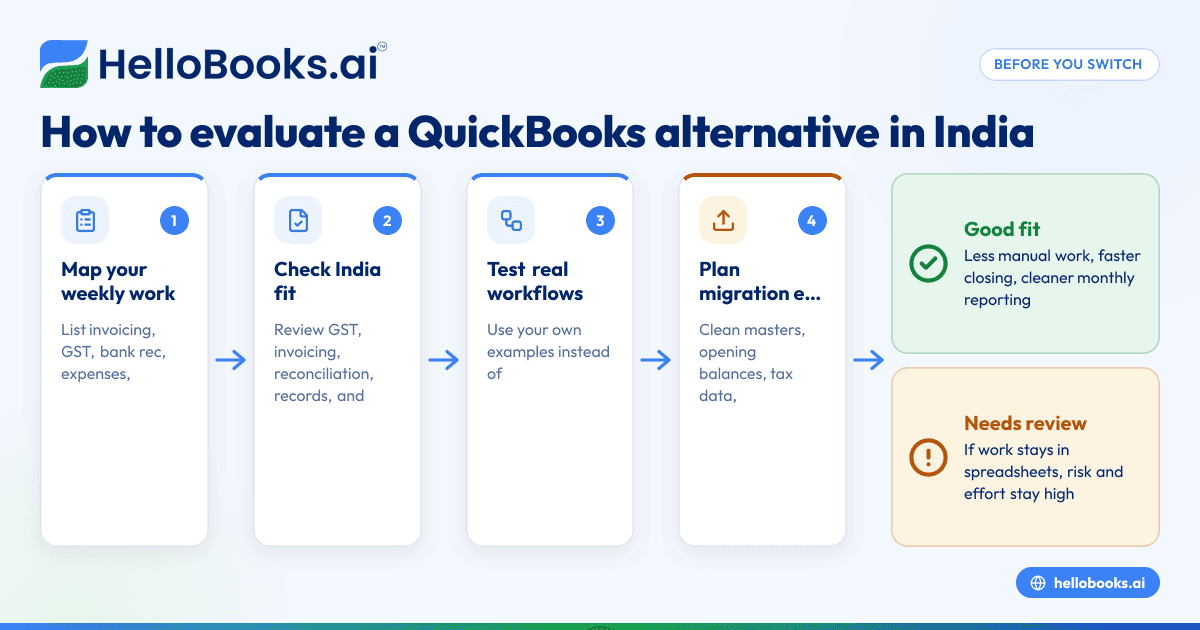
The best way to avoid a painful migration is to evaluate software using your actual workflow, not a generic demo.
1. List your must-have workflows
Start with the work your team does every week.
Include:
- Sales invoicing
- Purchase entries
- GST treatment
- Bank reconciliation
- Customer collections
- Vendor payments
- Expense tracking
- Monthly reports
- Accountant review
- Data export needs
This list becomes your scorecard. Without it, demos can look impressive but miss the daily pain points.
2. Check how easy invoice creation really is
Ask to see the full invoice workflow, not only the final invoice screen.
You want to know:
- How many steps it takes to create an invoice
- Whether tax fields are simple to review
- Whether the invoice format looks professional
- Whether credit notes are easy to issue
- Whether recurring invoices or repeat customer workflows are smooth
If invoicing is central to your business, review whether dedicated invoice software features are built in well enough for your team.
3. Review GST and records carefully
For Indian businesses, this is not a minor box to tick.
Ask practical questions:
- How are GST sales and purchase entries handled?
- How easy is tax review before filing?
- Can your accountant check entries cleanly?
- Are reports understandable to a non-specialist business owner?
This is general information, not tax or legal advice. If your business has specific GST treatment questions, ask your accountant to validate the workflow before you switch.
4. Ask about migration, not just features
Feature comparisons are useful. Migration planning matters more.
Check:
- Can customer and vendor masters be imported?
- Can opening balances be added clearly?
- Can historical transactions be migrated if needed?
- What data needs cleaning before import?
- How long does a typical switch take for a small business?
Most migration problems come from poor source data, not software alone. Old ledgers may have duplicate parties, missing GSTIN details, unclear expense heads, or unreconciled bank entries. It is better to clean these early.
5. Test reporting with your own examples
Do not accept vague statements like “Yes, reporting is available.”
Ask to see:
- Profit and loss
- Balance sheet
- Outstanding receivables
- Outstanding payables
- Tax summaries
- Cash flow views if available
Use sample figures from a business like yours. A trading company in Ahmedabad will need something different from a services firm in Bengaluru.
6. Check user roles and access
As your business grows, not everyone should see or edit everything.
Look at:
- Role-based access
- Approval flows where relevant
- Audit visibility
- Controls around edits and deletions
This is especially useful when founders, finance staff, external accountants, and branch teams all work in the same system.
7. Understand data handling and access
Any accounting system stores sensitive business and personal data. In India, businesses should think carefully about data access and handling, especially where employee, customer, or vendor personal data is involved under the DPDP Act 2023 context.
You do not need legal jargon. You do need clarity on who can access data, how your team can manage permissions, and how exports work.
Common mistakes businesses make when switching
Even a good product can disappoint if the switch is rushed.
Choosing only on price or familiarity
Low price alone is not value if the team still spends hours doing manual work. Familiar-looking screens also do not help if the process underneath remains inefficient.
Instead, compare software based on time saved, error reduction, and reporting quality. If you are comparing options, it helps to look at solutions built as accounting software for small business rather than generic accounting tools.
Migrating bad data without cleanup
If your old books are messy, the mess will move with you.
Before migration:
- Remove duplicate ledgers
- Review opening balances
- Confirm unpaid invoices
- Check vendor balances
- Reconcile major bank accounts
- Clean tax fields where possible
A cleaner start often matters more than a longer historical import.
Excluding the accountant from the decision
The founder may own the final choice. But the accountant or finance lead often sees problems that others miss.
They can help review chart of accounts structure, tax treatment, reporting needs, and migration readiness. If you do not have in-house finance support, consider asking your CA or using a service that helps you find an accountant before the transition.
Trying to switch during a peak period
Avoid changing systems in your busiest sales month or right before major filing work. A calmer period gives your team time to learn the new process properly.
For many businesses, the cleanest switch is at the start of a month or financial period.
How to compare options practically
When people search for a QuickBooks alternative in India, they often compare product pages and feature lists. That is a useful start, but it is not enough.
A better method is to run a short practical evaluation.
Use a 30-day reality test
Pick 2 or 3 serious options. Then test them against common tasks.
For example:
- Create five sales invoices
- Enter five purchase bills
- Record two expense claims
- Match a bank statement sample
- Check outstanding receivables
- Review GST-related summaries
- Export reports for your accountant
This approach shows where your team gets stuck.
Involve the actual users
A founder may care about dashboard visibility. The accountant may care about ledger structure. The operations team may care about invoice speed. The admin team may care about ease of entry.
All of them are right.
The best software is not the one that impresses one person. It is the one that the team will actually use consistently.
Prefer simplicity over feature overload
Small businesses rarely need the most complex system. They need one that is dependable and clear.
That is why many businesses now look beyond legacy setups and evaluate tools designed around AI accounting software or AI bookkeeping workflows. The real advantage is not hype. It is less manual entry, faster categorisation, and cleaner books with less effort.
If you are specifically replacing an older setup, reviewing a modern QuickBooks alternative can help narrow the shortlist.
What a successful switch should achieve
A good move should deliver visible improvements within the first few months.
You should expect:
- Faster invoice creation
- Better control over expenses
- Easier reconciliation
- Cleaner records for GST review
- More confidence in monthly reports
- Less dependence on spreadsheets and memory
Your business does not need a perfect setup on day one. But it should feel simpler, clearer, and more manageable very quickly.
For Indian small businesses, that usually matters more than long feature lists. You need software that fits your business as it is today, and that can support the next stage without making finance heavier.
If you are evaluating options, HelloBooks offers accounting software in India designed for small businesses that want bookkeeping, invoicing, GST workflows, reconciliation, and reporting in one place. If you are moving away from older tools, it can also be useful to compare it as a Tally alternative depending on your current setup.
If you want to see whether HelloBooks fits your workflow, you can book a demo or compare plans on the pricing page.
Frequently asked questions
What is the best QuickBooks alternative in India for small businesses?
The best option depends on your workflow, not just feature count. For most Indian small businesses, the right choice is one that handles GST, invoicing, reconciliation, and reporting simply and reliably.
Is QuickBooks still suitable for Indian businesses?
That depends on how your business operates today. If your team needs strong India-specific accounting workflows and less manual effort around GST and reconciliation, you may find a better fit in software designed for India.
How hard is it to migrate from QuickBooks to another accounting software?
Migration difficulty depends mostly on your current data quality. If your customer, vendor, bank, and tax records are clean, switching is usually much easier than businesses expect.
Should I migrate all historical data when switching?
Not always. Many small businesses migrate masters, opening balances, and recent periods first, then keep older records archived separately if needed. This can make the transition faster and cleaner.


