
Key takeaways
What this article covers, in order:
- Key takeaways
- Why manufacturers in the United States start looking beyond QuickBooks
- What should manufacturers compare first?
- What makes a good quickbooks alternative for manufacturers in the United States?
- How does an ai quickbooks alternative help a manufacturing finance team?
- What to compare for invoicing
If QuickBooks is starting to feel too generic for your factory, job shop, or distributor, the right replacement should reduce manual work around invoicing, bank matching, and month-end close. A strong quickbooks alternative for manufacturers united states should fit how manufacturing cash flow works, handle high transaction volumes cleanly, and give finance teams faster visibility without adding more spreadsheet work.
Key takeaways
- Manufacturers often outgrow QuickBooks when invoicing rules, reconciliations, and close checklists become too manual.
- The best replacement is not just a general ledger. It should support approvals, exception handling, and cleaner month-end workflows.
- For many small and growing manufacturers, speed of reconciliation matters as much as reporting depth.
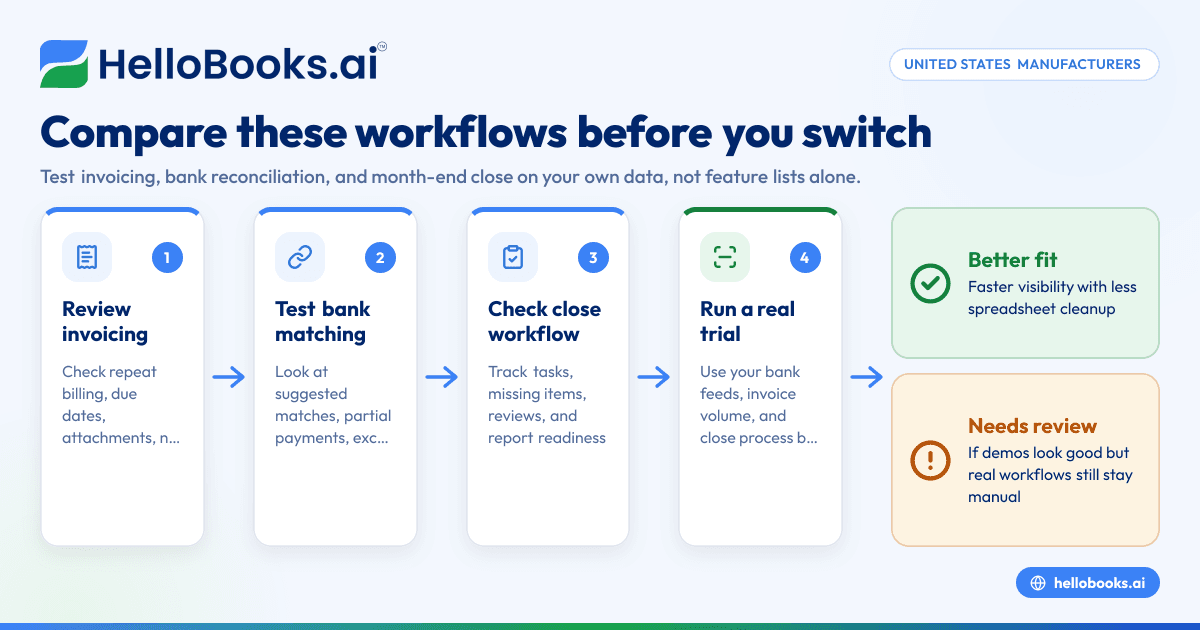
- You should compare systems using real workflows, not feature lists alone.
- An ai quickbooks alternative can help reduce categorization, matching, and follow-up work for lean finance teams.
- Always test the software on your own bank feeds, invoice volume, and close process before switching.
Why manufacturers in the United States start looking beyond QuickBooks
QuickBooks works well for many small businesses. But manufacturers often hit friction earlier than service businesses do.
The reason is simple. Manufacturing finance has more moving parts. You may issue invoices against shipments, deposits, milestones, or recurring purchase orders. You may collect through ACH, card, check, or wire. You may run multiple bank accounts, merchant accounts, and credit cards. That creates more exceptions at month-end.
A manufacturer in Chicago or Houston may also deal with long customer payment cycles, partial receipts, freight charges, customer-specific billing terms, and a high volume of vendor spend. Even if production planning sits elsewhere, accounting still has to close the books on time.
QuickBooks can become slow when your team is doing too much outside the system. Common warning signs include:
- Bank reconciliation is delayed every month
- Invoices are created manually from spreadsheets or email threads
- Finance staff spend hours clearing unmatched transactions
- Month-end depends on one person knowing the process
- Reports are technically available, but not trusted
- The controller exports data to Excel to finish the close
That is where a replacement starts to make sense. Not because QuickBooks is bad, but because your workflow is now more complex than the tool setup.
What should manufacturers compare first?
Start with the workflows that slow your team down every week: invoicing, reconciliation, and close. If a system looks good in a demo but does not improve those three areas, it will not help much in real life.
From there, look at controls, reporting, and how easy it is for your team to adopt.
1. Invoicing flexibility
Manufacturers rarely have one simple invoice pattern. Some customers want consolidated invoices. Others want line-item detail by shipment, SKU, location, or purchase order. Some require backup documents before paying.
When you compare systems, ask:
- Can invoices be created quickly from repeat patterns?
- Can the team track due dates and payment status clearly?
- Can invoice records support attachments and notes?
- Can finance follow up on overdue invoices without switching tools?
- Can the process work for both low-volume, high-value invoices and frequent billing?
This is where good invoice software matters. The goal is not just sending an invoice. The goal is creating a repeatable billing process with fewer errors.
2. Bank reconciliation speed
Manufacturers often have more payment noise than expected. Card fees, freight offsets, customer short pays, duplicate references, and batched deposits can all slow down matching.
A better system should make bank reconciliation faster in two ways. First, it should automate straightforward matches. Second, it should make exceptions obvious instead of burying them.
Ask these questions during evaluation:
- How quickly does the system import and classify transactions?
- Can it suggest likely matches for invoices and expenses?
- How does it handle partial payments and batched receipts?
- Can users review exceptions without downloading everything to Excel?
- Is there an audit trail for changes and approvals?
If your team spends several days a month clearing bank lines, then bank reconciliation software should be one of your top buying criteria.
3. Month-end close workflow
Many businesses think they need “better reporting” when the real problem is an inconsistent close.
The issue is usually process. Entries are delayed. Reconciliations are incomplete. Documents are scattered across inboxes. No one knows what is still open until the last day.
A stronger accounting system should help you:
- Track recurring close tasks
- Reduce manual data entry
- Surface missing transactions earlier
- Review variances faster
- Keep support documents organized
- Produce financial reports sooner
For a lean finance team, the best system is often the one that cuts close time by removing cleanup work upstream.
What makes a good quickbooks alternative for manufacturers in the United States?
A good alternative gives manufacturers cleaner transaction flow, better controls, and less dependence on spreadsheets. It should make invoicing, bank matching, and close review faster without forcing the team into heavy setup for basic daily work.
Manufacturers in the United States should look for software that supports real cash collection patterns and internal review. It should also fit common finance stacks, such as bank feeds, card spend, and customer payment records.
That short answer matters because many software searches start too broad. “Manufacturing accounting” can mean inventory, ERP, job costing, plant operations, or financial close. But if your immediate pain is accounts receivable and month-end cleanup, then start there.
A practical evaluation should focus on the work your accounting team repeats every day. For example:
- Creating and tracking invoices
- Matching deposits to open receivables
- Reconciling bank and card activity
- Reviewing uncategorized spend
- Closing books by a target date every month
- Producing reliable P&L, balance sheet, and cash flow reports
For many small and midsize manufacturers, this is where an AI accounting software approach helps. It can reduce coding, matching, and exception review time. That matters when you do not have a large accounting department.
How does an ai quickbooks alternative help a manufacturing finance team?
It helps by automating repetitive accounting work, especially transaction coding, invoice follow-up, and reconciliation review. That gives controllers and owners more time for exceptions, cash planning, and month-end review instead of data cleanup.
That short answer is the practical one. AI is useful when it removes repeated steps that do not need judgment every single time.
For manufacturers, those repeated steps often include:
- Pulling bank transactions and classifying them
- Matching customer payments to invoices
- Flagging unusual or missing entries
- Organizing expense records
- Reducing duplicate data entry across workflows
An ai quickbooks alternative is not valuable because it sounds modern. It is valuable if your finance team can close faster with fewer manual touches.
That is especially true in businesses where one controller, bookkeeper, or office manager carries too much of the monthly accounting load. If that person is constantly correcting postings, chasing invoice status, and reconciling deposits, then automation is not a luxury. It is capacity.
This is where AI bookkeeping can be useful for manufacturers that want better day-to-day accounting without taking on a full ERP project.
What to compare for invoicing
Invoicing is often the first pain point manufacturers notice because it directly affects cash flow.
If invoices are delayed, inaccurate, or hard to track, collections slip. That leads to more manual follow-up and less confidence in receivables.
Compare the invoice creation workflow
Look at how many steps it takes to create a standard customer invoice.
You want a system that lets your team move quickly while still keeping the right detail. That includes customer terms, due dates, item descriptions, supporting notes, and reference fields.
For recurring patterns, ask whether the software can reduce rework. A manufacturer that bills the same customers every month should not rebuild invoices from scratch.
Compare collections visibility
Good invoicing is not only about sending documents. It is also about seeing what is unpaid and what needs action.
Your team should be able to answer these questions quickly:
- Which invoices are overdue?
- Which customers pay late most often?
- Which receipts have come in but are still unmatched?
- Which invoices are blocked by missing details?
Without that visibility, collections turn into inbox searching and ad hoc spreadsheet tracking.
Compare document handling
Many manufacturers need to attach backup. That may include shipping details, order references, signed acknowledgments, or communication notes.
If that support sits outside the accounting system, follow-up gets slower. It also becomes harder for someone else to pick up the account.
Compare reporting from invoicing to cash
The best replacement should help you see invoicing and collections together. That means you can track billed amounts, receipts, overdue balances, and trends without stitching reports manually.
What to compare for bank reconciliation
Bank reconciliation is where many accounting teams lose time they did not plan to lose.
A single month may include dozens or hundreds of transactions that are easy to post individually but hard to clear accurately. Manufacturing makes this worse when payments come in batches, fees are deducted before deposit, or remittance detail arrives late.
Compare matching quality, not just bank feeds
Most systems can connect to bank feeds. That is not the real differentiator.
The real question is how well the system helps your team turn raw bank activity into reviewed accounting records.
During a demo, ask the vendor to show:
- Suggested matches for customer receipts
- Handling of partial payments
- Duplicate transaction prevention
- Exception queues for unclear items
- Review history for changes
A clean matching experience saves time every week. A weak one creates hidden work.
Compare exception handling
You should assume exceptions will happen. Customers short pay. Fees are netted out. Payments reference old invoice numbers. Refunds and chargebacks appear.
A good system should make those transactions easy to investigate and resolve. If it takes too many clicks to understand a mismatch, reconciliation will remain slow.
Compare review controls
Manufacturers often have small teams, so one person may do the initial work and another may review it. That makes approval history important.
You want to know who matched, edited, or reclassified a transaction. This supports cleaner close and easier review when questions come up later.
What to compare for month-end close
Month-end close is where invoicing and reconciliation problems finally show up.
If transactions are late or unclear all month, the close becomes a scramble. The right software should reduce that scramble.
Compare close readiness
Ask whether the system helps your team see unresolved items before the last day of the month.
Useful signals include:
- Unmatched bank transactions
- Open invoice exceptions
- Missing expense documents
- Pending reviews
- Accounts that changed unusually from prior periods
These signals help the controller focus on actual issues instead of searching for them.
Compare recurring close tasks
Many small manufacturers still run their close from memory or a spreadsheet checklist. That works until someone is out of office or the company grows.
A better process is one where close steps are visible and repeatable. Even simple reminders and review structure can shorten the cycle.
Compare reporting reliability
The point of closing quickly is not speed alone. It is confidence.
Your owners and finance leads need a P&L, balance sheet, and cash flow report they can actually use. If every month ends with a manual rebuild in Excel, the system is not doing enough.
This article is general information, not tax or legal advice. If your close includes tax filings, sales tax treatment, or 1099 reporting decisions, review those with a qualified advisor.
A practical scorecard for evaluating alternatives
Use a simple scorecard instead of relying on demo impressions.
Rate each option from 1 to 5 on the criteria below:
Core workflow criteria
- Invoice creation speed
- Invoice tracking and collections visibility
- Bank matching accuracy
- Exception handling
- Month-end close support
- Financial report clarity
Team and control criteria
- Ease of use for daily staff
- Reviewer approval trail
- Document organization
- Role-based accountability
- Time to train new users
Business fit criteria
- Works for your transaction volume
- Handles multiple bank and card accounts
- Supports your current finance process
- Reduces spreadsheet dependency
- Helps a lean accounting team do more
Bring real examples into the test. Use last month’s bank statement, a sample customer invoice batch, and your close checklist. If a system performs well on your own data, that matters more than a polished generic demo.
When should a manufacturer switch?
Switch when the cost of staying is higher than the effort of change. If your team spends too much time on invoices, reconciliations, and close cleanup, that drag compounds every month.
A few signs it is time:
- Books close later than management needs
- Bank recs are consistently behind
- Receivables follow-up is manual and scattered
- Reporting depends on one person’s spreadsheet logic
- Finance hires are added just to keep up with transaction work
You do not always need a full ERP to solve these issues. Sometimes you need better accounting operations first. For many teams, that starts with choosing accounting software in the USA that fits real daily finance work better than a generic setup.
How HelloBooks fits the evaluation
HelloBooks can be worth a look if your manufacturing business wants simpler invoicing, faster reconciliation, and less manual month-end work. It is designed to reduce routine bookkeeping effort so small finance teams can spend more time reviewing numbers and less time entering them.
The key is to evaluate it the same way you would evaluate any replacement. Use your actual workflows. Test invoice creation, bank matching, exception review, and reporting. Compare the result against your current process and any QuickBooks alternative you are considering.
If you are trying to move away from spreadsheet-heavy accounting, you can also compare it with broader accounting software for small business options using the scorecard above.
If you want to see whether HelloBooks can shorten your invoicing, bank rec, and close process, book a demo at book a demo or review options on the pricing page.
Frequently asked questions
Is QuickBooks enough for a small manufacturer in the United States?
It can be, especially at an earlier stage. But if invoicing, bank rec, and month-end close require too much manual work, your team may need a better fit.
Do manufacturers always need an ERP instead of accounting software?
No. Some manufacturers need stronger accounting operations before they need a full ERP rollout. If your biggest pain is billing, reconciliation, and close, start by fixing that workflow first.
What is the biggest thing to test in a QuickBooks replacement?
Test your real monthly work. A system should prove it can handle your invoice flow, your bank activity, and your close process with less manual cleanup.