


Key takeaways
What this article covers, in order:
- Why this comes up / what goes wrong
- Step-by-step
- Example (fictional figures)
- Common mistakes
- Doing this in HelloBooks
- Frequently asked questions
Project accountant software helps accountants and business owners manage the financials of individual projects separately. It covers GST invoicing, filing, reconciliation, expense tracking, and reporting. For Indian CA firms and tax practitioners, this software streamlines handling multiple clients, each with different GSTINs and projects, ensuring compliance and accuracy.
Why this comes up / what goes wrong
Chartered accountants and bookkeeping firms often manage many clients with projects spread across states, each requiring separate GST compliance. For example, a three-partner CA firm in Ahmedabad handling 80 GST clients must keep project financials distinct and file GST returns correctly for each GSTIN. Similarly, a solo tax practitioner in Nagpur needs to avoid mixing client data and track project expenses precisely. Without project accountant software, these professionals face excessive manual data entry, reconciliation errors, and delayed or incorrect GST filings.
Step-by-step
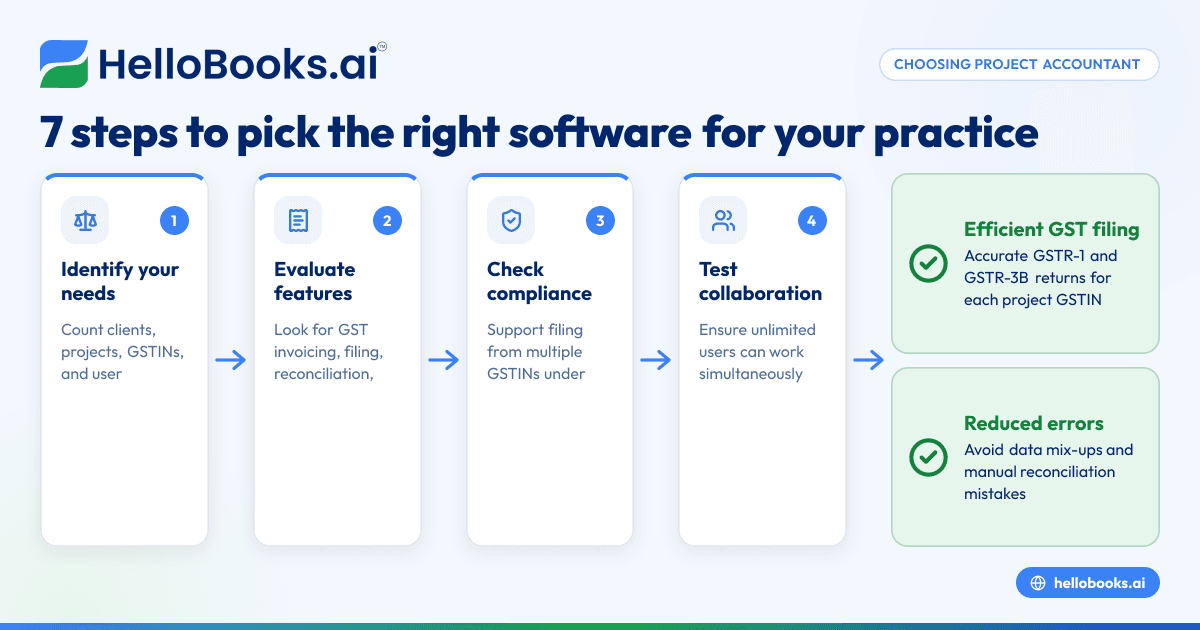
- Identify your project accounting needs: List the number of clients, projects, and GSTINs you manage. Confirm if you need multi-GSTIN support and multiple user access for partners or staff.
- Evaluate software features: Look for GST invoicing, e-invoicing, GSTR-1 and GSTR-3B filing, GSTR-2B reconciliation, bank statement reconciliation, expense and inventory tracking, and project-wise financial reporting.
- Check compliance capabilities: Ensure the software supports filing returns from multiple GSTINs under one login, important for firms working across states.
- Test user access and collaboration: Confirm if the software allows unlimited users to work simultaneously, which helps partners and staff collaborate efficiently.
- Assess integration and data entry ease: Verify if the software can import data from Excel or Tally to reduce manual entry and errors.
- Review reporting and audit trails: Ensure the software provides clear project-wise financial reports and audit logs to track changes.
- Consider scalability and pricing: Check if plans cover your current and future client base without per-branch pricing, important for growing CA firms.
Example (fictional figures)
A three-partner CA firm in Ahmedabad manages GST compliance for a construction project starting on 01/03/2024 with a contract value of ₹1,00,00,000. The project accountant software tracks:
- Project revenue: ₹1,00,00,000
- GST collected (assumed illustrative rate 18%): ₹1,00,00,000 × 18% = ₹18,00,000
- Expenses incurred:
- Material purchase: ₹40,00,000
- Labour costs: ₹20,00,000
- Other expenses: ₹5,00,000
- Total expenses: ₹40,00,000 + ₹20,00,000 + ₹5,00,000 = ₹65,00,000
- GST paid on expenses (assumed 18%): ₹65,00,000 × 18% = ₹11,70,000
The software calculates:
- Net GST payable = GST collected − GST paid
- Net GST payable = ₹18,00,000 − ₹11,70,000 = ₹6,30,000
This enables the firm to file accurate GSTR-1 and GSTR-3B returns for the project's GSTIN, reconcile expenses, and generate project-wise profit reports.
Common mistakes
- Mixing client and project data: This causes confusion and errors. Prevent it by using software that supports project-wise segregation and multi-GSTIN filing.
- Ignoring multi-user access: Restricts collaboration and delays work. Choose software with unlimited users so partners and staff can work simultaneously.
- Overlooking GST compliance features: Missing e-invoicing or GSTR reconciliation leads to filing errors. Always verify compliance capabilities before selecting software.
- Manual data entry errors: These cause discrepancies. Reduce errors by importing data from Excel or Tally where possible.
- Not reviewing reports regularly: Failing to check reports can hide mistakes. Schedule periodic reviews to catch discrepancies early.
- Selecting software without scalability: Limits your growth. Ensure plans can handle increasing clients and projects without per-branch pricing.
Doing this in HelloBooks
HelloBooks supports Multi-GSTIN and unlimited users, allowing a CA firm or trader with GSTINs in multiple states to file all returns from a single login. This feature suits CA firms managing many clients across India, enabling partners and staff to collaborate without extra per-branch pricing. Learn more about HelloBooks for India here.
Frequently asked questions
What is project accountant software?
Project accountant software helps accountants track and manage the financials and GST compliance of individual projects separately. It includes GST invoicing, expense tracking, filing, and reporting.
Why do CA firms need project accountant software?
CA firms handle multiple clients and projects with different GSTINs. Dedicated software helps keep data separate, ensures GST compliance, reduces manual errors, and saves time.
Can project accountant software handle multiple GSTINs?
Yes, software that supports multi-GSTIN filing from one login is essential for firms working across states to file returns accurately and efficiently.
How does HelloBooks help with project accounting?
HelloBooks offers multi-GSTIN and unlimited user access, enabling CA firms to manage multiple clients and projects efficiently from a single platform.
Is it possible to import data from Excel or Tally?
Many project accountant software solutions allow importing data from spreadsheets or Tally to reduce manual entry and errors. Check the specific software capabilities.
What should I consider when choosing project accountant software?
Focus on GST compliance features, multi-GSTIN support, user access, reporting, integration options, and scalability for your firm’s needs.
For more on accounting software for CA firms, see Chartered accountants and bookkeeping firms. For GST invoicing details, visit GST invoicing.
Key takeaways
- Project accountant software helps segregate project financials and GST compliance for CA firms and practitioners.
- Multi-GSTIN and unlimited user access are critical features for firms managing clients across states.
- Choose software with GST invoicing, e-invoicing, filing, reconciliation, and reporting capabilities.
- Avoid common mistakes like mixing data, manual errors, and ignoring scalability.
- HelloBooks supports multi-GSTIN and unlimited users, suitable for Indian CA firms.
Choosing the right project accountant software can save time and improve accuracy in your accounting practice. To explore options and pricing, visit Compare plans for India.


